1. Pendahuluan dan Selesaiview
The Rugged Radios RRP696 Plus is an advanced in-car voice-activated communications intercom system designed for clear communication and high-fidelity audio in demanding environments. It features an upgraded Bluetooth module for seamless wireless music streaming and phone call management. This system is engineered to provide reliable performance, even in vehicles with high-noise electrical systems, thanks to its advanced interference shielding.

Depan view of the Rugged Radios RRP696 Plus Intercom, showing the volume/VOX knob, Bluetooth controls, and model number.
2. Isi Paket
Verify that all items are present in your RRP696 Plus package:
- RRP696 Plus Intercom Unit
- Kabel Listrik
- Pemasangan Braket dan Perangkat Keras
Catatan: Headsets and intercom cables are sold separately and are required for full system functionality.

Included power cord and mounting brackets for installing the RRP696 Plus Intercom.

Examples of optional intercom cables, including offroad straight cables and direct headset to intercom straight cables, available for separate purchase.
3. Pengaturan dan Instalasi
3.1 Memasang Interkom
- Select a secure and accessible location within your vehicle for the intercom unit.
- Use the provided mounting bracket and hardware to firmly attach the intercom. Ensure it is positioned to avoid interference with vehicle operation.
3.2 Sambungan Daya
- Connect the supplied power cord to the intercom unit.
- Connect the other end of the power cord to a 12V DC power source in your vehicle. Ensure proper polarity (red to positive, black to negative).
- It is recommended to connect the power through a switched circuit to prevent battery drain when the vehicle is off.
3.3 Connecting Headsets and Radio
The RRP696 Plus supports up to 5 seats (Driver, Co-Driver, and 3 Crew). Use appropriate intercom cables (sold separately) to connect your headsets and two-way radio.
- Connect the Driver and Co-Driver headsets to their respective ports.
- Connect additional crew headsets to the 'CREW' ports as needed.
- Connect your two-way radio to the 'RADIO' port.
- Pastikan semua sambungan terpasang dengan aman untuk mencegah kehilangan sinyal atau gangguan.

Belakang view of the RRP696 Plus Intercom, illustrating the various ports for driver, co-driver, radio, and crew headsets, along with PTT and auxiliary output connections.
4. Petunjuk Pengoperasian
4.1 Menghidupkan/Mematikan
The intercom powers on automatically when connected to a switched 12V power source. There is no separate power button on the unit.
4.2 Volume and VOX Control
The RRP696 Plus features an ergonomic volume and VOX (Voice Activated) control knob. Rotate the knob to adjust the overall volume for all connected headsets. The VOX setting determines the sensitivity of the voice activation for communication. Adjust it so that your voice activates the microphone without picking up excessive background noise.
4.3 Konektivitas Bluetooth
The intercom includes an upgraded Bluetooth module for high-fidelity music streaming and hands-free phone calls.
- Pasangan: Ensure your mobile device's Bluetooth is enabled. On the RRP696 Plus, press and hold the Bluetooth pairing button (often indicated by a Bluetooth symbol) until the indicator light flashes, signifying pairing mode. Select 'RUGGED' or 'RRP696 Plus' from your device's Bluetooth list.
- Pemutaran Musik: Once paired, you can stream music from your device. Use the intercom's dedicated music control buttons (Play/Pause, Skip Forward, Skip Back) to manage playback.
- Panggilan Telepon: When a call comes in, the music will mute, and you can answer the call through your headset.
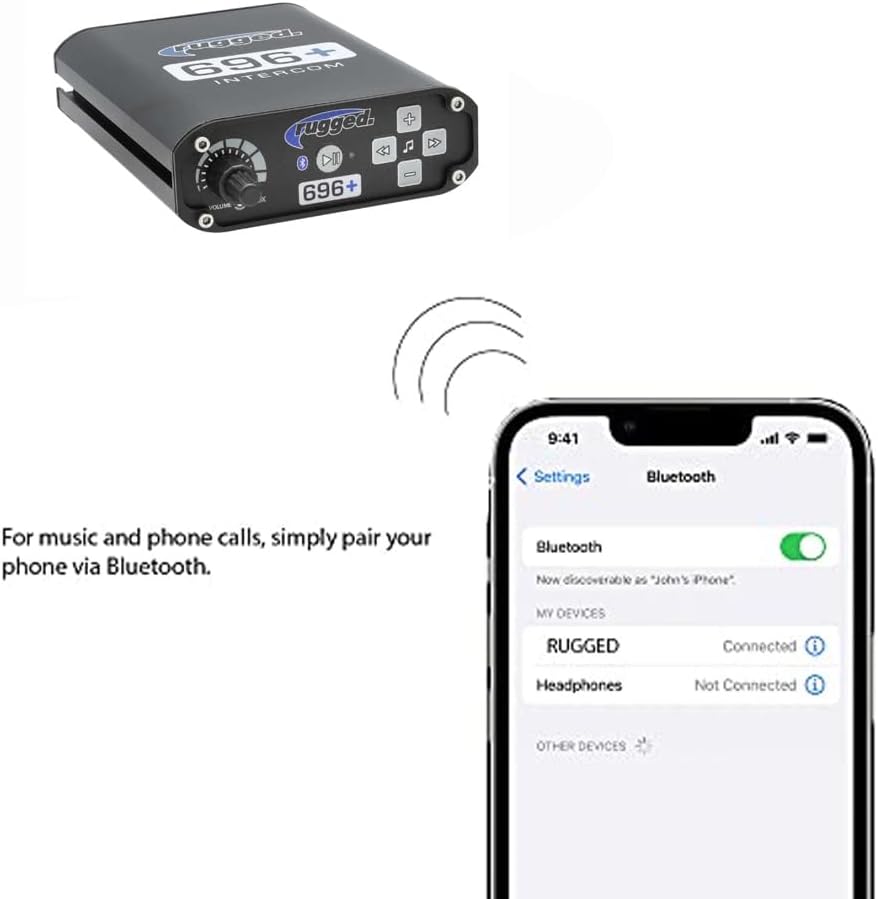
An image demonstrating the Bluetooth pairing process between a mobile phone and the RRP696 Plus Intercom, showing 'RUGGED' as a connected device.
4.4 Komunikasi Interkom
The voice-activated system allows for clear communication between all connected passengers. Adjust the VOX setting to ensure your voice triggers the microphone effectively without constant activation from background noise.
4.5 Keluaran Audio
The 3.5mm audio output allows for integration with external sound systems or in-car audio recording devices. Connect a standard 3.5mm audio cable from the intercom's AUX OUT port to your desired external audio input.
5. Pemeliharaan
- Pembersihan: Use a soft, dry cloth to clean the exterior of the intercom. Avoid abrasive cleaners or solvents.
- Koneksi: Periodically check all cable connections for tightness and signs of wear. Loose connections can lead to audio issues.
- Penyimpanan: If storing the vehicle for an extended period, disconnect the intercom from the power source.
6. Penyelesaian masalah
- Tidak Ada Daya: Ensure the power cord is securely connected to both the intercom and a functional 12V power source. Check vehicle fuses.
- Tidak ada suara/Suara terputus-putus: Verify all headset and radio cables are fully seated in their respective ports. Check headset functionality. Adjust volume and VOX settings.
- Bluetooth Tidak Terhubung: Ensure the intercom is in pairing mode and your device's Bluetooth is on. Try unpairing and re-pairing the device. Ensure no other devices are actively connected to the intercom via Bluetooth.
- Kebisingan/Dengung Berlebihan: Check for proper grounding of the intercom and radio. Ensure power connections are clean and secure. In some vehicles, external noise filters may be necessary to mitigate electrical interference.
- VOX Not Activating: Increase the VOX sensitivity by adjusting the VOX knob. Ensure your microphone is positioned correctly.
7. Spesifikasi
| Dimensi Produk | 6x5x1.5 inci |
| Berat Barang | 1.1 pon |
| Nomor Model | RRP696PLUS |
| Teknologi Konektivitas | Tambahan, Bluetooth |
| Tipe Pengendali | Kontrol Tangan |
| Fitur Khusus | Built-In Microphone (via connected headsets) |
| Perangkat yang Kompatibel | Smartphone, Speaker (via AUX out) |
| Jumlah Port HDMI | 5 (This likely refers to the 5 headset ports, not HDMI standard) |
| Jenis Konektor | 3.5mm Jack, USB (for charging/data, not primary audio) |
| Mode Keluaran Audio | Stereo |
| Warna | Hitam |
8. Garansi dan Dukungan
Specific warranty details for the Rugged Radios RRP696 Plus Intercom are not provided in the available product data. For warranty information, technical support, or service inquiries, please contact Rugged Radios directly through their official websitus atau saluran layanan pelanggan.
Anda dapat mengunjungi Rugged Radios Store on Amazon untuk informasi produk lebih lanjut dan detail kontak.


