1. Pendahuluan
The Okaysou AirMic4S Air Purifier is designed to provide clean and fresh air in your home or office. It features an advanced filtration system to capture and reduce airborne particles, odors, and harmful gases, contributing to a healthier indoor environment.

Figure 1.1: Okaysou AirMic4S Air Purifier, illustrating its capability to filter various airborne contaminants including dust, pollen, dander, smoke, and VOCs.
This manual provides detailed instructions for the setup, operation, maintenance, and troubleshooting of your AirMic4S Air Purifier. Please read it thoroughly before use and keep it for future reference.
2. Informasi Keselamatan
Untuk mengurangi risiko kebakaran, sengatan listrik, atau cedera, harap perhatikan tindakan pencegahan keselamatan berikut:
- Selalu cabut steker pembersih udara sebelum memindahkan, membersihkan, atau mengganti filter.
- Jangan mengoperasikan unit dengan kabel atau steker yang rusak.
- Jauhkan kabel daya dari permukaan yang panas.
- Jangan menghalangi lubang ventilasi atau meletakkan unit di atas permukaan lunak yang dapat menghalangi lubang ventilasi.
- Jangan merendam unit di dalam air atau cairan lainnya.
- Peralatan ini tidak ditujukan untuk digunakan oleh orang (termasuk anak-anak) dengan keterbatasan fisik, sensorik, atau mental, atau kurang pengalaman dan pengetahuan, kecuali mereka telah diberi pengawasan atau petunjuk mengenai penggunaan peralatan oleh orang yang bertanggung jawab atas keselamatan mereka.
- Use only genuine Okaysou replacement filters to maintain optimal performance and warranty.
3. Produk Lebihview
The Okaysou AirMic4S features a compact design with powerful air purification capabilities. It utilizes a multi-stage filtration system to effectively clean the air.

Gambar 3.1: Depan view of the Okaysou AirMic4S Air Purifier, showcasing desainnya yang ramping.
3.1 Komponen Utama
- Kisi-kisi Saluran Masuk Udara: Located on the lower section, designed to capture hair and large particles.
- Panel Kontrol: Top-mounted touch panel for all functions.
- Ventilasi udara: Top grille for purified air release.
- Kompartemen Filter: Houses the multi-stagdan menyaring.
3.2 Sistem Filtrasi
The AirMic4S employs an advanced 3-stage H13 True HEPA filtration system:
- Pra-filter yang dapat dicuci: The first defense, capturing large particles like hair and fur.
- H13 Filter HEPA Sejati: Captures pollen, dander, dust, smell, and smoke particles as small as 0.3 microns.
- Filter Karbon Aktif: Effectively absorbs stubborn and unwanted odors, harmful gases, and VOCs.

Figure 3.2: Illustration of the advanced 3-stage H13 True HEPA filtration system, detailing the washable pre-filter, H13 True HEPA filter, and active carbon filter.
4. Pengaturan
Follow these steps to set up your Okaysou AirMic4S Air Purifier:
- Bongkar Unitnya: Keluarkan pembersih udara dari kemasannya dengan hati-hati.
- Lepaskan Kemasan Filter: Before first use, unscrew the bottom cover (twist counter-clockwise) and remove the plastic packaging from the filter.
- Pasang kembali Filter: Pasang kembali filter ke dalam unit, pastikan filter terpasang dengan benar.
- Penutup Bawah yang Aman: Pasang kembali penutup bawah dan putar searah jarum jam untuk mengencangkannya.
- Penempatan: Place the air purifier on a firm, level surface. Ensure there is adequate space around the unit for proper airflow (at least 6 inches from walls or furniture).
- Menyambungkan: Sambungkan kabel daya ke stopkontak listrik yang sesuai.
5. Petunjuk Pengoperasian
The AirMic4S features an intuitive touch control panel for easy operation.

Figure 5.1: The control panel of the AirMic4S, showing buttons for power, fan speed, timer, filter reset, and night light/sleep mode.
5.1 Fungsi Panel Kontrol
- Tombol Daya (⑁): Tekan untuk menghidupkan atau mematikan unit.
- Fan Speed Button (✴): Mengatur kecepatan kipas secara bergantian (Rendah, Sedang, Tinggi).
- Timer Button (⌛): Mengatur pengatur waktu pengoperasian selama 2, 4, atau 8 jam. Unit akan mati secara otomatis setelah waktu yang dipilih.
- Night Light Mode (🌙): Mengaktifkan atau menonaktifkan fitur lampu malam.
- Sleep Mode (🌛): Activates a quiet operation mode (as low as 24dB) for undisturbed sleep.
- Filter Reset Indicator (📄): Lights up when it's time to replace the filter. Press and hold to reset after filter replacement.
5.2 Operasi Umum
- Nyalakan: Press the Power button to start the air purifier. It will typically start on a low fan speed.
- Sesuaikan Kecepatan Kipas: Press the Fan Speed button repeatedly to cycle through the desired fan speeds (Low, Medium, High).
- Setel Timer: Press the Timer button to select 2H, 4H, or 8H. The corresponding indicator will light up.
- Aktifkan Mode Tidur: Press the Sleep Mode button to enter ultra-quiet operation. The night light may dim or turn off in this mode.
- Control Night Light: Use the Night Light button to toggle the light on or off independently.
- Matikan: Tekan tombol daya lagi untuk mematikan perangkat.
6. Pemeliharaan
Perawatan rutin memastikan kinerja optimal dan memperpanjang umur pakai alat penjernih udara Anda.
6.1 Penggantian Filter
The filter replacement indicator will illuminate when it's time to change the filter. Filter lifespan varies based on usage and air quality.
- Cabut alat pembersih udara dari stopkontak.
- Turn the unit upside down and twist the bottom cover counter-clockwise to remove it.
- Lepaskan filter lama.
- Insert a new genuine Okaysou filter into the unit.
- Pasang kembali penutup bawah dan putar searah jarum jam untuk mengencangkannya.
- Plug in the unit. With the unit powered on, press and hold the Filter Reset button for 3-5 seconds until the indicator light turns off.
Okaysou offers 4 optional replacement filters tailored to specific needs:
- Filter Asli: Best for general use, absorbing odors, dander, pollen, smoke.
- Customized Blue Filter (G-Defense Filter): Best for humid environments to absorb harmful substances.
- Customized Green Filter (Toxin Absorber Filter): Best for areas with high levels of toxins, vehicle exhaust, VOCs.
- Yellow Odor Remover Filter: Best for powerfully reducing odors from ash, wildfire, cooking.

Figure 6.1: Various optional replacement filters available for the AirMic4S, each designed for specific air purification needs.
6.2 Membersihkan Unit
- Bersihkan bagian luar pembersih udara dengan kain lembut dan kering.
- The washable pre-filter can be gently cleaned with a soft brush or vacuum cleaner to remove large dust and hair particles. Ensure it is completely dry before reinstallation.
- Jangan gunakan pembersih atau pelarut yang bersifat abrasif.
7. Penyelesaian masalah
If you encounter issues with your AirMic4S Air Purifier, refer to the following table for common problems and solutions:
| Masalah | Kemungkinan Penyebab | Larutan |
|---|---|---|
| Unit tidak menyala. | Tidak terpasang; daya padamtage; filter tidak terpasang dengan benar. | Ensure unit is securely plugged in. Check power supply. Verify filter is unwrapped and correctly seated, and bottom cover is secured. |
| Aliran udara lemah atau berisik. | Filter is dirty or clogged; air inlets/outlets blocked. | Clean or replace the filter. Ensure nothing is obstructing the air inlets or outlets. |
| Bau tetap ada. | Filter perlu diganti; sumber bau eksternal yang kuat. | Replace the filter, especially if using the Original filter for strong odors. Consider using an Odor Remover filter. Ensure the room is adequately ventilated. |
| Filter Reset light remains on after replacement. | Penyetelan ulang filter tidak dilakukan dengan benar. | With the unit powered on, press and hold the Filter Reset button for 3-5 seconds until the light turns off. |
If the problem persists after trying these solutions, please contact Okaysou customer support.
8. Spesifikasi
| Fitur | Detil |
|---|---|
| Nomor Model | AirMic 4S |
| Dimensi Produk | 8.7"Panjang x 8.7"Lebar x 11.89"T |
| Berat | 6.6 pon |
| Daya Terukur | 25 watt |
| Tingkat Kebisingan | 24 dB (Mode Tidur) |
| Area Cakupan | Up to 300 sq. ft. (5x per hour in 150 sq.ft, 3x per hour in 300 sq.ft, 2x per hour in 580 sq.ft) |
| Jenis Filtrasi | H13 True HEPA (3-Stage) |
| Ozon Gratis | 100% Bebas Ozon |
| Sertifikasi | CARB, CE, RoHS, ETL Listed |
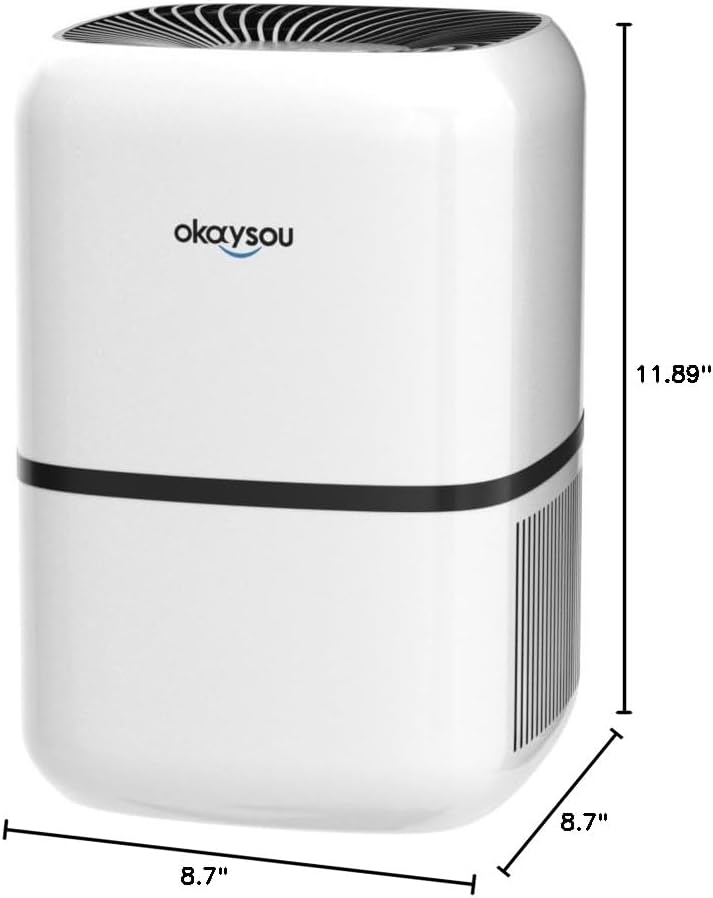
Gambar 8.1: Dimensi view of the Okaysou AirMic4S Air Purifier, showing its height, depth, and width.
9. Garansi dan Dukungan
The Okaysou AirMic4S Air Purifier comes with a Garansi 5 tahun. Okaysou also provides lifetime US-based customer support.
For warranty claims, technical assistance, or any questions regarding your product, please contact Okaysou customer support through their official channels or refer to the contact information provided with your purchase.
You can also visit the official Okaysou store on Amazon for more information and support: Okaysou Amazon Store


