1. Produk Lebihview
The EARISE M37 is a portable 100W PA system designed for various audio applications, including home parties, small events, and karaoke. It features a wooden cabinet for enhanced acoustics, built-in Bluetooth connectivity, and comes with two wireless microphones for immediate use. The system supports multiple audio inputs including AUX and USB, offering versatile playback options.

Image: The EARISE M37 PA system, showcasing its wooden box design and two included wireless microphones.
2. Informasi Keselamatan
- Jangan biarkan unit terkena hujan atau kelembapan untuk mencegah kebakaran atau sengatan listrik.
- Jangan membuka kabinet. Tidak ada komponen di dalamnya yang dapat diperbaiki oleh pengguna. Serahkan semua perbaikan kepada personel yang berkualifikasi.
- Pastikan ventilasi di sekitar unit baik. Jangan halangi lubang ventilasi.
- Hindari menempatkan unit di dekat sumber panas seperti radiator, ventilasi pemanas, kompor, atau peralatan lainnya (termasuk amppengangkat) yang menghasilkan panas.
- Lindungi kabel daya agar tidak terinjak atau terjepit, terutama pada bagian steker, stopkontak, dan titik keluarnya kabel dari peralatan.
- Cabut peralatan ini saat terjadi badai petir atau bila tidak digunakan dalam waktu lama.
3. Isi Paket
Silakan periksa paket untuk item berikut:
- EARISE M37 PA System Unit
- 2 x Mikrofon Nirkabel
- Pengendali Jarak Jauh
- Adaptor Daya
- User Manual (dokumen ini)

Image: A visual representation of key features and included accessories: wireless microphone, Bluetooth 4.2, USB auto-play, and remote controller.
4. Fitur dan Komponen Produk
Familiarize yourself with the main components and controls of your EARISE M37 PA System.

Image: The control panel of the EARISE M37, showing various inputs and adjustment knobs. Key controls include: Mode, Previous/Next Track, Play/Pause, Record, EQ, Light, Mic 1/2 inputs, AUX In/Out, USB, TF card slot, DC Power In, ON/OFF switch, Charging indicator, ECHO, DELAY, MIC VOL, MASTER VOL, TREBLE, EXTRA BASS, and BASS.
Fungsi Panel Kontrol:
- ARAH: Beralih antar mode input (Bluetooth, AUX, USB, Kartu TF).
- Trek Sebelumnya/Berikutnya: Navigates tracks during media playback.
- Putar/Jeda: Mengontrol pemutaran media.
- Catatan: Initiates or stops recording (requires USB/TF storage).
- EQ: Menyesuaikan pengaturan ekualisasi.
- Lampu: Controls the integrated LED lighting.
- MIC 1 / MIC 2: Inputs for wired microphones (if used).
- AUX IN / AUX OUT: Audio input and output jacks for external devices.
- Kabel USB: USB port for media playback or recording.
- TF: TF (MicroSD) card slot for media playback or recording.
- DC Power IN: Input daya untuk pengisian daya dan pengoperasian.
- AKTIF / NONAKTIF: Saklar daya untuk unit tersebut.
- Indikator Pengisian Daya: Lampu indikator status pengisian daya.
- GEMA: Mengatur efek gema untuk mikrofon.
- MENUNDA: Adjusts the delay effect for microphones.
- Mikrofon VOL: Mengatur volume mikrofon.
- KULIAH UTAMA: Controls the overall master volume of the system.
- TIGA KALI LIPAT: Mengatur keluaran audio frekuensi tinggi.
- BASS EKSTRA: Meningkatkan keluaran audio frekuensi rendah.
- BAS: Mengatur keluaran audio frekuensi rendah.
5. Pengaturan
5.1 Mengisi Daya Sistem PA
Before first use, fully charge the PA system. Connect the provided power adapter to the "DC Power IN" port on the unit and plug it into a standard wall outlet. The charging indicator light will show the charging status. A full charge provides up to 7 hours of play time.

Image: Illustration highlighting the 3600mAh battery capacity, providing up to 7 hours of continuous play time.
5.2 Pengaturan Mikrofon Nirkabel
The two wireless microphones are pre-paired with the PA system. Insert AA batteries (not included) into each microphone. Turn on the microphones using their respective power switches. They should automatically connect to the PA system.
5.3 Menghubungkan Sumber Audio
Koneksi Bluetooth:
- Turn on the EARISE M37 PA system.
- Tekan tombol MODE button until the display shows "Bluetooth" or a Bluetooth icon.
- Pada perangkat seluler Anda (ponsel pintar, tablet, dll.), aktifkan Bluetooth dan cari perangkat yang tersedia.
- Select "EARISE M37" from the list. Once connected, you will hear a confirmation sound.

Image: A hand holding a smartphone displaying a Bluetooth connection screen, indicating the ease of pairing with the EARISE M37 PA system.
Pemutaran USB/Kartu TF:
Masukkan flash drive USB atau kartu TF (MicroSD) yang berisi audio MP3. files into the respective port. The system will automatically detect and begin playing music. Use the Previous/Next Track and Play/Pause buttons to control playback.
Masukan AUX:
Hubungkan perangkat audio eksternal (misalnya, pemutar MP3, komputer) ke AUX IN port using a 3.5mm audio cable (not included). Press the MODE button until AUX input is selected.
6. Petunjuk Pengoperasian
6.1 Daya Hidup/Mati
To turn the unit on or off, use the AKTIF/NONAKTIF sakelar yang terletak pada panel kontrol.
6.2 Adjusting Volume and Effects
- KULIAH UTAMA: Rotate this knob to adjust the overall volume of the PA system.
- Mikrofon VOL: Mengatur volume mikrofon yang terhubung.
- ECHO / DELAY: Use these knobs to add or reduce echo and delay effects to the microphone sound.
- TREBLE / BASS / EXTRA BASS: Adjust these knobs to fine-tune the high and low frequencies of the audio output.
6.3 Using Microphones
Once the wireless microphones are powered on and connected, speak into them. Adjust the mikrofon vol, GEMA, Dan MENUNDA knobs on the PA system to achieve the desired sound. For optimal performance, hold the microphone a few inches from your mouth.

Image: Two individuals enjoying karaoke with the EARISE M37 PA system and its wireless microphones, demonstrating typical usage.
6.4 Fungsi Perekaman
To record audio (e.g., microphone input or music playback), ensure a USB flash drive or TF card is inserted into the corresponding slot. Press the CATATAN button to start recording. Press it again to stop. Recorded fileData akan disimpan ke perangkat penyimpanan yang dimasukkan.
7. Pemeliharaan
- Bersihkan unit dengan kain lembut dan kering. Jangan gunakan pembersih abrasif atau pelarut.
- Store the PA system in a cool, dry place away from direct sunlight and extreme temperatures.
- If the unit will not be used for an extended period, fully charge the battery before storage and recharge it every few months to maintain battery health.
8. Penyelesaian masalah
| Masalah | Kemungkinan Penyebab | Larutan |
|---|---|---|
| Tidak ada daya | Battery drained; Power cable not connected. | Charge the unit; Ensure power cable is securely connected. |
| Tidak ada suara dari mikrofon | Microphones off; Batteries low/dead; MIC VOL too low. | Turn on microphones; Replace batteries; Increase MIC VOL. |
| Bluetooth tidak terhubung | PA system not in Bluetooth mode; Device too far; Interference. | Press MODE button to select Bluetooth; Move device closer; Restart both devices. |
| USB/kartu TF tidak berfungsi | Salah file Format; Kartu/drive tidak terpasang dengan benar; Rusak files. | Memastikan files are MP3; Reinsert card/drive; Try different files/device. |
9. Spesifikasi
| Fitur | Detil |
|---|---|
| Merek | DAPATKAN |
| Model | Pesawat M37 |
| Keluaran Wattage | 100 Watt |
| Sumber Daya | Bertenaga Baterai |
| Teknologi Konektivitas | Bluetooth, USB, AUX |
| Versi Bluetooth | 4.2 (dari gambar) |
| Masukan Audio | Wireless Microphone, AUX |
| Jumlah Saluran | 2 |
| Berat Barang | 11.62 pon |
| Dimensi Paket | 18.7x12x11.9 inci |
| Dimensi Produk (kira-kira) | Tinggi 32.5 cm (12.8 inci) x Lebar 25.5 cm (10 inci) x Kedalaman 23.8 cm (9.4 inci) |
| Warna | Hitam |
| Jenis Pemasangan | Meja |
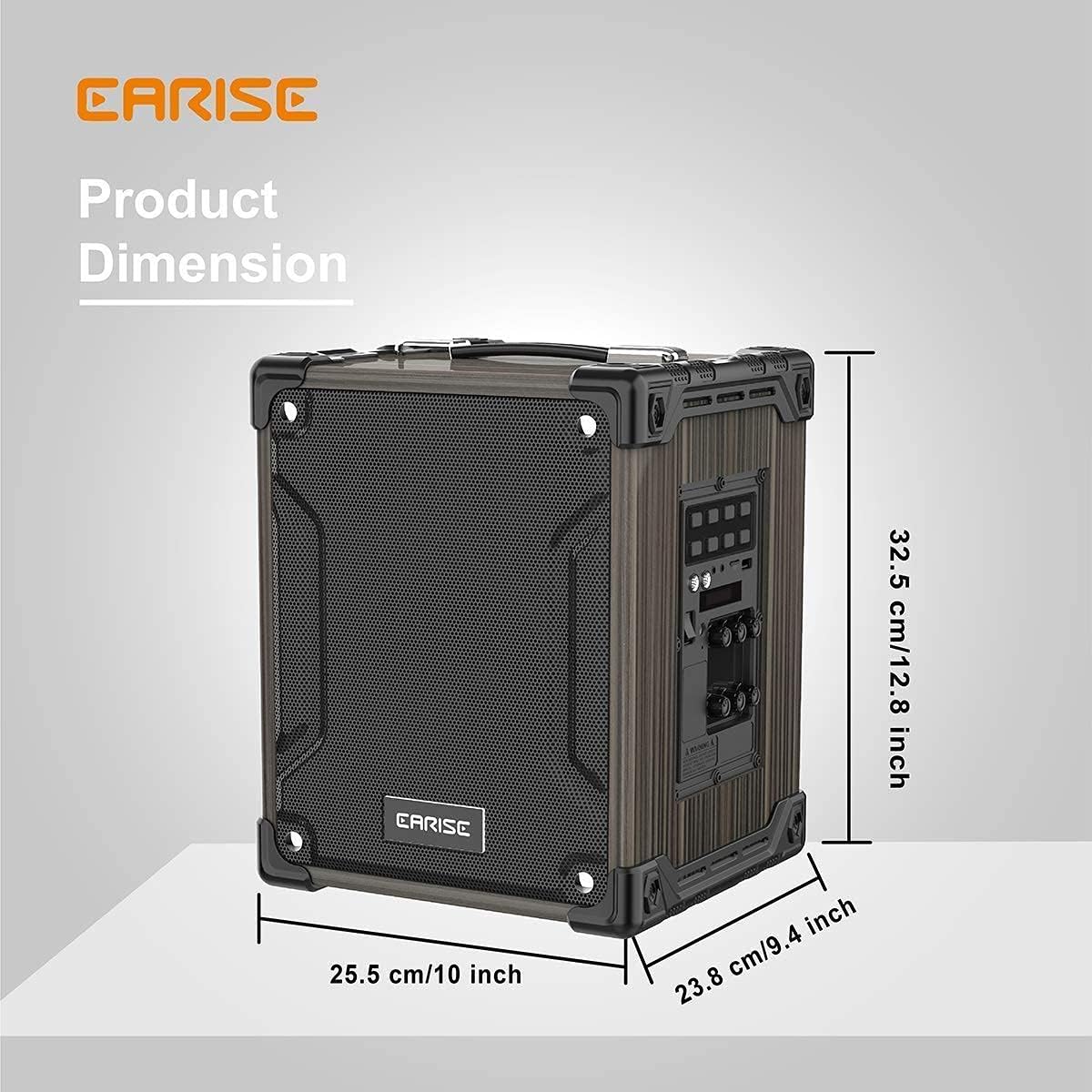
Image: Product dimensions of the EARISE M37, measuring approximately 32.5 cm (12.8 inches) in height, 25.5 cm (10 inches) in width, and 23.8 cm (9.4 inches) in depth.
10. Garansi dan Dukungan
For warranty information or technical support, please refer to the contact details provided with your purchase or visit the official EARISE websitus. Simpan bukti pembelian Anda untuk klaim garansi.