Perkenalan
The Hyperkin Armor3 NuWave Controller is designed to provide accurate and fluid motion control for your Nintendo Wii U and Wii consoles. Featuring built-in Nu+ technology, this controller enhances your gaming experience by offering a wider range of motion in compatible titles. This manual provides essential information on setting up, operating, maintaining, and troubleshooting your NuWave Controller.
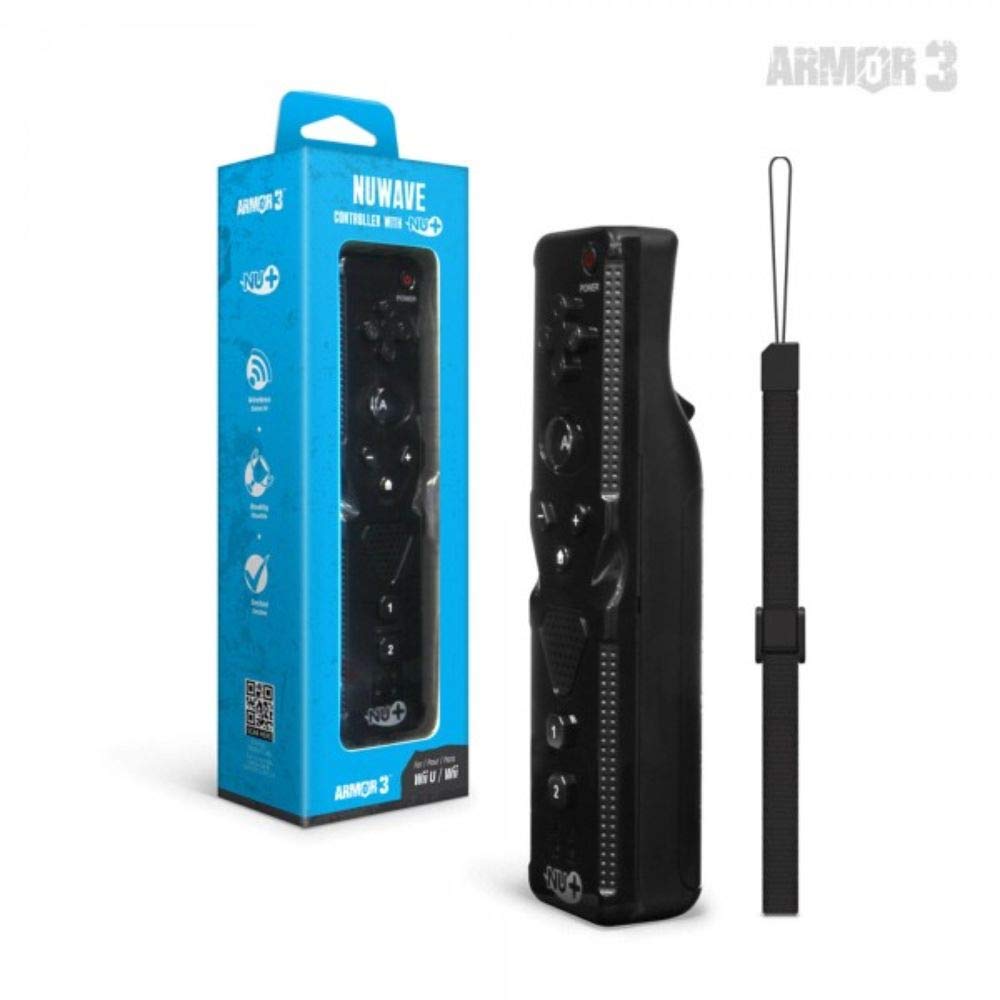
Gambar 1: Hyperkin Armor3 NuWave Controller and its packaging. The controller is black with a wrist strap, and the packaging highlights its Nu+ technology and compatibility with Wii U and Wii.
Produk Selesaiview
The Armor3 NuWave Controller is a motion-sensing controller compatible with both Wii U and Wii systems. It integrates advanced Nu+ technology for enhanced motion detection and precision in supported games.
Fitur Utama:
- Kesesuaian: Fully compatible with Nintendo Wii U and Nintendo Wii consoles.
- Nu+ Technology: Built-in technology for a wider range of motion and improved accuracy in compatible titles.
- Desain Ergonomis: Designed for comfortable grip and extended gameplay sessions.
- Sumber Daya: Membutuhkan 2 baterai AA (tidak termasuk).
Pengaturan
1. Pemasangan Baterai
- Temukan tempat baterai di bagian belakang pengontrol.
- Geser penutup baterai ke bawah untuk membukanya.
- Masukkan dua (2) baterai AA, pastikan polaritasnya benar (+/-) seperti yang ditunjukkan di dalam kompartemen.
- Pasang kembali penutup baterai dengan menggesernya ke atas hingga berbunyi klik dan terkunci pada tempatnya.
2. Connecting to Your Console
To connect the NuWave Controller to your Wii U or Wii console, follow these steps:
- Pastikan konsol Anda dalam keadaan menyala.
- On your Wii U or Wii console, press the SYNC button (usually located near the SD card slot or battery compartment).
- On the NuWave Controller, open the battery cover and locate the small red SYNC button inside the battery compartment.
- Press and release the SYNC button on the controller.
- The player indicator lights on the bottom of the controller will flash. Once a single light remains lit, the controller is successfully connected.
- If connection fails, repeat steps 2-5. Ensure the controller is within range of the console.
Petunjuk Pengoperasian
Kontrol Dasar:
- Papan Arah (D-Pad): Used for menu navigation and character movement.
- Sebuah tombol: Primary action button, often used for selection or interaction.
- B Button (Trigger): Located on the underside, typically used for grabbing or firing.
- 1 & 2 Buttons: Auxiliary action buttons, functions vary by game.
- Tombol Home: Returns to the console's Home Menu.
- Tombol Plus (+) & Minus (-): Often used for zooming, adjusting settings, or specific in-game actions.
- Tombol Daya: Menyalakan/mematikan pengontrol.
Motion Sensing with Nu+ Technology:
The built-in Nu+ technology provides enhanced motion tracking. For games that support it, you will experience more precise and responsive movements. Hold the controller firmly and ensure clear line of sight to the sensor bar for optimal performance.
- Kalibrasi: Some games may require initial calibration. Follow on-screen prompts.
- Tali pergelangan tangan: Always use the included wrist strap to prevent accidental drops during active gameplay.
Pemeliharaan
Pembersihan:
- Bersihkan kontroler dengan kain lembut dan kering.
- Untuk kotoran membandel, sedikit dampBilas kain dengan air. Jangan gunakan bahan kimia keras atau pembersih abrasif.
- Ensure no liquid enters the controller's openings.
Penyimpanan:
- Simpan pengontrol di tempat yang sejuk dan kering, jauhkan dari sinar matahari langsung dan suhu ekstrem.
- Jika menyimpan untuk jangka waktu lama, keluarkan baterai untuk mencegah kebocoran.
Perawatan Baterai:
- Always use new, high-quality AA batteries.
- Jangan mencampur baterai lama dan baru, atau jenis baterai yang berbeda.
- Buang baterai bekas secara bertanggung jawab sesuai dengan peraturan setempat.
Penyelesaian Masalah
| Masalah | Kemungkinan Penyebab | Larutan |
|---|---|---|
| Pengontrol tidak menyala. | Baterai mati atau salah dimasukkan. | Ganti baterai dengan baterai AA baru, pastikan polaritasnya benar. |
| Controller does not sync with console. | Incorrect syncing procedure; out of range; console interference. | Ensure console is on. Repeat syncing steps (press SYNC on console, then on controller). Move closer to console. Check for other wireless device interference. |
| Tombol tidak responsif atau mengalami keterlambatan. | Low battery; connection issue; physical obstruction. | Replace batteries. Re-sync the controller. Ensure buttons are not stuck. |
| Motion control is inaccurate. | Sensor bar obstruction; improper calibration; environmental factors. | Ensure clear line of sight to the sensor bar. Re-calibrate in-game if prompted. Avoid strong light sources directly facing the sensor bar. |
Spesifikasi
- Model: M07399-bk
- Merek: hiperkin
- Kesesuaian: Nintendo Wii U, Nintendo Wii
- Sumber Daya: 2 x Baterai AA (tidak termasuk)
- Ukuran: 2.8 x 1.8 x 8 inci (perkiraan)
- Berat: 3.88 ons (perkiraan, tanpa baterai)
- Teknologi: Built-in Nu+ motion technology
- Warna: Hitam
Garansi dan Dukungan
For specific warranty information and terms, please refer to the documentation included with your purchase or visit the official Hyperkin website. Hyperkin provides customer support for their products.
Dukungan online: Visit the official Hyperkin websitus untuk FAQ, panduan pemecahan masalah, dan informasi kontak. www.hyperkin.com
Kontak: Refer to the Hyperkin website for the most current customer service contact methods (phone, email, etc.).


