1. Pendahuluan
Terima kasih sudah membeliasing the GLIDiC Sound Air TW-5000s True Wireless Earbuds. This manual provides essential information for the safe and effective use of your device. Please read it thoroughly before use and retain it for future reference.
2. Informasi Keselamatan
- Jangan biarkan earbud atau casing pengisi daya terkena suhu ekstrem, sinar matahari langsung, atau kelembapan tinggi.
- Avoid dropping, impacting, or disassembling the device. This may cause damage and void the warranty.
- Keep the device away from water and liquids. While sweatproof, immersion can cause damage.
- Gunakan hanya kabel pengisi daya yang disediakan atau kabel setara yang bersertifikat.
- Mendengarkan dalam waktu lama dengan volume tinggi dapat menyebabkan kerusakan pendengaran. Sesuaikan volume ke tingkat yang aman.
- Be aware of your surroundings when using earbuds, especially in traffic or hazardous environments.
3. Isi Paket
Verifikasi bahwa semua item ada dalam paket Anda:
- GLIDiC Sound Air TW-5000s True Wireless Earbuds (Left and Right)
- Kotak Pengisian Daya
- USB Charging Cable (Type-A to Micro-USB)
- Berbagai ukuran ujung telinga (S, M, L)
- Instruksi Manual (dokumen ini)
4. Produk Lebihview
Familiarize yourself with the components of your GLIDiC Sound Air TW-5000s earbuds and charging case.

Figure 4.1: GLIDiC Sound Air TW-5000s Earbuds and Charging Case. The image displays the black charging case with the GLIDiC logo on top, positioned next to the two black earbuds.
Komponen Earbud
- Tombol Multifungsi: Located on the outer surface of each earbud, used for playback control, call management, and voice assistant activation.
- Indikator LED: Provides status information (pairing, charging, power).
- Mikropon: For voice calls and voice assistant commands.
- Pengisian Kontak: Located on the underside of each earbud, for charging within the case.
- Ujung Telinga: Silicone tip for in-ear comfort and sound isolation.
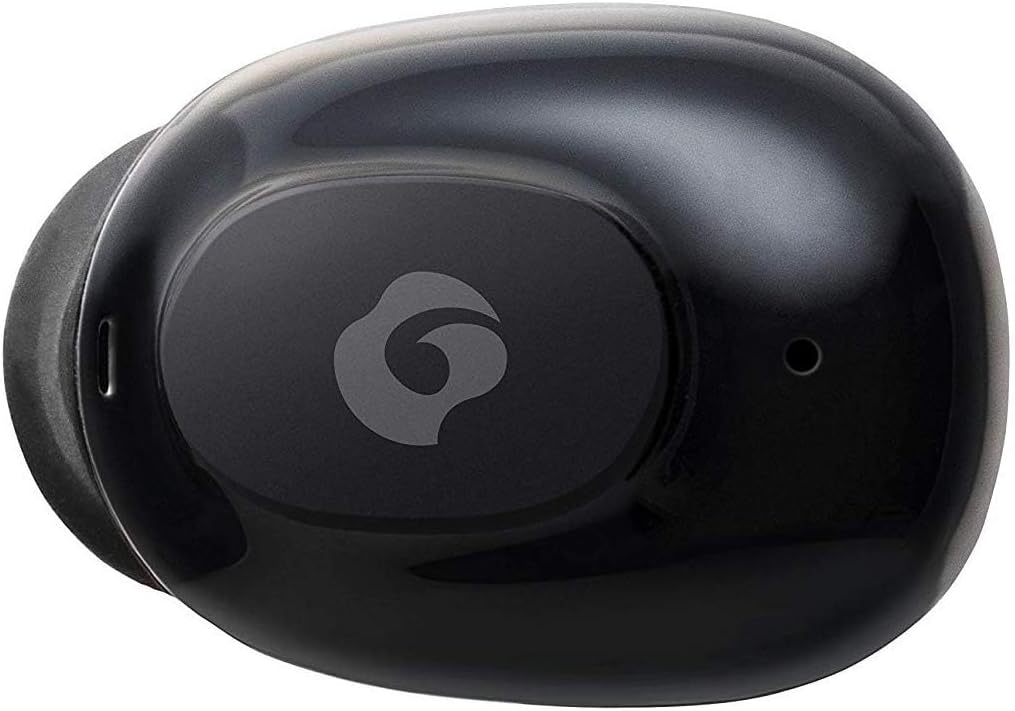
Gambar 4.2: Tampilan jarak dekat view of a single GLIDiC earbud, highlighting the multifunction button with the GLIDiC logo and the microphone opening.
Komponen Kotak Pengisian Daya
- Port Pengisian Daya: Internal contacts for earbuds, external port for case charging.
- Indikator LED Kasus: Menunjukkan status pengisian daya casing.
- Tutup: Protects earbuds and secures them during charging.
5. Pengaturan
5.1 Pengisian Awal
- Place both earbuds into the charging case. Ensure they are correctly seated, and the LED indicators on the earbuds illuminate.
- Hubungkan kabel pengisian daya USB ke port pengisian daya pada casing dan colokkan ujung lainnya ke sumber daya USB (misalnya, komputer, adaptor dinding).
- The case LED indicator will show charging status. Allow approximately 2 hours for a full charge of both earbuds and the case.
- Once fully charged, disconnect the charging cable. The earbuds offer up to 60 days of standby time when stored in the fully charged case.
5.2 Memasangkan dengan Perangkat Bluetooth
- Pastikan earbud terisi dayanya.
- Buka wadah pengisi daya. Earbud akan secara otomatis memasuki mode pemasangan, dan indikator LED-nya akan berkedip.
- Pada perangkat Anda yang mendukung Bluetooth (ponsel pintar, tablet, dll.), buka pengaturan Bluetooth.
- Pencarian untuk available devices. Select "GLIDiC TW-5000s" from the list.
- Once connected, the earbud LED indicators will stop flashing and may show a solid light or turn off, depending on the model. A voice prompt may also confirm the connection.
- Jika proses pemasangan gagal, masukkan kembali earbud ke dalam wadah, tutup penutupnya, tunggu beberapa detik, lalu ulangi langkah-langkah tersebut.
6. Petunjuk Pengoperasian
6.1 Daya Hidup/Mati
- Nyalakan: Open the charging case, or press and hold the multifunction button on each earbud for approximately 3 seconds.
- Matikan: Place the earbuds back into the charging case and close the lid, or press and hold the multifunction button on each earbud for approximately 5 seconds.
6.2 Pemutaran Musik
- Putar/Jeda: Tekan tombol multifungsi sekali pada salah satu earbud.
- Lagu Berikutnya: Double-press the multifunction button on the right earbud.
- Lagu Sebelumnya: Double-press the multifunction button on the left earbud.
- Volume Naik: Triple-press the multifunction button on the right earbud.
- Volume Turun: Triple-press the multifunction button on the left earbud.
6.3 Manajemen Panggilan
- Menjawab/Mengakhiri Panggilan: Tekan tombol multifungsi sekali pada salah satu earbud.
- Tolak Panggilan: Press and hold the multifunction button on either earbud for approximately 2 seconds.
6.4 Asisten Suara
- Aktifkan Voice Assistant: Press and hold the multifunction button on either earbud for approximately 2 seconds (when not on a call).
6.5 Multi-Communication Mode
The GLIDiC Sound Air TW-5000s features a multi-communication mode that allows select ambient sounds to be heard without compromising audio quality. This enhances user awareness and safety.
- Activate/Deactivate Multi-Communication Mode: Consult the specific instructions provided with your device, as activation methods can vary. Typically, this involves a specific press sequence on the multifunction button or an option within a companion app if available.
7. Pemeliharaan
7.1 Pembersihan
- Bersihkan earbud dan casing pengisi daya dengan kain yang lembut, kering, dan tidak berbulu.
- Jangan gunakan pembersih abrasif, alkohol, atau pelarut kimia.
- Lepaskan ujung telinga secara perlahan dan bersihkan dengan sabun lembut dan air jika perlu. Pastikan ujung telinga benar-benar kering sebelum dipasang kembali.
- Use a dry cotton swab to carefully clean the charging contacts on both the earbuds and the case.
7.2 Penyimpanan
- Jika tidak digunakan, simpan earbud dalam wadah pengisi dayanya untuk melindunginya dan memastikannya tetap terisi daya.
- Simpan perangkat di tempat yang sejuk dan kering, jauhkan dari sinar matahari langsung dan suhu ekstrem.
8. Penyelesaian masalah
If you encounter issues with your GLIDiC Sound Air TW-5000s, refer to the following common problems and solutions:
| Masalah | Solusi yang mungkin |
|---|---|
| Earbud tidak menyala. | Ensure earbuds are charged. Place them in the charging case and connect the case to a power source. |
| Earbud tidak terhubung dengan perangkat. |
|
| Hanya satu earbud yang memiliki suara. |
|
| Kotak pengisi daya tidak mengisi daya. |
|
| Kualitas suara buruk atau terputus-putus. |
|
9. Spesifikasi
| Fitur | Detil |
|---|---|
| Nama Model | TW-5000 |
| Teknologi Konektivitas | Nirkabel (Bluetooth) |
| Jangkauan Bluetooth | 10 Meter |
| Rentang Frekuensi | 20 Hz - 20,000 Hz |
| Battery Life (Carrying Case Standby) | Hingga 60 Hari |
| Tingkat Tahan Air | Tahan Air (Tahan Keringat) |
| Jenis Kontrol | Kontrol Media, Sentuh, Suara |
| Fitur Khusus | Microphone Included, Noise Cancellation, Multi-communication mode |
| Bahan | Plastic, TPE, and Silicone |
| Dimensi (Earbud) | 0.98 x 0.67 x 0.91 inci (perkiraan) |
| Berat Barang | 9.6 ons (berat total kemasan) |
| UPC | 811559030024 |
10. Garansi dan Dukungan
GLIDiC products are designed for reliability and performance. For specific warranty details, please refer to the warranty card included with your purchase or visit the official GLIDiC website. If you require technical support or have questions not covered in this manual, please contact GLIDiC customer service through their official channels.
Harap simpan bukti pembelian Anda untuk klaim garansi.


