1. Pendahuluan
The LAUNCH CRP239 is an intelligent and networkable automotive diagnostic tool designed for passenger cars. It offers comprehensive OBD II full functionality and rapid testing capabilities for four major vehicle systems: Engine, Automatic Transmission (A/T), Anti-lock Braking System (ABS), and Supplemental Restraint System (SRS). Additionally, the CRP239 includes advanced reset functions such as Oil Reset, Steering Angle Reset, Brake-Pad Reset, Battery Matching, Throttle Adaptation, and Diesel Particulate Filter (DPF) Regeneration, catering to the needs of professional technicians and DIY enthusiasts.
2. Informasi Keselamatan
Always observe the following safety precautions when operating the LAUNCH CRP239:
- Pastikan kunci kontak kendaraan dimatikan sebelum menghubungkan atau melepaskan alat diagnostik.
- Jangan mengoperasikan alat ini dalam kondisi basah atau di dekat cairan atau gas yang mudah terbakar.
- Gunakan peralatan pelindung diri yang sesuai, seperti kacamata keselamatan, saat bekerja pada kendaraan.
- Lihat buku panduan servis kendaraan untuk prosedur diagnostik spesifik dan peringatan keselamatan.
- Jauhkan alat ini dari medan magnet yang kuat.
- Gunakan hanya kabel dan aksesori yang disediakan.
3. Isi Paket
Verifikasi bahwa semua item ada dalam paket:
- LAUNCH CRP239 Main Unit
- Kabel Diagnostik OBD II
- Kabel USB
- Panduan Pengguna
- Kotak Pembawa

Figure 3.1: Contents of the LAUNCH CRP239 package, showing the diagnostic tool, cables, and storage case.
4. Produk Lebihview
The LAUNCH CRP239 features a robust design with a 5.0-inch 720p touch screen for intuitive navigation. It includes physical buttons for common operations and a durable rubber exterior for protection.

Gambar 4.1: Depan view of the LAUNCH CRP239, highlighting the touch screen display and navigation buttons.
4.1. Komponen
- Layar Sentuh 5.0 inci: High-resolution display for clear data presentation and touch input.
- Tombol Navigasi: Directional pad, OK button, and Return button for menu navigation.
- OBD II Connector: Konektor 16-pin standar untuk komunikasi kendaraan.
- Port USB: Untuk menghubungkan ke komputer untuk pembaruan atau transfer data.
- Indikator Daya: Lampu LED menunjukkan status daya.
5. Pengaturan
Follow these steps for initial setup of your LAUNCH CRP239:
- Isi daya Perangkat: Connect the CRP239 to a power source using the provided USB cable to ensure the internal 4000mAh lithium-polymer battery is fully charged before first use.
- Nyalakan: Tekan dan tahan tombol daya untuk menghidupkan perangkat.
- Pemilihan Bahasa: On the initial setup screen, select your preferred language. The device supports multilingual operation.
- Koneksi Wi-Fi: Navigate to the 'Settings' menu and select 'Wi-Fi'. Connect to an available wireless network to enable online updates and diagnostic report sharing.
- Pembaruan Perangkat Lunak: It is recommended to perform a software update immediately after connecting to Wi-Fi to ensure you have the latest features and vehicle coverage. Navigate to the 'Update' section and follow the on-screen prompts.

Figure 5.1: The LAUNCH CRP239 with its diagnostic cable connected, ready for vehicle communication.
6. Petunjuk Pengoperasian
The LAUNCH CRP239 provides a comprehensive suite of diagnostic functions. Below are instructions for common operations.
6.1. Menghubungkan ke Kendaraan
- Locate the vehicle's 16-pin OBD II diagnostic port (usually under the dashboard).
- Pastikan kunci kontak kendaraan dalam posisi MATI.
- Connect the OBD II diagnostic cable to the vehicle's OBD II port and to the CRP239.
- Turn the vehicle's ignition to the ON position (engine off). The CRP239 will power on automatically.
6.2. Navigasi Menu Utama
Dari menu utama, Anda dapat mengakses berbagai fungsi:
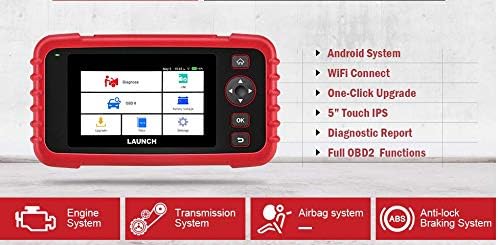
Figure 6.1: The main menu interface of the LAUNCH CRP239, providing access to all primary functions.
- Diagnosa: For full system diagnostics (Engine, A/T, ABS, SRS).
- AKU: Readiness status for emissions.
- OBD II: Standard OBD II functions (read/clear DTCs, live data, freeze frame, O2 sensor test, etc.).
- Atur ulang: Access various maintenance reset functions.
- Vol bateraitage: Menampilkan tegangan baterai kendaraan secara real-time.tage.
- Memperbarui: For software and firmware updates via Wi-Fi.
- Data: Review saved diagnostic data and reports.
- Pengaturan: Configure device settings such as language, Wi-Fi, and display.
6.3. Melakukan Pemindaian Diagnostik
- Dari menu utama, pilih "Diagnose".
- The tool will attempt to automatically identify the vehicle via VIN scan. If unsuccessful, you may need to manually select the vehicle make, model, and year.
- Choose the system you wish to diagnose (e.g., Engine, Transmission, ABS, SRS).
- Memilih "Read Fault Codes" ke view Diagnostic Trouble Codes (DTCs).
- Memilih "Clear Fault Codes" to erase DTCs after repairs have been made. Caution: Clearing codes without addressing the underlying issue will result in the codes reappearing.
- Memilih "Read Data Stream" ke view live sensor data.
6.4. Using Reset Functions
The CRP239 supports several common maintenance reset functions:
- Reset Oli: Mengatur ulang pengingat masa pakai oli setelah penggantian oli.
- Reset Sudut Kemudi: Mengatur ulang sensor sudut kemudi setelah penyelarasan atau penggantian komponen.
- Brake-Pad Reset (EPB): Mengatur ulang sistem rem parkir elektronik setelah penggantian bantalan rem.
- Pencocokan Baterai (BMS): Registers a new battery with the vehicle's Battery Management System.
- Adaptasi Throttle: Mempelajari kembali posisi throttle body setelah dibersihkan atau diganti.
- Regenerasi DPF: Memulai proses regenerasi Filter Partikulat Diesel.
To use a reset function, select "Reset" from the main menu, then choose the desired function and follow the on-screen instructions.
6.5. Pembaruan Perangkat Lunak
The CRP239 supports one-click Wi-Fi updates for software and vehicle coverage, ensuring you always have the latest diagnostic capabilities.
- Pastikan perangkat terhubung ke jaringan Wi-Fi yang stabil.
- Dari menu utama, pilih "Memperbarui".
- The device will check for available updates. Select the updates you wish to install and confirm.
- Allow the update process to complete without interruption. The device may restart during this process.

Figure 6.2: The update screen on the LAUNCH CRP239, showing available software updates for various vehicle brands.
6.6. Diagnostic Report Generation
The CRP239 can automatically generate diagnostic reports, which can be shared via email.
- After completing a diagnostic session, the tool will prompt you to generate a report.
- Confirm to generate the report.
- Navigasi ke "Data" menu untuk view saved reports.
- Select a report and choose the option to share via email. Ensure your Wi-Fi is connected and email settings are configured in the 'Settings' menu.
7. Pemeliharaan
Proper maintenance ensures the longevity and optimal performance of your LAUNCH CRP239:
- Pembersihan: Gunakan kain lembut dan kering untuk membersihkan perangkat. Jangan gunakan pembersih atau pelarut abrasif.
- Penyimpanan: Store the device in its carrying case in a cool, dry place when not in use. Avoid extreme temperatures.
- Perawatan Baterai: Charge the battery regularly, even if the device is not in frequent use, to maintain battery health. Avoid fully discharging the battery for extended periods.
- Pemeriksaan Kabel: Periodically inspect the diagnostic and USB cables for any signs of damage. Replace damaged cables immediately.
8. Penyelesaian masalah
This section addresses common issues you might encounter with the LAUNCH CRP239.
| Masalah | Kemungkinan Penyebab | Larutan |
|---|---|---|
| Perangkat tidak menyala. | Low battery; faulty connection to vehicle. | Charge the device fully. Ensure the OBD II cable is securely connected to both the CRP239 and the vehicle. Check vehicle's ignition is ON. |
| Tidak dapat berkomunikasi dengan kendaraan. | Incorrect vehicle protocol; faulty OBD II port; damaged cable. | Verify vehicle compatibility. Check the vehicle's OBD II port for power. Try a different vehicle or cable if available. Ensure vehicle ignition is ON. |
| Pembaruan perangkat lunak gagal. | Koneksi Wi-Fi tidak stabil; penyimpanan tidak cukup. | Pastikan koneksi Wi-Fi kuat dan stabil. Periksa ruang penyimpanan yang tersedia di perangkat. Mulai ulang proses pembaruan. |
| Layar tidak responsif. | Gangguan perangkat lunak; kerusakan fisik. | Perform a soft reset by holding the power button until the device restarts. If the issue persists, contact customer support. |
9. Spesifikasi
| Fitur | Detil |
|---|---|
| Model | CRP239 (CREADER PROFESSIONAL 239) |
| Menampilkan | 5.0-inch 720p Touch Screen |
| Baterai | Baterai Lithium Polimer Isi Ulang 4000mAh (termasuk) |
| Konektivitas | OBD II, Wi-Fi, USB |
| Cakupan Kendaraan | Domestic, Asian, European vehicles (1996 and newer OBD2) |
| Sistem yang Didukung | Engine, Automatic Transmission (A/T), ABS, SRS |
| Fungsi Khusus | Oil Reset, Steering Angle Reset, Brake-Pad Reset (EPB), Battery Matching (BMS), Throttle Adaptation, DPF Regeneration |
| Ukuran | 32.4 x 25.4 x 8 cm (Paket) |
| Berat Barang | 560 gram |
| Bahan Eksterior | Karet |
10. Informasi Garansi
The LAUNCH CRP239 comes with a standard manufacturer's warranty. For specific warranty terms and conditions, please refer to the warranty card included in your product package or visit the official Launch websitus. Simpan struk pembelian Anda sebagai bukti pembelian untuk klaim garansi.
Opsi perpanjangan garansi mungkin tersedia dari penyedia pihak ketiga. Misalnya,ampGaransi tambahan 1 tahun dan 2 tahun dari Salama Care ditawarkan untuk produk ini.
11. Dukungan
For technical assistance, product inquiries, or support, please contact Launch customer service through their official website or the contact information provided in your product documentation. Ensure you have your product model number (CRP239) and serial number ready when contacting support.
Untuk sumber daya tambahan, kunjungi Launch Official Weblokasi.


