1. Pendahuluan
Thank you for choosing the Xiaomi Mi 55-inch 4K UHD Smart Android TV. This manual provides essential information for the safe and efficient use of your television. Please read it thoroughly before operating the device and retain it for future reference.

Gambar 1.1: Depan view of the Xiaomi Mi 55-inch 4K UHD Smart Android TV.
2. Informasi Keselamatan
Untuk memastikan pengoperasian yang aman dan mencegah kerusakan, perhatikan tindakan pencegahan berikut:
- Jangan biarkan TV terkena hujan atau lembab.
- Jangan halangi lubang ventilasi.
- Pastikan pentanahan yang tepat untuk steker listrik.
- Hindari meletakkan TV pada permukaan yang tidak stabil.
- Jauhkan TV dari sinar matahari langsung, sumber panas, dan api terbuka.
- Cabut TV saat terjadi badai petir atau saat tidak digunakan dalam jangka waktu lama.
- Serahkan semua servis kepada teknisi servis yang berkualifikasi.
3. Isi Paket
Verifikasi bahwa semua item ada dalam paket:
- 1 × Xiaomi Mi 55-inch TV
- 1 × Remote control with voice control
- 1 × Remote control batteries
- 1 × Kabel daya
- 1 × User manual (this document)
- 1 × Support legs
- 4 × Screws for support legs
4. Pengaturan
4.1. Instalasi Fisik
Your TV can be installed on a stand or wall-mounted. The TV is VESA mounting standard compatible.
4.1.1. Instalasi Berdiri
- Letakkan TV dengan hati-hati menghadap ke bawah di permukaan yang lembut dan rata untuk mencegah kerusakan layar.
- Attach the support legs to the designated slots at the bottom of the TV using the provided screws. Ensure they are securely fastened.
- Letakkan TV di permukaan yang stabil dan rata.
4.1.2. Pemasangan di Dinding (Opsional)
If you choose to wall-mount your TV, use a VESA-compatible wall mount kit (sold separately) and follow the instructions provided with the wall mount. Ensure the wall can support the weight of the TV.
4.2. Menghubungkan Periferal
Hubungkan perangkat eksternal Anda ke port TV:
- HDMI: Connect Blu-ray players, game consoles, or set-top boxes to the HDMI ports (3 available). HDMI ARC is supported for audio return channel functionality.
- Kabel USB: Connect USB storage devices for media playback (2 available).
- LAN: Untuk koneksi internet berkabel, sambungkan kabel Ethernet ke port LAN.
- Keluaran Audio Digital (Optik): Connect to an external audio system for high-quality digital sound.
4.3. Daya Awal Menyala
- Hubungkan kabel daya ke TV lalu ke stopkontak.
- Tekan tombol daya pada remote control atau pada TV.
- Ikuti petunjuk di layar untuk menyelesaikan pengaturan awal, termasuk pemilihan bahasa, koneksi jaringan (Wi-Fi atau Ethernet), dan masuk ke akun Google.
5. Petunjuk Pengoperasian
5.1. Kontrol Jarak Jauh
The included remote control allows you to navigate the TV's features. It supports voice control for convenient interaction with Google Assistant.
- Tombol Daya: Menyalakan atau mematikan TV.
- Papan Navigasi (Atas/Bawah/Kiri/Kanan/OK): Menavigasi menu dan memilih opsi.
- Tombol Volume: Menyesuaikan tingkat suara.
- Tombol Saluran: Mengganti saluran TV.
- Tombol Asisten Google: Mengaktifkan kontrol suara.
- Tombol Home: Kembali ke layar beranda Android TV.
- Tombol Kembali: Kembali ke layar sebelumnya.
- Tombol Aplikasi: Dedicated buttons for popular apps like Netflix and YouTube.
5.2. Fitur Smart TV (Android TV)
Your TV runs on Android TV (version 9), providing access to a wide range of smart features:
- Asisten Google: Gunakan perintah suara untuk mencari konten, mengontrol perangkat rumah pintar, dan mendapatkan informasi.
- Toko Google Play: Download and install various apps, games, and streaming services.
- Chromecast bawaan: Transmisikan konten dari telepon pintar, tablet, atau komputer Anda langsung ke TV.
- Aplikasi Pra-instal: Access Netflix, YouTube, and a web peramban secara langsung.
- Dukungan Aplikasi SmartThings: Integrate with other compatible smart home devices.
5.3. Pengaturan Gambar dan Suara
Sesuaikan pengaturan gambar dan suara untuk mengoptimalkan tampilan Anda. viewpengalaman ing:
- Mode Gambar: Select from various presets (e.g., Standard, Vivid, Movie, Game) or customize brightness, contrast, color, and sharpness.
- HDR: The TV supports HDR for enhanced contrast and color with compatible content.
- Mode Suara: Pilih dari preset seperti Standar, Musik, Film, atau sesuaikan pengaturan equalizer.
- DTS/Dolby Audio: The TV supports DTS and Dolby audio technologies for immersive sound.
6. Pemeliharaan
6.1. Pembersihan
Untuk membersihkan TV Anda:
- Selalu cabut kabel TV sebelum membersihkan.
- Gunakan kain lembut dan kering untuk menyeka layar dan kabinet.
- Untuk noda membandel, oleskan sedikitampBasahi kain dengan air atau pembersih layar khusus. Jangan pernah menyemprotkan pembersih langsung ke layar.
- Hindari penggunaan pembersih atau pelarut yang bersifat abrasif.
6.2. Pembaruan Perangkat Lunak
Periodically check for software updates to ensure your TV has the latest features and performance improvements. Updates can usually be found in the TV's settings menu under 'About' or 'System Update'.
7. Penyelesaian masalah
Jika Anda mengalami masalah, lihat masalah umum dan solusi berikut:
| Masalah | Solusi yang mungkin |
|---|---|
| Tidak ada daya | Periksa apakah kabel daya terhubung dengan aman dan stopkontak berfungsi. Coba stopkontak lain. |
| Tidak ada gambar, tetapi ada suara | Pastikan sumber input yang benar telah dipilih. Periksa sambungan kabel ke perangkat eksternal. |
| Tidak ada suara, tetapi gambar ada | Check volume level and mute settings. Verify audio cable connections. If using external audio, ensure it's powered on and correctly configured. |
| Kontrol jarak jauh tidak berfungsi | Replace batteries. Ensure there are no obstructions between the remote and the TV. Re-pair the remote if it's a Bluetooth remote. |
| Tidak dapat terhubung ke Wi-Fi | Check if the Wi-Fi router is on and working. Re-enter the Wi-Fi password. Try restarting the TV and router. |
| Aplikasi berjalan lambat atau mengalami kerusakan. | Close unused apps. Clear app cache. Restart the TV. Ensure sufficient internet speed. |
Jika masalah berlanjut, hubungi dukungan pelanggan.
8. Spesifikasi
| Fitur | Detil |
|---|---|
| Nomor Model | L55M5-5ASP |
| Ukuran Layar | 55 inci |
| Teknologi Tampilan | DIPIMPIN |
| Resolusi | Resolusi 3840x2160 (4K UHD) |
| Tingkat Penyegaran | frekuensi 60Hz |
| Viewsudut ing | 178 derajat |
| Fitur Video | Dukungan HDR |
| Sistem Operasi | Android TV (Android 9) |
| RAM | 2 GB |
| Kapasitas Penyimpanan | 8 GB |
| Keluaran Audio | 2 speaker 10W |
| Teknologi Audio | DTS/Dolby Audio |
| Fitur Cerdas | Google Assistant, Google Play, Web Browser, SmartThings app support, YouTube, Netflix (subscription not included), Chromecast built-in, DVB-T2 + DVB-C tuner |
| Konektivitas | 3 x HDMI (with ARC), 2 x USB, 1 x LAN (Ethernet 100Mbps), 1 x Digital Optical Audio Out, Built-in Wi-Fi (2.4G/5G), Bluetooth 4.2 |
| Rasio Aspek | 16:9 |
| Mounting Standard | Kompatibel dengan VESA |
| Dimensi Produk (P x L x T) | 124.2 x 24.5 x 78 cm (dengan dudukan) |
| Berat Produk | 13 kg |
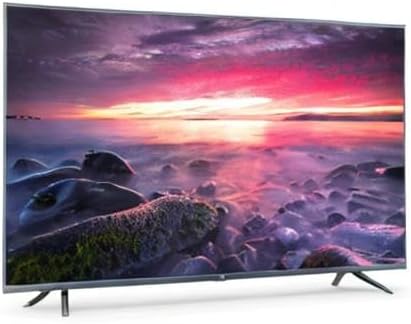
Image 8.1: Energy efficiency label for the Xiaomi Mi 55-inch TV.
9. Garansi dan Dukungan
Untuk informasi garansi, silakan merujuk pada kartu garansi yang disertakan dengan produk Anda atau kunjungi situs web resmi Xiaomi websitus untuk wilayah Anda. Simpan struk pembelian Anda sebagai bukti pembelian.
For technical support, troubleshooting assistance beyond this manual, or service inquiries, please contact Xiaomi customer service through their official channels.


