Perkenalan
The smartmi Evaporative Humidifier is designed to provide comfortable humidity levels in your home without producing mist or white residue. Utilizing natural evaporative humidification, it is suitable for various rooms including bedrooms, living rooms, and baby rooms. This manual provides essential information for the safe and efficient operation, maintenance, and troubleshooting of your humidifier.

Image: The smartmi Evaporative Humidifier, a sleek white unit, with water being poured into its top opening, demonstrating the top-fill feature.

Image: The smartmi Evaporative Humidifier displayed alongside logos for design awards, highlighting its aesthetic and functional recognition.
Informasi Keselamatan
Harap baca semua petunjuk keselamatan dengan saksama sebelum menggunakan alat ini. Kegagalan mengikuti petunjuk ini dapat mengakibatkan sengatan listrik, kebakaran, atau cedera serius.
- Selalu letakkan pelembap udara di atas permukaan yang kokoh, rata, dan tahan air.
- Jangan letakkan pelembap udara di dekat sumber panas atau di bawah sinar matahari langsung.
- Do not add essential oils, perfumes, or any chemical substances to the water tank, as this may damage the unit and void the warranty.
- Ensure the electrical components in the top part are kept separate from the water tank to maintain safety.
- Cabut steker pelembap udara sebelum membersihkan atau mengisinya kembali.
- Jauhkan dari jangkauan anak-anak dan hewan peliharaan.
- Jangan menghalangi saluran masuk atau keluar udara.
- The unit features an automatic shut-off if the top is separated from the water tank for enhanced safety.
Produk Selesaiview dan Komponen
Familiarize yourself with the different parts of your smartmi Evaporative Humidifier.

Image: A detailed diagram showing the disassembled smartmi Evaporative Humidifier, labeling its main components: Control Panel, Exhaust/Water Refilling Port, Upper Casing, Evaporating Basin, 4L Water Tank, and Lower Casing.
- Huruf C atasasing: Contains the control panel, fan, and electrical components.
- Panel Kontrol: Buttons and indicators for operation.
- Exhaust/Water Refilling Port: Where humidified air exits and water is added.
- Evaporating Basin: Houses the evaporating elements and collects water.
- Tangki Air 4L: Waduk utama untuk air.
- C . lebih rendahasing: The base of the unit.
Pengaturan
Follow these steps for initial setup of your humidifier:
- Membongkar: Keluarkan semua komponen dari kemasannya dengan hati-hati.
- Penempatan: Place the humidifier on a flat, stable surface away from walls and furniture to allow for proper air circulation.
- Isi Tangki Air:
The smartmi humidifier supports both top filling and water tank filling.
- Top Filling: Pour clean tap water directly into the exhaust/water refilling port on the top of the unit.
- Pengisian Tangki Air: Separate the upper casing dari c bawahasing. Fill the 4L water tank directly with clean tap water. Ensure the evaporating basin is properly seated before reattaching the upper casing.
Do not exceed the maximum water level indicator. Do not add essential oils or hot water.
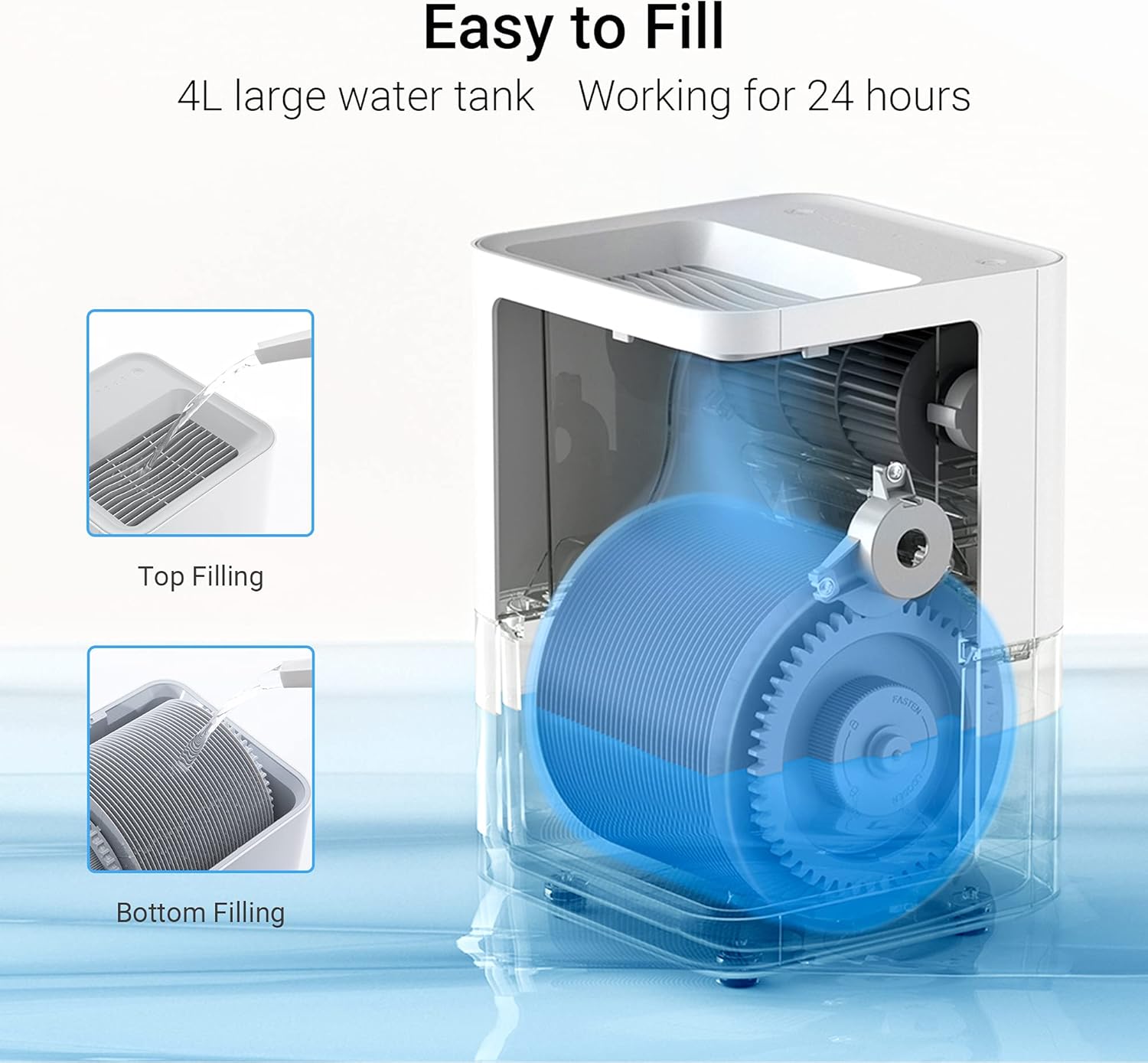
Image: A visual guide illustrating two methods for filling the humidifier: directly pouring water into the top (Top Filling) and filling the water tank after separating the upper casing (Bottom Filling).
- Hubungkan Daya: Sambungkan kabel daya ke stopkontak listrik yang sesuai.
Petunjuk Pengoperasian
Your smartmi Evaporative Humidifier offers intuitive controls and smart app connectivity.

Gambar: Dari atas ke bawah view of the smartmi humidifier's control panel, highlighting the Water Level Indicator lights and the Power/Mode Button.
Operasi Panel Kontrol:
- Daya Hidup/Mati: Press the Power/Mode button to turn the unit on or off.
- Pemilihan Mode: Press the Power/Mode button repeatedly to cycle through different operating modes (e.g., Auto, Manual speeds).
- Indikator Ketinggian Air: The light panel on the control panel indicates the current water level in the tank.
Kontrol Aplikasi Cerdas:
The smartmi humidifier can be controlled via a dedicated mobile application, offering advanced features and remote control.
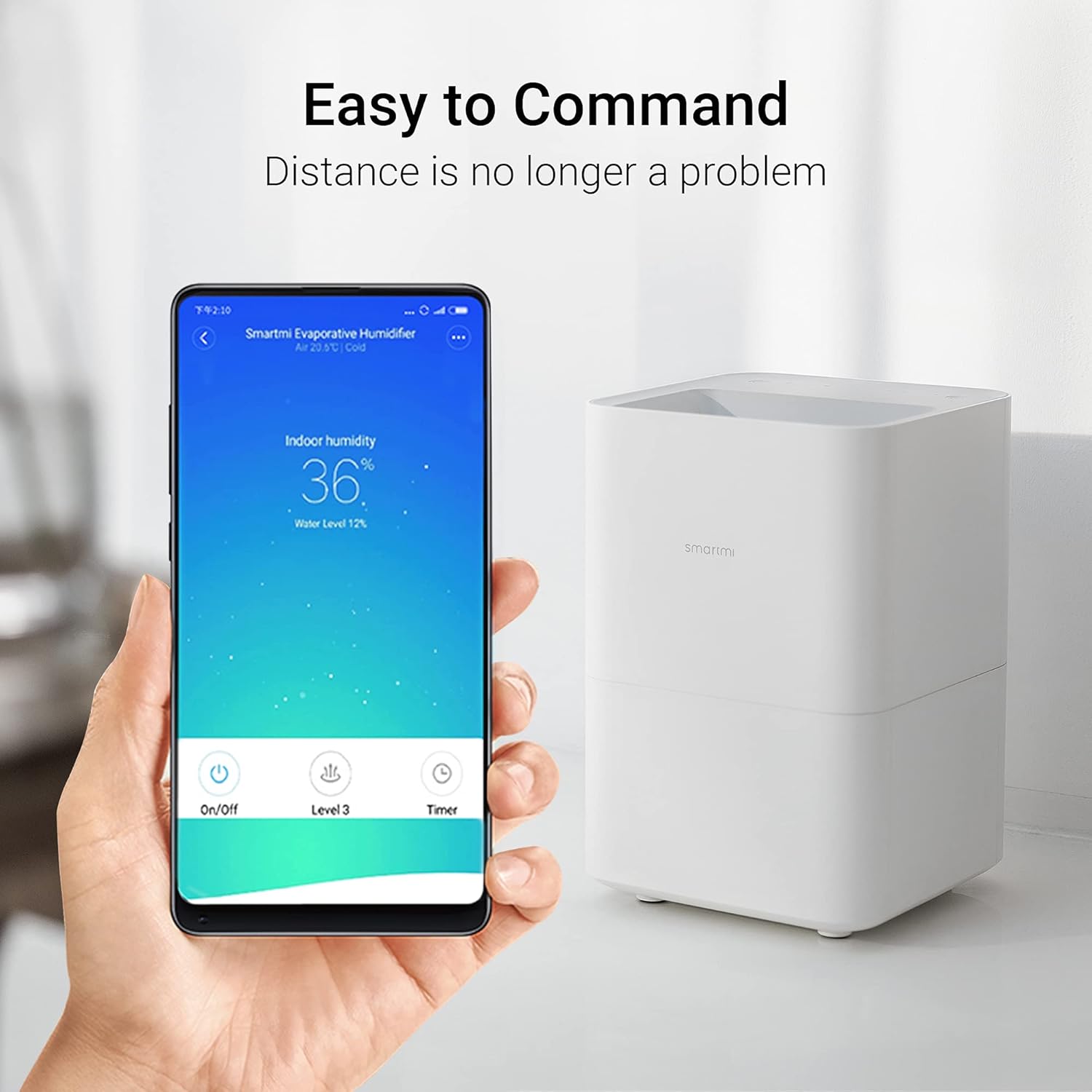
Image: A hand holding a smartphone displaying the smartmi app interface, showing indoor humidity, water level, and control options like On/Off, Level, and Timer, next to the humidifier unit.
- Unduh Aplikasi: Download the smartmi app from your device's app store.
- Pasangkan Perangkat: Follow the in-app instructions to pair your humidifier with your smartphone.
- Fitur: Melalui aplikasi ini, Anda dapat:
- Monitor indoor humidity and water level.
- Adjust fan speed and operating modes.
- Atur pengatur waktu dan jadwal.
- Access additional automation controls based on humidity or temperature.
Note: The app's humidity reading may be higher than an external hygrometer due to the sensor's proximity to the humidifier. For precise room humidity, use a separate hygrometer.
Operasi Tenang:
The smartmi humidifier operates at a low noise level of 34dB, ensuring minimal disturbance, even during sleep.

Image: A person sleeping peacefully in a bedroom with the smartmi humidifier on a bedside table, emphasizing its quiet operation. Icons for Low Noise, Light On/Off, and 24 Hours are displayed.
Pemeliharaan
Regular cleaning is crucial for maintaining the performance and longevity of your smartmi humidifier and ensuring healthy air quality. It is strongly recommended to clean the humidifier once a week if used frequently.
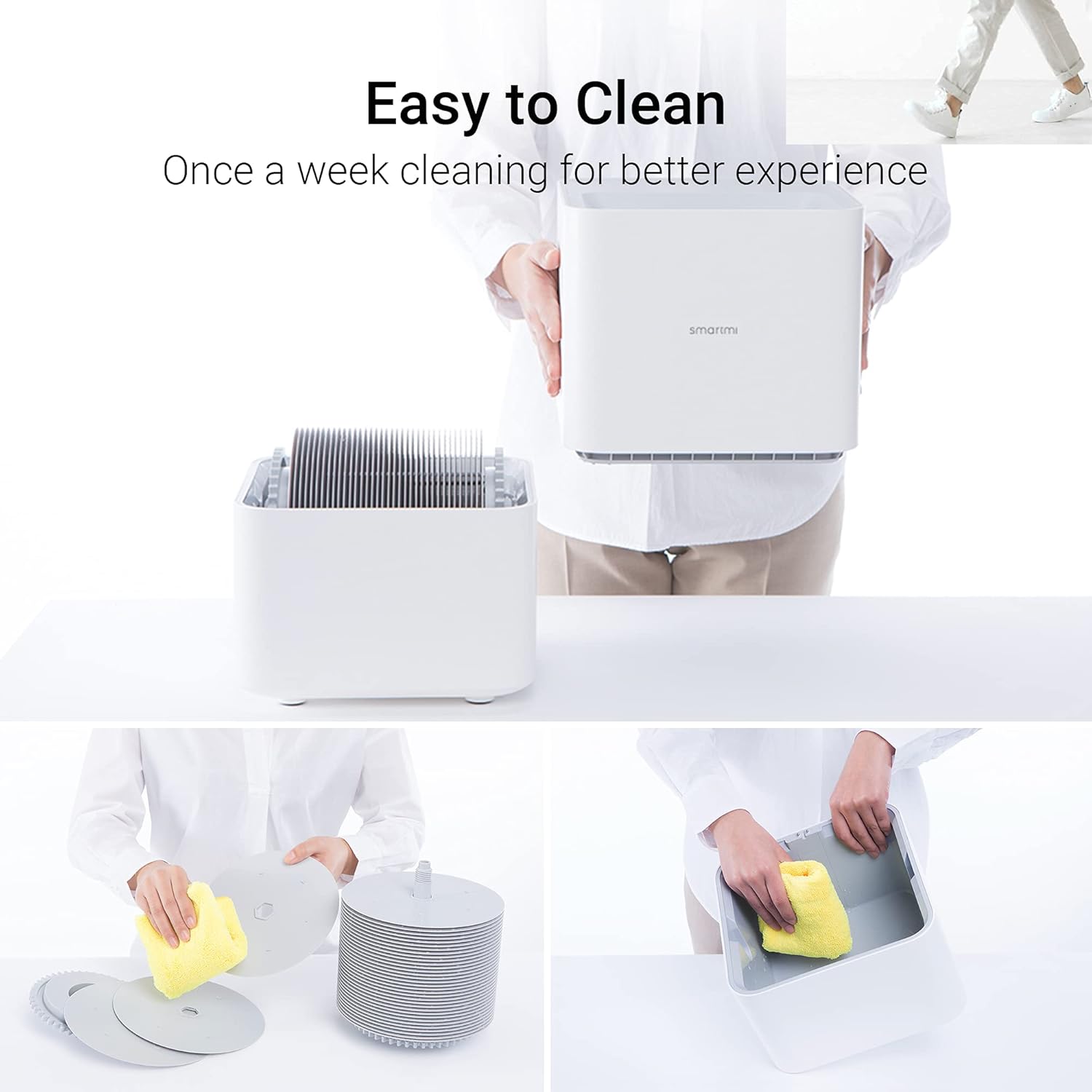
Image: A series of images demonstrating the ease of cleaning the smartmi humidifier, showing the separation of components and wiping down the water tank and evaporating basin dengan kain.
- Penggantian Air Harian: To prevent mineral deposits and bacterial growth, drain the reservoir entirely and refill with fresh water daily, or at least every other day.
- Weekly Cleaning (Water Tank & Evaporating Basin):
- Unplug the humidifier and separate the upper and lower casings.
- Empty any remaining water from the water tank and evaporating basin.
- Add a splash of household vinegar to the empty water reservoir. Use a clean micro cloth to thoroughly wipe the reservoir to remove built-up mineral deposits. The surface should feel smooth.
- Bilas sampai bersih dengan air bersih.
- For deeper cleaning, add about a cup of household vinegar to the reservoir, fill halfway with water, reassemble the unit, and let it run for about 15 minutes. Vent the area or take the unit outside to avoid vinegar fumes.
- Drain the vinegar solution, rinse the reservoir, and fill with clean water. Run for another 15 minutes, then drain and rinse again.
- To remove any residual vinegar smell, add a half cup of baking soda (dissolved in a gallon of water) to the reservoir, fill halfway, and run for 15 minutes. Drain, rinse, and run with clean water again.
- Wipe the upper drive gear with vinegar occasionally to prevent mineral buildup.
- Periodic Disinfection (Optional): Every once in a while, you may add a teaspoon of bleach to a gallon of water. Use half of this solution in the machine, run for about 15 minutes, then fill to the line and run for another 15 minutes. Ensure proper ventilation. Follow with a baking soda rinse to neutralize odors.
- Pengeringan: Allow all parts to air dry completely before reassembling or storing the humidifier.
Penyelesaian Masalah
If you encounter issues with your smartmi Evaporative Humidifier, refer to the following common problems and solutions:
| Masalah | Kemungkinan Penyebab | Larutan |
|---|---|---|
| Pelembap tidak menyala. | No power; unit not assembled correctly. | Check power connection. Ensure upper and lower casings are securely connected. |
| No mist or low humidity output. | This is a no-mist evaporative humidifier; low water level; dirty evaporating basin/elements. | This unit does not produce mist. Check water level and refill if necessary. Clean the evaporating basin and elements as per maintenance instructions. Ensure room door is closed for optimal performance. |
| Unit beeps and indicates empty tank when full. | Water level sensor malfunction or obstruction. | Clean the water tank and sensor area thoroughly. If the issue persists, contact customer support. |
| Bau tidak sedap dari alat pelembap udara. | Stagnant water or bacterial growth. | Perform a thorough cleaning of the water tank and evaporating basin, including the vinegar and baking soda steps. Change water daily. |
| Grinding noise during operation. | Mineral buildup on driving wheels/gears. | Clean the driving wheels and gears, especially the upper gear, with vinegar to remove mineral deposits. |
Spesifikasi
| Fitur | Detil |
|---|---|
| Merek | pintar kami |
| Nama Model | CJXJSQ02ZM (air humidifier, evaporative humidifier) |
| Fitur Khusus | App Control, Quiet, Auto Shut Off |
| Warna | Putih |
| Jenis Filter | Sumbu |
| Mode Operasi | Menguapkan |
| Dimensi Produk (P x L x T) | 9.5"Panjang x 9.5"Lebar x 14.3"T |
| Berat Barang | 9.48 pon |
| Tipe Kamar | Bedroom (suitable for home, large room, baby room) |
| Kapasitas Tangki Air | 4 liter |
| Tingkat Pelembapan | Up to 240ml/hour |
| Tingkat Kebisingan | 34dB |
| Apatage | 8 watt |
| Metode Kontrol | Aplikasi, Tombol Manual |
| UPC | 717390359099, 717390359105 |
| Tanggal Pertama Tersedia | 23 April 2020 |
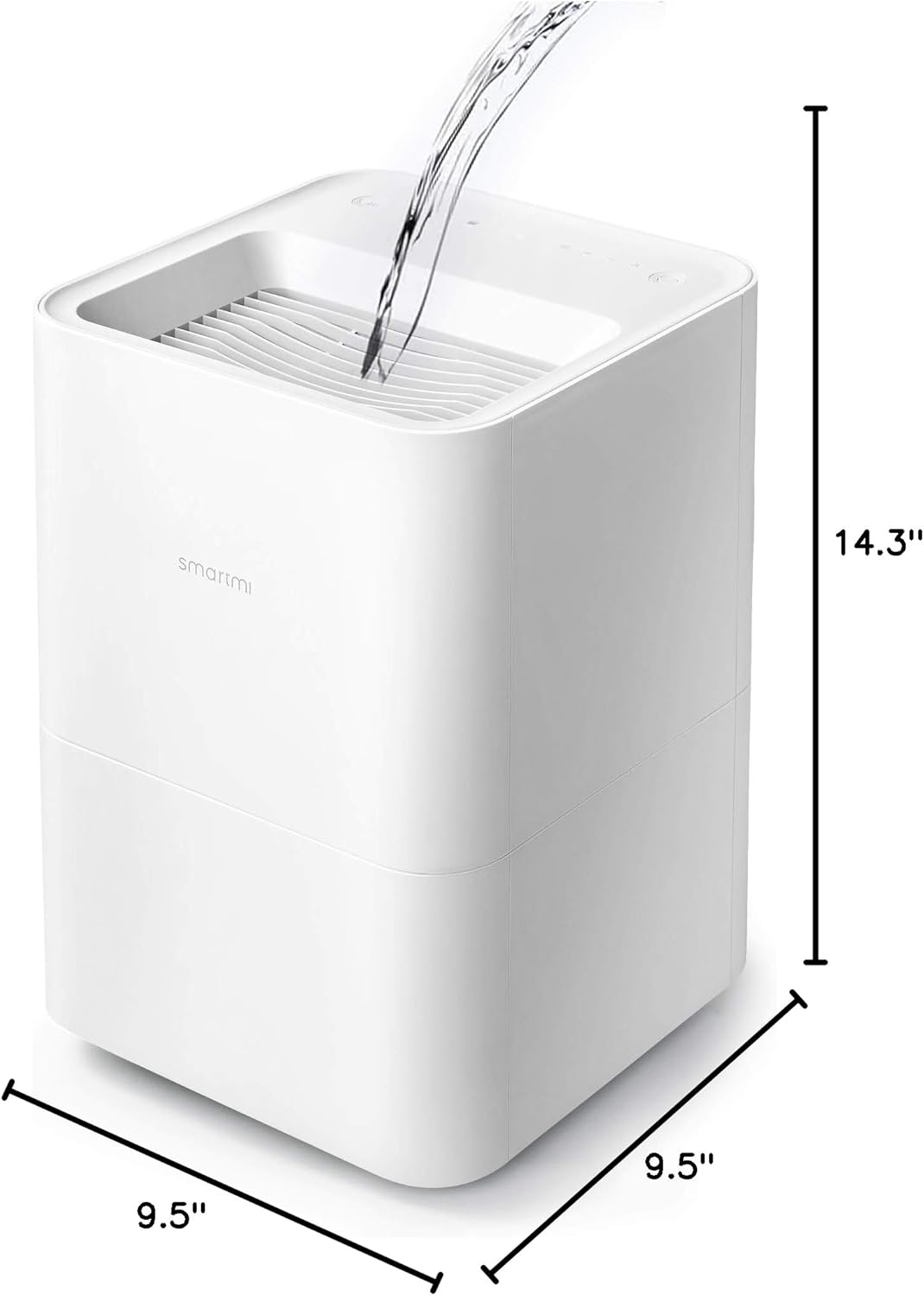
Image: The smartmi Evaporative Humidifier with its dimensions clearly marked: 9.5 inches (depth), 9.5 inches (width), and 14.3 inches (height).
Garansi dan Dukungan
The smartmi Evaporative Humidifier comes with a Garansi 1 Tahun sejak tanggal pembelian. Garansi ini mencakup cacat bahan dan pengerjaan dalam penggunaan normal.
For warranty claims, technical support, or any questions regarding your product, please contact smartmi customer service. You can typically find contact information on the smartmi official websitus atau melalui platform pembelian Anda.
Please have your model number (CJXJSQ02ZM) and proof of purchase ready when contacting support.