1. Pendahuluan
Thank you for choosing the Losei D65 Wireless Earbuds. These earbuds are designed to provide a high-quality audio experience with advanced features such as environmental noise canceling (ENC), individual power display, wireless charging, and IPX7 waterproofing. This manual will guide you through the setup, operation, and maintenance of your new earbuds.
2. Apa yang ada di dalam kotak
- Wireless Sport Earbuds (1 Pair)
- Charging Case (1 PC)
- Type-C Charging Cable (1 PC)
- Original Ear Caps (1 Pair)
- Spare Ear Caps (6 Pairs)
- Panduan Pengguna (Dokumen ini)
3. Produk Lebihview
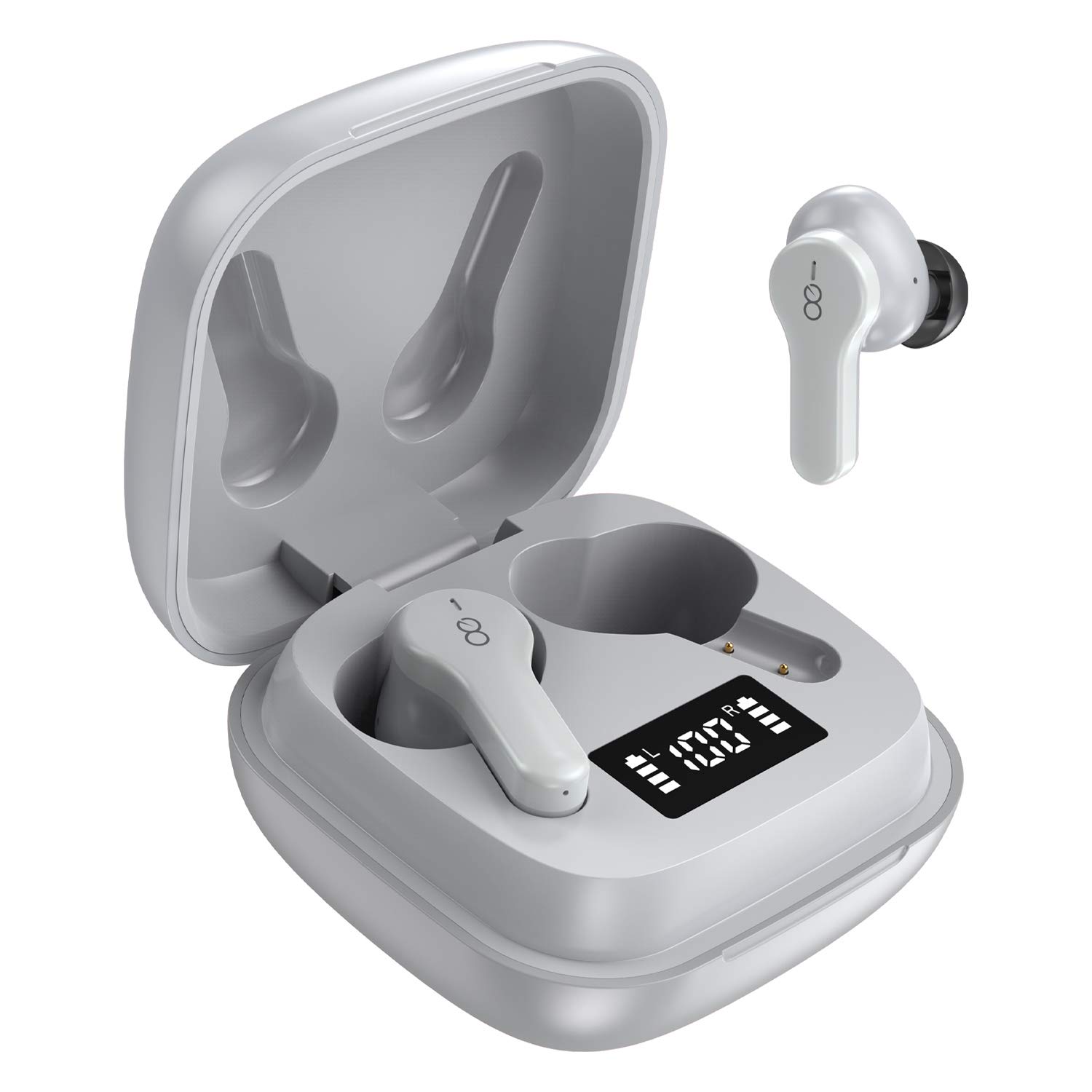
The Losei D65 earbuds feature a compact, in-ear design with touch controls. The accompanying charging case provides portable power and includes a digital display to show battery levels for both the case and individual earbuds.
Fitur Utama:
- Clear Call with 4-Mics Noise Reduction: Built-in 4 microphones with Environmental Noise Canceling (ENC) technology for clear calls.
- Individual Power Display: Digital display on the charging case shows battery percentage for the case and charging status for each earbud.
- Wireless Charging & Extended Playtime: Supports wireless charging and provides up to 30 hours of total playtime with the charging case.
- Comfortable Fit & IPX7 Waterproof: Ergonomic design with multiple ear tip sizes and IPX7 water resistance for sports and daily use.
- Auto Pairing & Smart Touch Control: Automatic connection to the last paired device and intuitive touch controls for various functions.
4. Pengaturan
4.1 Mengisi Daya Earbud dan Casing
Sebelum penggunaan pertama, isi daya earbud dan casing pengisi daya hingga penuh.
- Mengisi Daya Earbud: Place the earbuds into the charging case. The marquee lights on the case will indicate charging. They will stop when fully charged.
- Charging the Case (Wired): Connect the provided Type-C charging cable to the charging port on the case and to a USB power source. The digital display will show the battery percentagpeningkatanasing. A full charge takes approximately 1.5-2 hours.
- Mengisi Daya Casing (Nirkabel): Place the charging case on a compatible wireless charging pad (not included). The digital display will indicate charging status.
The charging case's digital display shows the battery percentage (1-100%). The individual earbud power consumption indicators show 4 grids, each representing 25% battery.
4.2 Memasangkan dengan Perangkat Anda
The Losei D65 earbuds feature automatic pairing.
- Pastikan Bluetooth perangkat Anda dihidupkan.
- Buka casing pengisi daya. Earbud akan otomatis menyala dan masuk ke mode berpasangan.
- On your device, search for Bluetooth devices and select "Losei-D65" from the list.
- Setelah terhubung, Anda akan mendengar perintah konfirmasi, dan earbud siap digunakan.
Earbud akan secara otomatis tersambung kembali ke perangkat terakhir yang dipasangkan saat dikeluarkan dari wadah pengisi daya.
5. Petunjuk Pengoperasian
5.1 Kontrol Sentuh Cerdas
The Losei D65 earbuds utilize touch controls for various functions. The sensor area is typically located on the outer surface of each earbud.
- Putar/Jeda: Ketuk satu kali pada salah satu earbud.
- Lagu Berikutnya: Ketuk dua kali pada earbud kanan.
- Lagu Sebelumnya: Ketuk dua kali pada earbud kiri.
- Volume Naik: Ketuk tiga kali pada earbud kanan.
- Volume Turun: Ketuk tiga kali pada earbud kiri.
- Menjawab/Mengakhiri Panggilan: Ketuk satu kali pada salah satu earbud saat ada panggilan masuk.
- Tolak Panggilan: Tekan dan tahan salah satu earbud selama 2 detik selama panggilan masuk.
- Aktifkan Voice Assistant: Tekan dan tahan salah satu earbud selama 3 detik (saat tidak sedang melakukan panggilan).
5.2 Multi-Using Modes
The earbuds support different usage scenarios:
- Mode Mono: Each earbud can be used independently. This is ideal for driving or when you need to be aware of your surroundings. Simply take one earbud out of the case and connect it.
- Bagikan Mode: You can share one earbud with another person to listen to the same audio content.
- Mode Stereo: Use both earbuds together for a full, immersive stereo sound experience.
6. Pemeliharaan
6.1 Pembersihan
Pembersihan secara teratur membantu menjaga kualitas suara dan kebersihan.
- Gunakan kain yang lembut, kering, dan tidak berbulu untuk membersihkan earbud dan casing pengisi daya.
- Untuk ujung telinga, lepaskan dari earbud dan bersihkan dengan larutan sabun lembut jika perlu, lalu bilas hingga bersih dan keringkan sepenuhnya sebelum dipasang kembali.
- Jangan gunakan pembersih abrasif, alkohol, atau pelarut kimia.
6.2 Penyimpanan
Jika tidak digunakan, simpan earbud dalam wadah pengisi dayanya untuk melindunginya dan menjaganya tetap terisi daya.
- Simpan di tempat sejuk dan kering, jauh dari suhu ekstrem.
- Hindari paparan sinar matahari langsung dalam waktu lama.
6.3 Tahan Air (IPX7)
The Losei D65 earbuds are IPX7 waterproof, meaning they can withstand immersion in water up to 1 meter for 30 minutes. This makes them suitable for sports and protection against sweat and rain. However, they are not designed for swimming or prolonged submersion. Ensure the earbuds are dry before placing them back in the charging case to prevent damage.
7. Penyelesaian masalah
If you encounter issues with your Losei D65 earbuds, refer to the following common solutions:
- Earbud tidak dapat dipasangkan atau terhubung:
- Pastikan kedua earbud terisi dayanya.
- Matikan Bluetooth pada perangkat Anda, lalu hidupkan kembali.
- Forget/delete "Losei-D65" from your device's Bluetooth list and attempt to pair again.
- Place both earbuds back into the charging case, close the lid, wait a few seconds, then open the lid to reset.
- Hanya satu earbud yang berfungsi:
- Pastikan kedua earbud terisi dayanya.
- Place both earbuds back into the charging case, close the lid, wait a few seconds, then open the lid. They should reconnect to each other automatically.
- If the issue persists, try resetting the earbuds as described in the pairing section.
- Poor sound quality or low volume:
- Sesuaikan volume pada perangkat dan earbud Anda.
- Ensure the ear tips are properly sealed in your ear canal. Try different sized ear tips for a better fit.
- Bersihkan kotoran apa pun dari speaker earbud dan ujung earbud.
- Pastikan tidak ada penghalang antara perangkat Anda dan earbud.
- Casing pengisi daya tidak mengisi daya:
- Periksa kabel pengisi daya dan adaptor daya apakah ada kerusakan.
- Pastikan kabel Type-C terhubung dengan aman ke casing dan sumber daya.
- Jika menggunakan pengisian daya nirkabel, pastikan casing terpasang dengan benar pada alas pengisian daya nirkabel yang kompatibel.
8. Spesifikasi
| Nama Model | Losei-D65 |
| Teknologi Konektivitas | Nirkabel (Bluetooth 5.0) |
| Penempatan Telinga | Di Telinga |
| Kontrol Kebisingan | Sound Isolation, Environmental Noise Canceling (ENC) |
| Tingkat Tahan Air | IPX7 (Tahan Air) |
| Jenis Kontrol | Kontrol Sentuh |
| Daya Tahan Baterai (Earbud) | Hingga 5 jam dengan sekali pengisian daya |
| Total Waktu Bermain (dengan Casing) | Hingga 30 jam |
| Waktu Pengisian Daya (Kasus) | Sekitar 1.5-2 jam |
| Antarmuka Pengisian Daya | Tipe-C, Pengisian Daya Nirkabel |
| Perangkat yang Kompatibel | Most Bluetooth-enabled devices (Android, iOS, PC, etc.) |
| Berat Barang | 0.176 ons (per earbud) |
| Dimensi Produk | 1.18 x 1.54 x 1.85 inci (Kotak Pengisi Daya) |
9. Garansi dan Dukungan
9.1 Informasi Garansi
The Losei D65 Wireless Earbuds come with a Garansi penggantian 12 bulan. Additionally, returns are accepted within 30 days for a full refund. This warranty covers manufacturing defects and ensures customer satisfaction.
9.2 Dukungan Pelanggan
For any questions, issues, or support needs, please contact Losei customer service. Quick-response professional customer service is available to assist you.
Please refer to the product packaging or the official Losei websitus untuk rincian kontak spesifik.


