1. Pendahuluan
Thank you for choosing the HANMATEK S1 DM20 Digital Multimeter. This intelligent multimeter is designed for safe and accurate measurements of various electrical parameters. Please read this manual thoroughly before use to ensure proper operation and to prevent potential hazards.
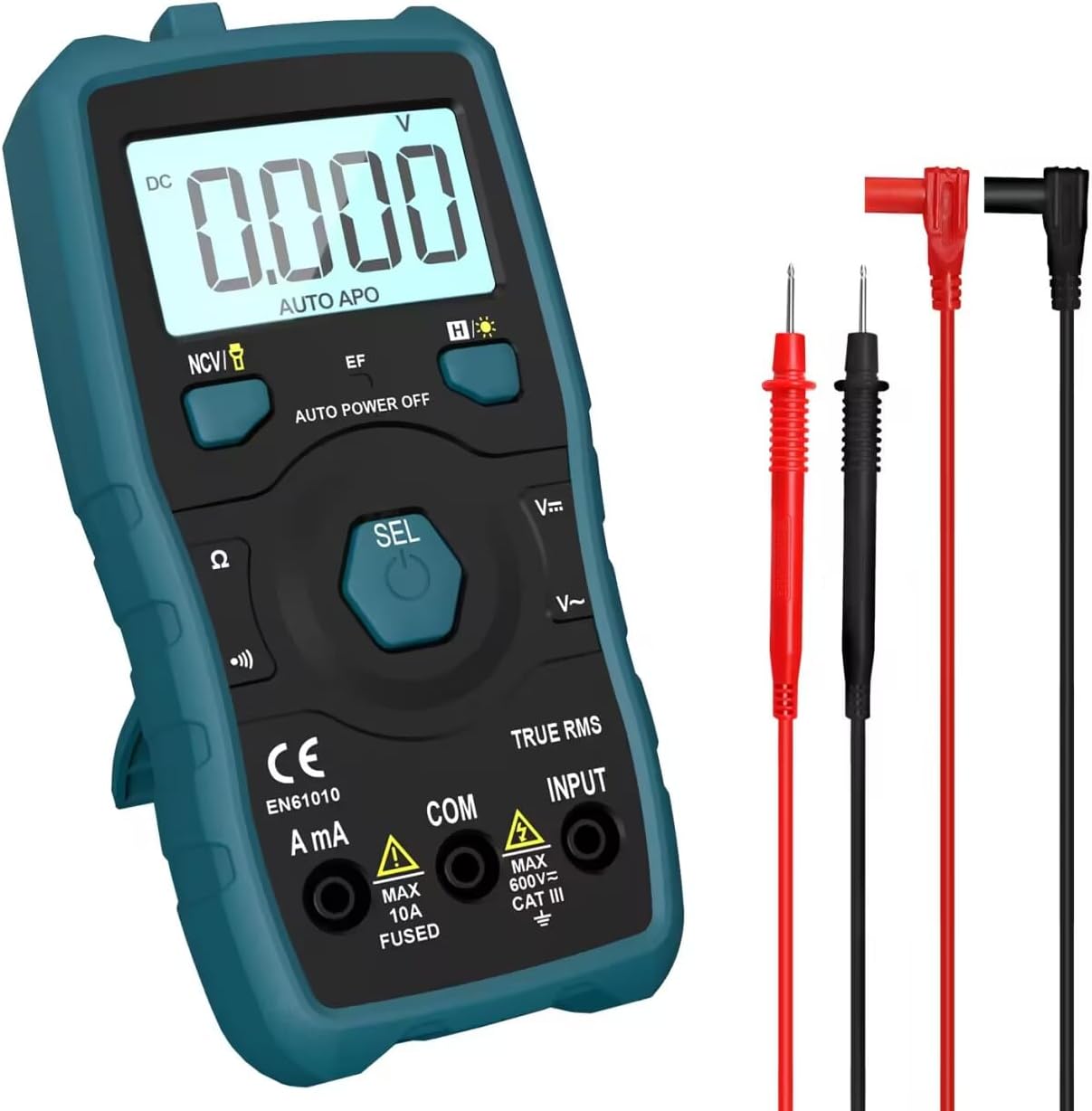
Image 1.1: HANMATEK S1 DM20 Digital Multimeter with included test leads.
2. Informasi Keselamatan
PERINGATAN: Kegagalan mengikuti petunjuk keselamatan ini dapat mengakibatkan sengatan listrik, kebakaran, atau cedera pribadi.
- To prevent erroneous readings and avoid electric shock or personal injury, replace the battery as soon as the low battery voltagSimbol e muncul.
- To prevent electric shock or personal injury, turn off the device and ensure test leads are disconnected from the circuit under test before opening the battery cover to replace the battery.
- Do not measure any AC or DC voltage exceeding 600V to prevent electric shock or damage to the instrument.
- Selalu periksa multimeter dan kabel uji untuk memastikan tidak ada kerusakan sebelum digunakan. Jangan gunakan jika rusak.
- Ensure your hands are dry when operating the multimeter.
- Jangan mengoperasikan multimeter di lingkungan yang mengandung gas, uap, atau debu yang mudah meledak.
3. Fitur dan Komponen Produk
The HANMATEK S1 DM20 Digital Multimeter is equipped with several features for versatile measurements. Familiarize yourself with the components shown below.
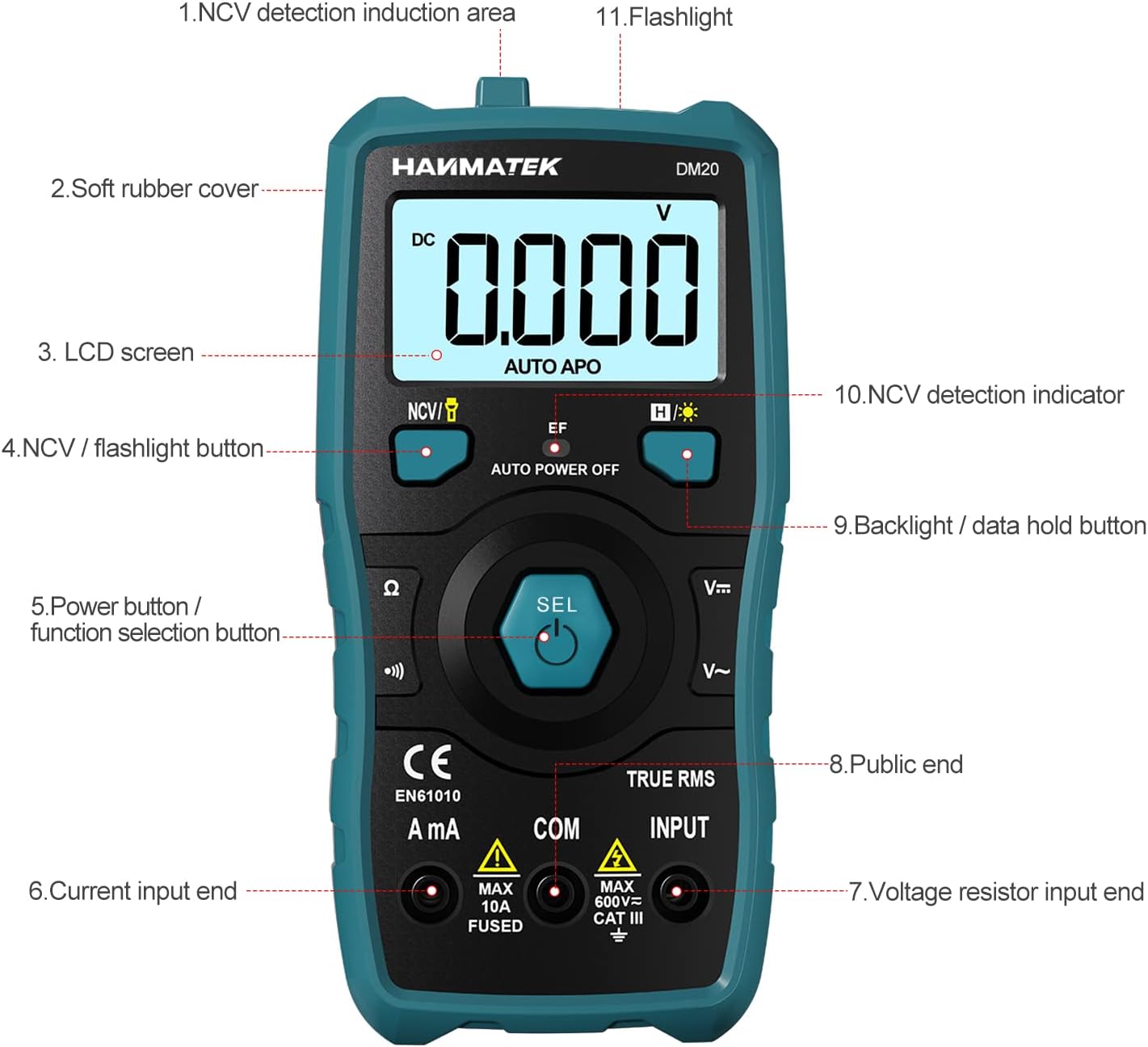
Gambar 3.1: Depan view of the multimeter with labeled components.
- NCV Detection Induction Area
- Soft Rubber Cover
- Layar LCD
- NCV / Flashlight Button
- Power Button / Function Selection Button (SEL)
- Current Input End (A mA)
- Jil.tage Resistor Input End (INPUT)
- Public End (COM)
- Backlight / Data Hold Button
- NCV Detection Indicator
- Senter

Gambar 3.2: Selesaiview of multimeter functions including AC/DC Voltage, AC/DC Current, Resistance, Continuity, Backlight, Data Hold, NCV, Flashlight, and 6000 Count display.
4. Pengaturan
4.1 Isi Paket
Sebelum memulai, pastikan semua barang ada di dalam paket:
- HANMATEK S1 DM20 Digital Multimeter
- 3 x Baterai AAA 1.5V
- Kabel Uji (Merah dan Hitam)
- Panduan Pengguna

Image 4.1: Package contents including the multimeter, batteries, test leads, and manual.
4.2 Pemasangan Baterai
The multimeter requires 3 x 1.5V AAA batteries. Follow these steps to install them:
- Pastikan multimeter dimatikan dan kabel uji dilepas.
- Temukan tempat baterai di bagian belakang multimeter.
- Gunakan obeng untuk membuka penutup baterai.
- Insert the 3 AAA batteries, observing the correct polarity (+/-).
- Pasang kembali penutup baterai dan kencangkan dengan sekrup.

Gambar 4.2: Detail view of the multimeter's rear, showing the battery bay and stable holder.
5. Petunjuk Pengoperasian
The HANMATEK S1 DM20 features auto-ranging for most measurements, simplifying operation.
5.1 Daya Hidup/Mati
- Tekan tombol SEL button to power on the multimeter.
- Multimeter akan mati secara otomatis setelah beberapa waktu tidak aktif untuk menghemat daya baterai.
- Untuk mematikan daya secara manual, tekan dan tahan tombol SEL tombol.
5.2 Pemilihan Fungsi
The multimeter automatically detects the measurement type (voltage, resistance, continuity) when test leads are connected. For specific functions or to switch between AC/DC, press the SEL tombol sebentar.
5.3 Pengukuran Dasar
Hubungkan kabel tes merah ke MASUKAN terminal dan tes hitam mengarah ke DAPAT terminal for most measurements.
- Jil.tagdan (AC/DC): Connect test leads in parallel to the circuit or component. The multimeter will automatically detect AC or DC voltage.
- Current (AC/DC): Connect test leads in series with the circuit. Use the Sebuah mA terminal for current measurements. Ensure the circuit is de-energized before connecting.
- Perlawanan: Connect test leads across the component. Ensure the component is isolated from power.
- Kontinuitas: Connect test leads across the circuit. A buzzer will sound if continuity is detected.
- Dioda: Connect test leads across the diode.
- Frekuensi: Connect test leads to the signal source.

Image 5.1: Demonstrations of NCV testing, resistance test, current measuring, voltage measuring, and on-off test.
5.4 Non-Kontak Voltage (NCV) Deteksi
Fungsi NCV memungkinkan deteksi tegangan AC.tage tanpa kontak langsung.
- Tekan tombol NCV / Flashlight tombol untuk mengaktifkan mode NCV.
- Place the NCV detection area (top of the multimeter) near the conductor.
- Jika tegangan ACtage is detected, the NCV LED will flash, and the buzzer will sound. The LCD screen will display segments ('-' to '----') indicating signal strength.

Image 5.2: NCV function detecting voltage in a live line versus a null line.
5.5 Lampu Latar dan Penahan Data
- Lampu latar:Tekan tombol Backlight / Data Hold button briefly to turn the LCD backlight on/off.
- Penyimpanan Data:Tekan dan tahan tombol Backlight / Data Hold Tekan tombol untuk membekukan pembacaan saat ini pada layar. Tekan lagi untuk melepaskan.
5.6 Senter
- Tekan dan tahan tombol NCV / Flashlight button to turn the built-in flashlight on/off.
6. Pemeliharaan
- Pembersihan: Wipe the multimeter with a damp kain dan deterjen ringan. Jangan gunakan bahan abrasif atau pelarut.
- Penyimpanan: Store the multimeter in a dry, cool place away from direct sunlight. If storing for extended periods, remove the batteries to prevent leakage.
- Penggantian Baterai: Replace batteries promptly when the low battery indicator appears to ensure accurate readings. Refer to Section 4.2 for instructions.
7. Penyelesaian masalah
- No Display/Power On: Check battery installation and ensure batteries are not depleted. Replace if necessary.
- Pembacaan yang Tidak Akurat: Ensure test leads are properly connected and not damaged. Verify the correct measurement function is selected (though auto-ranging handles most). Check battery level.
- No NCV Detection: Ensure NCV mode is activated. The detection area must be close to the AC voltagsumber.
- Auto Power Off Too Soon: This is a power-saving feature. The device will power off after a period of inactivity.
8. Spesifikasi
| Fitur | Spesifikasi |
|---|---|
| Nomor Model | DM20 |
| Jumlah Tampilan | 4000 |
| Peringkat Keamanan | 600V CAT II, Pollution Degree 2, IEC61010 |
| Sumber Daya | 3 x Baterai AAA 1.5V |
| Ukuran | 147mm x 71mm x 45mm (7.1 x 4.5 x 14.7 cm) |
| Berat | 220 gram |
| Fitur Khusus | NCV, Auto-Ranging, Data Hold, Auto Power-Off, Backlight, Flashlight |
9. Garansi dan Dukungan
The HANMATEK S1 DM20 Digital Multimeter comes with a Garansi 24 bulan sejak tanggal pembelian. Garansi ini mencakup cacat produksi dalam penggunaan normal.
For technical support, warranty claims, or any inquiries, please contact HANMATEK customer service through their official channels or the retailer where the product was purchased. You can find more information on the HANMATEK Brand Store.


