1. Pendahuluan
Thank you for choosing the MAXXMEE Cordless Handheld Vacuum Cleaner. This powerful and compact device is designed for efficient cleaning of various surfaces in your home and car. Featuring a strong BLDC motor and a HEPA filter, it ensures thorough cleaning and improved air quality. Please read this manual carefully before first use to ensure safe and optimal operation.
2. Petunjuk Keselamatan
- Always ensure the vacuum cleaner is switched off before cleaning or performing maintenance.
- Do not use the appliance to vacuum water or other liquids, hot ashes, or sharp objects.
- Jauhkan rambut, pakaian longgar, jari, dan semua bagian tubuh dari celah dan bagian yang bergerak.
- Do not operate the vacuum cleaner if it is damaged or malfunctioning. Contact customer support.
- Use only the original charging adapter provided with the device.
- Alat ini hanya untuk penggunaan rumah tangga. Jangan gunakan di luar ruangan atau di permukaan yang basah.
- Jauhkan dari jangkauan anak-anak.
3. Isi Paket
Harap periksa isi paket saat membuka kemasan untuk memastikan semua bagian ada dan tidak rusak:
- 1x MAXXMEE Cordless Handheld Vacuum Cleaner
- 1x stasiun pengisian daya
- 1x Adaptor Daya dengan Kabel
- 1x Nozzle Celah
- 1x Brush Nozzle
- 1x Flexible Extension Nozzle

Image: All components included in the package, labeled for easy identification.
4. Pengaturan
4.1 Pengisian Awal
- Letakkan stasiun pengisian daya pada permukaan yang stabil dan datar.
- Connect the power adapter cable to the charging station.
- Hubungkan adaptor daya ke stopkontak dinding yang sesuai.
- Place the handheld vacuum cleaner onto the charging station. Ensure it is properly seated. The charging indicator light will illuminate.
- Charge the vacuum cleaner completely before first use. This may take several hours.
4.2 Memasang Aksesori
To attach an accessory (crevice nozzle, brush nozzle, or flexible extension nozzle), simply align the accessory with the suction opening of the vacuum cleaner and push it firmly until it clicks into place. To remove, pull the accessory off.

Gambar: Lebih dariview of the vacuum cleaner's main components and how accessories attach.
5. Petunjuk Pengoperasian
5.1 Menghidupkan/Mematikan
Tekan tombol daya yang terletak di pegangan untuk menghidupkan penyedot debu. Tekan lagi untuk mematikannya.
5.2 Menggunakan Penyedot Debu
- Ensure the dust container is empty and the filter is clean before use.
- Select the appropriate nozzle for the cleaning task:
- Nosel Celah: Ideal for narrow gaps, corners, and hard-to-reach areas like car interiors or between sofa cushions.
- Nosel Kuas: Effective for cleaning upholstered furniture, curtains, and removing pet hair.
- Flexible Extension Nozzle: Perfect for reaching high places, behind radiators, or under furniture.
- Turn on the vacuum cleaner and move the nozzle slowly over the surface to be cleaned.
- After use, turn off the vacuum cleaner and return it to the charging station.

Image: The vacuum cleaner with the flexible extension nozzle, demonstrating its reach for high areas.

Image: Demonstrations of the crevice nozzle for tight spaces, the brush nozzle for upholstery and pet hair, and the flexible extension nozzle for radiators.
6. Pemeliharaan
Perawatan rutin memastikan umur panjang dan kinerja optimal dari penyedot debu Anda.
6.1 Mengosongkan Wadah Debu
Empty the dust container after each use or when it reaches its maximum fill line.
- Pastikan penyedot debu dalam keadaan mati.
- Locate the release button or latch for the dust container.
- Press the button/latch and carefully detach the dust container from the main unit.
- Hold the dust container over a waste bin and open its bottom flap to release the collected dirt.
- Close the flap and reattach the dust container to the vacuum cleaner until it clicks securely.
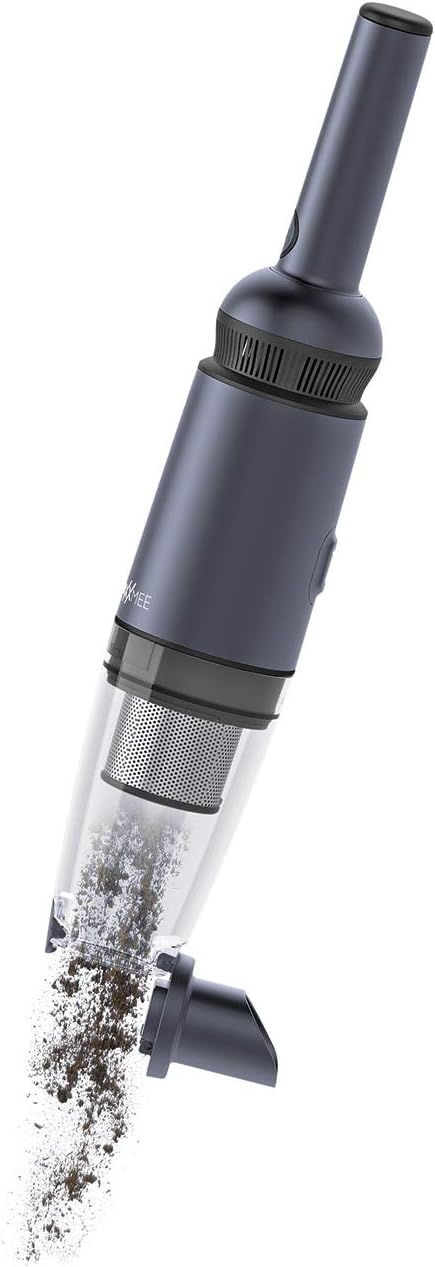
Image: The dust container being detached and emptied of collected debris.
6.2 Membersihkan Filter HEPA
The HEPA filter and the permanent stainless steel filter should be cleaned regularly to maintain suction power. It is recommended to clean them after every few uses, depending on the amount of dirt.
- Buang wadah debu seperti dijelaskan di atas.
- Carefully remove the HEPA filter and the stainless steel filter from the dust container.
- Ketuk filter perlahan di atas tempat sampah untuk menghilangkan debu yang menempel.
- If necessary, rinse the filters under running water. Ensure they are completely dry before reinserting them. Do not use detergents.
- Once completely dry, reinsert the filters into the dust container and reattach the container to the vacuum cleaner.
7. Penyelesaian masalah
| Masalah | Kemungkinan Penyebab | Larutan |
|---|---|---|
| Penyedot debu tidak menyala. | Baterai habis. | Isi daya penyedot debu hingga penuh. |
| Daya hisap rendah. | Wadah debu penuh. | Kosongkan tempat debu. |
| Daya hisap rendah. | Filter tersumbat. | Bersihkan atau ganti filter HEPA. |
| Daya hisap rendah. | Nosel atau selang tersumbat. | Remove any blockages from the nozzle or suction opening. |
| Indikator pengisian daya tidak menyala. | Adaptor daya tidak tersambung dengan benar. | Check power adapter and charging station connections. |
8. Spesifikasi
| Fitur | Spesifikasi |
|---|---|
| Merek | MAXXMEE |
| Nomor Model | 2378 |
| Warna | Antrasit |
| Dimensi Paket | Ukuran 58.93x19.3x18.8 cm |
| Berat Barang | 520 gram |
| Kapasitas | 90 Mililiter |
| Kekuatan | 90 Watt |
| Jil.tage | 11.1 Volt |
| Jumlah Kecepatan | 2 |
| Tingkat Suara | 80dB |
| Daya Tahan Baterai | 15 menit |
| Fitur | Tanpa kantong |
| Jenis Filter | Filter HEPA |
| Rekomendasi Permukaan | Kain pelapis |
| Sumber Daya | Bertenaga Baterai |
| Komponen yang Termasuk | Charging station, telescopic tube (flexible extension nozzle) |
| Tanpa kabel? | Ya |
| Pabrikan | DS Produkte GmbH |
| Tanggal Pertama Tersedia di Amazon.com.be | 1 Juni 2022 |
9. Garansi dan Dukungan
This product comes with a standard manufacturer's warranty. Please refer to your purchase documentation or contact your retailer for specific warranty terms and conditions. For technical support, spare parts, or any other inquiries, please contact MAXXMEE customer service or visit their official weblokasi.
Simpan bukti pembelian Anda untuk klaim garansi.


