Perkenalan
This manual provides comprehensive instructions for setting up, operating, maintaining, and troubleshooting your Mercusys MR50G AC1900 Dual-Band Wi-Fi 5 Router. The MR50G is designed to deliver high-speed wireless connectivity with AC1900 speeds, Gigabit Ethernet ports, and advanced features like MU-MIMO and Beamforming.

Gambar: Depan view of the Mercusys MR50G router, illustrating its dual-band capabilities with 5GHz (1300 Mbps) and 2.4GHz (600 Mbps) speeds.
Panduan Pengaturan
1. Isi Paket
Verifikasi bahwa paket Anda berisi item berikut:
- Mercusys MR50G AC1900 Dual-Band Wi-Fi 5 Router
- Adaptor Daya
- Kabel Ethernet
- Quick Installation Guide (User Guide)
2. Koneksi Fisik
Ikuti langkah-langkah berikut untuk menghubungkan router Anda:
- Matikan: Putuskan sambungan daya dari modem dan router Anda (jika ada).
- Hubungkan Modem ke Router: Connect one end of the provided Ethernet cable to the WAN port (usually blue) on your MR50G router and the other end to your modem's Ethernet port.
- Hubungkan Perangkat (Opsional): For wired connections, connect your computer or other devices to the LAN ports (yellow) on the MR50G router using Ethernet cables.
- Nyalakan: Connect the power adapter to the router's power port and plug it into a power outlet. Power on your modem, then power on the MR50G router.
- Tunggu Indikator: Wait for the router's LED indicators to stabilize. The Power LED should be solid green.
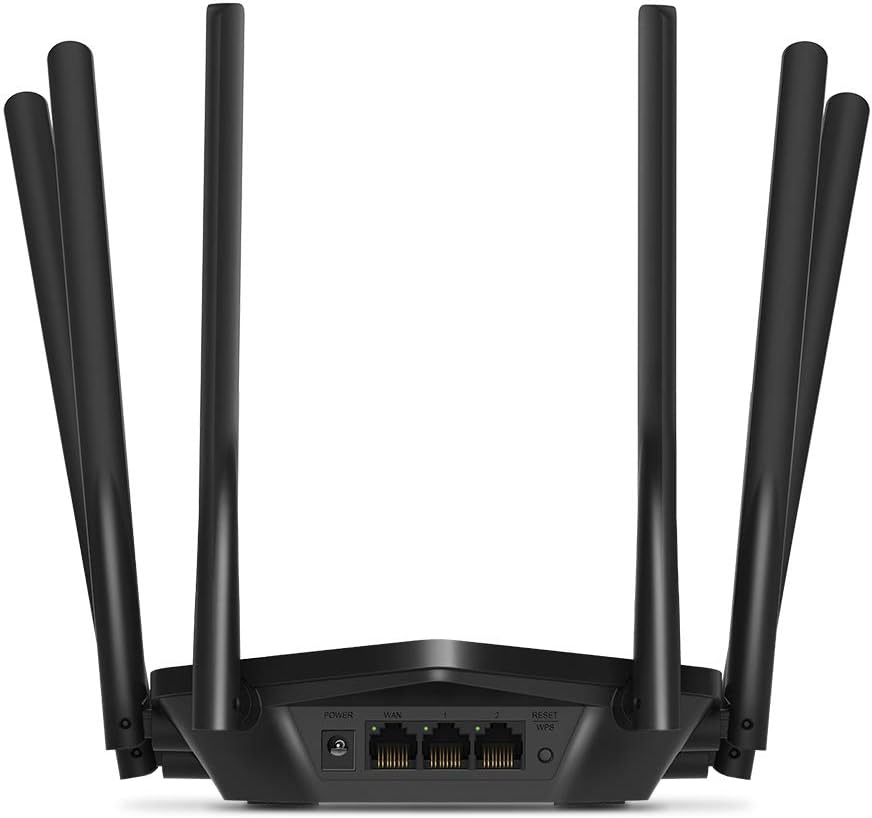
Gambar: Belakang view of the Mercusys MR50G router, illustrating the power input, WAN port (blue), and three LAN ports (yellow) for wired connections, along with the Reset/WPS button.
3. Konfigurasi Awal
Untuk mengonfigurasi router Anda untuk pertama kalinya:
- Hubungkan ke Wi-Fi: Connect your computer or mobile device to the router's default Wi-Fi network (SSID and password are typically printed on a label on the bottom of the router).
- Mengakses Web Antarmuka: Buka sebuah web peramban dan ketik
mwlogin.netor192.168.1.1ke dalam bilah alamat. - Buat Kata Sandi Login: Follow the on-screen instructions to create a login password for the router's management page.
- Ikuti Panduan Penyiapan Cepat: The Quick Setup wizard will guide you through basic internet and wireless settings.
Petunjuk Pengoperasian
1. Basic Wi-Fi Settings
Setelah masuk ke dalam web antarmuka:
- Nama Jaringan (SSID): Navigate to the Wireless settings to change your Wi-Fi network names (SSIDs) for both 2.4 GHz and 5 GHz bands.
- Kata sandi: Set a strong, unique password for your Wi-Fi networks. The MR50G supports WPA3 for enhanced security.
- Jenis keamanan: It is recommended to use WPA2-PSK/WPA3-Personal for optimal security.
2. Pengoperasian Pita Ganda
The MR50G operates on two frequency bands:
- 2.4 GHz: Provides wider coverage and better penetration through walls, suitable for general internet use and older devices.
- 5 GHz: Offers faster speeds and less interference, ideal for bandwidth-intensive activities like 4K streaming and online gaming, but with a shorter range.
You can configure separate SSIDs for each band or use Smart Connect to combine them into a single SSID, allowing the router to automatically assign devices to the optimal band.
3. Mode Titik Akses
To use the MR50G as an Access Point (AP) to extend an existing wired network:
- Menghubungkan: Connect an Ethernet cable from your existing router's LAN port to one of the MR50G's LAN ports (not the WAN port).
- Konfigurasi: Log into the MR50G's web interface, navigate to the Operation Mode settings, and select "Access Point Mode". Follow the prompts to complete the setup.
4. Fitur Lanjutan
- MU-MIMO: Teknologi Multi-User, Multiple-Input, Multiple-Output (MUMO) memungkinkan router untuk berkomunikasi dengan banyak perangkat secara bersamaan, sehingga meningkatkan efisiensi jaringan.
- Pembentukan berkas: Memfokuskan sinyal Wi-Fi ke perangkat yang terhubung, meningkatkan kekuatan dan jangkauan sinyal.
- Dukungan VPN: The router supports VPN functionality, allowing for secure remote access or connection to VPN services. Refer to the router's web interface for specific VPN client/server configurations.
- Kontrol Orang Tua: Manage and restrict internet access for specific devices or users.
- Jaringan Tamu: Buat jaringan Wi-Fi terpisah untuk tamu, jaga keamanan jaringan utama Anda.
Pemeliharaan
1. Pembaruan Firmware
Regularly check for and install firmware updates to ensure optimal performance, security, and access to new features. Firmware updates can typically be found in the router's web interface under System Tools or Advanced settings.
2. Mengatur Ulang Router
If you encounter persistent issues or forget your login password, you may need to reset the router to its factory default settings:
- With the router powered on, press and hold the Reset/WPS button on the back panel for approximately 5-10 seconds until the LED indicators flash.
- Release the button and wait for the router to restart. All settings will be restored to factory defaults.
3. Penempatan Optimal
For the best Wi-Fi coverage and performance:
- Letakkan router di lokasi sentral di rumah atau kantor Anda.
- Avoid placing it near obstructions like thick walls, metal objects, or large appliances (microwaves, refrigerators) that can interfere with Wi-Fi signals.
- Elevate the router if possible, as Wi-Fi signals tend to spread downwards.

Image: Mercusys MR50G router positioned on a table, demonstrating a typical placement for optimal signal distribution within a living space.
Penyelesaian Masalah
1. Tidak Ada Akses Internet
- Periksa Koneksi: Pastikan semua kabel Ethernet tersambung dengan aman ke port yang benar (WAN ke modem, LAN ke perangkat).
- Mulai Ulang Perangkat: Power cycle your modem, then the router, and then your connected devices.
- Periksa LED WAN: Verify that the WAN LED on the router is lit, indicating a connection to the modem.
- Status ISP: Hubungi Penyedia Layanan Internet (ISP) Anda untuk memastikan tidak ada gangguan layanan.tagdi daerah Anda.
2. Kecepatan Wi-Fi Lambat
- Penempatan Router: Ensure the router is placed optimally (refer to "Optimal Placement" section).
- Gangguan: Jauhkan router dari perangkat elektronik lain yang dapat menyebabkan gangguan.
- Pemilihan Band: For speed-critical applications, ensure your device is connected to the 5 GHz band.
- Optimasi Saluran: Di dalam router web Pada antarmuka, coba ubah saluran Wi-Fi untuk pita 2.4 GHz dan 5 GHz ke saluran yang kurang padat.
- Perangkat Lunak: Pastikan firmware router Anda sudah yang terbaru.
3. Tidak Dapat Mengakses Halaman Manajemen Router
- Alamat IP: Ensure you are using the correct address (
mwlogin.netor192.168.1.1). - Koneksi Kabel: Try accessing the page from a computer connected directly to the router via an Ethernet cable.
- Hapus Cache Browser: Bersihkan Anda web cache dan cookie browser, atau coba browser lain.
- Firewall/Antivirus: Nonaktifkan sementara firewall atau perangkat lunak antivirus di komputer Anda yang mungkin memblokir akses.
- Setel Ulang Router: If all else fails, perform a factory reset (refer to "Resetting the Router" section).
Spesifikasi
| Model | MR50G (EU) |
| Standar Nirkabel | IEEE 802.11a/b/g/n/ac |
| Frekuensi | 2.4 GHz dan 5 GHz (Dual-Band) |
| Kecepatan Data | AC1900 (600 Mbps pada 2.4 GHz, 1300 Mbps pada 5 GHz) |
| Port Ethernet | 1x Port WAN Gigabit, 3x Port LAN Gigabit |
| Antena | 6 Antena Omni-Directional Tetap |
| Keamanan | WPA-PSK / WPA2-PSK / WPA3-Personal |
| Dimensi (L x D x T) | Ukuran 15.72x17.56x4.5 cm |
| Berat | 450 gram |
| Fitur Khusus | MU-MIMO, Beamforming, Access Point Mode, VPN Support, Parental Controls, Guest Network |
| Masukan Daya | Tegangan 100-240V ~ 50/60Hz |
Garansi dan Dukungan
Mercusys products come with a limited warranty. For detailed warranty information, please refer to the warranty card included with your product or visit the official Mercusys weblokasi.
For technical support, firmware updates, and additional resources, please visit the Mercusys support websitus tersebut. Anda biasanya dapat menemukan informasi kontak dan FAQ di sana.
Official Mercusys Weblokasi: www.mercusys.com


