1. Pendahuluan
Thank you for choosing the FREESTYLE FH0955 LED Bluetooth Headphones. This manual provides essential information for the proper setup, operation, and maintenance of your new headphones. Please read it carefully before use to ensure optimal performance and longevity of the product.
2. Produk Lebihview
The FREESTYLE FH0955 headphones offer a wireless audio experience with integrated features designed for convenience and style. Key features include Bluetooth 5.0 + EDR connectivity, a built-in microSD card slot for direct music playback, a foldable headband for portability, and subtle LED backlighting on the earcups.

Gambar 2.1: Depan view of the FREESTYLE FH0955 LED Bluetooth Headphones, showcasing the over-ear design and LED lighting.

Gambar 2.2: Sisi profile of the FREESTYLE FH0955 LED Bluetooth Headphones, highlighting the earcup and headband design.

Image 2.3: A person wearing the FREESTYLE FH0955 LED Bluetooth Headphones, demonstrating typical usage.
3. Pengaturan
3.1. Mengisi Daya Headphone
Before first use, fully charge the headphones. The FH0955LB model is equipped with a 400 mAh Lithium-ion battery.
- Connect the supplied MicroUSB charging cable to the charging port on the headphones.
- Connect the other end of the cable to a USB power source (e.g., computer USB port, USB wall adapter, or power bank).
- The LED indicator will illuminate during charging and turn off or change color once fully charged.
- A full charge typically takes approximately 2 hours and provides up to 10 hours of continuous music playback.
3.2. Pemasangan Bluetooth
Untuk menghubungkan headphone Anda secara nirkabel ke perangkat:
- Pastikan headphone terisi daya dan dimatikan.
- Tekan dan tahan tombol Daya pada headphone hingga indikator LED berkedip, menandakan mode pemasangan.
- Pada perangkat Anda (ponsel pintar, tablet, komputer), aktifkan Bluetooth dan cari perangkat yang tersedia.
- Select "FH0955" or a similar name from the list of found devices.
- Once connected, the LED indicator will stop flashing and remain solid or turn off, depending on the model.
- The Bluetooth 5.0 + EDR technology allows for a stable connection up to 10 meters.
3.3. Pemutaran Kartu MicroSD
The headphones feature an integrated microSD card slot for direct music playback without a connected device.
- Insert a microSD card (pre-loaded with audio files) into the designated slot on the headphones.
- The headphones should automatically switch to microSD playback mode. If not, use the Mode button (if available) to switch.
- Use the playback controls on the headphones to manage your music.
3.4. Wired Connection (3.5mm Audio Jack)
For devices without Bluetooth or when the battery is depleted, you can use the included 3.5mm audio cable.
- Hubungkan salah satu ujung kabel audio 3.5 mm ke jack audio pada headphone.
- Hubungkan ujung lainnya ke output audio 3.5 mm pada perangkat Anda.
- Headphone akan beroperasi dalam mode pasif, dan fungsi Bluetooth akan dinonaktifkan.
4. Petunjuk Pengoperasian
4.1. Daya Hidup/Mati
- Nyalakan: Tekan dan tahan tombol Daya selama sekitar 3 detik hingga indikator LED menyala.
- Matikan: Tekan dan tahan tombol daya selama kurang lebih 3-5 detik hingga indikator LED mati.
4.2. Pemutaran Musik
- Putar/Jeda: Tekan tombol Putar/Jeda sekali.
- Lagu Berikutnya: Press the "Next" button (often Volume Up, long press).
- Lagu Sebelumnya: Press the "Previous" button (often Volume Down, long press).
- Volume Naik: Tekan sebentar tombol Volume Naik.
- Volume Turun: Tekan sebentar tombol Volume Turun.
4.3. Manajemen Panggilan
With the built-in microphone, you can manage phone calls when connected via Bluetooth.
- Menjawab/Mengakhiri Panggilan: Tekan tombol Putar/Jeda sekali selama panggilan masuk.
- Tolak Panggilan: Tekan dan tahan tombol Putar/Jeda selama kurang lebih 2 detik saat ada panggilan masuk.
- Panggil Ulang Nomor Terakhir: Tekan dua kali tombol Putar/Jeda.
4.4. LED Backlighting
The headphones feature subtle LED backlighting. Refer to the specific controls on your device for toggling or changing LED modes, if available. This feature is primarily aesthetic.
5. Pemeliharaan
5.1. Pembersihan
- Use a soft, dry cloth to clean the surface of the headphones.
- Do not use abrasive cleaners, alcohol, or chemical solvents, as these may damage the finish.
- Jaga agar port pengisian daya dan jack audio terbebas dari debu dan kotoran.
5.2. Penyimpanan
- Simpan headphone di tempat sejuk dan kering, jauhkan dari sinar matahari langsung dan suhu ekstrem.
- Jika tidak digunakan dalam jangka waktu lama, isi daya baterai setidaknya sekali setiap tiga bulan untuk menjaga kesehatan baterai.
- Utilize the foldable headband feature for compact storage and transport.
6. Penyelesaian masalah
| Masalah | Kemungkinan Penyebab | Larutan |
|---|---|---|
| Headphone tidak menyala. | Baterai lemah. | Isi daya headphone hingga penuh. |
| Tidak dapat dipasangkan melalui Bluetooth. | Headphone tidak dalam mode berpasangan; Bluetooth perangkat mati; terlalu jauh dari perangkat. | Ensure headphones are in pairing mode. Turn device Bluetooth off/on. Move closer to device (within 10m). |
| Tidak ada suara. | Volume terlalu rendah; sumber audio tidak tepat; headphone tidak terhubung. | Increase volume on headphones and device. Check Bluetooth connection or 3.5mm cable. Ensure correct mode (Bluetooth/MicroSD). |
| MicroSD card not playing. | Kartu tidak dimasukkan dengan benar; tidak didukung file format; kartu rusak. | Reinsert card. Ensure audio files are in a supported format (e.g., MP3). Try a different microSD card. |
7. Spesifikasi
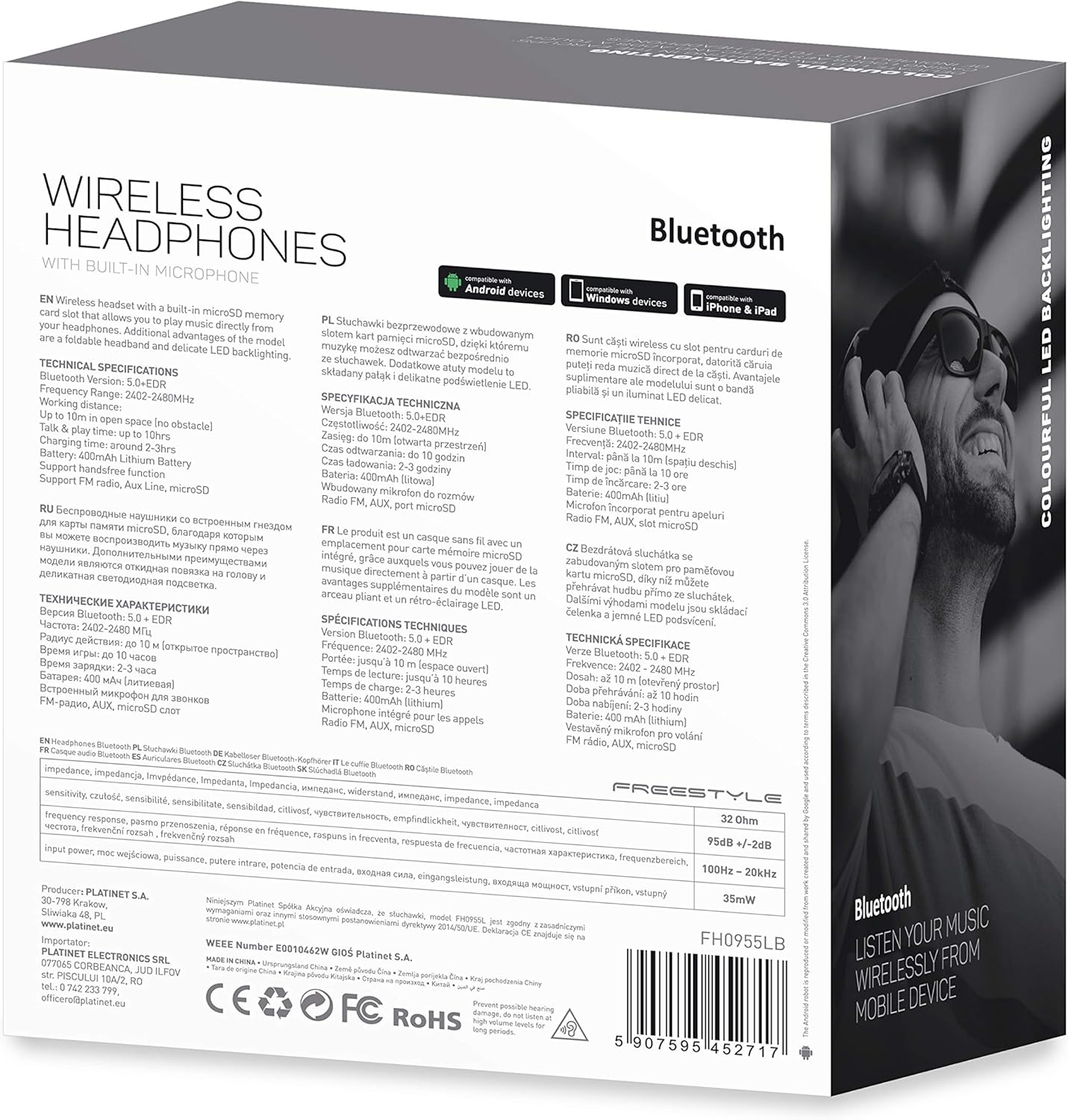
Gambar 7.1: Detail view of the product packaging, showing technical specifications and compliance information.
| Fitur | Spesifikasi |
|---|---|
| Nomor Model | FH0955LB |
| Merek | Gaya Bebas |
| Teknologi Konektivitas | Wireless (Bluetooth 5.0 + EDR) |
| Range Nirkabel | Hingga 10 meter |
| Soket Audio | 3.5 mm |
| Faktor Bentuk | Di Atas Telinga (Circum-Auricular) |
| Fitur Khusus | Noise Cancellation, LED Backlighting, MicroSD Card Slot |
| Jenis Baterai | Integrated Lithium-ion (400 mAh) |
| Waktu Pemutaran Ulang | Hingga 10 jam |
| Waktu Pengisian Daya | Sekitar 2 jam |
| Port Pengisian Daya | Mikro USB |
| Warna | Hitam |
| Bahan | Leather (earpads/headband) |
| Tingkat Tahan Air | Tahan air |
| Komponen yang Termasuk | 1 pasang headphone |
| Pabrikan | Platina |
8. Garansi dan Dukungan
Rincian garansi spesifik biasanya tercantum dalam dokumen pembelian Anda atau di situs resmi produsen. websitus. Harap simpan bukti pembelian Anda untuk klaim garansi apa pun.
For technical support or inquiries, please refer to the contact information provided by your retailer or the manufacturer, Platinet.
9. Informasi Keselamatan
- Jangan biarkan headphone terkena suhu ekstrem, kelembapan, atau cairan.
- Hindari mendengarkan dengan tingkat volume tinggi dalam waktu lama untuk mencegah kerusakan pendengaran.
- Do not attempt to disassemble or modify the headphones, as this may void the warranty and cause damage.
- Jauhkan dari jangkauan anak-anak.
- Dispose of the product responsibly according to local electronic waste regulations.


