Perkenalan
The FLAMMA FS05 Multi Modulation Pedal is a versatile stereo effects pedal designed for electric guitar. It offers 11 distinct modulation effects and 7 storable preset slots, providing a wide range of tonal possibilities for musicians.
Informasi Keselamatan
Always ensure proper power supply connections and use the pedal in a dry environment. Avoid exposing the unit to extreme temperatures or humidity. Disconnect power when not in use or during cleaning.
Isi Paket
- FLAMMA FS05 Multi Modulation Pedal
- Instruksi Manual (dokumen ini)
- (Catu daya tidak termasuk)
Produk Selesaiview
The FS05 pedal features a compact design with intuitive controls for easy operation and sound shaping.

Figure 1: FLAMMA FS05 Multi Modulation Pedal front view.
Kontrol dan Koneksi
Gambar 2: Rinci view of the FS05 control knobs.
- Tombol RATE: Menyesuaikan kecepatan efek modulasi.
- JENIS Tombol: Memilih salah satu dari 11 efek modulasi.
- Tombol KEDALAMAN: Controls the intensity or depth of the modulation.
- Tombol CTRL 1: Adjusts a primary parameter specific to the selected effect (e.g., Mix, Duty, Pitch).
- Tombol CTRL 2: Adjusts a secondary parameter specific to the selected effect (e.g., Tone, Feedback, Smooth, Bit Rate).
- SAVE/SELECT Button: Used to save presets or select between them.
- LED Indicators (1-7): Show the currently selected preset slot.
- Sakelar kaki: Activates/deactivates the pedal.
- Input L (Mono) / Input R: Audio input jacks.
- Output L (Mono) / Output R: Audio output jacks.
- DC DI: Power input (9V DC, center negative).
Video 1: Produk resmi selesaiview of the FLAMMA FS05 Multi Modulation Pedal, demonstrating its features and 11 modulation effects.
Pengaturan
Catu Daya
The FLAMMA FS05 pedal requires a 9V DC power supply with a minimum current of 302mA (center negative). The power supply is NOT INCLUDED with the pedal. Insufficient current may cause operational issues.
Menghubungkan Pedal
The FS05 supports both mono and stereo connections, offering flexibility for various setups.

Figure 3: Diagram illustrating stereo and mono to stereo connection setups for the FS05 pedal.
- Pengaturan Mono: Connect your guitar to Input L (Mono) and your amplifier to Output L (Mono).
- Pengaturan Stereo: Connect your guitar to Input L (Mono) and Input R. Connect Output L (Mono) and Output R to your stereo amplifier atau antarmuka audio.
Petunjuk Pengoperasian
Selecting Modulation Effects
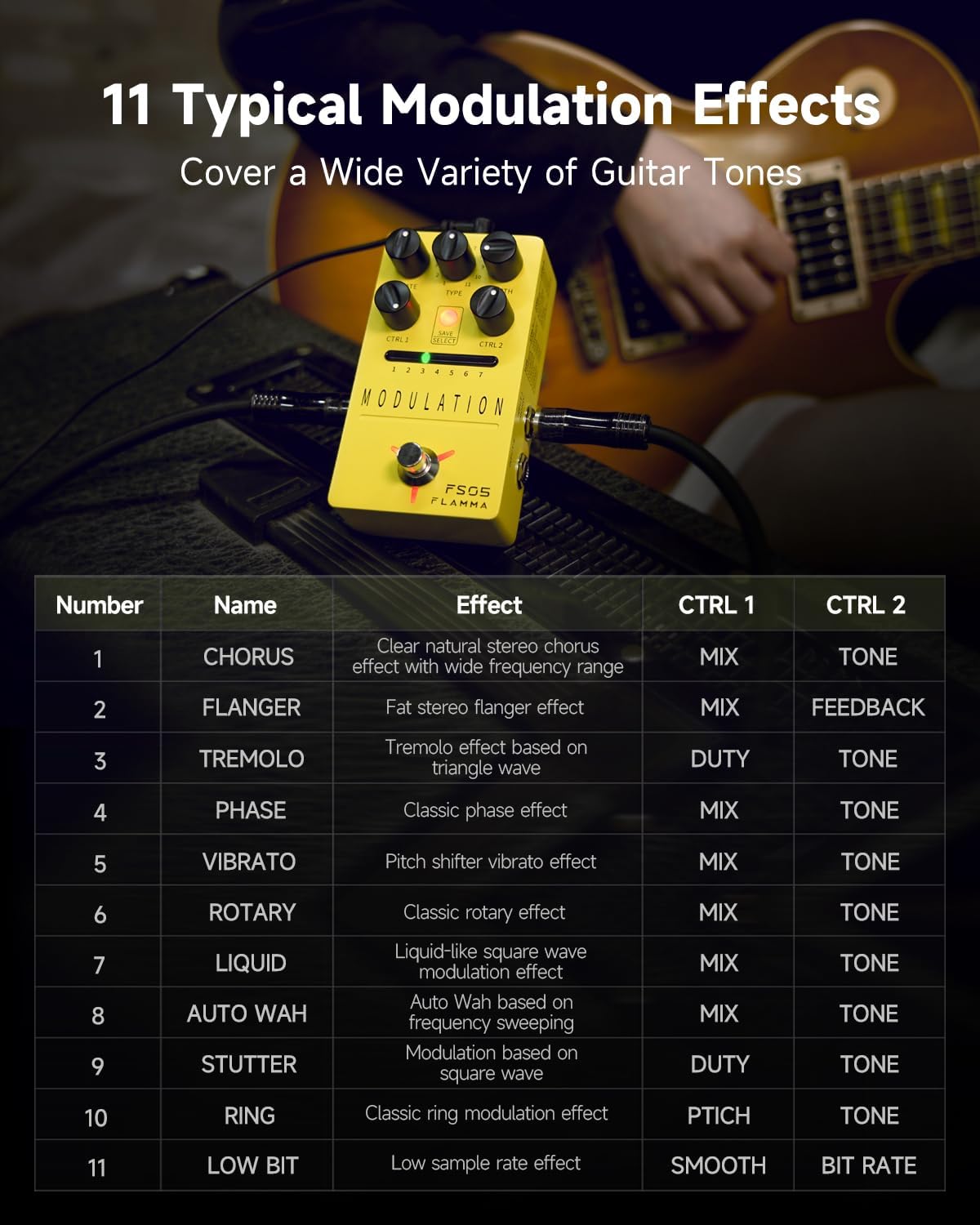
The FS05 offers 11 distinct modulation effects, ranging from classic to experimental tones. Use the TYPE knob to cycle through the available effects.
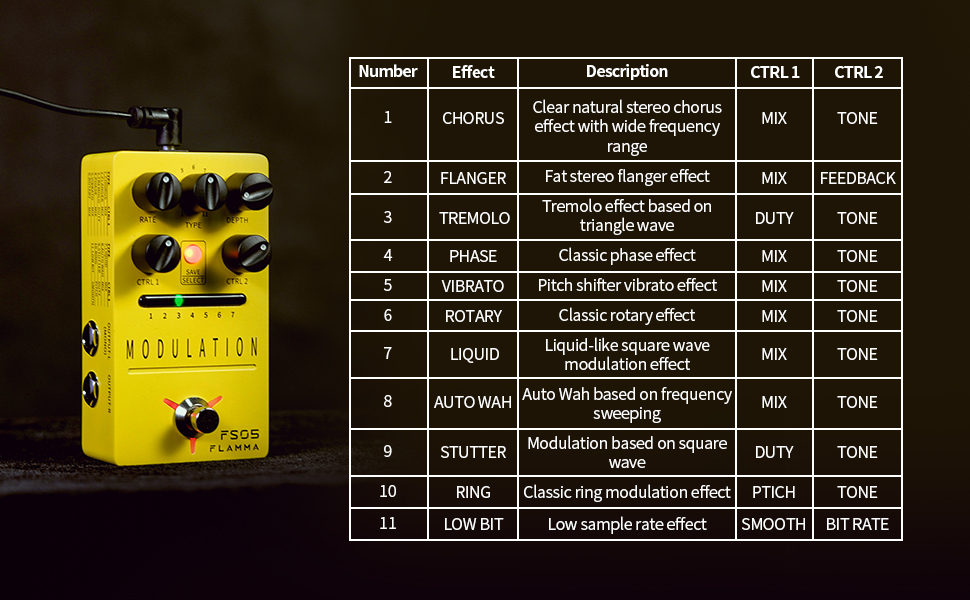
Figure 4: List of 11 modulation effects and their corresponding CTRL 1 and CTRL 2 parameters.
The available effects include Chorus, Flanger, Tremolo, Phase, Vibrato, Rotary, Liquid, Auto Wah, Stutter, Ring, and Low Bit.
Adjusting Effect Parameters
Each effect has adjustable parameters via the RATE, DEPTH, CTRL 1, and CTRL 2 knobs. Refer to Figure 4 for specific parameter functions per effect.

Figure 5: The FS05 pedal highlighting its versatile control knobs.
Menyimpan dan Memanggil Kembali Preset
The pedal features 7 preset slots to save your customized settings. Use the SAVE/SELECT button and LED indicators to manage your presets.

Figure 6: The FS05 pedal showing the 7 preset slots and SAVE/SELECT button.
- Untuk Menyimpan: Adjust the parameters to your desired settings. Press and hold the SAVE/SELECT button until the LED for the current slot flashes, indicating the preset is saved.
- Untuk Mengingat: Briefly press the SAVE/SELECT button to cycle through the 7 preset slots. The corresponding LED will illuminate.
True Bypass / Buffer Bypass
The FS05 features True Bypass to minimize signal loss when the pedal is disengaged. Some videos also mention a low-noise buffer bypass, which helps maintain signal integrity over long cable runs.
Video 2: Demonstration of the FLAMMA FS05 Multi Modulation Pedal's features, including its true bypass functionality and various effects.
Pemeliharaan
Clean the pedal's exterior with a soft, dry cloth. Do not use abrasive cleaners or solvents. Ensure all connections are secure before and after use.
Penyelesaian Masalah
- Tidak Ada Daya: Ensure the 9V DC power supply is correctly connected and provides sufficient current (minimum 302mA).
- Tidak ada suara: Check all audio cables and connections. Verify the pedal is engaged (footswitch LED illuminated).
- Kebisingan yang Tidak Diinginkan: Ensure proper grounding and use a high-quality, isolated power supply.
Spesifikasi
- Model: FS05
- Berat Barang: 10.5 ons (0.3 Kilogram)
- Dimensi Produk: 2.75"P x 1.97"L x 4.78"T
- Jil.tage: Tegangan DC 9 Volt
- Undian saat ini: >302mA (Power Supply NOT INCLUDED)
- Tipe Konektor: 2.1mm DC power jack
- Format Sinyal: Digital
- Antarmuka Perangkat Keras: USB (for potential firmware updates, not for audio)
- Efek: 11 Modulation Effects (Chorus, Flanger, Tremolo, Phase, Vibrato, Rotary, Liquid, Auto Wah, Stutter, Ring, Low Bit)
- Preset: 7 Storable Slots
- Jalan pintas: Bypass benar
Garansi & Dukungan
Untuk informasi garansi dan dukungan teknis, silakan merujuk ke situs resmi produsen. webKunjungi situs web atau hubungi dealer setempat Anda. Simpan struk pembelian Anda sebagai bukti pembelian.


