1. Pendahuluan
The Peaktech P2170 is a digital LCR meter with Equivalent Series Resistance (ESR) measurement capabilities. Designed for both component testing in professional environments and for service and maintenance tasks, its compact design and advanced features ensure precise measurements.
Key features include an illuminated multifunction display with a bargraph and a high measurement frequency of up to 100 kHz. The device also supports PC connectivity for data storage and analysis using the included software.
2. Informasi Keselamatan
Selalu perhatikan tindakan pencegahan keselamatan berikut untuk mencegah cedera atau kerusakan pada perangkat:
- Read the entire manual before operating the device.
- Do not operate the meter if it appears damaged or if the insulation is compromised.
- Ensure correct battery installation and replacement.
- Hindari kontak dengan sirkuit listrik aktif saat menyambungkan atau melepaskan kabel uji.
- Do not exceed the maximum input ratings specified for each function.
- Jaga agar perangkat tetap kering dan bersih.
3. Produk Lebihview
The Peaktech P2170 LCR Meter is a handheld device designed for measuring inductance (L), capacitance (C), and resistance (R), along with other parameters like ESR, DCR, Dissipation Factor (D), Quality Factor (Q), and Phase Angle (θ).
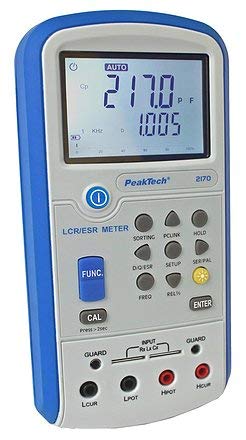
Gambar 1: Depan view of the Peaktech P2170 LCR Meter, showing the display, function buttons, and input terminals.
3.1 Komponen dan Aksesoris
Paket standar mencakup item-item berikut:
- Peaktech P2170 LCR Meter
- Kabel antarmuka USB
- perangkat lunak komputer
- Kelvin clips (test leads)
- Kotak pelindung
- AAA batteries (6x 1.5V)
- Manual instruksi
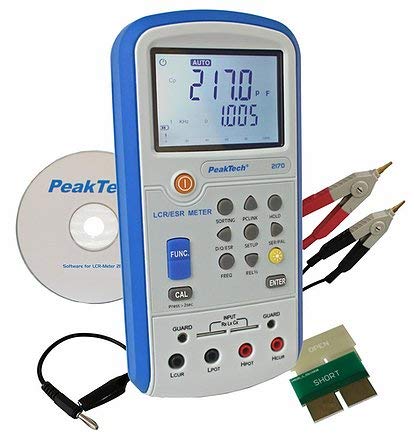
Figure 2: Peaktech P2170 LCR Meter shown with its included accessories, including Kelvin clips, USB cable, and software CD.
4. Pengaturan
4.1 Pemasangan Baterai
The device operates on 6 x 1.5V AAA batteries. To install or replace batteries:
- Pastikan meteran dalam keadaan mati.
- Temukan penutup kompartemen baterai di bagian belakang perangkat.
- Open the cover and insert 6 AAA batteries, observing the correct polarity markings.
- Tutup penutup ruang baterai dengan rapat.
An optional 12V 500mA power adapter can also be used for external power.
4.2 Menghubungkan Kabel Uji
Use the provided Kelvin clips for accurate measurements. Connect them to the input terminals as follows:
- Connect the red Kelvin clip to the Hpot Dan Hcur terminal.
- Connect the black Kelvin clip to the Lpot Dan Lcur terminal.
- For 2-wire measurements, connect the test leads to Hpot Dan Lpot.
- Ensure a secure connection to minimize measurement errors.
4.3 Software Installation (PC Link)
The included PC software allows for data logging and analysis. Follow these steps to install:
- Insert the software CD into your computer's optical drive.
- Ikuti petunjuk di layar untuk menyelesaikan instalasi.
- Connect the meter to your PC using the supplied USB interface cable.
- Launch the software and establish communication with the device. Refer to the software's help documentation for detailed usage.
5. Petunjuk Pengoperasian
5.1 Menghidupkan/Mematikan
Tekan tombol KEKUATAN tombol untuk menghidupkan atau mematikan meteran.
5.2 Mode Pengukuran
The P2170 supports various measurement modes. Press the FUNC button to cycle through the primary measurement parameters:
- Ls (Series Inductance)
- Cs (Series Capacitance)
- Lp (Parallel Inductance)
- Cp (Parallel Capacitance)
- DCR (DC Resistance)
- ESR (Equivalent Series Resistance)
- Rp (Parallel Resistance)
- D (Dissipation Factor)
- Q (Quality Factor)
- θ (Phase Angle)
The illuminated display will show the selected mode and measurement results.
5.3 Measurement Frequency Selection
Tekan tombol Frekuensi button to select the desired test frequency. Available frequencies include 100 Hz, 120 Hz, 1 kHz, 10 kHz, and 100 kHz. The chosen frequency will be displayed on the screen.
5.4 Fungsi Penahanan Data
Tekan tombol MEMEGANG button to freeze the current measurement reading on the display. Press it again to release the hold function.
5.5 Kalibrasi
To perform a calibration, ensure no component is connected to the input terminals. Press and hold the KALI button for approximately 2 seconds. Follow any on-screen prompts.
6. Pemeliharaan
6.1 Pembersihan
Bersihkan meteran casing dengan lembut, damp Gunakan kain. Jangan gunakan pembersih abrasif atau pelarut. Pastikan perangkat dimatikan dan diputus dari sumber daya listrik sebelum dibersihkan.
6.2 Penggantian Baterai
When the low battery indicator appears on the display, replace all 6 AAA batteries as described in Section 4.1.
6.3 Penyimpanan
If the meter is not used for an extended period, remove the batteries to prevent leakage. Store the device in its protective carrying case in a cool, dry place, away from direct sunlight and extreme temperatures.
7. Penyelesaian masalah
If you encounter issues with your Peaktech P2170, refer to the following common problems and solutions:
- Meter tidak menyala: Check battery installation and ensure batteries are not depleted. Try replacing with new batteries.
- Pembacaan yang tidak akurat:
- Pastikan kabel uji terhubung dengan benar dan tidak rusak.
- Perform a calibration (Section 5.5).
- Verify the correct measurement mode and frequency are selected for the component being tested.
- Ensure the component is properly connected to the Kelvin clips.
- Perangkat lunak PC tidak terhubung:
- Periksa sambungan kabel USB.
- Ensure the software drivers are correctly installed.
- Restart both the meter and the PC.
If the problem persists, contact Peaktech customer support.
8. Spesifikasi
Detailed technical specifications for the Peaktech P2170 LCR Meter:
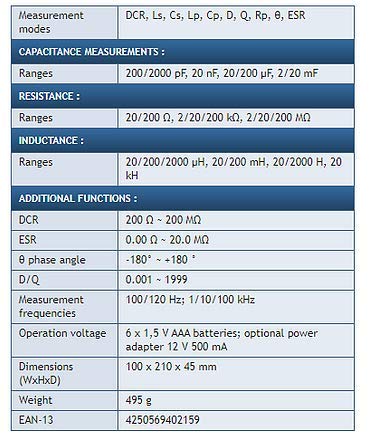
Figure 3: Detailed specifications table for the Peaktech P2170 LCR Meter, including measurement modes, ranges, frequencies, and physical characteristics.
| Parameter | Nilai |
|---|---|
| Mode Pengukuran | DCR, Ls, Cs, Lp, Cp, D, Q, Rp, θ, ESR |
| Capacitance Ranges | 200/2000 pF, 20 nF, 20/200 µF, 2/20 mF |
| Rentang Resistensi | 20/200 Ω, 2/20/200 kΩ, 2/20/200 MΩ |
| Inductance Ranges | 20/200/2000 µH, 20/200 mH, 20/2000 H, 20 kH |
| DCR Range | 200 Ω ~ 200 MΩ |
| ESR Range | 0.00 Ω ~ 20.0 MΩ |
| Phase Angle (θ) | -180° hingga +180° |
| D/Q Resolution | 0.001 ~ 1999 |
| Measurement Frequencies | 100/120 Hz; 1/10/100 kHz |
| Akurasi Dasar | 0.3% |
| Operasi Voltage | 6 x 1.5 V AAA batteries; optional power adapter 12 V 500 mA |
| Dimensi (P x L x T) | Ukuran 100x210x45 mm |
| Berat | 495 gram |
| Pabrikan | Peaktech |
9. Garansi dan Dukungan
For warranty information, technical support, or service inquiries, please contact Peaktech directly or refer to their official websitus. Simpan struk pembelian Anda sebagai bukti pembelian.


