1. Pendahuluan
The ELRO DV50 IP WiFi Intercom System allows you to see and communicate with visitors at your door, whether you are at home or away. This system includes two 7-inch color monitors for indoor viewing and communication, making it suitable for larger homes or multi-story residences. Additionally, the ELRO Intercom app extends functionality to your smartphone, enabling remote viewing, two-way communication, and recording capabilities.
The system features a compact, vandal-resistant metal doorbell unit and two 7-inch (18 cm) color screens. The monitor housing is crafted from high-quality brushed aluminum, providing a modern aesthetic. Users can adjust speech and ringtone volumes, as well as image brightness and color intensity. Sixteen different ringtones are available for selection.
The doorbell unit includes a rain shield to prevent water droplets from obstructing the camera lens. Infrared LEDs provide night vision up to 5 meters.
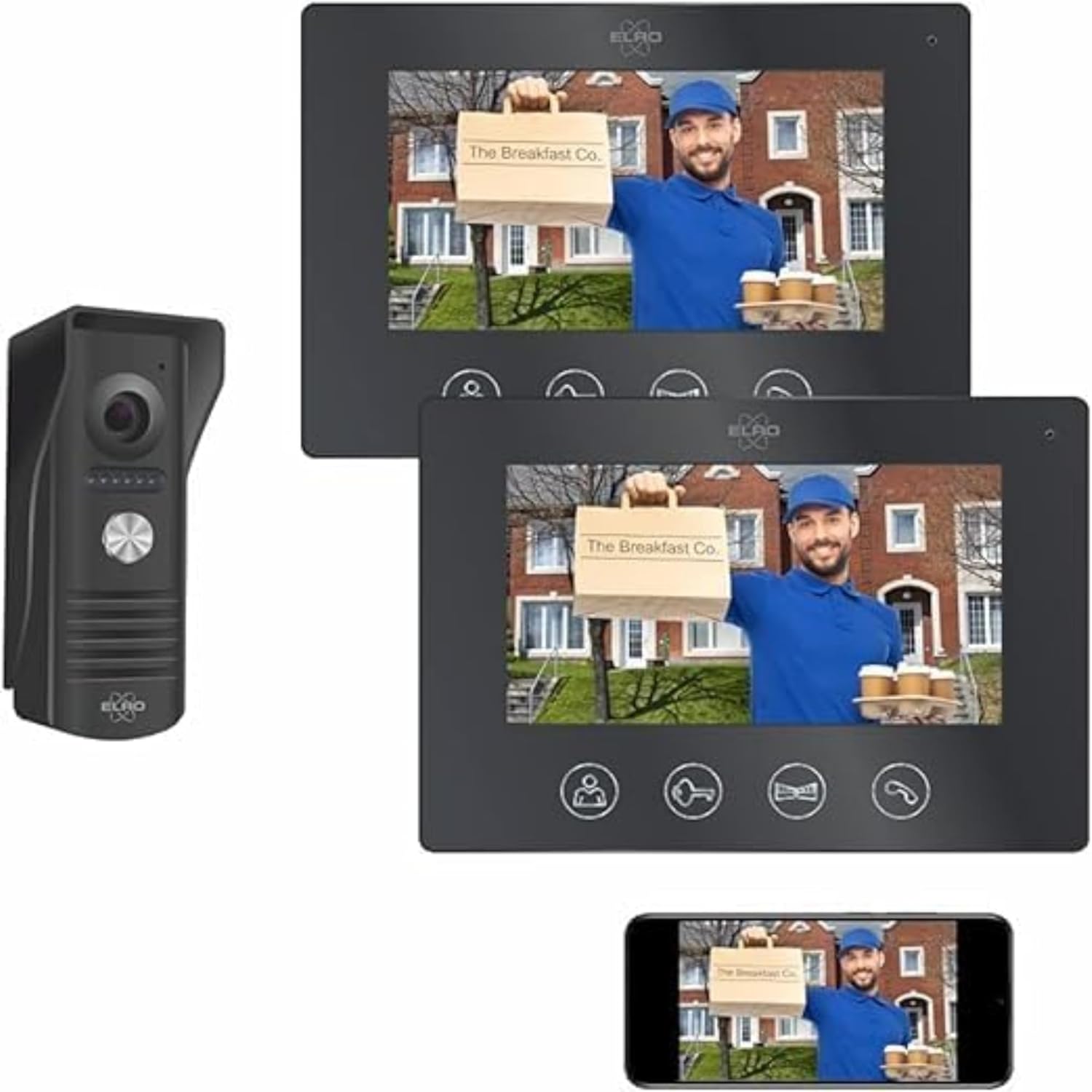
Figure 1: ELRO DV50 IP WiFi Intercom System components.
2. Isi Paket
Verifikasi bahwa semua item yang tercantum di bawah ini disertakan dalam paket Anda:
- 1x Waterproof Doorbell Unit with Rain Shield
- 2x 7-inch Color Monitors
- 2x Monitor Mounting Brackets
- 1x Kabel 4 kawat sepanjang 15 meter
- 1x Kabel 4 kawat sepanjang 10 meter
- Adaptor Daya
- Perangkat Keras Pemasangan (sekrup, colokan dinding)
- User Manual (dokumen ini)

Gambar 2: Lebihview of package contents and basic installation steps.
3. Produk Lebihview
3.1 Doorbell Unit
The outdoor doorbell unit is designed for durability and clear communication. It includes the following components:
- Mikropon: Captures audio from visitors.
- Kamera: Provides video feed of the visitor.
- Night Vision LEDs: Illuminates the area for clear viewing in low light conditions, up to 5 meters.
- Bell Push Button: Activates the intercom system and alerts indoor monitors and the app.
- Pembicara: Outputs audio from indoor monitors or the app.
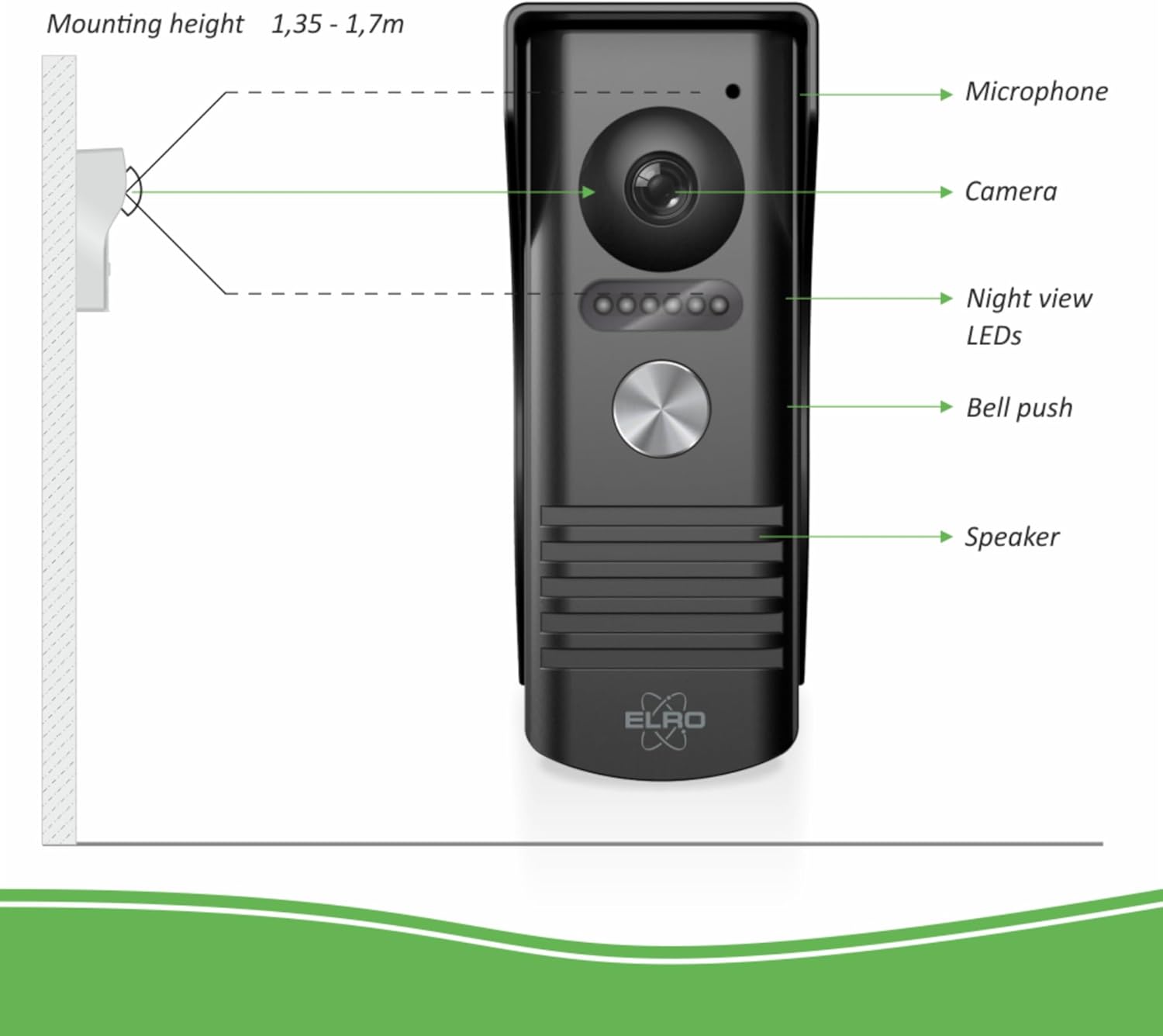
Figure 3: Doorbell unit components and recommended mounting height.
3.2 Indoor Monitors
The two 7-inch color monitors provide visual and audio interaction with visitors. Each monitor features:
- Layar Warna 7 inci: Shows live video feed from the doorbell camera.
- Mikropon: For two-way communication with the visitor.
- Tombol Kontrol:
- Hidup View: Activates the camera feed.
- Membuka Kunci Pintu: Remotely unlocks a connected door (12V door openers, not included).
- Gate Unlock: Remotely unlocks a connected gate.
- Berbicara: Initiates two-way communication.
- Kontrol Samping:
- Volume Melodi: Adjusts the ringtone volume.
- Pilih Melodi: Cycles through 16 available ringtones.
- Kecerahan: Menyesuaikan kecerahan layar.
- Color Intensity: Adjusts screen color saturation.
- Talk Volume: Adjusts the volume of the two-way conversation.

Figure 4: Indoor monitor front panel and button functions.

Figure 5: Indoor monitor side controls and power/cable connections.
4. Instalasi
The installation process for the ELRO DV50 is designed to be straightforward. Follow these steps carefully:
- Mount the Rain Shield: Secure the rain shield for the doorbell unit to an exterior wall. The recommended mounting height is between 1.35 and 1.70 meters from the ground.
- Mount Indoor Monitors: Install the mounting brackets for the indoor monitors at desired locations inside your home.
- Hubungkan Sistemnya: Use the provided 4-wire cables to connect the doorbell unit to the indoor monitors. Ensure all connections are secure.
- Attach Doorbell Unit: Mount the doorbell unit into its bracket, ensuring it is firmly in place within the rain shield.
- Nyalakan: Connect the power adapters to the monitors and plug them into electrical outlets.
- Koneksi Aplikasi: Proceed to Section 5 for instructions on connecting the system to the ELRO Intercom app.
Catatan: For detailed wiring diagrams and specific instructions, refer to the included printed manual.
5. Pengaturan Aplikasi dan Konektivitas
The ELRO Intercom app allows you to manage your intercom system remotely via your smartphone. This section details how to set up the app and connect it to your DV50 system.
- Unduh Aplikasi: Download the free ELRO Intercom app from the App Store (for iOS devices) or Google Playstore (for Android devices).
- Buat Akun: Buka aplikasi dan ikuti petunjuk di layar untuk membuat akun pengguna baru atau masuk jika Anda sudah memilikinya.
- Tambahkan Perangkat: Within the app, select the option to add a new device. You will typically be prompted to scan a QR code or manually enter device details. The QR code is usually found on the device itself or in the printed manual.
- Hubungkan ke Wi-Fi: Follow the app's instructions to connect your ELRO DV50 system to your home's Wi-Fi network. Ensure your smartphone is connected to the same Wi-Fi network during the initial setup.
- Beberapa Pengguna: If multiple individuals wish to use the intercom, they can download the ELRO Intercom app and easily connect it to the same intercom system.
Penting: The app requires an active internet connection (Wi-Fi or 4G) on your smartphone to function remotely.
6. Operasi
Operating your ELRO DV50 system involves using both the indoor monitors and the ELRO Intercom app.
6.1 Using the Indoor Monitors
- Menerima Panggilan: When a visitor presses the doorbell button, the indoor monitors will ring and display the live video feed.
- Komunikasi Dua Arah: Tekan tombol Bicara button on the monitor to speak with the visitor. Press it again to end the conversation.
- ViewSiaran Langsung: Tekan tombol Hidup View button to see the camera feed at any time, even without a visitor.
- Membuka Pintu/Gerbang: If connected, press the Buka Kunci Pintu or Buka Gerbang button to grant access.
- Menyesuaikan Pengaturan: Use the side controls (refer to Figure 5) to adjust ringtone volume, select melodies, and modify screen brightness and color intensity.
6.2 Menggunakan Aplikasi Interkom ELRO
The app provides extended control and monitoring capabilities:
- Menerima Pemberitahuan: When a visitor presses the doorbell, your smartphone will receive a notification.
- Komunikasi Jarak Jauh: Open the app to see the visitor, speak with them, and grant access remotely.
- App Interface Functions (refer to Figure 6):
- Mikrofon Hidup/Mati: Toggle to communicate with the visitor.
- Loudspeaker On/Off: Toggle to hear ambient sound from the doorbell unit.
- Take Picture: Capture a still image from the live feed.
- Mulai/Hentikan Perekaman Video: Rekam video footage.
- Layar Penuh: Beralih ke mode layar penuh view.
- Tutup Telepon: Akhiri panggilan.
- Membuka kunci: Remotely unlock a connected door or gate.
- Penyimpanan Foto dan Video: Photos and videos captured via the app can be stored directly on your smartphone.
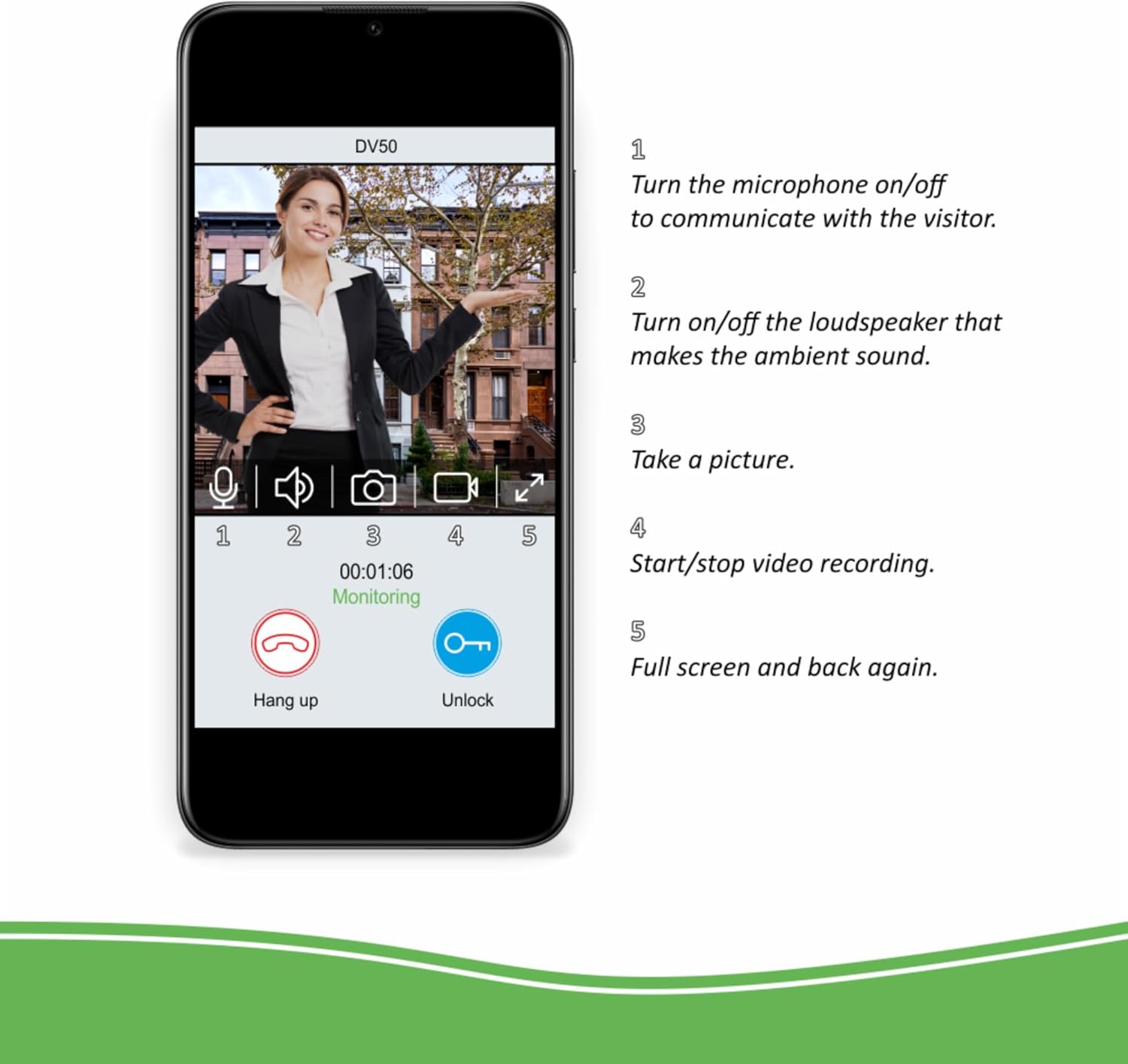
Figure 6: ELRO Intercom app interface and functions.
7. Spesifikasi
| Fitur | Detil |
|---|---|
| Nomor Model | DV50 |
| Merek | ELRO |
| Ukuran Monitor | 2x 7-inch (18 cm) Color Display |
| Doorbell Material | Metal, Vandal-resistant |
| Monitor Housing Material | Aluminium disikat |
| Rentang Penglihatan Malam | Hingga 5 meter |
| Nada Dering | 16 melodi yang dapat dipilih |
| Konektivitas | Wired (4-wire cable), Wi-Fi (for app) |
| Catu Daya | Tegangan DC 12V |
| Doorbell Dimensions (approx.) | 51 mm (W) x 131 mm (H) x 46 mm (D) (with rain shield) |
| Dimensi Monitor (kurang lebih) | 214 mm (L) x 152 mm (T) x 17 mm (D) |
| Penilaian Perlindungan Internasional | IP54 (Doorbell Unit) |
| Volume Operasitage | 12 Volt (DC) |

Figure 7: Doorbell unit dimensions.
8. Penyelesaian masalah
This section addresses common issues you might encounter with your ELRO DV50 system.
- No Video/Audio on Monitor:
- Ensure all 4-wire cables are securely connected between the doorbell unit and monitors.
- Verify that monitors are powered on and receiving electricity.
- Check for any physical damage to cables or connectors.
- App Not Connecting to Intercom / Frequent Disconnections:
- Confirm your home Wi-Fi network is active and stable.
- Ensure the intercom system is within range of your Wi-Fi router.
- Restart your Wi-Fi router, the intercom monitors, and your smartphone.
- Re-attempt the app setup process (Section 5).
- Periksa apakah aplikasi telah diperbarui ke versi terbaru.
- Penglihatan Malam yang Buruk:
- Ensure the night vision LEDs on the doorbell unit are not obstructed.
- Clean the camera lens if it appears dirty.
- Door/Gate Unlock Function Not Working:
- Verify that the 12V door opener or gate mechanism is correctly wired to the doorbell unit and is functional independently.
- Check wiring connections for the unlock function.
- No Sound from Doorbell Speaker or Monitor Speaker:
- Adjust the "Talk Volume" on the side of the indoor monitor (Figure 5).
- Ensure the microphone and loudspeaker are enabled in the ELRO Intercom app (Figure 6).
If you continue to experience issues after following these steps, please contact ELRO customer support.
9. Pemeliharaan
To ensure optimal performance and longevity of your ELRO DV50 IP WiFi Intercom System, follow these simple maintenance guidelines:
- Pembersihan: Regularly wipe the doorbell unit and indoor monitors with a soft, damp cloth. Avoid using abrasive cleaners or solvents, which can damage surfaces.
- Lensa Kamera: Keep the camera lens on the doorbell unit clean and free from dust, dirt, or water spots to ensure clear video quality.
- Pelindung Hujan: Periodically check the rain shield for any debris accumulation that might obstruct the camera or microphone.
- Koneksi Kabel: Occasionally inspect all wired connections for any signs of wear or corrosion, especially outdoor connections.
- Pembaruan Perangkat Lunak: Keep the ELRO Intercom app updated to the latest version to benefit from new features and security enhancements.
10. Garansi dan Dukungan
ELRO products are designed for reliability and performance. For information regarding warranty coverage, please refer to the warranty card included with your product or visit the official ELRO weblokasi.
For technical support, troubleshooting assistance beyond this manual, or spare parts, please contact ELRO customer service. Contact details can typically be found on the ELRO websitus atau dalam dokumentasi produk Anda.
ELRO Official Weblokasi: www.elro.eu


