1. Pendahuluan
The Tycon TPSC2440NMPPT is an advanced Maximum Power Point Tracking (MPPT) solar charge controller designed for efficient battery charging from solar panels. It automatically adjusts to 12V or 24V battery systems and supports various battery types including Flooded, AGM, GEL, and Lithium, with a customizable USER setting. This controller features an integral LCD display for monitoring key system parameters.
2. Petunjuk Keselamatan
Harap baca dan pahami semua petunjuk sebelum pemasangan dan pengoperasian. Kegagalan mengikuti petunjuk ini dapat mengakibatkan sengatan listrik, kebakaran, atau cedera serius.
- Ensure all wiring is correctly polarized and securely connected.
- Do not disassemble or attempt to repair the controller. Refer to qualified service personnel.
- Pasang pengontrol di area yang berventilasi baik, jauh dari bahan yang mudah terbakar dan gas korosif.
- Always disconnect the battery and solar panel before installing or moving the controller.
- Kenakan alat pelindung diri (APD) yang sesuai selama pemasangan.
- The controller is designed for indoor use or protected outdoor environments (IP32 rating). Avoid direct exposure to water.
3. Produk Lebihview
The TPSC2440NMPPT controller is equipped with several features to optimize solar charging and battery management:
- Teknologi MPPT: Memaksimalkan perolehan energi dari panel surya.
- Auto-Ranging Voltage: Compatible with 12V or 24V battery arrays.
- Multimode Load Operation: Offers 5 selectable modes for load control.
- Soft Start Load Output: Powers high capacitive loads safely.
- Automatic Battery Equalization: Performs 30-day equalization for optimal battery health.
- Conformal Coated Electronics: Provides environmental protection.
- TVS Lightning Protection: Enhances durability against electrical surges.
- Integral LCD Display: Menunjukkan Baterai Voltage, Capacity, Charging Capacity, Temperature, Load Current, and Solar Current.
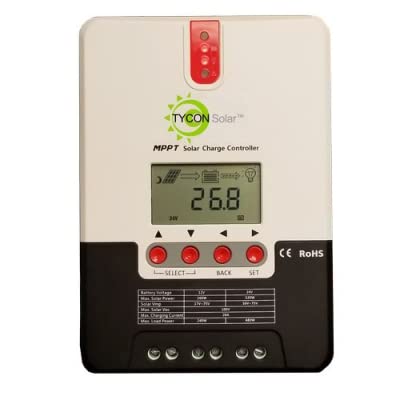
Gambar 1: Depan view of the Tycon TPSC2440NMPPT Solar MPPT Battery Charging Controller, showing the LCD display and connection terminals.
4. Pengaturan dan Instalasi
Ikuti langkah-langkah berikut untuk instalasi yang benar:
- Pemasangan: Choose a suitable location for mounting the controller. Ensure good ventilation and protection from direct sunlight and moisture.
- Koneksi Baterai: Connect the battery to the controller's battery terminals first. Ensure correct polarity (+ to + and - to -). The controller will automatically detect the battery voltage (12V atau 24V).
- Koneksi Panel Surya: Connect the solar panel array to the controller's solar input terminals. Observe correct polarity. Ensure the open-circuit voltage of the solar array does not exceed the controller's maximum input voltage (110V at 25°C).
- Koneksi Beban (Opsional): If using the load output, connect your DC loads to the controller's load terminals. Do not exceed the rated load current (20A Max).
- Sensor Suhu: Connect the included battery temperature probe cable to the designated port on the controller. Place the sensor near the battery for accurate temperature compensation.
- Nyalakan: Once all connections are secure, the controller will power on and begin operation.
5. Petunjuk Pengoperasian
The integral LCD display provides real-time information about your solar charging system. Use the buttons (if present, assuming standard UP/DOWN/SET) to navigate through the display menus and adjust settings.
5.1 Informasi Layar LCD
- Vol bateraitage: Volume saat initage baterai yang terhubung.
- Kapasitas Baterai: Estimated state of charge.
- Kapasitas Pengisian: Current power being delivered to the battery.
- Suhu Baterai: Temperature measured by the external probe.
- Beban Saat Ini: Current being drawn by connected DC loads.
- Solar Current: Current being generated by the solar panels.
5.2 Pengaturan Jenis Baterai
The controller supports Flooded, AGM, GEL, and Lithium battery types. A USER setting allows for custom charge parameters. Refer to the on-screen menu for selecting and configuring the battery type.
5.3 Load Operation Modes
The controller offers 5 selectable load operation modes. Consult the device's menu for details on each mode and how to select them, typically involving timed operation or dusk-to-dawn control.
6. Pemeliharaan
Perawatan rutin memastikan kinerja optimal dan umur pakai yang lebih panjang untuk pengontrol pengisian daya surya Anda.
- Periksa Koneksi: Periksa secara berkala semua sambungan kabel untuk kekencangan dan korosi.
- Pengontrol Bersih: Keep the controller clean and free of dust. Use a dry cloth for cleaning. Do not use liquids.
- Kesehatan Baterai: Memantau volume bateraitage and capacity on the LCD. Ensure batteries are properly maintained according to their manufacturer's guidelines.
- Ventilasi: Pastikan area pemasangan tetap berventilasi baik untuk mencegah panas berlebih.
7. Penyelesaian masalah
| Masalah | Kemungkinan Penyebab | Larutan |
|---|---|---|
| Tidak ada tampilan/Tidak ada daya | Loose battery connection; Battery voltage too low; Blown fuse (external, if applicable). | Check battery connections and polarity. Charge battery if voltage is below operating threshold. Check and replace any external fuses. |
| Tidak ada pengisian daya tenaga surya | Solar panel not connected; Incorrect polarity; Insufficient sunlight; Damaged solar panel/wiring. | Verify solar panel connections and polarity. Ensure panels are receiving adequate sunlight. Inspect panels and wiring for damage. |
| Pemuatan tidak berfungsi | Load disconnected; Overload; Short circuit; Battery voltage terlalu rendah. | Check load connections. Reduce load if exceeding 20A. Check for short circuits. Ensure battery is sufficiently charged. |
| Pembacaan yang tidak akurat | Loose connections; Faulty sensor. | Check all wiring connections. Ensure temperature sensor is properly connected and placed. |
8. Spesifikasi
- Model: TPSC2440NMPPT
- Vol otomatistage: 12V/24V (System)
- Ampsebelum: 40A
- Nilai Beban Saat Ini: 20A Maksimal
- Beban Kapasitif Maksimum: 10,000uF
- Tegangan Masukan Surya Makstage: 110V (25°C), 90V (25°C)
- Max Power Point Range: 2VDC to 75VDC (Battery Volts)
- Efisiensi Konversi: 96% Tip.
- MPPT Tracking Efficiency: 99%
- Konsumsi sendiri: 1W
- Kompensasi Suhu: -3.0mV/°C/Sel
- Ukuran Kawat Maksimum: 8 AWG
- Jil.tage and Current Accuracy: +/-2%
- Pembumian: Landasan Negatif
- Perlindungan Lingkungan: Tingkat IP32
- Dimensi Produk: 12x9x6 inci
- Berat Barang: 5.16 pon
- Tipe Tampilan: Layar LCD


