1. Pendahuluan
Thank you for choosing the THOMSON Coffee Maker with Integrated Grinder, Model THCOG6. This appliance is designed to provide you with a rich and authentic coffee experience, whether you prefer freshly ground beans or pre-ground coffee. Its compact design and user-friendly features make it an ideal addition to any kitchen. Please read this manual carefully before using the appliance to ensure safe and optimal operation.
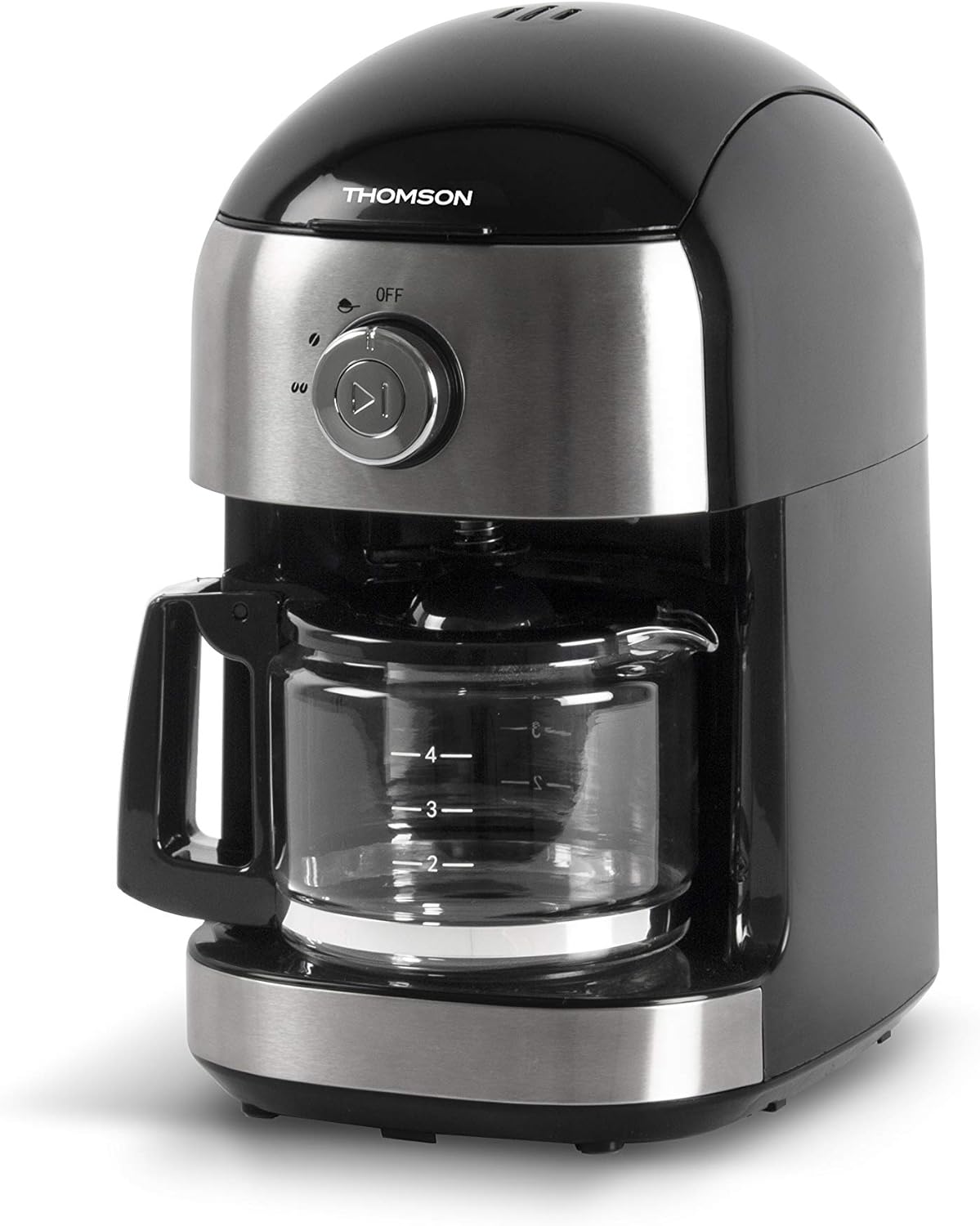
Gambar 1.1: Depan view of the THOMSON Coffee Maker, showcasing its sleek black and stainless steel design with the glass carafe in place.
2. Petunjuk Keselamatan
To prevent personal injury or damage to the appliance, always observe basic safety precautions when using electrical appliances. Keep this manual for future reference.
- Baca semua petunjuk sebelum digunakan.
- Jangan merendam alat, kabel, atau steker di dalam air atau cairan lainnya.
- Pengawasan ketat diperlukan saat peralatan apa pun digunakan oleh atau di dekat anak-anak.
- Cabut steker dari stopkontak saat tidak digunakan dan sebelum membersihkan. Biarkan dingin sebelum memasang atau melepas komponen, dan sebelum membersihkan alat.
- Jangan mengoperasikan peralatan apa pun dengan kabel atau steker yang rusak, atau setelah peralatan tersebut mengalami kegagalan fungsi atau telah rusak dengan cara apa pun.
- Penggunaan aksesori tambahan yang tidak direkomendasikan oleh produsen alat dapat mengakibatkan kebakaran, sengatan listrik, atau cedera pada orang.
- Jangan gunakan di luar ruangan.
- Jangan biarkan kabel menggantung di tepi meja atau meja dapur, atau menyentuh permukaan panas.
- Jangan menaruhnya di atas atau di dekat kompor gas atau listrik yang panas, atau di dalam oven yang sedang dipanaskan.
- Selalu pasang steker ke alat terlebih dahulu, lalu colokkan kabel ke stopkontak. Untuk melepas, putar kontrol ke posisi "off", lalu cabut steker dari stopkontak.
- Jangan menggunakan alat ini untuk tujuan lain selain yang dimaksudkan.
- Exercise extreme caution when disposing of hot steam.
- Teko dirancang untuk digunakan hanya dengan alat ini. Itu tidak boleh digunakan di atas kisaran.
- Jangan meletakkan teko panas di atas permukaan yang dingin atau basah.
- Jangan gunakan botol yang retak atau botol yang pegangannya longgar atau lemah.
- Jangan bersihkan teko dengan pembersih, bantalan wol baja, atau bahan abrasif lainnya.
3. Bagian dan Komponen
Familiarize yourself with the different parts of your THOMSON Coffee Maker.
- Tutup
- Tangki Air
- Bean Hopper (with lid)
- Perakitan Penggiling
- Keranjang Saringan (dapat dilepas)
- Control Dial (OFF / Grind / Brew)
- Tombol Mulai/Berhenti
- Teko Kaca dengan Pegangan
- Pelat Pemanas
- Kabel Listrik

Image 3.1: The coffee maker with its main removable components, including the water tank and filter basket, displayed separately for clarity.
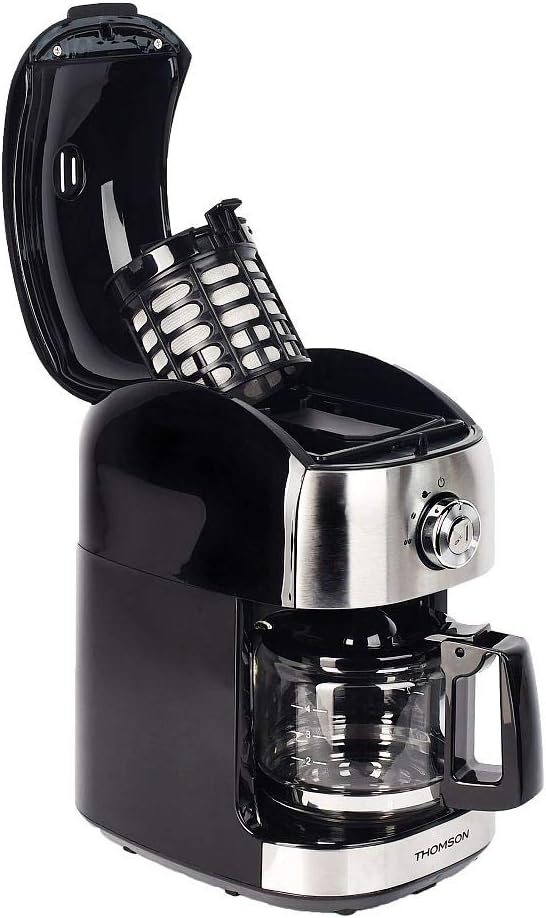
Gambar 3.2: Atas view of the coffee maker with the lid open, showing the internal filter basket and bean hopper area.
4. Pengaturan
Sebelum penggunaan pertama, dan untuk kinerja optimal, ikuti langkah-langkah pengaturan berikut:
- Membongkar: Carefully remove the coffee maker and all its components from the packaging. Retain packaging for future storage or transport.
- Pembersihan: Wash the glass carafe, filter basket, and water tank with warm, soapy water. Rinse thoroughly and dry. Wipe the exterior of the appliance with a damp kain.
- First Use Cycle (Cleaning Cycle):
- Fill the water tank with clean water up to the MAX level (500 ml).
- Place the empty filter basket into its position.
- Tempatkan teko kaca di atas pelat pemanas.
- Plug the appliance into a suitable power outlet (240V).
- Turn the control dial to the "Brew" position.
- Press the Start/Stop button to begin the brewing cycle without coffee.
- Allow the full cycle to complete. Discard the hot water.
- Repeat this process 2-3 times to ensure the appliance is thoroughly cleaned and free of any manufacturing residues.
- Penempatan: Place the coffee maker on a stable, flat, heat-resistant surface, away from the edge of the counter and out of reach of children. Ensure adequate ventilation around the unit.
5. Petunjuk Pengoperasian
Your THOMSON Coffee Maker offers two brewing options: using whole coffee beans with the integrated grinder, or using pre-ground coffee.
5.1. Brewing with Whole Coffee Beans (Grind & Brew)
- Isi Tangki Air: Open the lid and fill the water tank with fresh, cold water. The capacity is 500 ml, suitable for 4 to 6 cups. Do not exceed the MAX fill line.
- Tambahkan Biji Kopi: Open the bean hopper lid and add up to 32g of whole coffee beans. Close the bean hopper lid securely.
- Masukkan Keranjang Filter: Ensure the filter basket is correctly placed in its compartment.
- Tempatkan Teko: Letakkan teko kaca kosong di atas piring penghangat.
- Select Grind & Brew: Turn the control dial to the "Grind" position. This setting activates both the grinder and the brewing function.
- Mulai Menyeduh: Press the Start/Stop button. The grinder will activate first, grinding the beans, followed by the brewing process.
- Menikmati: Once the brewing cycle is complete, the appliance will automatically switch to the keep-warm function for up to 30 minutes. Carefully remove the carafe to pour and serve.

Image 5.1: The THOMSON Coffee Maker positioned on a kitchen counter, accompanied by a freshly brewed cup of coffee, illustrating its use in a home environment.
5.2. Brewing with Pre-Ground Coffee
- Isi Tangki Air: Open the lid and fill the water tank with fresh, cold water up to the desired level (max 500 ml).
- Tambahkan Kopi Bubuk: Place the desired amount of pre-ground coffee into the filter basket. Do not overfill.
- Masukkan Keranjang Filter: Ensure the filter basket is correctly placed in its compartment.
- Tempatkan Teko: Letakkan teko kaca kosong di atas piring penghangat.
- Pilih Minuman: Turn the control dial to the "Brew" position.
- Mulai Menyeduh: Press the Start/Stop button. The brewing process will begin immediately.
- Menikmati: Once the brewing cycle is complete, the appliance will automatically switch to the keep-warm function for up to 30 minutes.
5.3. Anti-Drip System
The appliance features an anti-drip system, allowing you to temporarily remove the carafe during the brewing cycle to pour a cup of coffee. The flow of coffee will pause. Return the carafe to the warming plate within 20 seconds to prevent overflow from the filter basket.
5.4. Fungsi Menjaga Kehangatan
After brewing, the warming plate will keep your coffee warm for up to 30 minutes. After 30 minutes, the appliance will automatically shut off for safety and energy saving.
6. Perawatan dan Pembersihan
Regular cleaning ensures optimal performance and extends the lifespan of your coffee maker. Always unplug the appliance and allow it to cool completely before cleaning.
- Teko dan Keranjang Saringan: Wash the glass carafe and filter basket with warm, soapy water after each use. Rinse thoroughly and dry. These parts are not dishwasher safe.
- Luar: Usap permukaan luar mesin kopi dengan kain lembut dan kering.amp kain. Jangan gunakan pembersih abrasif atau sabut gosok, karena dapat menggores permukaan.
- Grinder Assembly: Periodically clean the grinder assembly. Use a small brush to remove any residual coffee grounds from the bean hopper and grinder blades. Do not use water directly on the grinder.
- Kerak: Endapan mineral dari air dapat menumpuk seiring waktu dan memengaruhi kinerja. Bersihkan kerak pada mesin kopi Anda setiap 2-3 bulan, atau lebih sering jika air di rumah Anda mengandung banyak mineral (air sadah).
- Prepare a descaling solution by mixing white vinegar and water in a 1:2 ratio (e.g., 1 part vinegar to 2 parts water).
- Tuang larutan ke dalam tangki air.
- Tempatkan teko kosong di atas piring penghangat.
- Jalankan siklus penyeduhan tanpa kopi.
- After the cycle, let the solution sit in the carafe for 15 minutes.
- Buang larutan tersebut dan bilas teko serta tangki air hingga bersih.
- Run 2-3 cycles with fresh, clean water to remove any residual vinegar taste.
- Penyimpanan: When not in use, store the coffee maker in a clean, dry place.
7. Penyelesaian masalah
Jika Anda mengalami masalah dengan mesin pembuat kopi Anda, lihat tabel berikut untuk mengetahui masalah umum dan solusinya.
| Masalah | Kemungkinan Penyebab | Larutan |
|---|---|---|
| Pembuat kopi tidak menyala. | Tidak terpasang; daya padamtage; stopkontak rusak. | Pastikan kabel daya terpasang dengan benar ke stopkontak yang berfungsi. Periksa pemutus arus listrik rumah Anda. |
| Kopi tidak diseduh. | No water in tank; carafe not correctly placed; control dial not set to "Brew" or "Grind". | Fill water tank. Ensure carafe is properly seated on the warming plate. Set control dial to the correct position and press Start/Stop. |
| Mesin penggiling tidak berfungsi. | No beans in hopper; bean hopper lid not closed; grinder clogged. | Add coffee beans. Ensure bean hopper lid is securely closed. Clean the grinder assembly to remove any blockages. |
| Kopi rasanya lemah atau encer. | Insufficient coffee grounds/beans; too much water; appliance needs descaling; grind setting too coarse. | Increase amount of coffee. Use less water. Descale the appliance. If using beans, ensure the grinder is set to a finer grind (if adjustable, though this model has a fixed grind). |
| Kopi meluap dari keranjang penyaring. | Too much coffee grounds; carafe removed for too long; filter clogged. | Reduce amount of coffee. Return carafe quickly if removed. Clean filter basket thoroughly. |
| Suara keras selama operasi. | Normal grinding noise; foreign object in grinder; appliance needs descaling. | Grinding is naturally noisy. Check bean hopper for foreign objects. Descale the appliance if noise persists during brewing. |
Jika masalah berlanjut setelah mencoba solusi ini, hubungi dukungan pelanggan.
8. Spesifikasi
Key technical specifications for the THOMSON Coffee Maker (Model THCOG6):
| Fitur | Detil |
|---|---|
| Nomor Model | THCOG6 |
| Merek | Bahasa Indonesia: Thomson |
| Jenis | Filter Coffee Maker with Integrated Grinder |
| Kapasitas | 500 ml (approx. 4-6 cups) |
| Kapasitas Bean Hopper | 32 gram |
| Kekuatan | 680 Watt |
| Jil.tage | 240V |
| Dimensi (P x L x T) | Ukuran 24x17x27 cm |
| Berat | 2.1 kg |
| Bahan | Plastik |
| Fitur Khusus | Keep Warm Function (up to 30 min), Anti-drip System, Mechanical Control |

Image 8.1: Diagram showing the dimensions of the coffee maker (24cm x 17cm x 27cm) and icons indicating its compatibility with coffee beans and ground coffee, along with the 30-minute keep-warm function.
9. Garansi dan Dukungan
THOMSON products are manufactured to high-quality standards. This product is covered by a manufacturer's warranty against defects in materials and workmanship. The specific terms and duration of the warranty may vary by region. Please retain your proof of purchase for warranty claims.
For technical support, warranty inquiries, or spare parts, please contact your local THOMSON customer service or the retailer from whom you purchased the product. You may also visit the official THOMSON website for more information and contact details.
Kontak Layanan Pelanggan: Refer to your regional THOMSON website or product packaging for specific contact information.


