Perkenalan
This manual provides essential information for the proper installation, operation, and maintenance of your Zebronics Zeb-D370S DVD Player. Please read this manual thoroughly before using the device to ensure safe and efficient operation. Keep this manual for future reference.
Informasi Keselamatan Penting
- Jangan biarkan perangkat terkena hujan atau kelembapan untuk mencegah kebakaran atau sengatan listrik.
- Jangan membuka casing. Serahkan semua servis kepada personel yang berkualifikasi.
- Pastikan ventilasi di sekitar unit baik. Jangan halangi lubang ventilasi.
- Use only the power adapter supplied with the unit or specified by the manufacturer.
- Hindari meletakkan unit di permukaan yang tidak stabil.
- Cabut kabel daya saat terjadi badai petir atau bila tidak digunakan dalam jangka waktu lama.
Isi Paket
Verifikasi bahwa semua item ada dalam paket:
- Zebronics Zeb-D370S DVD Player Unit
- Kontrol Jarak Jauh
- AV Kabel
- Kabel listrik
- Manual Instruksi
Produk Selesaiview
The Zebronics Zeb-D370S is a versatile DVD player featuring a built-in stereo speaker and amplifier, HDMI, USB, and SD card support, and dual karaoke microphone inputs. It supports multiple formats and offers 5.1 channel, coaxial, and optical audio outputs.
Front Panel Controls and Ports
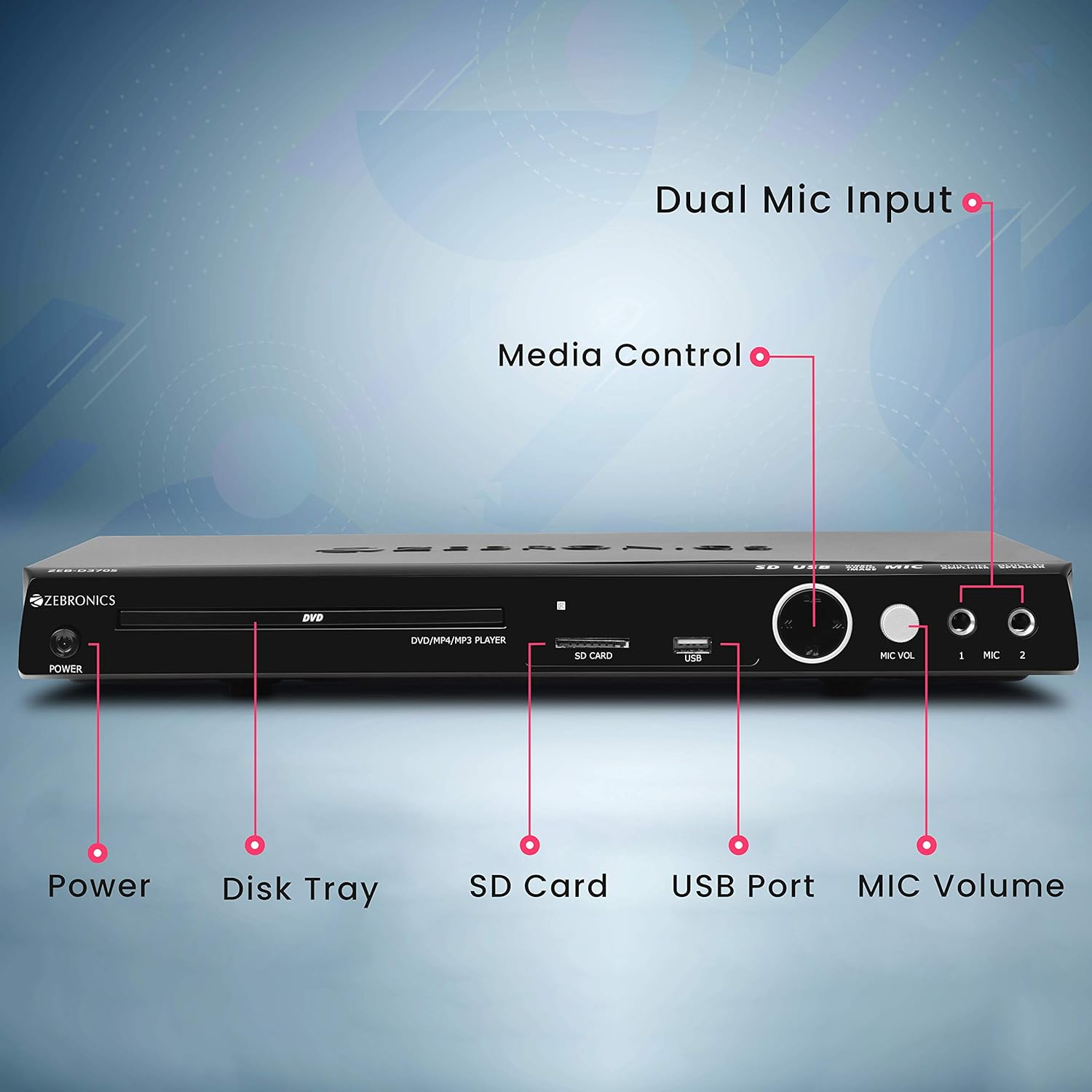
Front panel of the Zebronics Zeb-D370S DVD Player, showing the Power button, Disk Tray, SD Card slot, USB Port, MIC Volume control, and two Microphone inputs (MIC 1, MIC 2).
- Tombol Daya: Menyalakan atau mematikan unit.
- Disk Tray: For inserting DVDs, CDs, VCDs, and SVCDs.
- Slot Kartu SD: Untuk memutar media files dari kartu SD.
- Port USB: Untuk memutar media files dari drive USB.
- Volume MIC: Mengatur volume mikrofon yang terhubung.
- MIKROFON 1 & MIKROFON 2: Inputs for connecting microphones for karaoke.
- Tombol Kontrol Media: Play/Pause, Stop, Skip, etc.
Koneksi Panel Belakang

Rear panel of the Zebronics Zeb-D370S DVD Player, detailing the Coaxial Output, Optical Output, 5.1 Channel Output, HDMI port, Composite video output, Component video output, S-Video output, and Ext-Audio Output.
- Keluaran HDMI: For high-definition video and audio connection to a TV or display.
- Keluaran Video Komposit: Standard definition video output.
- Output Video Komponen: Higher quality analog video output (YPbPr).
- Output S-Video: Improved analog video output.
- Digital Audio Output (Optical & Coaxial): For connecting to external audio receivers or sound systems.
- Analog 5.1 Channel Output: For connecting to a 5.1 channel speaker system.
- Ext-Audio Output: Additional audio output connections.
- Keluaran Pembicara: Terminals for connecting external speakers, utilizing the built-in amppengangkat.

Belakang view of the Zebronics Zeb-D370S DVD Player highlighting the built-in amplifier, built-in speaker, and speaker output terminals.
Petunjuk Pengaturan
1. Koneksi Daya
- Ensure the DVD player is placed on a stable, flat surface with adequate ventilation.
- Connect the power cable to the AC input on the rear of the DVD player.
- Plug the other end of the power cable into a standard electrical outlet (110V - 260V AC).
2. Video Connection to TV/Display
Pilih salah satu dari metode koneksi berikut:
- HDMI (Recommended for best quality): Connect an HDMI cable from the HDMI output on the DVD player to an HDMI input on your TV.
- Video Komponen: Connect component video cables (Red, Green, Blue) from the DVD player's component outputs to the corresponding inputs on your TV.
- Video Komposit: Connect a composite video cable (Yellow) from the DVD player's composite output to the yellow video input on your TV.
- S-Video: Connect an S-Video cable from the DVD player's S-Video output to the S-Video input on your TV.
3. Koneksi Audio
Choose one of the following audio connection methods:
- HDMI: If using HDMI for video, audio will also be transmitted via the HDMI cable.
- 5.1 Channel Analog Output: Connect RCA cables from the 5.1 channel outputs (Front Left, Front Right, Center, Subwoofer, Surround Left, Surround Right) on the DVD player to a compatible 5.1 channel ampsistem pengeras suara atau speaker.
- Audio Digital (Optik/Koaksial): Connect an optical or coaxial cable from the respective output on the DVD player to a digital audio input on your amplifier or home theater system for surround sound.
- Output Speaker Terintegrasi: If using the built-in speakers, ensure no external speakers are connected to the 5.1 channel outputs unless desired.
4. Koneksi Mikrofon (Opsional)
- Plug your microphones into the MIC 1 and/or MIC 2 inputs on the front panel.
- Adjust the MIC Volume knob to control microphone audio levels.
Petunjuk Pengoperasian

Zebronics Zeb-D370S DVD Player with a disc inserted, remote control, and a visual representation of content playing on a screen, illustrating its multimedia capabilities.
1. Pemutaran Disk
- Tekan tombol Kekuatan button to turn on the DVD player.
- Tekan tombol Buka/Tutup button (usually on the remote or front panel) to open the disc tray.
- Place a compatible disc (DVD Video, DVD+RW/-RW/+R/-R, Dual Layer Disc, CD Audio, CD-R/-RW, VCD, SVCD) onto the disc tray with the label side facing up.
- Tekan tombol Buka/Tutup button again to close the tray. The player will automatically begin playback or display a menu.
- Use the remote control for playback functions such as Play, Pause, Stop, Fast Forward, Rewind, and Chapter Skip.
2. USB/SD Media Playback
- Insert a USB drive into the USB port or an SD card into the SD card slot on the front panel.
- The player should automatically detect the media and display a menu to browse files. If not, select the USB or SD source using the remote control's Sumber or Masukan tombol.
- Navigasi melalui Anda files (VOB, MP4, DIVX, AVI, MPEG-1, MPEG-2, 3GP, MP3, WMA, AAC, JPEG, TXT) using the remote control and press Bermain untuk memulai pemutaran.
3. Acara Karaoke
- Connect one or two microphones to the MIC 1 and MIC 2 inputs.
- Play a karaoke disc or a media file with instrumental tracks.
- Adjust the MIC Volume knob on the front panel to control the microphone audio level.
4. Fungsi Lanjutan
- Menyalin CD: Convert audio CDs to digital formats (refer to on-screen menu for options).
- Picture Slideshow: View JPEG images from disc, USB, or SD card as a slideshow.
- Pemindaian Progresif: Provides a smoother, flicker-free image on compatible displays.
- Zoom IN/OUT: Magnify or reduce the displayed image during playback.
- High Speed Search: Quickly scan through disc or media content.
- Kunci orang tua: Restrict playback of certain content based on ratings.
- Peluncuran Instan: Jump back a few seconds during playback.
- Disc Resume: Resume playback from where it was last stopped on a disc.
Pemeliharaan
- Membersihkan Unit: Use a soft, dry cloth to clean the exterior of the DVD player. Do not use liquid cleaners or abrasive materials.
- Perawatan Cakram: Handle discs by their edges. Keep them clean and free of scratches. Use a soft, lint-free cloth to wipe discs from the center outwards.
- Ventilasi: Pastikan lubang ventilasi tidak terhalang untuk mencegah panas berlebih.
Penyelesaian Masalah
If you encounter issues with your DVD player, refer to the table below for common problems and solutions:
| Masalah | Kemungkinan Penyebab | Larutan |
|---|---|---|
| Tidak ada daya | Kabel daya tidak tersambung; Stopkontak tidak berfungsi | Periksa sambungan kabel daya; Coba stopkontak yang berbeda |
| Tidak ada keluaran video | Incorrect video cable connection; Incorrect input selected on TV | Ensure video cables are securely connected; Select the correct input source on your TV (e.g., HDMI 1, AV) |
| Tidak ada keluaran audio | Incorrect audio cable connection; TV/amplifier volume too low; Mute activated | Check audio cable connections; Increase volume; Deactivate mute function |
| Disk tidak dapat diputar | Disc is dirty or scratched; Disc format not supported; Disc inserted incorrectly | Clean the disc; Ensure disc is compatible; Insert disc with label side up |
| USB/SD media not detected | USB drive/SD card not inserted correctly; Incompatible file format; Corrupted media | Reinsert USB/SD; Check supported file formats; Try a different USB/SD device |
Spesifikasi

Dimensions of the Zebronics Zeb-D370S DVD Player: 360mm (width), 220mm (depth), and 50mm (height).
| Fitur | Detil |
|---|---|
| Nama Model | Zeb D370S |
| Merek | ZEBRONIK |
| Dimensi Produk | 28 x 39 x 82 mm (1.4 kg) |
| Resolusi | 1920 x 1080 (Supported resolutions: 480i/576i/480p/576p/720p/1080i/1080p) |
| Fitur Khusus | Surround Sound, Built-in Amplifier, Built-in Stereo Speaker, Karaoke Mic Input |
| Mode Keluaran Audio | Stereo, Surround (2CH / 5.1CH / Virtual Surround Sound) |
| Konfigurasi Saluran Suara Surround Speaker | 5.1 |
| Format Audio yang Didukung | Dolby Digital, MP3, WMA, AAC |
| Video Playback System | NTSC / PAL / AUTO |
| Jenis Konektor | HDMI, USB, SD Slot, MIC 1 & MIC 2, Composite, Component, S-Video, Digital Audio Output (Optical & Coaxial), Analog 5.1Ch Output, Ext-Audio Output x 2 |
| Media Type (Playback Disc) | DVD Video, DVD+RW/-RW/+R/-R, Dual Layer Disc, CD Audio, CD-R/-RW, VCD, SVCD |
| Media Files Didukung | VOB, MP4, DIVX, AVI, MPEG-1, MPEG-2, 3GP, MP3, WMA, AAC, JPEG, TXT |
| Volume Operasitage | Tegangan AC 110V - 260V |
| Fungsi | CD Ripping, Picture SlideShow, Progressive scan, Zoom IN/OUT, High speed search, Parental lock, Instant replay, Disc resume |
Garansi dan Dukungan
For warranty information, technical support, or service inquiries, please refer to the warranty card included with your product or visit the official Zebronics webJangan mencoba memperbaiki perangkat sendiri.


