Perkenalan
Terima kasih sudah membeliasing the Bytech True Wireless Bluetooth Boost Link True Speaker. This manual provides essential information for setting up, operating, and maintaining your new speakers. Please read this manual thoroughly before use to ensure proper operation and to maximize your listening experience. These speakers feature True Wireless Stereo (TWS) functionality, Bluetooth connectivity, FM Radio, and Bass Boost for rich audio.
Informasi Keselamatan
- Jangan biarkan speaker terkena suhu ekstrem, kelembapan tinggi, atau sinar matahari langsung.
- Hindari menjatuhkan atau membenturkan speaker dengan keras.
- Do not disassemble, repair, or modify the speakers yourself. Refer all servicing to qualified personnel.
- Keep the speakers away from water and other liquids.
- Gunakan hanya kabel pengisi daya dan adaptor daya yang ditentukan.
- Bersihkan speaker dengan kain lembut dan kering. Jangan gunakan pembersih abrasif atau pelarut.
- Dengarkan dengan volume sedang untuk menghindari kerusakan pendengaran.
Isi Paket

Image: The Bytech Boost Link True Wireless Speakers shown in their retail packaging, highlighting the two speakers and the Bluetooth connectivity feature.
Harap periksa apakah semua barang ada dan dalam kondisi baik:
- 2 x Bytech Boost Link True Wireless Speakers
- 1 x Kabel Pengisi Daya (USB)
- 1 x Panduan Pengguna (dokumen ini)
Produk Selesaiview

Gambar: Bagian depan dari dekat view of the two Bytech Boost Link True Wireless Speakers, showing the speaker grilles and control buttons at the bottom.
Pelajari komponen dan kontrol speaker:
- Kisi-kisi Pembicara: Melindungi driver speaker.
- Tombol Kontrol:
- Tombol Daya: Power On/Off, Play/Pause.
- Tombol Mode: Switch between Bluetooth, FM Radio, etc.
- Tombol Trek Sebelumnya/Volume Turun: Tekan sebentar untuk lagu sebelumnya, tekan lama untuk mengecilkan volume.
- Tombol Trek Berikutnya/Volume Naik: Tekan sebentar untuk lagu berikutnya, tekan lama untuk menaikkan volume.
- Port Pengisian Daya: Untuk menghubungkan kabel pengisian daya USB.
- Indikator LED: Shows power status, charging status, and pairing status.
Pengaturan
Mengisi daya Speaker
Before first use, fully charge both speakers. Connect the supplied USB charging cable to the charging port on each speaker and plug the other end into a USB power adapter (not included) or a computer's USB port. The LED indicator will show charging status and turn off or change color when fully charged.
Menyalakan/Mematikan
- Untuk menghidupkan: Press and hold the Power button on each speaker until the LED indicator lights up and you hear a power-on prompt.
- Untuk mematikan: Press and hold the Power button on each speaker until the LED indicator turns off and you hear a power-off prompt.
Petunjuk Pengoperasian
Penyandingan Bluetooth (Mode Speaker Tunggal)
- Pastikan speaker dalam keadaan menyala dan dalam mode pemasangan Bluetooth (indikator LED akan berkedip).
- Pada perangkat Anda (ponsel pintar, tablet, laptop), aktifkan Bluetooth dan cari perangkat yang tersedia.
- Select "BYTECH BOOST LINK" (or similar name) from the list.
- Once paired, the LED indicator will stop flashing and remain solid, and you will hear a confirmation sound.
Pemasangan True Wireless Stereo (TWS) (Dua Speaker)
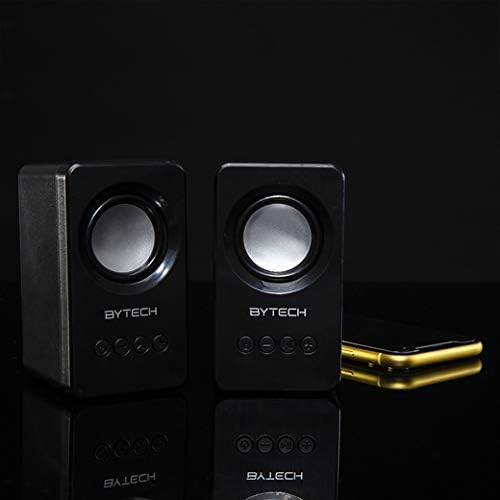
Image: The two Bytech Boost Link True Wireless Speakers positioned next to a smartphone, symbolizing their ability to connect wirelessly to each other and a device for stereo sound.
For a true stereo sound experience, you can pair both speakers together:
- Power on both Bytech Boost Link speakers. Do not connect them to your Bluetooth device yet.
- The speakers will automatically attempt to pair with each other. You will hear a confirmation sound when they are successfully linked for TWS. One speaker will become the master (left channel) and the other the slave (right channel).
- Once TWS paired, the master speaker will enter Bluetooth pairing mode (LED flashing).
- On your device, enable Bluetooth and search for "BYTECH BOOST LINK". Connect to this single entry.
- Kedua speaker sekarang akan memutar audio dalam stereo.
- Catatan: If the speakers do not automatically pair, try double-pressing the Mode button on one of the speakers to initiate TWS pairing.
Operasi Radio FM
- Power on the speaker(s).
- Tekan tombol Mode button repeatedly until you hear the FM radio prompt.
- Untuk memindai dan menyimpan stasiun secara otomatis, tekan dan tahan tombol Putar/Jeda button. The speaker will scan and store available FM stations.
- Gunakan Trek Sebelumnya Dan Lagu Berikutnya tombol untuk menavigasi antara stasiun yang disimpan.
Audio Playback and Volume Control
- Putar/Jeda: Tekan sebentar tombol Daya.
- Lagu Berikutnya: Short press the Next Track/Volume Up button.
- Lagu Sebelumnya: Short press the Previous Track/Volume Down button.
- Volume Naik: Long press the Next Track/Volume Up button.
- Volume Turun: Long press the Previous Track/Volume Down button.
Pemeliharaan
- Pembersihan: Use a soft, dry, lint-free cloth to clean the surface of the speakers. Do not use liquid cleaners, aerosols, or solvents.
- Penyimpanan: Saat tidak digunakan dalam jangka waktu lama, simpan speaker di tempat yang sejuk dan kering, jauh dari sinar matahari langsung dan suhu ekstrem.
- Perawatan Baterai: To prolong battery life, avoid fully discharging the battery frequently. Charge the speakers regularly, even if not in use.
Penyelesaian Masalah
| Masalah | Kemungkinan Penyebab | Larutan |
|---|---|---|
| Speaker tidak menyala. | Baterai lemah. | Isi daya speaker hingga penuh. |
| Tidak dapat dipasangkan melalui Bluetooth. | Speaker tidak dalam mode pemasangan; Bluetooth perangkat mati; Terlalu jauh dari perangkat. | Ensure speaker LED is flashing; Turn on Bluetooth on your device; Move speaker closer to device (within 10 meters). |
| Tidak ada suara. | Volume too low; Speaker not connected; Incorrect mode. | Increase volume on speaker and device; Re-pair Bluetooth; Ensure correct mode (Bluetooth/FM). |
| Pemasangan TWS gagal. | Speaker sudah terhubung ke perangkat; Speaker terlalu berjauhan. | Disconnect speakers from any device; Power off and on both speakers, then try TWS pairing again; Ensure speakers are close to each other. |
| Penerimaan radio FM buruk. | Sinyal lemah; Interferensi. | Relocate the speaker to an area with better reception; Extend the charging cable (can act as an antenna). |
Spesifikasi
- Model: OLEH-AU-BS-152-BK
- Merek: Bytek
- Teknologi Konektivitas: Nirkabel (Bluetooth)
- Mode Keluaran Audio: Mengelilingi
- Tipe Pembicara: Suara Sekitar
- Fitur Khusus: Wireless Bluetooth, Bass Boost, FM Radio, True Wireless Stereo (TWS)
- Penggunaan yang Direkomendasikan: Untuk Pemutar Musik
- Perangkat yang Kompatibel: Laptop, Tablet, Ponsel Cerdas
- Tipe Pengontrol: Tombol pada perangkat
- Dimensi Paket: Ukuran 20.7x16x9 cm
- Berat: 560 gram
Garansi dan Dukungan
Bytech products are designed and manufactured to the highest quality standards. For information regarding warranty coverage, technical support, or service inquiries, please refer to the warranty card included with your purchase or visit the official Bytech websitus. Harap simpan bukti pembelian Anda untuk klaim garansi.
For further assistance, please contact Bytech customer support.


