1. Pendahuluan
Terima kasih sudah membeliasing the ONIKUMA K1 RGB Gaming Headset. This manual provides detailed instructions for setup, operation, maintenance, and troubleshooting to ensure optimal performance and longevity of your headset. Please read this manual carefully before use and retain it for future reference.
2. Produk Lebihview
The ONIKUMA K1 is a wired gaming headset designed for multi-platform compatibility, featuring vibrant RGB lighting, 7.1 surround sound, and a noise-cancelling microphone. It is built for comfort during extended gaming sessions.
Fitur Utama:
- 7.1 Suara Sekitar: Provides immersive audio for an enhanced gaming experience.
- Mikrofon Peredam Kebisingan: Ensures clear communication by reducing background noise.
- Pencahayaan RGB: Dynamic lighting effects for an aesthetic appeal.
- Kompatibilitas Multi-Platform: Works with PC, PlayStation (PS3, PS4), Mobile devices, and Xbox (Xbox One requires an adapter, not included).
- Desain yang nyaman: Features soft protein earpads, an adjustable headband, and cozy head cushions.
- Kontrol Sebaris: Easy access to volume adjustment and microphone mute.
Komponen:
The headset includes the main unit with integrated microphone and a wired connection featuring a 3.5mm audio jack and a USB connector for RGB lighting.

Figure 1: Headset with in-line volume and microphone mute control, USB connector for RGB lighting, and 3.5mm audio jack.

Figure 2: Flexible microphone with 160-degree adjustment and 360-degree voice pick-up for clear communication.

Figure 3: Soft protein earpads, adjustable headband, and cozy head cushions designed for supreme comfort.
3. Petunjuk Penyiapan
Follow these steps to connect your ONIKUMA K1 headset to your device.
Kompatibilitas Multi-Platform:
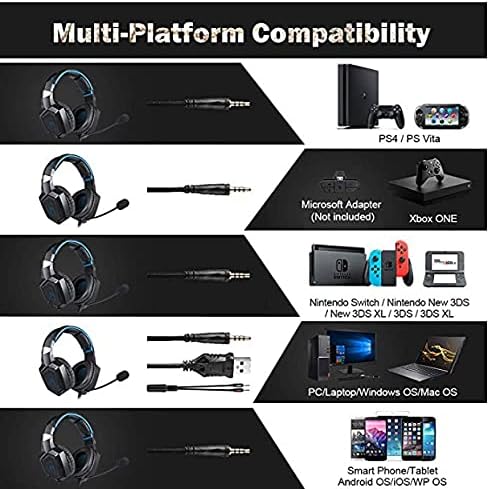
Gambar 4: Kompatibilitas di atasview for PC, PlayStation, Xbox, Nintendo Switch, and mobile devices.
- For PC/Laptop (Windows OS/Mac OS):
Connect the 3.5mm audio jack to your computer's audio output/input port. Connect the USB cable to a USB port for RGB lighting. Ensure your sound settings are configured to use the headset. - For PlayStation (PS4/PS Vita/PS3):
Connect the 3.5mm audio jack to the controller or console's audio port. For PS4, go to Settings > Devices > Audio Devices > Output to Headphones > All Audio. Connect the USB for RGB lighting if a USB port is available. - For Xbox ONE:
An additional Microsoft Adapter (not included) is required for older Xbox One controllers. Connect the 3.5mm audio jack to the adapter, then connect the adapter to your controller. Newer Xbox One controllers have a built-in 3.5mm jack. Connect the USB for RGB lighting if a USB port is available on the console. - For Nintendo Switch/New 3DS XL/3DS/3DS XL:
Connect the 3.5mm audio jack directly to the console's audio port. - For Smart Phone/Tablet (Android OS/iOS/WP OS):
Connect the 3.5mm audio jack directly to your mobile device's headphone jack.
4. Petunjuk Pengoperasian
Once connected, you can begin using your headset. Here are the basic operating functions:
- Kontrol Volume: Use the in-line volume roller to adjust the audio output level. Roll up to increase volume, roll down to decrease.
- Mikrofon Bisu: Use the in-line switch to mute or unmute the microphone. Slide the switch to the 'OFF' position to mute and 'ON' to unmute.
- Pengaturan Mikrofon: The microphone is flexible. Adjust its position closer to your mouth for optimal voice pickup or away when not in use.
- Pencahayaan RGB: The RGB lighting is powered via the USB connection. Once the USB is plugged in, the lighting will activate automatically. There are no user-adjustable controls for the RGB lighting patterns on the headset itself.
- Headset Cocok: Adjust the headband to ensure a comfortable and secure fit over your ears. The earpads should fully cover your ears for optimal sound isolation and comfort.
5. Pemeliharaan
Perawatan yang tepat akan memperpanjang umur pakai headset Anda.
- Pembersihan: Gunakan kain lembut dan kering untuk membersihkan headset. Jangan gunakan cairan pembersih atau bahan abrasif.
- Penyimpanan: Simpan headset di tempat yang sejuk dan kering, jauhkan dari sinar matahari langsung dan suhu ekstrem.
- Perawatan Kabel: Avoid sharp bends or excessive pulling on the cables to prevent damage. The cable is designed to be tangle-free.
- Hindari Kelembaban: The headset is not water-resistant. Keep it away from liquids.
6. Penyelesaian masalah
Jika Anda mengalami masalah dengan headset Anda, silakan lihat solusi umum berikut:
| Masalah | Solusi yang mungkin |
|---|---|
| Tidak ada suara atau volume rendah |
|
| Mikrofon tidak berfungsi |
|
| Pencahayaan RGB tidak berfungsi |
|
| Sound quality issues (e.g., no 7.1 surround sound) |
|
7. Spesifikasi
| Fitur | Detil |
|---|---|
| Nama Model | K1-B-Black RGB |
| Teknologi Konektivitas | Berkabel |
| Soket Headphone | 3.5 mm Jack |
| Kepekaan | 104dB |
| Respon Frekuensi | Not specified (Original data: 3045 Unknown Rate) |
| Kontrol Kebisingan | Peredam Kebisingan Aktif |
| Faktor Bentuk Headphone | Di Atas Telinga |
| Penempatan Telinga | Di Atas Telinga |
| Warna | Hitam |
| Nama Merek | ONIKUMA |
| Dimensi Produk | Ukuran 22.5x19.5x10.5 cm |
| Berat Barang | 394 gram |
| Fitur Kabel | Bebas kusut |
| Jenis Kontrol | Kontrol Volume |
| Perangkat yang Kompatibel | Multi-platform |
| Penggunaan yang Direkomendasikan | Gaming, Making Calls |
| Penggunaan Produk Spesifik | Headset Permainan |
| Bahan | Plastic, Polycarbonate Leather (PC) |
| Deskripsi Rentang Usia | Dewasa |
| Tingkat Tahan Air | Tidak tahan air |
8. Garansi dan Dukungan
Untuk informasi garansi atau dukungan teknis, silakan merujuk ke dokumentasi yang disertakan dengan pembelian Anda atau hubungi penjual secara langsung. Simpan bukti pembelian Anda untuk klaim garansi apa pun.


