Informasi Keselamatan Penting
Please read and understand this entire manual before attempting to assemble, install, or operate this product. Failure to follow these instructions may result in electric shock, fire, or serious personal injury.
- Selalu matikan aliran listrik di pemutus sirkuit utama sebelum memulai pemasangan.
- If you are not qualified to perform electrical installations, please contact a professional electrician.
- Pastikan semua sambungan listrik mematuhi kode dan peraturan setempat.
- Struktur pemasangan harus mampu menopang berat kipas (sekitar 29.9 pon).
- Do not bend the fan blade holders during assembly or installation.
- Jauhkan anak-anak dari kipas angin selama pengoperasian.
Isi Paket
Pastikan semua komponen yang tercantum di bawah ini disertakan dalam paket Anda. Jika ada komponen yang hilang atau rusak, silakan hubungi dukungan pelanggan.
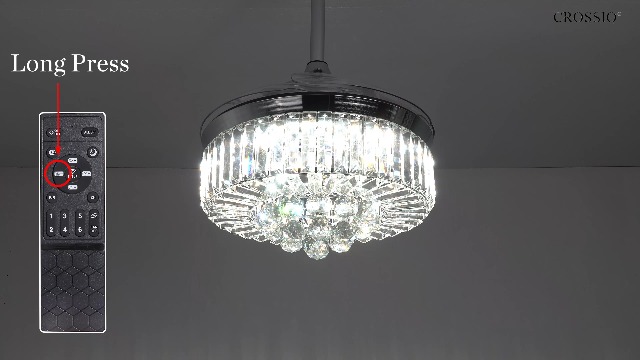
Image: All components of the CROSSIO Crystal Ceiling Fan laid out on a white surface, including the instruction manual, crystal balls, fan motor assembly, light shade, spare crystal bars, hardware bag, remote control, LED panel, LED driver, adapter cover, downrods, canopy, and mounting bracket.
- Manual Instruksi
- Crystal Ball (multiple pieces)
- Perakitan Motor Kipas
- Light Shade (Crystal)
- Spare Crystal Bar
- Hardware Bag (screws, wire nuts, etc.)
- Kontrol Jarak Jauh
- Panel LED
- Penggerak LED
- Penutup Adaptor
- Batang penyangga (5 inci)
- Long Downrod (10 inches)
- Kanopi
- Mounting Bracket
Pengaturan dan Instalasi
Ikuti langkah-langkah ini dengan cermat untuk pemasangan yang benar. Disarankan untuk melakukan pemasangan oleh dua orang.
1. Pra-Instalasi
- Matikan daya pada pemutus arus.
- Ensure the ceiling junction box is securely mounted and can support the fan's weight.
- Buka kemasan semua komponen dan letakkan pada permukaan yang bersih dan lembut untuk mencegah goresan.
2. Assembly of Fan and Light Components
Refer to the official installation video for a visual guide.
Video: Official CROSSIO Crystal Ceiling Fan Light Installation Guide. This video demonstrates the step-by-step assembly and installation process of the ceiling fan, including attaching the light shade, LED panel, and crystal elements.
- Attach the LED panel to the fan motor assembly.
- Secure the crystal light shade to the fan motor assembly.
- Connect the downrod to the fan motor assembly, ensuring all wires are properly routed.
- Geser kanopi ke atas batang penyangga.
3. Memasang Kipas
- Install the mounting bracket to the ceiling junction box using appropriate screws.
- Hang the fan assembly from the mounting bracket.
- Complete electrical wiring: Connect the fan's wires to the household wiring according to the wiring diagram in the manual. Ensure proper grounding.
- Kencangkan kanopi ke braket pemasangan.
4. Attaching Crystal Decorations
Carefully attach the crystal balls and bars to the light shade. Use the provided white gloves to avoid fingerprints.

Gambar: Close-up view of hands wearing white gloves attaching crystal balls to the bottom of the ceiling fan's light fixture, demonstrating the final decorative assembly step.
Petunjuk Pengoperasian
This fan can be controlled via the included remote control or a mobile application.
Fungsi Kontrol Jarak Jauh
Image: A detailed diagram of the remote control for the CROSSIO ceiling fan, highlighting buttons for light on/off, quick change light color, F-forward/R-reverse direction, six fan speeds (1-6), auto wind speeds, night mode, adjust color temperature, time setting, and all off.
- Lampu Hidup/Mati: Tekan tombol AKTIF/NONAKTIF tombol untuk menghidupkan/mematikan lampu.
- Quick Change Light Color: Tekan tombol K button to cycle through Warm White (2700K), Natural Light (4500K), and Cool White (6000K).
- Sesuaikan Suhu Warna: Gunakan Panah Atas/Bawah next to the light icon to fine-tune the color temperature.
- Sesuaikan Kecerahan: Gunakan Panah Atas/Bawah next to the sun icon to dim or brighten the light.
- Kecepatan Kipas: Select from 6 wind speeds using buttons 1 melalui 6.
- Auto Wind Speeds: Tekan tombol FAN button for natural wind mode.
- Pisau yang Dapat Dibalik: Tekan Depan/Kanan to change the fan direction (forward for summer, reverse for winter).
- Fungsi Pengatur Waktu: Set the fan to turn off after 2, 4, or 8 hours using the respective buttons.
- Mode Malam: Tekan tombol Ikon bulan for a low-light setting.
- Semua Mati: Tekan tombol SEMUA MATI button to turn off both the fan and light. This also retracts the invisible blades.
Kontrol Aplikasi Seluler
The fan also supports control via a proprietary mobile application. Download the app from your device's app store and follow the in-app instructions for pairing.

Image: Illustration showing three control methods for the fan: a mobile app interface on a smartphone, the physical remote controller, and a wall switch (not included).
Fitur Utama
- Bahan Berkualitas Tinggi: Constructed with K9 clear crystal and clear acrylic for durability and aesthetic appeal.
- LED Dimmable Light: Features an LED panel with 3-color changing options (2700K Warm White, 4500K Natural Light, 6000K Cool White). Brightness is also adjustable.
- 6 Kecepatan Angin: Offers six fan speed settings, including a natural wind mode suitable for sleep.
- Pisau yang Dapat Dibalik: Allows for seasonal adjustment of airflow direction. Forward mode provides downward airflow for cooling in summer, while reverse mode creates upward airflow to circulate warm air in winter.
- Invisible Blades: The fan blades retract automatically when the fan is turned off, maintaining a sleek chandelier appearance.
- Operasi Tenang: Equipped with a DC quiet motor designed for minimal noise, ensuring a peaceful environment.

Image: A graphic illustrating the low noise level of the ceiling fan (35dB) compared to other common sounds like a library (20dB) or a crowded street (55dB), emphasizing its quiet operation for better sleep.
Pemeliharaan
- Pembersihan: Untuk membersihkan kipas, lap dengan kain lembut dan kering.amp kain. Jangan gunakan pembersih atau pelarut yang bersifat abrasif.
- Pembersihan Kristal: The crystal components can be gently wiped with a soft, lint-free cloth. For deeper cleaning, a mild glass cleaner can be applied to the cloth (not directly to the crystals).
- Penggantian Bohlam: The LED panel is integrated and generally not user-replaceable. If the LED light fails, contact customer support for assistance.
Penyelesaian Masalah
| Masalah | Kemungkinan Penyebab | Larutan |
|---|---|---|
| Kipas tidak mulai | Kipas tidak mendapat daya; sambungan kabel longgar; baterai remote control lemah. | Check circuit breaker; ensure all wire connections are secure; replace remote control battery. |
| Lampu tidak bekerja | Loose wire connection to LED panel; LED driver malfunction. | Check LED panel connections; contact customer support if LED driver is suspected. |
| Kipas mengeluarkan suara yang terlalu bising. | Loose screws on mounting bracket; fan blades unbalanced. | Tighten all screws; ensure blades are properly installed and balanced. |
| Kontrol jarak jauh tidak berfungsi | Battery low or incorrectly inserted; remote not paired with fan. | Replace battery; refer to remote pairing instructions in the full manual. |
Spesifikasi
| Atribut | Detil |
|---|---|
| Merek | LINTAS |
| Nama Model | CFL-8111-48G |
| Ukuran | 48 inci |
| Warna | Emas |
| Bahan | Kristal, Logam |
| Jenis Sumber Cahaya | DIPIMPIN |
| Suhu Warna | 2700K (Hangat), 4500K (Alami), 6000K (Dingin) |
| Kecerahan | Sampai 4200 Lumens |
| Jil.tage | 120 Volt (AC) |
| Metode Kontrol | Kontrol Jarak Jauh, Aplikasi |
| Fitur Khusus | 6 Wind Speeds, Invisible Blades, LED Dimmable, Reversible Motor, Two Downrods |
| Berat Barang | 29.9 pon |
| Dimensi Produk | 48"P x 48"L x 26.57"T |
| UPC | 750743750600 |

Image: A diagram illustrating the dimensions of the 48-inch ceiling fan, including diameter and height with different downrod options. Icons also highlight key features such as remote control, reversible motor, dimmable light, night light, 6 speeds, silent operation, timer, and easy installation.
Garansi dan Dukungan
This CROSSIO ceiling fan comes with a one-year warranty from the date of purchase. For warranty claims, technical support, or any inquiries, please contact CROSSIO customer service.
For additional support and product information, visit the official CROSSIO Store: CROSSIO Store on Amazon.


