1. Pendahuluan
Terima kasih sudah membeliasing the Blackstar ID:Core Stereo 10 Sugar Skull V2 Limited Edition amplifier. This 10-watt (2x5W) stereo combo amplifier is designed to provide a versatile and high-quality sound experience for electric guitarists. It features Blackstar's patented ISF (Infinite Shape Feature) control, a range of voices, and built-in effects, making it ideal for practice, recording, and small performances. This manual provides essential information for safe and effective use of your amppengangkat.
2. Petunjuk Keselamatan Penting
- Baca Instruksi: Baca semua petunjuk keselamatan dan pengoperasian sebelum menggunakan produk ini.
- Simpan Instruksi: Simpan petunjuk ini untuk referensi di masa mendatang.
- Perhatikan Peringatan: Ikuti semua peringatan pada produk dan petunjuk pengoperasian.
- Air dan Kelembaban: Jangan gunakan peralatan ini di dekat air.
- Pembersihan: Bersihkan hanya dengan kain kering.
- Ventilasi: Jangan halangi lubang ventilasi apa pun. Pasang sesuai petunjuk produsen.
- Panas: Jangan memasang di dekat sumber panas seperti radiator, pemanas, kompor, atau peralatan lainnya (termasuk amppengangkat) yang menghasilkan panas.
- Perlindungan Kabel Listrik: Lindungi kabel daya agar tidak terinjak atau terjepit, terutama pada bagian steker, stopkontak, dan titik keluarnya kabel dari peralatan.
- Cabut Kabel Saat Badai: Cabut peralatan ini saat terjadi badai petir atau bila tidak digunakan dalam waktu lama.
- Pelayanan: Serahkan semua perbaikan ke teknisi servis yang berkualifikasi. Perbaikan diperlukan jika peralatan mengalami kerusakan, seperti kabel atau steker catu daya rusak, cairan tumpah atau benda jatuh ke dalam peralatan, peralatan terkena hujan atau lembap, tidak beroperasi secara normal, atau terjatuh.
3. Isi Paket
Harap centang kotak untuk item berikut:
- Blackstar ID:Core Stereo 10 Sugar Skull V2 Limited Edition Amppengangkat
- Unit Catu Daya
- Kabel USB
- User Manual (dokumen ini)
4. Kontrol dan Fitur
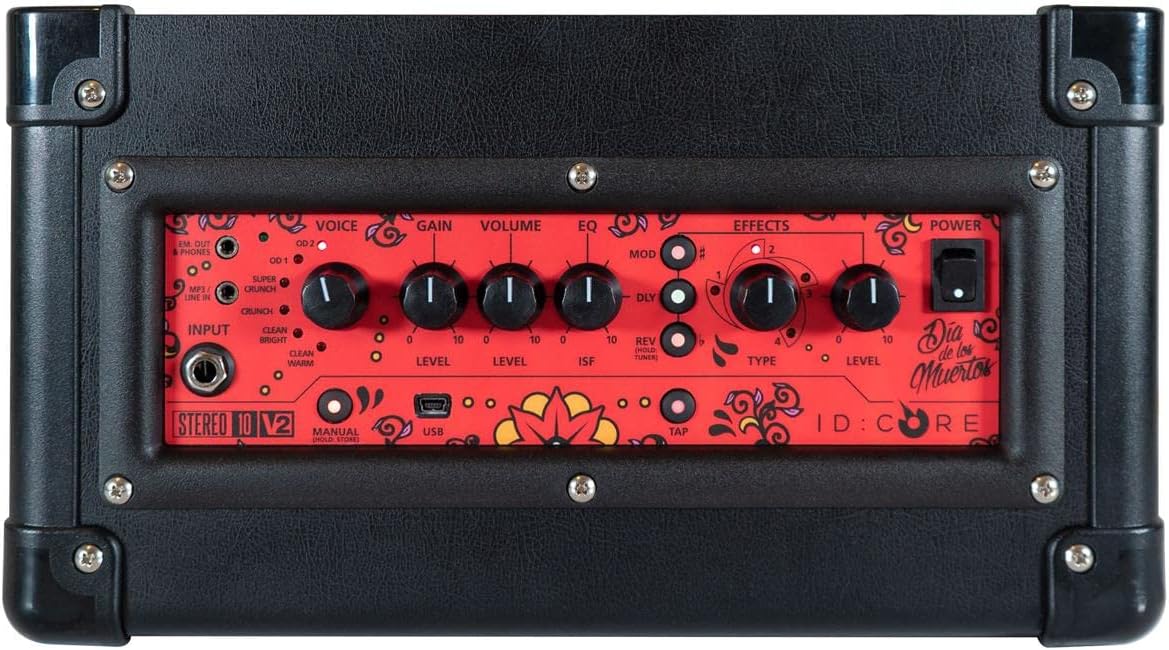
Gambar: Atas view dari amplifier's control panel, showing all knobs, buttons, and input/output jacks.
Kontrol Panel Depan:
- Masukan: 6.35mm (1/4") jack for connecting your guitar.
- Suara: Rotary switch to select one of six Blackstar voices: Clean Warm, Clean Bright, Crunch, Super Crunch, OD 1, OD 2.
- Memperoleh: Controls the amount of overdrive or distortion.
- Volume: Menyesuaikan tingkat keluaran keseluruhan dari amppengangkat.
- EQ: Kontrol nada.
- ISF (Infinite Shape Feature): Patented control that shifts the tone stack response between a USA-style (counter-clockwise) and a UK-style (clockwise) amppengangkat.
- Mod (Modulasi): Rotary switch to select and adjust the level of modulation effects (Chorus, Flanger, Phaser, Tremolo).
- Dly (Delay): Rotary switch to select and adjust the level of delay effects (Linear, Analogue, Tape, Multi).
- Rev (Reverb): Rotary switch to select and adjust the level of reverb effects (Room, Hall, Spring, Plate).
- Jenis: Selects the specific effect type within the Mod, Dly, or Rev categories.
- Tingkat: Menyesuaikan tingkat keseluruhan efek yang dipilih.
- Mengetuk: Button to set the tempo for time-based effects (Delay, Tremolo).
- Kekuatan: Saklar hidup/mati untuk amppengangkat.
- Kabel USB: USB-B port for connecting to a computer for recording and using Blackstar's Architect software.
- Em. Out / Phones: 6.35mm (1/4") jack for headphones or direct recording output with speaker emulation.
- MP3 / Line In: 3.5mm (1/8") stereo jack for connecting external audio devices like MP3 players or phones.

Gambar: Depan view of the Blackstar ID:Core Stereo 10 amppengangkat, pertunjukanasing the unique Sugar Skull V2 design on the speaker grille.
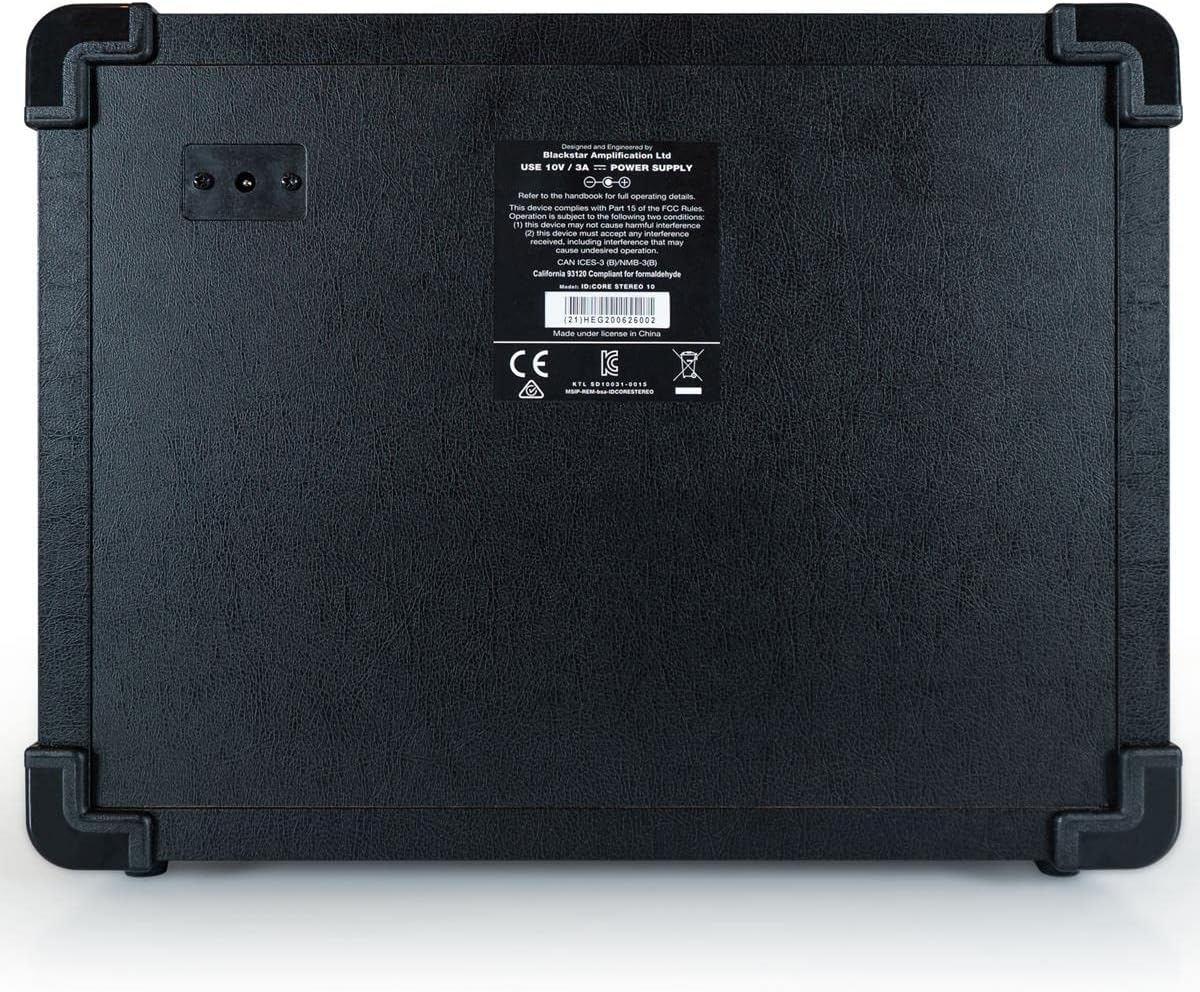
Gambar: Belakang view of the Blackstar ID:Core Stereo 10 amplifier, displaying the product information label and power input.
5. Pengaturan
- Membongkar: Lepaskan file amplifier and all accessories from the packaging. Retain the packaging for future transport or storage.
- Penempatan: Tempatkan amplifier on a stable, flat surface. Ensure adequate ventilation around the unit. Avoid placing it near heat sources or in direct sunlight.
- Sambungan Daya: Connect the supplied power supply unit to the DC input jack on the rear of the amplifier. Plug the power supply into a suitable mains outlet. Ensure the ampSaklar daya amplifier berada pada posisi OFF sebelum dihubungkan.
- Koneksi Gitar: Hubungkan gitar listrik Anda ke Masukan jack on the front panel using a standard 6.35mm (1/4") instrument cable.
- Audio Eksternal (Opsional): To play along with music, connect an MP3 player, phone, or other audio source to the MP3 / Baris Masuk jack using a 3.5mm stereo cable.
- Koneksi USB (Opsional): For recording or using the Blackstar Architect software, connect the amplifier to your computer using the supplied USB cable.
6. Petunjuk Pengoperasian
- Nyalakan: Ensure all connections are secure, then switch the Kekuatan button to the ON position. The power indicator light will illuminate.
- Atur Volume: Mulailah dengan Volume knob at a low setting to avoid sudden loud sounds.
- Pilih Suara: Putar Suara switch to choose your desired amplifier type (e.g., Clean Warm, Crunch, OD 1).
- Sesuaikan Keuntungan: Gunakan Memperoleh knob to control the amount of drive. Lower settings provide cleaner tones, while higher settings introduce more distortion.
- Shape Tone with EQ and ISF: Sesuaikan EQ knob for general tone shaping. Experiment with the ISF control to blend between American (tight low-end, aggressive mids) and British (woodier, less aggressive) amplifier characteristics.
- Terapkan Efek:
- Select a modulation, delay, or reverb effect using the Mod, Dly, atau Putaran rotary switches.
- Gunakan Jenis knob to select a specific effect within that category (e.g., Chorus, Flanger for Mod).
- Adjust the effect's intensity with the Tingkat tombol.
- For time-based effects (Delay, Tremolo), press the Mengetuk button repeatedly at your desired tempo to synchronize the effect.
- Headphone/Recording Output: Hubungkan headphone ke Em. Out / Phones jack for silent practice. This output also provides a speaker-emulated signal for direct recording.
- Audio USB: When connected to a computer via USB, the amplifier acts as an audio interface, allowing you to record your guitar directly into a DAW or use the Blackstar Architect software for deeper editing and patch management.
- Matikan: When finished, turn the Volume down, then switch the Kekuatan tombol ke posisi OFF.
7. Pemeliharaan
- Pembersihan: Bersihkan amplifier's exterior with a soft, dry cloth. Do not use abrasive cleaners, solvents, or waxes.
- Penyimpanan: Jika tidak digunakan dalam jangka waktu lama, simpan ampLetakkan amplifier di tempat yang kering dan sejuk, jauh dari sinar matahari langsung dan suhu ekstrem.
- Ventilasi: Ensure that the ventilation openings are always clear to prevent overheating.
- Perawatan Kabel: Always handle power and instrument cables carefully. Avoid bending or kinking them sharply.
8. Penyelesaian masalah
| Masalah | Kemungkinan Penyebab | Larutan |
|---|---|---|
| Tidak ada suara dari amppengangkat |
|
|
| Poor sound quality / Buzzing noise |
|
|
| Efek tidak berfungsi |
|
|
9. Spesifikasi
- Model: IDCORE10 V3
- Keluaran Wattage: 10 Watts (2 x 5W Stereo)
- Pembicara: 2 x 3" Blackstar Speakers
- Suara: 6 (Clean Warm, Clean Bright, Crunch, Super Crunch, OD 1, OD 2)
- Efek: Modulation (Chorus, Flanger, Phaser, Tremolo), Delay (Linear, Analogue, Tape, Multi), Reverb (Room, Hall, Spring, Plate)
- Kontrol: Voice, Gain, Volume, EQ, ISF, Mod, Dly, Rev, Type, Level, Tap, Power
- Masukan: Guitar Input (6.35mm jack), MP3/Line In (3.5mm stereo jack), USB-B
- Keluaran: Emulated Out/Headphones (6.35mm jack)
- Sumber Daya: Listrik Kabel
- Perangkat yang Kompatibel: Gitar Listrik
- Berat Barang: 10 pon (4.54 kg)
- Dimensi Produk: 16 x 18 x 14 inci (40.6 x 45.7 x 35.6 cm)
- ASIN: B08Z88WN8T
10. Garansi dan Dukungan
Bintang hitam Amplification products are designed and manufactured to the highest standards. For detailed warranty information specific to your region and product, please refer to the warranty card included with your purchase or visit the official Blackstar Ampliifikasi website. For technical support or service inquiries, please contact your authorized Blackstar dealer or Blackstar customer support directly.
Sumber Daya Daring:
- Bintang hitam Amplification Official Weblokasi: www.blackstaramps.com
- Blackstar Architect Software: www.blackstaramps.com/arsitek


