Perkenalan
This manual provides comprehensive instructions for the setup, operation, maintenance, and troubleshooting of your LECTRUS Android 10 Tablet. Please read this manual carefully before using your device to ensure optimal performance and longevity.

Figure 1: LECTRUS Android 10 Tablet (Front and Rear View)
This image displays the sleek black design of the LECTRUS Android 10 Tablet, showcasing both its front display and the rear panel with the LECTRUS branding and camera module.
Panduan Pengaturan
1. Pengisian Awal
Before first use, fully charge your tablet. Connect the provided USB cable to the tablet's charging port and the other end to a compatible USB power adapter (not always included) or a computer's USB port. The battery indicator on the screen will show charging progress.
The tablet is equipped with a 6000 mAh polymer lithium-ion battery, providing up to 7 hours of usage time on a full charge.
2. Daya Hidup/Mati
- Nyalakan: Press and hold the Power button located on the side of the tablet until the LECTRUS logo appears on the screen.
- Matikan: Tekan dan tahan tombol Daya hingga menu opsi daya muncul. Pilih "Matikan daya" dan konfirmasi.
- Mulai ulang: From the power options menu, select "Restart" to reboot the device.
3. Wisaya Pengaturan Awal
Saat pertama kali dinyalakan, tablet akan memandu Anda melalui proses pengaturan awal. Ikuti petunjuk di layar untuk:
- Pilih bahasa Anda.
- Hubungkan ke jaringan Wi-Fi.
- Masuk dengan akun Google Anda atau buat akun baru. Ini penting untuk mengakses Google Play Store dan layanan Google lainnya.
- Atur kunci layar (PIN, pola, kata sandi).
- Review dan menerima syarat dan ketentuan.
4. Memasang Kartu MicroSD (Opsional)
The tablet supports expandable memory up to 128GB via a microSD card. To insert:
- Locate the microSD card slot on the side of the tablet.
- Gently insert the microSD card into the slot with the gold contacts facing down until it clicks into place.
- To remove, gently push the card inward until it pops out.

Figure 2: Tablet with App Icons and Storage Information
This image illustrates the tablet's capability to support numerous applications, highlighting its 32GB internal storage and expandability for massive app support.
Petunjuk Pengoperasian
1. Menavigasi Antarmuka Android 10
Your LECTRUS tablet runs on the Android 10.0 operating system, offering an intuitive and user-friendly experience.
- Layar Beranda: The main screen where you can access apps, widgets, and shortcuts.
- Panel Pemberitahuan: Swipe down from the top of the screen to access notifications and quick settings (Wi-Fi, Bluetooth, Brightness, etc.).
- Laci Aplikasi: Geser ke atas dari bagian bawah layar untuk view semua aplikasi yang diinstal.
- Bilah Navigasi: Typically located at the bottom of the screen, it includes Back, Home, and Recent Apps buttons.

Figure 3: Android 10.0 Operating System Interface
This image shows the tablet's display with the "Android 10.0 OS" branding, indicating the operating system version.
2. Konektivitas Wi-Fi
Untuk menyambung ke jaringan Wi-Fi:
- Pergi ke Pengaturan > Jaringan & Internet > Wifi gratis.
- Aktifkan Wi-Fi.
- Pilih jaringan yang Anda inginkan dari daftar.
- Masukkan kata sandi jika diminta dan ketuk Menghubungkan.
3. Menggunakan Kamera
The tablet features a 5MP rear camera and a 2MP front camera for photos and video calls.
- Buka Kamera aplikasi.
- Ketuk ikon pengalih kamera untuk beralih antara kamera depan dan belakang.
- Ketuk tombol rana untuk mengambil foto atau memulai/menghentikan perekaman video.

Gambar 4: Mengabadikan Momen dengan Kamera Tablet
This image demonstrates the tablet's camera in use, capturing a precious moment, emphasizing its ability to record memories.
4. Multimedia and Applications
The 10.1-inch high-definition screen supports 1080p video playback, providing a clear and realistic viewing experience. You can download and use various applications from the Google Play Store, including:
- Hiburan: YouTube, Netflix, games.
- Komunikasi: Email, Facebook, Twitter, Instagram
- Navigasi: GPS applications.
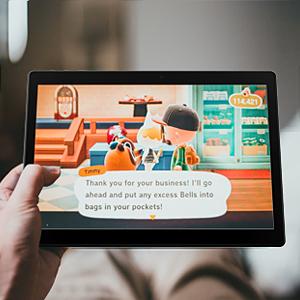
Figure 5: Tablet for Gaming
This image shows the tablet displaying a game, illustrating its use for entertainment.

Figure 6: Tablet for Navigation
This image depicts the tablet displaying a map with a route, highlighting its utility for navigation and GPS functions.
Pemeliharaan
1. Membersihkan Tablet Anda
- Gunakan kain lembut dan bebas serat untuk membersihkan layar dan bodi tablet.
- Untuk noda membandel, sedikit dampbilas kain dengan air atau pembersih layar yang dirancang untuk perangkat elektronik.
- Hindari penggunaan bahan kimia keras, bahan abrasif, atau semprotan aerosol langsung pada tablet.
2. Perawatan Baterai
- Hindari suhu ekstrem karena dapat menurunkan masa pakai baterai.
- Do not leave the tablet charging for excessively long periods after it's fully charged.
- If storing the tablet for an extended period, charge it to about 50% before turning it off.
3. Pembaruan Perangkat Lunak
Periksa dan instal pembaruan perangkat lunak secara berkala untuk memastikan tablet Anda memiliki fitur terbaru, tambalan keamanan, dan peningkatan kinerja.
- Pergi ke Pengaturan > Sistem > Pembaruan sistem.
- Ikuti petunjuk di layar untuk mengunduh dan menginstal pembaruan yang tersedia.
4. Pencadangan Data
It is recommended to regularly back up your important data (photos, videos, documents) to a cloud service (e.g., Google Drive) or an external storage device to prevent data loss.
Penyelesaian Masalah
Masalah Umum dan Solusinya
| Masalah | Kemungkinan Penyebab | Larutan |
|---|---|---|
| Tablet tidak menyala. | Baterai lemah; sistem mengalami kerusakan. | Isi daya tablet setidaknya selama 30 menit. Tekan dan tahan tombol Daya selama 10-15 detik untuk memulai ulang paksa. |
| Masalah koneksi Wi-Fi. | Kata sandi salah; masalah router; Wi-Fi tablet dinonaktifkan. | Ensure correct password. Restart your Wi-Fi router. Toggle Wi-Fi off and on in tablet settings. |
| Applications crashing or freezing. | RAM tidak mencukupi; bug aplikasi; aplikasi usang. | Tutup aplikasi latar belakang. Bersihkan cache aplikasi (Pengaturan > Aplikasi > [Nama Aplikasi] > Penyimpanan > Bersihkan cache). Perbarui aplikasi dari Google Play Store. |
| Kinerja lambat. | Terlalu banyak aplikasi yang berjalan; ruang penyimpanan rendah; perangkat lunak usang. | Tutup aplikasi yang tidak digunakan. Bebaskan ruang penyimpanan dengan menghapus aplikasi yang tidak perlu. files. Periksa pembaruan sistem. |
| Screen not responding. | Gangguan perangkat lunak sementara. | Force restart the tablet by holding the Power button for 10-15 seconds. |
Jika masalah masih berlanjut setelah mencoba solusi-solusi ini, silakan hubungi dukungan pelanggan.
Spesifikasi Produk
| Fitur | Detil |
|---|---|
| Merek | Lectrus |
| Nomor Model | ES-KTLA133 |
| Warna | Hitam |
| Sistem Operasi | Android 10 |
| Merek Prosesor | Pemenang Semua |
| Deskripsi Prosesor | Inti empat (1.6 GHz) |
| RAM | 2 GB |
| Penyimpanan Internal (ROM) | 32 GB |
| Memori yang Dapat Diperluas | Up to 128 GB (via Micro SD) |
| Ukuran Layar | 10.1 inci |
| Resolusi Layar | 1280 x 800 piksel |
| Kamera Belakang | 5 MP |
| Kamera Depan | 2 MP |
| Jenis Konektivitas | Wi-Fi (802.11n) |
| Antarmuka Perangkat Keras | Bluetooth, USB, Micro SD |
| Kapasitas Baterai | 6000 mAh |
| Daya Tahan Baterai | Hingga 7 jam |
| Dimensi Barang (P x L x T) | Ukuran 23.8x1x16.7 cm |
| Berat Produk | 900 gram |
Garansi dan Dukungan
Informasi Garansi
Specific warranty details for your LECTRUS tablet may vary by region and retailer. Please refer to the warranty card included with your product or contact your point of purchase for detailed information regarding warranty coverage and duration.
Catatan: Informasi mengenai ketersediaan suku cadang dan pembaruan perangkat lunak yang terjamin belum tersedia saat ini.
Dukungan Pelanggan
For technical assistance, troubleshooting beyond this manual, or warranty claims, please contact LECTRUS customer support through their official website or the contact information provided with your purchase. When contacting support, please have your model number (ES-KTLA133) and purchase details ready.


