Perkenalan
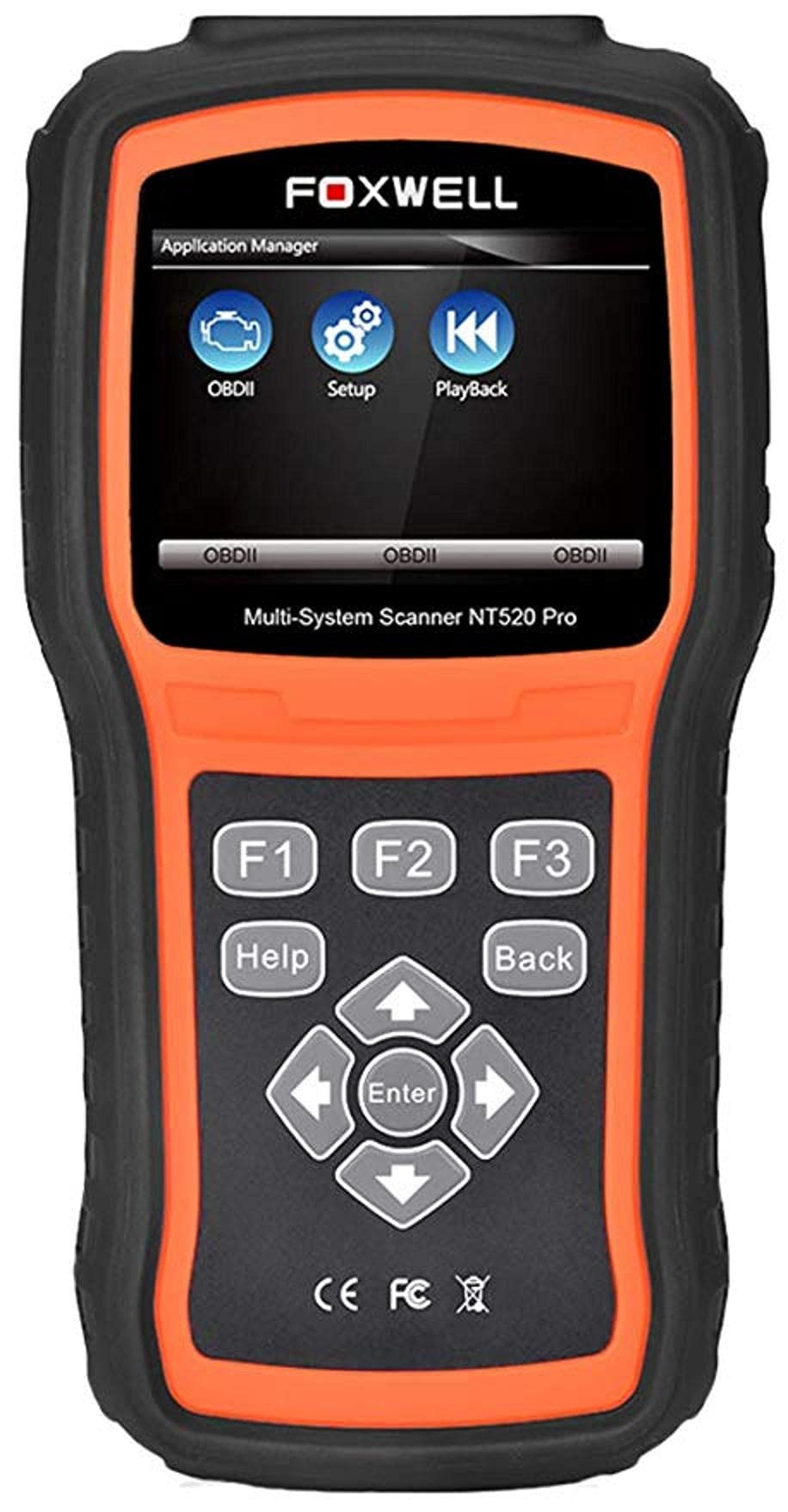
The Foxwell NT520 PRO is a professional-grade car fault diagnostic tool designed to help users identify and resolve issues in various vehicle systems. This device offers comprehensive diagnostic functions, including reading and clearing fault codes, viewing live data streams, and performing specialized tests and coding functions. It supports a wide range of car makes and models equipped with an OBD II - 16 pin connector.
1. Pengaturan
1.1 Isi Paket
- Foxwell NT520 PRO Diagnostic Tool
- Kabel Diagnostik OBD II
- USB Cable (for updates and data transfer)
- User Manual (dokumen ini)
1.2 Pengaktifan Awal Perangkat
- Connect the OBD II diagnostic cable to the NT520 PRO device.
- Locate the vehicle's OBD II port, typically found under the dashboard on the driver's side.
- Plug the diagnostic cable into the vehicle's OBD II port. The device should power on automatically. If not, ensure the vehicle's ignition is in the ON position.
1.3 Pembaruan Perangkat Lunak
The NT520 PRO offers free updates for one selected car brand. Additional brands (up to five) can be added via internet for a fee. Regular software updates ensure compatibility with newer vehicle models and provide access to the latest diagnostic features.
- Hubungkan perangkat ke komputer menggunakan kabel USB yang disediakan.
- Install the Foxwell update client software on your computer (refer to the official Foxwell website for download).
- Follow the on-screen instructions in the update client to register your device and perform software updates.
2. Petunjuk Pengoperasian
The NT520 PRO features a color screen for easy navigation and data display.
2.1 Navigasi Dasar
- Use the arrow keys to navigate through menus.
- Press the 'Enter' or 'OK' button to select an option.
- Press the 'Back' or 'Exit' button to return to the previous screen.
2.2 Fungsi Diagnostik
The device supports diagnostics for most available control units in a vehicle, including:
- Modul Kontrol Mesin (ECM)
- Modul Kontrol Transmisi (TCM)
- Sistem Pengereman Anti-Lock (ABS)
- Sistem Airbag
- Modul Kontrol Tubuh (BCM)
2.2.1 Membaca dan Menghapus Kode Kesalahan
- From the main menu, select 'Diagnostics' or 'Scan'.
- Pilih merek dan model kendaraan.
- Select the desired control unit (e.g., Engine, ABS).
- Pilih 'Baca Kode' untuk view current and stored Diagnostic Trouble Codes (DTCs).
- Select 'Clear Codes' to erase the detected fault codes. This will also turn off the Malfunction Indicator Lamp (MIL) if the fault is no longer present.
2.2.2 Aliran Data Langsung
View real-time data from various sensors and components.
- After selecting the control unit, choose 'Live Data'.
- Pilih parameter yang ingin Anda pantau.
- Data akan ditampilkan dalam format numerik atau grafik.
2.2.3 Informasi ECU
Access information about the Electronic Control Unit.
- After selecting the control unit, choose 'ECU Information'.
- View details such as VIN, calibration ID, and software version.
2.2.4 Component Testing and Coding
The device can perform tests on various car parts and supports programming and coding for different components.
- Component Tests: Select 'Active Test' or 'Component Test' from the menu to activate specific components and check their functionality.
- Programming and Coding: This function allows for programming and coding of various parts. Use with caution and only if you are familiar with the specific vehicle's requirements.
- Key Coding: For certain models, the device supports key coding functionality. Refer to your vehicle's service manual for specific procedures.
3. Pemeliharaan
3.1 Perawatan Perangkat
- Jaga perangkat tetap bersih dan bebas dari debu dan kelembapan.
- Simpan perangkat di tempat yang sejuk dan kering saat tidak digunakan.
- Hindari menjatuhkan perangkat atau membenturkannya dengan kuat.
- Do not use harsh chemicals for cleaning; a soft, damp kain sudah cukup.
3.2 Pemeliharaan Perangkat Lunak
Regularly check for and install software updates to ensure optimal performance and compatibility with the latest vehicle models. Refer to section 1.3 for update instructions.
4. Penyelesaian masalah
4.1 Perangkat Tidak Menyala
- Ensure the OBD II cable is securely connected to both the device and the vehicle's OBD II port.
- Pastikan kunci kontak kendaraan berada pada posisi ON.
- Check the vehicle's fuse for the OBD II port (consult your vehicle's owner's manual).
4.2 Kesalahan Komunikasi
- Confirm the vehicle supports the OBD II protocol (most vehicles manufactured after 1996 do).
- Pastikan kabel diagnostik tidak rusak.
- Cobalah menghubungkan ke kendaraan lain untuk mengesampingkan masalah spesifik kendaraan tersebut.
- Perbarui perangkat lunak perangkat ke versi terbaru.
4.3 Indikator Kerusakan Lamp (MIL) Remains On
After clearing fault codes, if the MIL (Check Engine Light) remains illuminated, it indicates that the underlying fault has not been resolved or a new fault has occurred. Address the root cause of the fault before attempting to clear codes again.
5. Spesifikasi
| Fitur | Detil |
|---|---|
| Pabrikan | Foxwell |
| Merek | Foxwell |
| Nomor Model | 111111111111 |
| Nomor Bagian Pabrikan | 111111111111 |
| Sumber Daya | Listrik Kabel |
| Berat Barang | 818 gram |
| Dimensi Pengiriman | Ukuran 21.2x17.8x8.2 cm |
| ASIN | B092326PXZ |
| Tanggal Pertama Tersedia | 8 April 2021 |
6. Garansi dan Dukungan
6.1 Garansi Produk
Please refer to the warranty card included with your product or visit the official Foxwell website for detailed warranty information. Warranty terms typically cover manufacturing defects for a specified period from the date of purchase.
6.2 Dukungan Teknis
For technical assistance, software updates, or troubleshooting not covered in this manual, please contact Foxwell customer support through their official website or authorized service centers. Have your product model and serial number ready when contacting support.