1. Pendahuluan
The ATOMSTACK A5 PRO Engraver Master is a high-performance laser engraving and cutting machine designed for precision and versatility. It features an innovative eye protection design, a powerful fixed-focus laser, and a robust all-metal structure, making it suitable for a wide range of creative and professional applications. This manual provides essential information for setting up, operating, and maintaining your device.
2. Informasi Keselamatan
PERINGATAN: This product utilizes a laser. Always exercise extreme caution during operation. Direct exposure to the laser beam can cause severe eye damage and skin burns. Ensure proper ventilation when operating, especially when engraving materials that may produce fumes.
Perlindungan Mata: The A5 PRO features a new eye protection design that filters 97% of UV light. However, it is highly recommended that both the operator and any bystanders wear the provided safety goggles during operation to ensure maximum protection.

Image: Laser module with integrated eye protection shield.

Gambar: Close-up view of the laser module showing the red eye protection shield.
Pemberhentian darurat: The machine is equipped with an emergency stop button for immediate shutdown in case of any unexpected issues or hazards.
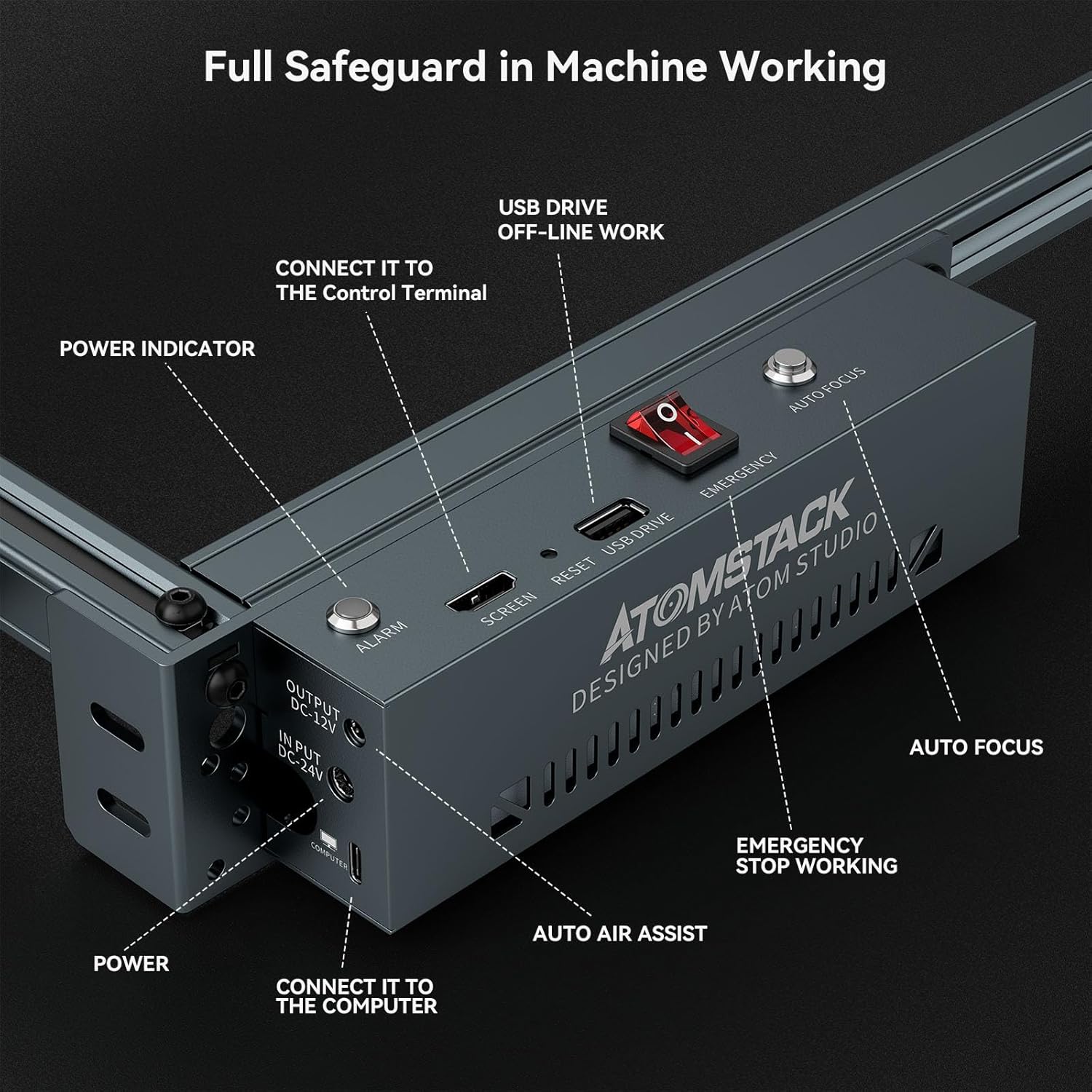
Image: Control panel highlighting the emergency stop button and various ports.
3. Isi Paket
Saat membuka kemasan, pastikan semua komponen yang tercantum di bawah ini ada dan dalam kondisi baik:

Image: All components included in the ATOMSTACK A5 PRO package.

Gambar: Detail view of the accessories and tools provided with the engraver.
For a detailed installation guide, please refer to the provided Installation Manual (PDF) or User Guide (PDF) documents:
4. Pengaturan & Instalasi
The ATOMSTACK A5 PRO features a strong and easy-to-install all-metal structure design, which enhances durability and engraving accuracy. Assembly is designed to be quick and straightforward.

Image: Diagram illustrating the quick assembly process of the engraver.
For detailed step-by-step assembly instructions, please consult the provided PDF manuals.
5. Key Features & Components
- Desain Pelindung Mata Baru: The protective case effectively filters 97% of UV rays, allowing observation of engraving without additional goggles for you and those around you.
- Ultra-fine Compression, Upgraded High-Performance Fixed-Focus Laser: Engraving can be performed without adjusting the focal length. The laser power is 5W-5.5W, and the focal length of the ultra-fine spot is reduced to 0.23mm². This allows for very detailed and fine engraving.
- Strong and Easy-to-Install Structure Design: The all-metal structure ensures the machine's sturdiness, durability, and improved engraving accuracy.
- Kompatibilitas Luas: The machine is compatible with various mature engraving software, including GRBL (Free) and LightBurn. It also supports Mac systems when using LightBurn.
- Penggunaan Luas: Capable of engraving on a variety of materials such as wood, bamboo, cardboard, plastic, leather, PCB board, aluminum oxide, metal (non-reflective plating and lacquer), ceramic, cobblestone, and acrylic.
- Bantuan Udara: The integrated air assist system helps to blow away debris and smoke during cutting, resulting in cleaner cuts and preventing charring.
- Ukiran Offline: The machine supports offline engraving, allowing you to load files onto a memory card and operate the engraver without a continuous computer connection.
- Limit Switches (X & Y): The inclusion of limit switches ensures that the laser module knows its boundaries, preventing it from crashing into the frame and ensuring precise movement.

Image: Comparison showing the fine detail achieved with 0.03mm² compressed spot technology.

Image: Close-up of the aluminum alloy frame, highlighting mechanical precision.

Gambar: Examples of various materials cut by the laser engraver, including black acrylic, basswood plywood, pine wood, paulownia, MDF, and vinyl.

Image: Various DIY projects and materials suitable for engraving and cutting, such as wood, bamboo, leather, plastic, acrylic, paper, cobblestone, stainless steel, ceramics, and foam cotton.

Image: Diagram illustrating the air assist mechanism and its effect on smoke removal during engraving.
6. Petunjuk Pengoperasian
The ATOMSTACK A5 PRO is designed for user-friendly operation. After assembly and connecting the power, you can begin your engraving or cutting projects.

Image: Cross positioning system for precise and horizontal engraving, showing observable framing and engraving alignment.
Penyesuaian Fokus: The fixed-focus laser simplifies setup as no manual focus adjustment is typically required. For specific materials or desired effects, refer to the software settings.

Image: Close-up of the laser module, indicating the focus adjustment knob.
Penggunaan Perangkat Lunak: The machine is compatible with GRBL and LightBurn. Install your preferred software on your computer (Windows or Mac with LightBurn) and connect the engraver via USB. For offline operation, prepare your engraving files on a MicroSD card and insert it into the machine.
Material Processing: The A5 PRO can cut various materials. For example, it can cut 12mm solid wood and 8mm acrylic in a single pass. It can also cut 0.05mm thin sheet metal.

Image: Two individuals working with the ATOMSTACK A5 PRO engraver on various materials.

Image: The engraver positioned to engrave a design onto a guitar, demonstrating its versatility for larger or irregularly shaped items.
7. Pemeliharaan
Regular maintenance ensures the longevity and optimal performance of your ATOMSTACK A5 PRO. Keep the laser lens clean and free of debris. Periodically check and clean the rails and belts to ensure smooth movement of the laser module. Always power off and unplug the device before performing any maintenance.
8. Penyelesaian masalah
If you encounter any issues with your ATOMSTACK A5 PRO, consider the following:
- Mesin tidak menyala: Ensure the power cable is securely connected and the power switch is in the ON position. Check the power indicator light on the control panel.
- Laser tidak menembak: Verify that the laser module is properly connected and seated. Check software settings for laser power and mode.
- Engraving/Cutting issues: Ensure the material is properly positioned and the focus is correct. Adjust speed and power settings in your software based on the material type. Clean the laser lens if the output is weak or inconsistent.
- Movement problems: Check for any obstructions on the rails. Ensure belts are properly tensioned and not slipping.
For more detailed troubleshooting, refer to the User Manual (PDF) or User Guide (PDF) provided with your product.
9. Spesifikasi
| Fitur | Spesifikasi |
|---|---|
| Dimensi Produk | 22.44x23.62x10.63 inci |
| Nomor Model Barang | ATOMSTACK A5 Pro 40W |
| Berat Barang | 10.98 pon |
| Wilayah kerja | 400mm * 400mm (approx. 15.75 x 15.75 inches) |
| Kekuatan Laser | 5W-5.5W (Output) |
| Ukuran Titik Laser | 0.23 mm² |
10. Garansi & Dukungan
For warranty information and customer support, please refer to the official ATOMSTACK website or contact their customer service directly. Additional user manuals and guides are available for download:


