1. Pendahuluan
Thank you for choosing the AUKEY Sprint Wireless Power Bank PB-Y32. This device is designed to provide portable power for your mobile devices, featuring both wired and wireless fast charging capabilities. Please read this manual carefully before use to ensure optimal performance and safety.
2. Fitur Produk
- Kapasitas 10000mAh: High-capacity battery to charge your devices multiple times.
- Dukungan Pengisian Cepat: Supports Quick Charge 3.0 and Power Delivery for rapid charging of compatible devices.
- Pengisian Daya Nirkabel: Conveniently charge Qi-compatible devices at up to 10W.
- Beberapa Port Keluaran: Dilengkapi dengan port USB-C dan USB-A untuk pengisian daya yang serbaguna.
- Desain Kompak dan Portabel: Mudah dibawa untuk daya listrik saat bepergian.
- Fitur Keselamatan: Built-in protections against overcharge, over-discharge, overcurrent, and short circuits.
3. Isi Paket
- AUKEY Sprint Wireless Power Bank PB-Y32
- Kabel USB-A ke C
- Panduan Pengguna
4. Pengaturan dan Penggunaan Awal
4.1 Mengisi Daya Power Bank
Before first use, fully charge the power bank. It takes approximately 7 hours to fully charge the power bank using a compatible USB-C power adapter.
- Connect the included USB-A to C cable to the power bank's USB-C input port.
- Connect the other end of the cable to a USB wall charger (not included).
- The LED indicators will light up to show the charging status. All four LEDs will be solid when fully charged.
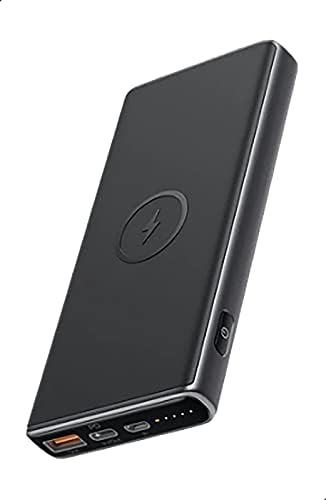
Image: The AUKEY Sprint Wireless Power Bank PB-Y32, showcasing its sleek black design and port layout.
5. Petunjuk Pengoperasian
5.1 Pengisian Kabel
To charge your device using a cable:
- Hubungkan kabel pengisi daya perangkat Anda ke port output USB-A atau port output USB-C pada power bank.
- Hubungkan ujung kabel yang lain ke perangkat Anda.
- Power bank akan secara otomatis mulai mengisi daya perangkat Anda.
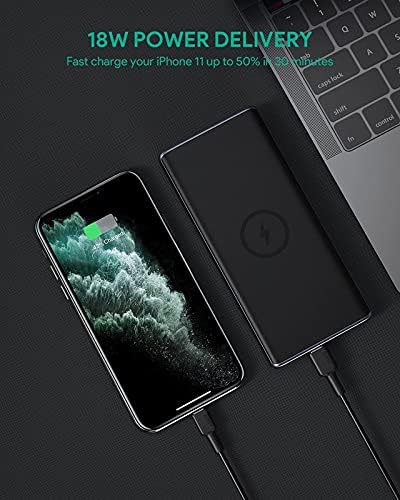
Image: The power bank connected via cable to a smartphone, demonstrating 18W Power Delivery fast charging.

Image: A smartphone connected to the power bank, illustrating Qualcomm Quick Charge 3.0 capabilities for rapid charging.
5.2 Pengisian Nirkabel
To charge your Qi-compatible device wirelessly:
- Place your Qi-compatible device directly onto the wireless charging pad located on the top surface of the power bank. Ensure the device is centered on the charging symbol.
- The power bank will automatically detect your device and begin wireless charging.

Image: A smartphone placed on the power bank's surface, demonstrating the wireless charging feature.

Gambar: Close-up view of the power bank showing the silicone ring designed to keep the phone stable during wireless charging.
5.3 Mode Pengisian Arus Rendah
This mode is ideal for charging low-power devices like wireless earbuds or smartwatches.
- Press and hold the power button for 2 seconds to enter low-current charging mode. The first LED indicator will blink green.
- Connect your low-power device or place it on the wireless charging pad.
- To exit low-current charging mode, press the power button once, or it will automatically exit after 2 hours.
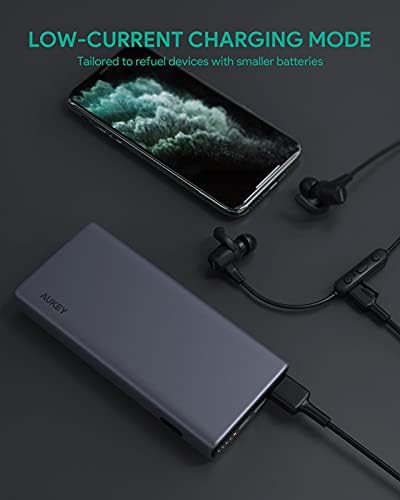
Image: The power bank connected to a smartphone and wireless earbuds, demonstrating its low-current charging mode for smaller devices.

Image: An illustration showing the power bank's broad compatibility with various devices, including smartphones, tablets, and gaming consoles.
6. Pemeliharaan
- Keep the power bank away from liquids, extreme heat, and strong magnetic fields.
- Jangan menjatuhkan atau membiarkan power bank terkena benturan keras.
- Bersihkan power bank dengan kain kering dan lembut. Jangan gunakan pembersih korosif.
- Simpan power bank di tempat yang sejuk dan kering saat tidak digunakan.
- Isi ulang power bank setidaknya sekali setiap 3 bulan untuk menjaga kesehatan baterai.
7. Penyelesaian masalah
7.1 Power Bank Tidak Mengisi Daya
- Pastikan kabel pengisian daya tersambung dengan aman ke bank daya dan pengisi daya dinding.
- Cobalah kabel USB-C atau pengisi daya dinding yang lain.
- Verify the wall charger's output meets the power bank's input requirements (DC 5V-3A / 9V-2A).
7.2 Perangkat Tidak Mengisi Daya dari Power Bank
- Pastikan power bank memiliki daya yang cukup.
- Cobalah kabel pengisi daya yang berbeda untuk perangkat Anda.
- For wireless charging, ensure your device is Qi-compatible and properly aligned on the charging pad. Remove any thick cases that might interfere.
- If charging a low-power device, ensure low-current charging mode is activated.
7.3 Power Bank Terlalu Panas
- Wajar jika power bank menjadi sedikit hangat selama pengisian atau pengosongan daya.
- If it becomes excessively hot, disconnect all devices and the charging cable immediately. Allow it to cool down before resuming use.
- Ensure proper ventilation and avoid covering the power bank during use.
8. Spesifikasi
| Fitur | Detil |
|---|---|
| Nama Model | Lari cepat |
| Nomor Model | PB-Y32 |
| Kapasitas Baterai | 10000 mAh |
| Masukan USB Tipe-C | DC 5V-3A / 9V-2A |
| Keluaran USB Tipe-C | DC 5V-3A / 9V-2A / 12V-1.5A |
| Keluaran USB Tipe-A | 18W |
| Daya Keluaran Maksimum | 18W |
| Keluaran Pengisian Nirkabel | 5W, 7.5W, 10W |
| Ukuran | Ukuran 144x67x17 mm |
| Berat | 210 gram |
| Komposisi Sel Baterai | Polimer Litium |
| Fitur Khusus | Short Circuit Protection, Wireless Charging |
| Warna | Hitam |
| Waktu Pengisian Baterai | 7 jam |
9. Garansi dan Dukungan
According to the product specifications, this product comes with Tidak Ada Garansi. For any product-related inquiries or support, please refer to the retailer or manufacturer's official websitus untuk informasi kontak.


