Perkenalan
This manual provides detailed instructions for the installation, operation, maintenance, and troubleshooting of your GIGABYTE GeForce RTX 3080 Vision OC 10G graphics card. This high-performance graphics card is designed for demanding visual tasks, powered by NVIDIA's Ampere architecture, featuring 2nd Generation RT Cores, 3rd Generation Tensor Cores, and 10GB GDDR6X memory. It incorporates the WINDFORCE 3X Cooling System for efficient thermal management and RGB Fusion 2.0 for customizable lighting.
Pengaturan dan Instalasi
1. Persyaratan Sistem
- Motherboard yang sesuai dengan PCI Express dengan satu slot grafis x16 lebar ganda.
- Catu daya minimal 750W dengan dua konektor daya PCIe 8-pin.
- Sistem operasi Microsoft Windows 10 64-bit atau Linux 64-bit.
- 32GB system memory recommended for optimal performance.
- Koneksi internet untuk mengunduh driver.
2. Isi Paket
- GIGABYTE GeForce RTX 3080 Vision OC 10G Graphics Card
- User Manual (dokumen ini)
3. Instalasi Fisik
- Siapkan sistem Anda: Matikan komputer Anda dan lepaskan semua kabel. Buka casing komputer.
- Temukan slot PCIe: Identifikasi slot PCI Express x16 yang tersedia pada motherboard Anda.
- Lepaskan penutup slot: Remove the necessary expansion slot covers from the back of your computer case to accommodate the graphics card.
- Pasang kartu grafis: Sejajarkan kartu grafis dengan hati-hati pada slot PCIe dan tekan dengan kuat hingga terpasang dengan aman. Pastikan klip penahan pada slot PCIe terkunci pada tempatnya.

Gambar: Depan view of the GIGABYTE GeForce RTX 3080 Vision OC 10G Graphics Card, showcasing the triple WINDFORCE fans and the white/silver shroud design.
- Amankan kartu: Fasten the graphics card to the computer case using screws.
- Hubungkan kabel daya: Connect the two 8-pin PCIe power connectors from your power supply to the corresponding ports on the graphics card. Ensure a firm connection.
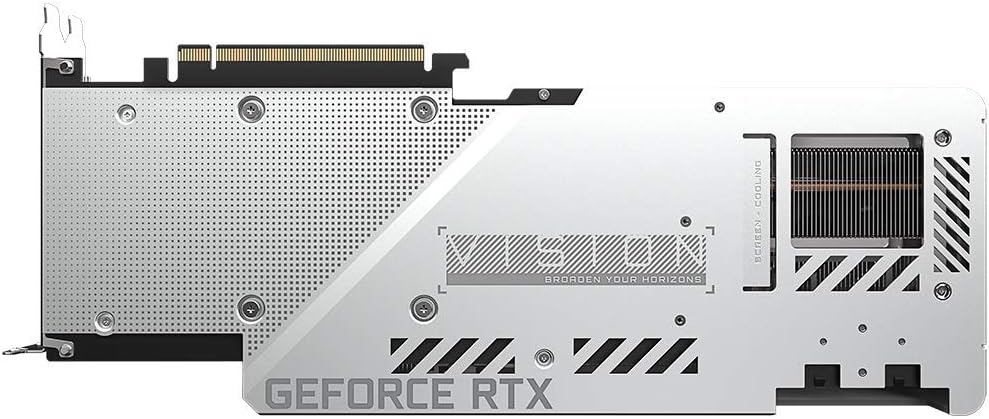
Gambar: Belakang view of the GIGABYTE GeForce RTX 3080 Vision OC 10G Graphics Card, highlighting the protective metal backplate with ventilation cutouts and the GeForce RTX branding.
- Tutup kasusnya: Pasang kembali penutup casing komputer dan sambungkan kembali semua kabel.
- Connect display: Hubungkan monitor Anda ke salah satu output tampilan (HDMI atau DisplayPort) pada kartu grafis.
Petunjuk Pengoperasian
1. Instalasi Driver
- Nyalakan: Turn on your computer. The system may boot into a lower resolution or use a generic display driver.
- Unduh driver: Kunjungi situs resmi GIGABYTE weblokasi (www.gigabyte.com) atau situs resmi NVIDIA weblokasi (www.nvidia.com/drivers).
- Select product: Navigate to the support section and locate the drivers for the GeForce RTX 3080 series.
- Instal driver: Download the latest recommended drivers and follow the on-screen instructions to complete the installation. A system restart may be required.
2. Konfigurasi Perangkat Lunak
- Pusat Kontrol GIGABYTE / Mesin AORUS: For advanced control over your graphics card, including fan speed adjustment, overclocking profiles, and RGB Fusion 2.0 lighting customization, download and install the GIGABYTE Control Center or AORUS Engine software from the GIGABYTE weblokasi.
- Pengalaman NVIDIA GeForce: Install NVIDIA GeForce Experience for optimal game settings, driver updates, and access to features like ShadowPlay.
Pemeliharaan
- Penghilangan Debu: Bersihkan debu dari kipas kartu grafis dan heatsink secara teratur menggunakan udara bertekanan. Pastikan sistem dimatikan dan dicabut sebelum dibersihkan.
- Inspeksi Penggemar: Periodically check the fans for any obstructions or unusual noises.
- Pembaruan Driver: Keep your graphics drivers updated to ensure optimal performance and stability.
Penyelesaian Masalah
Tidak Ada Keluaran Tampilan
- Pastikan kabel monitor terhubung dengan aman ke kartu grafis dan monitor.
- Verifikasi bahwa kartu grafis terpasang sepenuhnya pada slot PCIe.
- Check that all required PCIe power connectors are securely attached to the graphics card.
- Uji dengan kabel tampilan atau monitor yang berbeda jika memungkinkan.
Ketidakstabilan atau Kerusakan Sistem
- Pastikan catu daya Anda memenuhi kebutuhan daya minimumtagkebutuhan (750W).
- Perbarui driver grafis Anda ke versi terbaru.
- Monitor GPU temperatures using software like GIGABYTE Control Center to check for overheating.
- Periksa apakah ada konflik dengan driver atau perangkat lunak lain yang terpasang.
Kinerja Buruk
- Pastikan driver terpasang dengan benar dan selalu terbaru.
- Verify that the graphics card is running at its intended clock speeds (can be checked with monitoring software).
- Check background applications that might be consuming system resources.
- Ensure your system's BIOS/UEFI is updated.
Spesifikasi
| Unit Pemrosesan Grafis | Kartu grafis NVIDIA GeForce RTX 3080 |
| Memori Video | 10 GB GDDR6X |
| Antarmuka Memori | 320-sedikit |
| Jam Dorong | Frekuensi 1800 MHz |
| Kecepatan Memori | Frekuensi 19000 MHz |
| Port Keluaran | Port Layar, HDMI |
| Resolusi Digital Maksimum | 7680x4320 (via DisplayPort 1.4a) |
| Multi-view | 4 |
| Dimensi Kartu (PxLxT) | 12.6 x 4.96 x 2.17 inci (320 x 126 x 55 mm) |
| PSU yang direkomendasikan | 750W |
| Konektor Daya | 2x 8-pin |
| PCI Ekspres | 4.0x16 tahun |
| Nomor Model | GV-N3080VISION OC-10GD 2.0 |
Informasi Garansi
GIGABYTE products are covered by a limited warranty. The specific terms and duration of the warranty may vary by region and product. Please refer to the official GIGABYTE website or your product's packaging for detailed warranty information and registration procedures. Keep your proof of purchase for warranty claims.
Dukungan Teknis
For technical assistance, driver downloads, FAQs, and further support, please visit the official GIGABYTE support weblokasi:
Anda juga dapat menghubungi layanan pelanggan GIGABYTE melalui informasi kontak yang tersedia di websitus untuk wilayah spesifik Anda.


