Perkenalan
Welcome to your new Matrix Fitness TF30 Treadmill with XER Console. This manual provides essential information for the safe and effective operation, setup, maintenance, and troubleshooting of your treadmill. Designed for a comfortable and high-performance running experience, the TF30 combines robust construction with advanced technology to enhance your fitness journey.

Figure 1: Matrix Fitness TF30 Treadmill with XER Console, showcasing its sleek design and integrated console.
Informasi Keselamatan
Before operating the treadmill, please read and understand all safety instructions. Failure to do so may result in serious injury or equipment damage.
- Pemberhentian darurat: Always attach the safety key clip to your clothing before starting a workout. In case of an emergency, pulling the safety key or pressing the emergency stop button will immediately halt the treadmill.
- Izin: Ensure adequate clearance around the treadmill (at least 6 feet behind and 2 feet on each side) for safe operation and emergency dismount.
- Alas kaki: Selalu kenakan alas kaki olahraga yang sesuai saat menggunakan treadmill.
- Anak-anak dan Hewan Peliharaan: Jauhkan anak-anak dan hewan peliharaan dari treadmill selama pengoperasian.
- Kondisi Medis: Konsultasikan dengan dokter sebelum memulai program olahraga baru apa pun, terutama jika Anda memiliki kondisi medis yang sudah ada sebelumnya.
- Kekuatan: Connect the treadmill to a properly grounded outlet. Do not use extension cords.
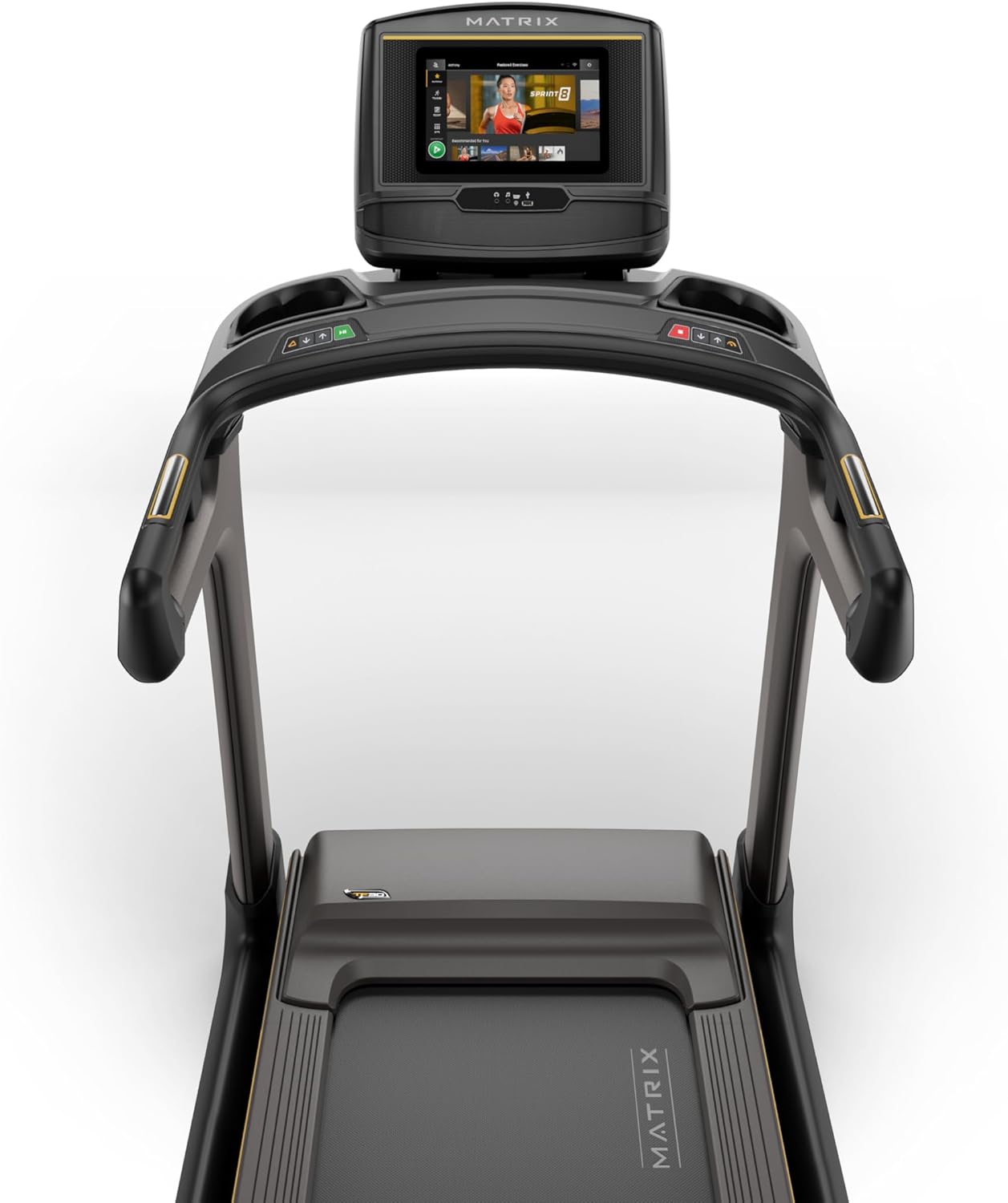
Figure 2: Close-up of the XER Console, highlighting the emergency stop button and safety key attachment point.
Pengaturan
The Matrix Fitness TF30 Treadmill requires some assembly. Please ensure all components listed below are present before beginning assembly.
Komponen yang Termasuk:
- Bingkai Treadmill
- Tiang-tiang
- Mast Boots
- Basis Konsol
- Stang
- Handlebar Sleeves
- Tutup Stang
- Frame Cover Sets
- Sampul Belakang
- Kabel Listrik
- Kunci Keamanan
- Perangkat Keras
For detailed assembly instructions, please refer to the separate assembly guide provided with your product. Ensure the treadmill is placed on a flat, stable surface.
Petunjuk Pengoperasian
Your TF30 Treadmill is equipped with advanced features for an optimal workout.
Fitur Utama:
- Permukaan Berjalan: A spacious 20" x 55" running surface provides ample room for comfortable strides.
- Speed & Incline: Adjust speed from 0.5 to 12.5 mph and incline from 0% to 15% to customize your workout intensity.
- Sistem Penggerak Johnson: Experience quiet, durable, and responsive performance with the continuous-duty drive system.
- Sistem Dek Terbaik: Benefit from a heavy-duty frame, extra-thick deck, and industrial-grade cushioning for superior comfort and joint protection.
- Desain Hemat-Ruang: The treadmill features a near 90-degree fold for convenient storage when not in use.

Figure 3: Diagram illustrating key features of the TF30 Treadmill, including its folding design, running surface, motor, incline, speed, and cushioning.

Figure 4: Demonstrating the space-saving folding capability of the TF30 Treadmill.
XER Console Operation:
The 10-inch touchscreen XER Console offers a rich interactive experience.
- Aplikasi Terintegrasi: Stream entertainment from popular apps like Netflix, YouTube, and Spotify directly on the console.
- Program Latihan: Access 12 built-in programs, including Sprint 8, and integrate with iFIT and Virtual Active for diverse workout experiences and scenic routes.
- Konektivitas: Connect via Bluetooth FTMS to third-party apps and use Bluetooth HR with the included strap for heart rate monitoring.
- Pengisian Daya Nirkabel: Conveniently charge your compatible smartphone by placing it on the designated wireless charging pad on the console.
- Pengguna Profiles: The console supports multiple user profiles, allowing personalized settings and tracking for each user.

Figure 5: The XER Console, highlighting its 10-inch touchscreen and integrated apps for entertainment and diverse workouts.

Figure 6: The XER Console's interface showing various entertainment applications available for use during workouts.

Figure 7: The XER Console displaying a virtual active scenic route, enhancing the immersive workout experience.
Pemeliharaan
Perawatan rutin memastikan umur panjang dan kinerja treadmill Anda yang optimal.
- Pembersihan: Wipe down the treadmill and console after each use with a damp Gunakan kain untuk menyeka keringat dan debu. Hindari pembersih abrasif.
- Pelumasan Sabuk: Periodically check and lubricate the running belt according to the instructions in your detailed product manual to ensure smooth operation and prevent wear.
- Belt Tension & Alignment: Inspect the running belt for proper tension and alignment. Adjust as needed to prevent slipping or rubbing.
- Area Motorik: Keep the area around the motor clean and free of dust and debris to ensure proper ventilation.
Penyelesaian Masalah
If you encounter issues with your treadmill, refer to the following common troubleshooting tips.
| Masalah | Kemungkinan Penyebab | Larutan |
|---|---|---|
| Treadmill tidak menyala. | Power cord not connected, circuit breaker tripped, safety key not engaged. | Ensure power cord is securely plugged in. Check household circuit breaker. Ensure safety key is fully inserted. |
| Sabuk lari tergelincir atau ragu-ragu. | Ketegangan sabuk terlalu kendor, sabuk perlu pelumasan. | Adjust belt tension according to manual. Lubricate the running belt. |
| Kebisingan yang tidak biasa selama pengoperasian. | Loose components, motor issues, belt friction. | Inspect for loose bolts and tighten. Check belt lubrication. If noise persists, contact customer support. |
| Console display is blank or unresponsive. | Power issue, software glitch. | Ensure power is connected. Try restarting the treadmill by unplugging and re-plugging. |
For more complex issues, please refer to the comprehensive troubleshooting section in your full user manual or contact Matrix Fitness customer support.
Spesifikasi
| Spesifikasi | Nilai |
|---|---|
| Merek | Matriks |
| Nama Model | Mesin Lari Matrix Fitness TF30 |
| Gaya | TF30 Treadmill with XER Console |
| Dimensi Produk (P x L x T) | 77"Panjang x 35"Lebar x 62"T |
| Ukuran Terlipat | 42"x35"x71" |
| Berat Barang | 294 pon |
| Rekomendasi Berat Maksimum | 350 pon |
| Running Surface (Deck Length x Deck Width) | 55 inci x 20 inci |
| Kecepatan Maksimum | 12.5 Mil per Jam |
| Kecepatan Minimum | 0.5 Mil per Jam |
| Persen Kemiringan Maksimumtage | 15% |
| Tenaga Kuda Maksimum | 3.25 Tenaga Kuda |
| Jenis Tampilan | LCD (10 Inches Screen Size) |
| Jumlah Program | 12 |
| Sumber Daya | Listrik Kabel |
| Perakitan Diperlukan | Ya |
| Metrik yang Diukur | Jarak |

Figure 8: Dimensions of the Matrix Fitness TF30 Treadmill.
Garansi dan Dukungan
Your Matrix Fitness TF30 Treadmill is backed by a comprehensive manufacturer's warranty:
- Bingkai: Garansi Seumur Hidup
- Motor dan Peredam: Garansi Seumur Hidup
- Menghibur: 5 years parts / 1 year labor
- Frame (Parts/Labor): 5 years parts / 2 years labor
For customer support or warranty claims, please contact Matrix Fitness USA directly.


