Perkenalan
The Vieta Pro Note True Wireless Earphones are designed to provide a high-quality audio experience with advanced features. These earphones utilize Bluetooth 5.1 for stable wireless connectivity, offer Active Noise Cancellation (ANC) up to -30dB, and include an integrated microphone for clear communication. With IPX4 water resistance, they are suitable for various activities. The charging case extends the total battery life to up to 20 hours.
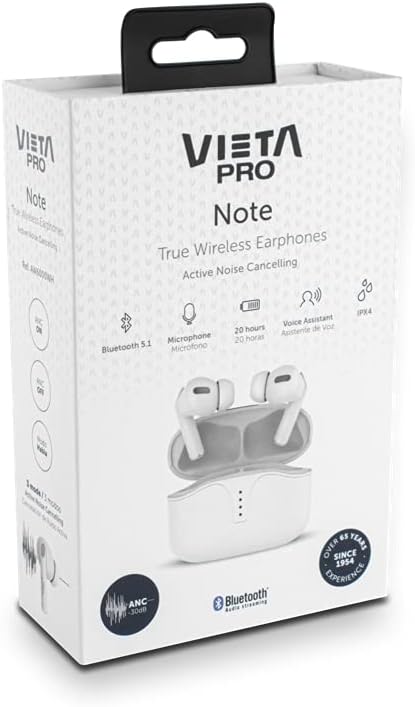
Image: Vieta Pro Note True Wireless Earphones in their retail packaging, highlighting key features like Bluetooth 5.1, microphone, 20 hours battery, Voice Assistant, and IPX4 rating.
Pengaturan
1. Pengisian Awal
Before first use, fully charge the earphones and the charging case. Connect the provided USB Type-C cable to the charging port on the case and to a power source. The LED indicators on the case will show the charging status and remaining battery level.
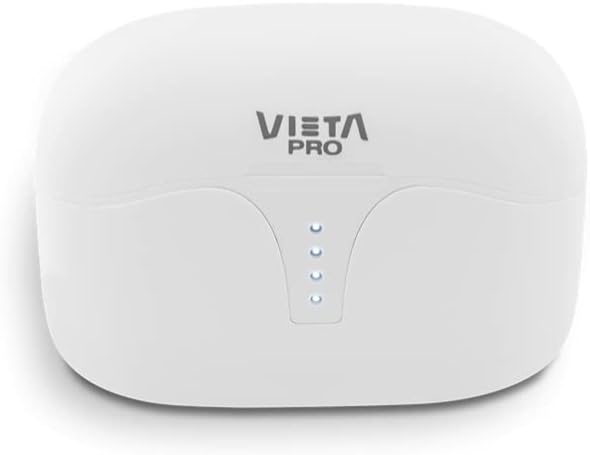
Gambar: Atas view of the Vieta Pro Note charging case, showing the four LED indicators that display battery status.
2. Memasangkan dengan Perangkat
- Pastikan earphone terisi daya dan diletakkan di dalam wadah pengisi daya.
- Buka penutup casing pengisi daya. Earphone akan otomatis masuk ke mode berpasangan.
- Pada telepon pintar atau perangkat Anda yang mendukung Bluetooth, buka pengaturan Bluetooth.
- Select "Vieta Pro Note" from the list of available devices.
- Setelah terhubung, suara konfirmasi akan terdengar, dan earphone siap digunakan.
The Vieta Pro Note earphones feature Dual Master Technology, meaning both earbuds can function independently. You can use either the left or right earbud alone after initial pairing.
Image: The Vieta Pro Note True Wireless Earphones removed from their open charging case, ready for pairing or use.
Petunjuk Pengoperasian
1. Daya Hidup/Mati
- Nyalakan: Open the charging case lid, or take the earphones out of the case. They will automatically power on and attempt to connect to the last paired device.
- Matikan: Masukkan kembali earphone ke dalam wadah pengisi daya dan tutup penutupnya. Earphone akan mati secara otomatis dan mulai mengisi daya.
2. Kontrol Sentuh
The Vieta Pro Note earphones feature a touch control panel on each earbud for various functions:

Gambar: Close-up view of the left Vieta Pro Note earbud, showing the touch-sensitive area and microphone.
- Putar/Jeda: Ketuk satu kali pada salah satu earbud.
- Lagu Berikutnya: Ketuk dua kali pada earbud kanan.
- Lagu Sebelumnya: Ketuk dua kali pada earbud kiri.
- Volume Naik: Ketuk tiga kali pada earbud kanan.
- Volume Turun: Ketuk tiga kali pada earbud kiri.
- Menjawab/Mengakhiri Panggilan: Ketuk satu kali pada salah satu earbud.
- Tolak Panggilan: Tekan dan tahan salah satu earbud selama 2 detik.
- Aktifkan Voice Assistant: Tekan dan tahan salah satu earbud selama 3 detik.
3. Mode Peredam Kebisingan Aktif (ANC)
The earphones offer three noise cancellation modes:
- Peredam Kebisingan Aktif (ANC): Reduces ambient noise by up to -30dB, ideal for noisy environments.
- Talk Mode (Transparency Mode): Allows you to hear your surroundings and engage in conversations without removing the earphones.
- Dinonaktifkan: Turns off noise cancellation for a standard listening experience.
To switch between ANC modes, press and hold the touch panel on the kiri earbud for approximately 2 seconds until you hear a voice prompt indicating the mode change.
Pemeliharaan
1. Pembersihan
- Bersihkan earbud dan casing pengisi daya secara teratur dengan kain yang lembut, kering, dan tidak berbulu.
- Jangan gunakan pembersih abrasif, pelarut, atau semprotan aerosol.
- Bersihkan perlahan kotoran telinga atau debu dari ujung telinga dan jaring speaker menggunakan sikat kecil yang lembut atau kapas.
2. Penyimpanan
When not in use, store the earphones in their charging case to protect them from dust, damage, and to ensure they remain charged.
3. Tahan Air (IPX4)
The Vieta Pro Note earphones are rated IPX4 for water resistance. This means they are resistant to splashing water from any direction. They are suitable for use during workouts or in light rain. However, they are bukan designed for submersion in water or exposure to pressurized water jets. Do not use them in a shower or while swimming.
Penyelesaian Masalah
- Tidak ada suara: Ensure earphones are charged, connected to your device, and volume is turned up on both the earphones and your device.
- Tidak Dapat Dipasangkan: Make sure Bluetooth is enabled on your device and the earphones are in pairing mode. Try turning Bluetooth off and on again on your device. If issues persist, try resetting the earphones (refer to the full manual for specific reset instructions if available).
- Koneksi Intermiten: Ensure there are no obstructions between the earphones and your device. Keep the device within the Bluetooth range (typically 10 meters/33 feet).
- Earbud Tidak Mengisi Daya: Check that the charging cable is securely connected and the charging case has power. Ensure the earbuds are correctly seated in the charging case.
Spesifikasi
| Nomor Model | AW6000WH |
| Merek | Vieta Pro |
| Konektivitas | Bluetooth 5.1 |
| Pembatalan Kebisingan | Peredam Kebisingan Aktif (-30dB) |
| Mikropon | Terintegrasi |
| Tahan Air | Tingkat IPX4 |
| Masa Pakai Baterai Earbud | Hingga 5 jam |
| Total Daya Tahan Baterai (dengan casing) | Hingga 20 jam |
| Port Pengisian Daya | USB Tipe-C |
| Jenis Kontrol | Kontrol Sentuh, Kontrol Volume |
| Faktor Bentuk | Di telinga |
| Bahan | Plastik |
Garansi dan Dukungan
For warranty information, technical support, or further assistance, please refer to the official Vieta Pro websitus web atau hubungi layanan pelanggan mereka. Simpan bukti pembelian Anda untuk klaim garansi.


