1. Pendahuluan
Welcome to the Hubble Connected Touch Twin 5-inch Smart Baby Monitor. This device is designed to provide reliable monitoring of your child with advanced features including a 5-inch interactive touchscreen viewer, two portable camera units, Wi-Fi connectivity for smartphone access, remote pan, tilt, and zoom, two-way talk, room temperature display, infrared night vision, and preloaded lullabies. This manual will guide you through the setup, operation, and maintenance of your new baby monitor system.
2. Informasi Keselamatan Penting
- Bahaya Tercekik: Keep all cords out of reach of children. Never place camera or cords within 3 feet (1 meter) of the crib or playpen. Secure cords to a wall or floor using cable clips.
- Bahaya Tersedak: Produk ini mengandung bagian-bagian kecil. Jauhkan dari jangkauan anak-anak.
- Terlalu panas: Do not cover the monitor or camera with blankets or towels. Ensure proper ventilation.
- Air dan Kelembaban: Do not expose the product to water or moisture. Use only in dry indoor environments.
- Sumber Daya: Use only the provided power adapters. Using unauthorized adapters may damage the product and void the warranty.
- Gangguan: Keep the monitor away from other electronic devices that may cause interference.
- Pengawasan Orang Dewasa: This product is intended to assist in monitoring your child and should not be used as a substitute for responsible adult supervision.
3. Isi Paket
Your Hubble Connect Touch Twin 5-inch Smart Baby Monitor package includes:
- 2 x Baby Camera Units
- 1 x Parent Monitor (5-inch Interactive Touchscreen Vieweh)
- 2 x Adaptor Daya
- 1 x Panduan Memulai Cepat
- 2 x Hubble Grip flexible mounts

4. Pengaturan
4.1 Charging the Parent Unit and Camera Units
Before initial use, fully charge the Parent Monitor and both Camera Units using the provided power adapters. A full charge ensures optimal performance and portability.
4.2 Penempatan Kamera
Position the camera units in locations that provide a clear view of your child. Ensure the camera is at least 3 feet (1 meter) away from the crib or playpen to prevent strangulation hazards from the power cord. The flexible Hubble Grip mounts allow for versatile placement on crib rails or other surfaces.

The camera features remote pan, tilt, and zoom capabilities, allowing you to adjust the viewing angle from the parent unit or smartphone app.
4.3 Pairing the Camera Units (if not pre-paired)
Your camera units should be pre-paired with the parent unit. If re-pairing is needed, consult the Quick Start Guide for specific instructions. Generally, this involves accessing the pairing menu on the parent unit and pressing a pairing button on the camera unit.
4.4 Connecting to Wi-Fi and Smartphone App
For advanced features and remote viewing, download the HubbleClub app on your smartphone or tablet. Follow the in-app instructions to connect your monitor system to your home Wi-Fi network.

5. Mengoperasikan Monitor Anda
5.1 Dasar Viewing and Navigation
Turn on the Parent Monitor. The screen will display the live video feed from one of your camera units. Use the directional buttons on the parent unit to pan and tilt the camera remotely. Pinch-to-zoom functionality may be available on the touchscreen for closer views.

5.2 Percakapan Dua Arah
Press and hold the microphone button on the parent unit to speak to your child through the camera's speaker. Release the button to listen.
5.3 Penglihatan Malam
The camera automatically switches to infrared night vision in low-light conditions, providing a clear black-and-white image of your child.

5.4 Lullabies and Soothing Sounds
Access the menu on the parent unit to select and play preloaded lullabies, audiobooks, or soothing sounds to help your child relax.
5.5 Pemantauan Suhu Ruangan
The parent unit displays the room temperature detected by the camera unit, allowing you to ensure a comfortable environment for your child.
5.6 Mode Privasi
For enhanced privacy, manually close the camera lens cover. This physically blocks the camera's view.

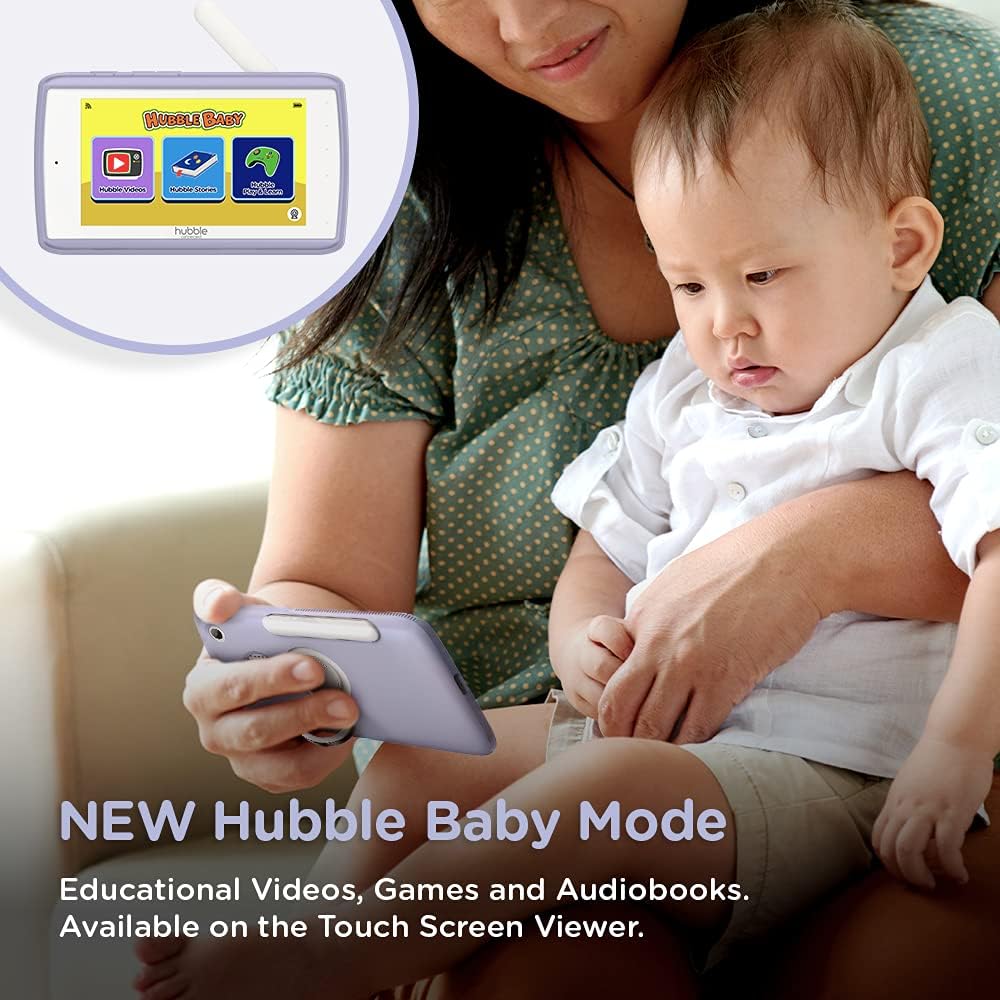
5.7 Hubble Baby Mode
The 5-inch interactive touchscreen viewer can switch to "Hubble Baby Mode," offering educational videos, games, and audiobooks for your child's entertainment and learning as they grow.
6. Pemeliharaan
- Pembersihan: Use a soft, dry cloth to clean the monitor and camera units. Do not use abrasive cleaners or solvents.
- Perawatan Baterai: To prolong battery life, avoid extreme temperatures and fully discharge and recharge the battery periodically.
- Penyimpanan: If storing the product for an extended period, ensure it is fully charged and stored in a cool, dry place.
7. Penyelesaian masalah
| Masalah | Larutan |
|---|---|
| Tidak ada video/audio pada unit utama. | Ensure both parent unit and camera are powered on and charged. Check if they are within range. Re-pair the units if necessary (refer to Quick Start Guide). |
| Poor video quality or interference. | Move the camera or parent unit closer. Ensure no large metal objects or other electronic devices are causing interference. Check Wi-Fi signal strength if using the app. |
| Baterai unit induk cepat habis. | Reduce screen brightness. Enable ECO mode (if available). Ensure the unit is fully charged before use. Battery life can vary with usage. |
| Cannot connect to HubbleClub app. | Ensure your home Wi-Fi is active and the camera is within range. Restart the camera and your router. Verify correct Wi-Fi password in the app. |
| Camera not responding to pan/tilt/zoom. | Check connection between parent unit/app and camera. Restart both devices. Ensure no physical obstructions are blocking camera movement. |
8. Spesifikasi
| Fitur | Detil |
|---|---|
| Ukuran Layar | 5 inci |
| Resolusi Pengambilan Video | 720p |
| Teknologi Konektivitas | Nirkabel, Wi-Fi |
| Sumber Daya | Bertenaga Baterai |
| Fitur Khusus | Penglihatan Malam |
| Penggunaan Dalam/Luar Ruangan | Dalam |
| Komponen yang Termasuk | 2 x Baby Camera Units, Parent Monitor, 2 x Power Adapters, Quick Start Guide |
| Berat Barang | 3.25 pon |
| Dimensi Produk | 13x13x13 inci |
| Baterai | Diperlukan 3 baterai Lithium Ion (termasuk) |
9. Garansi dan Dukungan
For warranty information and technical support, please refer to the official Hubble Connected websitus web atau hubungi layanan pelanggan mereka secara langsung. Simpan bukti pembelian Anda untuk klaim garansi.
Kunjungi HUBBLE CONNECTED Store untuk informasi dan produk lebih lanjut.


