Petunjuk Keselamatan Penting
Bacalah semua petunjuk sebelum menggunakan alat ini. Kegagalan mengikuti petunjuk ini dapat mengakibatkan sengatan listrik, kebakaran, atau cedera serius.
- Jangan gunakan di luar ruangan atau pada permukaan basah.
- Jangan biarkan digunakan sebagai mainan. Perhatian yang cermat diperlukan saat digunakan oleh atau di dekat anak-anak.
- Gunakan hanya sesuai yang dijelaskan dalam panduan ini. Gunakan hanya aksesori yang direkomendasikan pabrik.
- Jangan gunakan dengan kabel atau steker yang rusak. Jika alat tidak berfungsi sebagaimana mestinya, terjatuh, rusak, ditinggalkan di luar ruangan, atau terjatuh ke dalam air, kembalikan ke pusat servis.
- Jangan menarik atau membawa dengan kabel, menggunakan kabel sebagai pegangan, menutup pintu dengan kabel, atau menarik kabel di sekitar tepi atau sudut yang tajam. Jangan menjalankan alat di atas kabel. Jauhkan kabel dari permukaan yang panas.
- Jangan mencabut dengan menarik kabelnya. Untuk mencabut, pegang stekernya, bukan kabelnya.
- Jangan memegang steker atau peralatan dengan tangan basah.
- Jangan masukkan benda apa pun ke dalam lubang. Jangan gunakan jika lubang tersumbat; jauhkan dari debu, serat, rambut, dan apa pun yang dapat mengurangi aliran udara.
- Jauhkan rambut, pakaian longgar, jari, dan semua bagian tubuh dari celah dan bagian yang bergerak.
- Jangan mengambil apa pun yang terbakar atau berasap, seperti rokok, korek api, atau abu panas.
- Jangan gunakan tanpa cangkir debu dan/atau filter pada tempatnya.
- Matikan semua kontrol sebelum mencabutnya.
- Berhati-hatilah saat membersihkan tangga.
- Jangan gunakan untuk mengambil cairan yang mudah terbakar, seperti bensin, atau gunakan di area di mana cairan tersebut mungkin ada.
- Simpan alat di dalam ruangan.
Isi Paket
Your iHome StickVac SV1 package includes the following components:
- Unit Motor Utama
- Tongkat Ekstensi
- Motorized Floor Brush with LED Path Light
- Kuas Daya Mini
- Alat Celah
- Surface Tools (Upholstery Tool, Bristle Brush)
- Kit Pemasangan di Dinding
- Adaptor Daya

Image: All components included with the iHome StickVac SV1.
Produk Selesaiview
The iHome StickVac SV1 is a versatile 3-in-1 cordless vacuum cleaner designed for various cleaning tasks. It features a powerful motor, multi-surface brush with LED lights, and a 3-stagSistem filtrasi HEPA.

Image: The iHome StickVac SV1 in use as a stick vacuum.
Pengaturan dan Perakitan
Follow these steps to assemble your iHome StickVac SV1:
- Cara Merakit Penyedot Debu Tongkat: Insert the extension wand into the main motor unit until it clicks into place. Then, attach the motorized floor brush to the other end of the extension wand, ensuring it locks securely.
- Convert to Handheld Vacuum: To use as a handheld vacuum, detach the extension wand and motorized floor brush from the main motor unit. You can then directly attach accessories like the crevice tool or surface tools to the main motor unit.
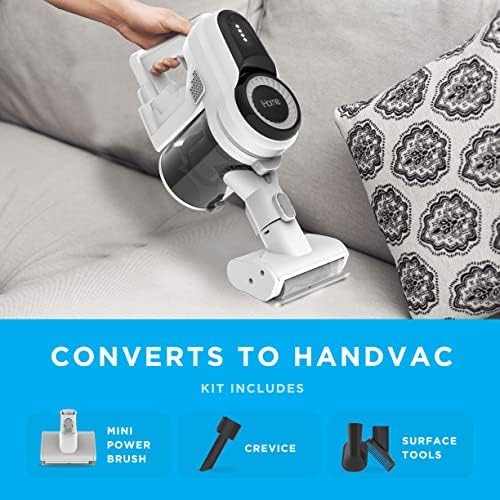
Image: The iHome StickVac SV1 easily converts to a handheld vacuum for versatile cleaning.
Mengisi Baterai
The iHome StickVac SV1 is powered by a rechargeable Lithium Ion battery, offering up to 35 minutes of runtime on a single charge. To charge the vacuum:
- Mount the included wall mount kit in a convenient location near a power outlet.
- Place the vacuum onto the wall mount.
- Connect the power adapter to the charging port on the main motor unit and plug it into a wall outlet.
- The battery indicator lights on the main unit will illuminate to show charging status. Ensure the vacuum is fully charged before first use.

Image: The iHome StickVac SV1 charging on its wall mount.
Petunjuk Pengoperasian
Stick Vacuum Mode
For general floor cleaning, attach the extension wand and motorized floor brush. The motorized brush is equipped with LED lights to illuminate dust and debris, making it easier to clean hard floors and carpets.
- Tekan tombol daya untuk menyalakan penyedot debu.
- Select your desired power level (2 power levels available) using the control method on the handle.
- Guide the vacuum across your floor surfaces. The LED lights will help highlight dirt.

Image: The motorized floor brush with LED lights illuminates debris on hard floors.
Handheld Vacuum Mode
For targeted cleaning of upholstery, stairs, or tight spaces, convert the unit to handheld mode and attach the appropriate accessory.
- Detach the extension wand and floor brush.
- Attach the crevice tool for narrow gaps, the upholstery tool for fabric surfaces, or the mini power brush for pet hair.
- Press the power button and clean the desired area.
Video: Demonstrates the iHome StickVac SV1 in various cleaning scenarios, including its conversion to a handheld vacuum and use with different attachments.
Pemeliharaan
Perawatan rutin memastikan kinerja optimal dan memperpanjang umur penyedot debu Anda.
Mengosongkan Tempat Sampah
The dustbin has a capacity of 0.5 liters and is designed for easy emptying.
- Pastikan penyedot debu dimatikan.
- Cari tombol pelepas tempat sampah pada unit motor utama.
- Press the button to release the dustbin.
- Hold the dustbin over a trash receptacle and open the bottom flap to empty debris.
- Tutup penutupnya dan pasang kembali tempat sampah ke unit utama hingga berbunyi klik.
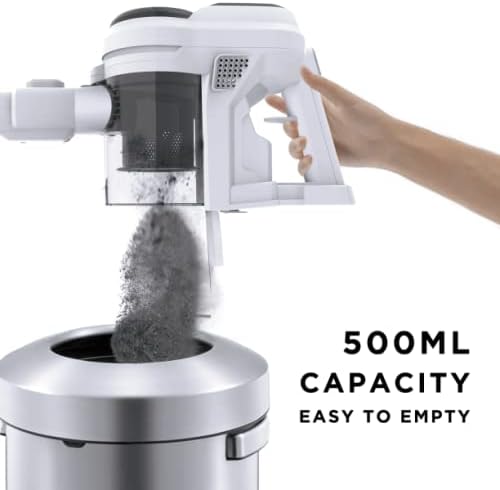
Image: Easy emptying of the 0.5L capacity dustbin.
Membersihkan Filter
Penyedot debu ini memiliki fitur 3 detik.tage HEPA filtration system to capture fine dust particles.
- Lepaskan tempat sampah dari unit utama.
- Carefully remove the filter components from the dustbin.
- Tap the filters gently over a trash can to remove loose dirt. For a deeper clean, rinse the filters with cold water (do not use detergent).
- Allow filters to air dry completely for at least 24 hours before reassembling. Do not use the vacuum with wet filters.
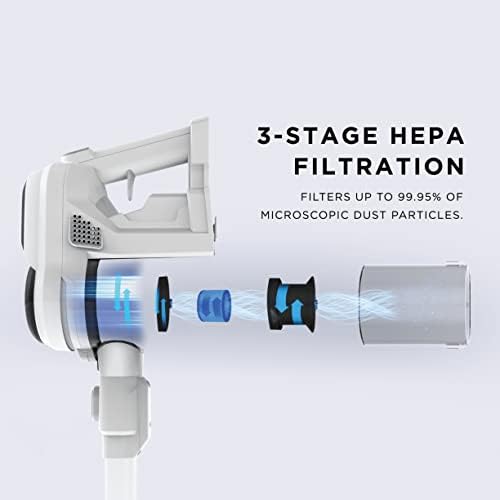
Gambar: Diagram 3-stagSistem filtrasi HEPA.
Membersihkan Rol Sikat
Periodically check and clean the brush roll for tangled hair or debris.
- Pastikan penyedot debu dalam keadaan mati dan terlepas dari pengisi daya.
- Remove the motorized floor brush from the extension wand.
- Temukan penutup akses rol sikat dan bukalah.
- Remove the brush roll and clear any tangled hair or debris using scissors or a brush.
- Pasang kembali rol sikat dan tutup penutup akses dengan rapat.
Penyelesaian Masalah
If you encounter issues with your iHome StickVac SV1, refer to the following common solutions:
| Masalah | Kemungkinan Penyebab | Larutan |
|---|---|---|
| Vakum tidak menyala | Baterai habis | Isi daya baterai hingga penuh. |
| Daya hisap rendah | Dustbin is full or filters are clogged | Empty the dustbin and clean the filters. |
| Daya hisap rendah | Blockage in the nozzle, wand, or hose | Periksa dan singkirkan segala penyumbatan. |
| Rol sikat tidak berputar | Debris tangled in brush roll | Clean the brush roll as described in the maintenance section. |
| Waktu pengoperasian baterai pendek | Battery not fully charged or aging battery | Pastikan baterai terisi penuh. Jika masalah berlanjut, baterai mungkin perlu diganti. |
Spesifikasi
- Merek: Saya Rumah
- Nama Model: StickVac SV1
- Fitur Khusus: HEPA, Lightweight, Portable
- Jenis Filter: Filter HEPA
- Komponen yang Termasuk: Crevice Tools, Surface Tools, HandVac
- Apakah Tanpa Kabel?: Ya
- Kapasitas: 0.5 liter
- Apatage: 120 watt
- Penggunaan yang Direkomendasikan untuk Produk: Carpet, Hard Floor, Hardwood, Home
- Faktor Bentuk: Tongkat
- Warna: Putih
- Dimensi Produk: 10"P x 8"L x 41"T
- Daya Tahan Baterai: 35 menit
- Berat Barang: 3 pon
- Tenaga Kuda Motor: 0.535 tenaga kuda
- Metode Kontrol: Menyentuh
- Jumlah Tingkat Daya: 2
- Pemakaian Dalam/Luar Ruangan: Dalam
- Vacuum Collection Technology: Pengisapan
Garansi dan Dukungan
For warranty information or technical support, please refer to the warranty card included in your product packaging or visit the official iHome websitus. Simpan struk pembelian Anda sebagai bukti pembelian untuk klaim garansi apa pun.


