1. Pendahuluan
Thank you for choosing the Hama Digital Radio DR7 USB. This manual provides essential information for the safe and efficient operation of your new radio. Please read it thoroughly before use and keep it for future reference. This portable radio supports DAB/DAB+ digital radio and conventional FM reception, offering clear sound quality and portability.
2. Petunjuk Keselamatan
- Protect the product from dirt, moisture, and overheating. Use it only in dry environments.
- Jangan menjatuhkan produk atau memaparkannya pada guncangan keras.
- Jangan membuka produk atau terus mengoperasikannya jika menjadi rusak.
- Jangan mencoba menyervis atau memperbaiki produk sendiri. Serahkan pekerjaan servis apa pun kepada ahli yang berkualifikasi.
- Jauhkan produk ini, seperti semua produk listrik, dari jangkauan anak-anak.
- Buang segera bahan kemasan sesuai dengan peraturan setempat yang berlaku.
- Baterai harus dimasukkan dengan polaritas yang benar.
- Remove batteries from the product if it is not to be used for an extended period.
3. Isi Paket
- Hama Digital Radio DR7 USB
- 4 baterai AA
- Manual instruksi
4. Pengaturan
4.1 Catu Daya
The Hama Digital Radio DR7 USB can be powered by either batteries or an external USB power source.
4.1.1 Pemasangan Baterai
To use the radio with batteries, open the battery compartment cover located on the back of the device. Insert 4 AA alkaline batteries, ensuring correct polarity (+/-). Close the battery compartment cover securely.

Gambar: Belakang view of the radio with the battery compartment open, showing battery insertion.
4.1.2 Koneksi Daya Eksternal
For continuous operation, connect the radio to a USB power source using a compatible USB 2.0 cable. The DC IN port requires 5.0V-0.5A. The USB port is located on the back of the radio.
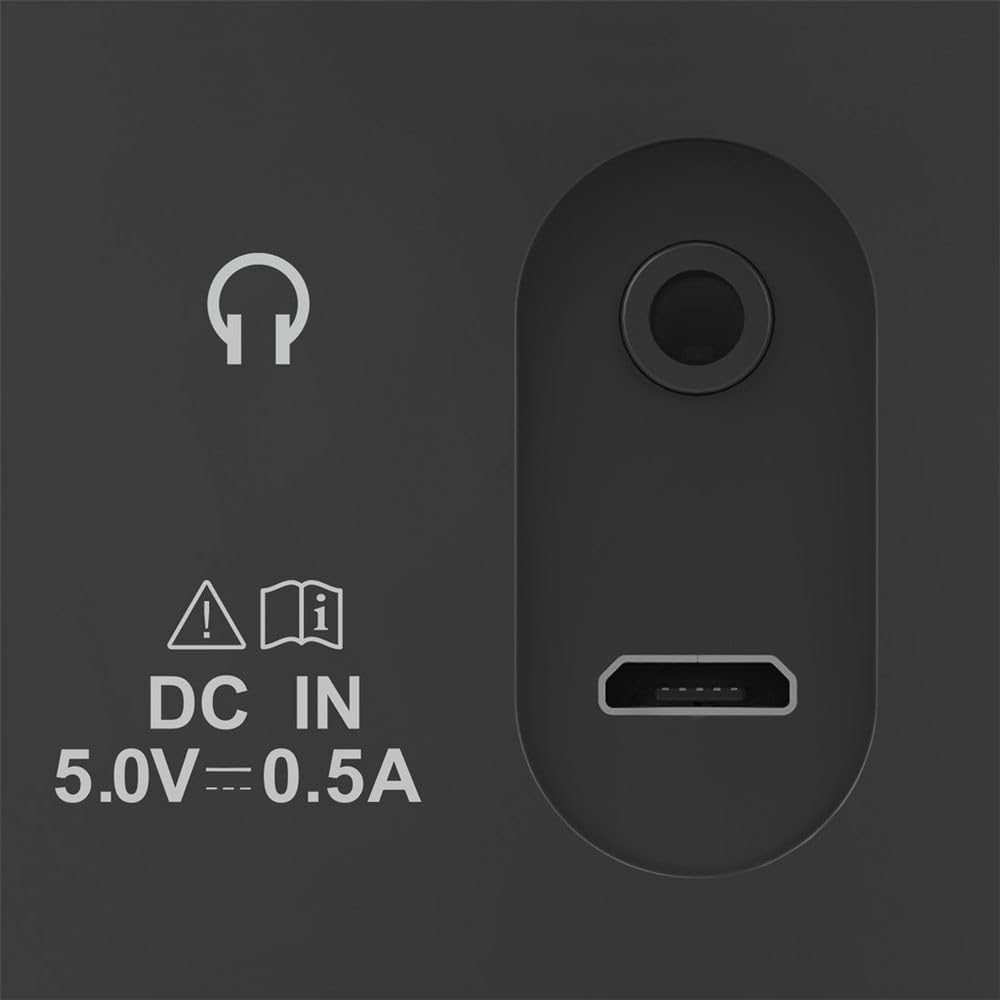
Image: Close-up of the radio's rear ports, including DC IN and USB.
4.2 Antena
Extend the telescopic antenna fully for optimal radio reception. Adjust its position to improve signal strength if needed.

Gambar: Belakang view of the radio with the antenna extended.
5. Petunjuk Pengoperasian
5.1 Menghidupkan/Mematikan
Tekan tombol Kekuatan button (usually marked with a circle and a vertical line) to turn the radio on or off.
5.2 Pemilihan Mode (DAB/DAB+ dan FM)
Gunakan Mode or Sumber button to switch between DAB/DAB+ digital radio and FM radio modes.
5.3 Station Tuning
5.3.1 Automatic Scan (DAB/DAB+)
In DAB/DAB+ mode, press the Pindai button to automatically search for available digital radio stations. The radio will store all found stations.
5.3.2 Manual Tuning (FM)
Dalam mode FM, gunakan Sesuaikan +/- buttons or the rotary knob (if available) to manually adjust the frequency. Press and hold the Sesuaikan +/- buttons for automatic station seeking.

Gambar: Depan view of the radio, highlighting the display and controls.
5.4 Stasiun Preset
The radio features two direct selection buttons and allows for storing up to 10 preset stations.
- Untuk Menyimpan: Tune to the desired station. Press and hold a preset button (e.g., 1 or 2) or the Telah ditetapkan sebelumnya button until the display confirms the station is saved.
- Untuk Mengingat: Briefly press the corresponding preset button to quickly switch to a saved station.
5.5 Kontrol Volume
Sesuaikan volume menggunakan Volume rotary knob or dedicated volume buttons.
5.6 Fungsi Jam Alarm
The radio includes an alarm clock feature. Refer to the detailed instructions in the printed manual for setting and managing alarms.
5.7 Penggunaan Headphone
Connect standard 3.5mm headphones to the headphone jack on the back of the radio for private listening. The internal speaker will mute automatically.
6. Pemeliharaan
- Bersihkan produk ini hanya dengan sedikit damp, kain bebas serat, dan jangan gunakan bahan pembersih yang agresif.
- Pastikan tidak ada air yang masuk ke dalam produk.
- When replacing batteries, always replace all batteries at once.
- Simpan radio di tempat yang sejuk dan kering saat tidak digunakan dalam jangka waktu lama.
7. Penyelesaian masalah
| Masalah | Kemungkinan Penyebab | Larutan |
|---|---|---|
| Tidak ada daya | Batteries are depleted or incorrectly inserted; power cable is disconnected. | Replace batteries, check polarity; ensure power cable is securely connected. |
| Penerimaan buruk atau tidak ada sama sekali | Antena tidak diperpanjang; sinyal lemah; interferensi. | Fully extend and adjust the telescopic antenna; try moving the radio to a different location; perform a new station scan. |
| Tidak ada suara | Volume terlalu rendah; headphone tersambung. | Increase volume; disconnect headphones if you want to use the speaker. |
8. Spesifikasi
- Model: 00054242
- Dimensi (P x L x T): Ukuran 16.5x5.5x10.5 cm
- Berat: 448.54 gram
- Teknologi Penyetel: DAB, DAB+, FM
- Frequency (FM): Frekuensi 87.5 MHz
- Sumber Daya: 4 x AA Alkaline Batteries, USB 2.0 (DC IN 5.0V-0.5A)
- Bahan: Plastik
- Fitur Khusus: Alarm clock, 2 direct selection buttons, 10 preset stations
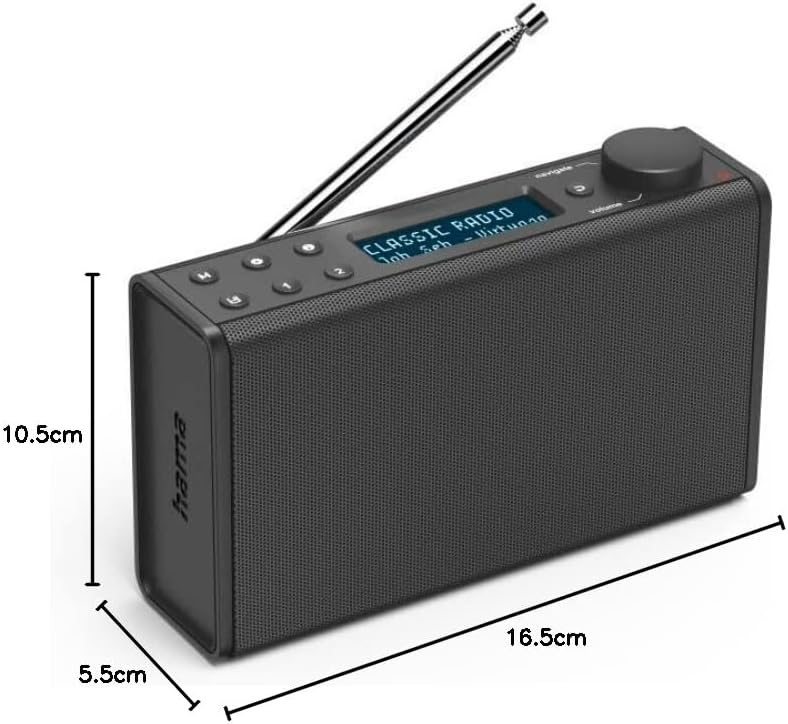
Image: Dimensions of the Hama Digital Radio DR7 USB.
9. Garansi dan Dukungan
Hama GmbH & Co KG assumes no liability and provides no warranty for damage resulting from improper installation/mounting, improper use of the product, or from failure to observe the operating instructions and/or safety notes. For further support, please visit the official Hama websitus atau hubungi layanan pelanggan mereka.


