1. Pendahuluan
Welcome to the user manual for your Ulefone Armor X9 Rugged Phone. This guide provides essential information on setting up, operating, maintaining, and troubleshooting your device. The Ulefone Armor X9 is designed for durability and performance, featuring robust protection and advanced functionalities.
Key features of your Ulefone Armor X9 include:
- IP68/IP69K Grade 360 All Round Protection: Dibuat untuk bertahan di lingkungan yang keras.
- Sistem Operasi Android 11: Enjoy the latest Android experience.
- RAM 4GB + ROM 128GB: Ample memory and storage for your applications and data.
- 16MP Triple Rear Camera: Capture high-quality photos and videos.
- Massive 5580mAh Battery Capacity: Extended usage time.
- Triple Navigation System: Enhanced positioning accuracy.
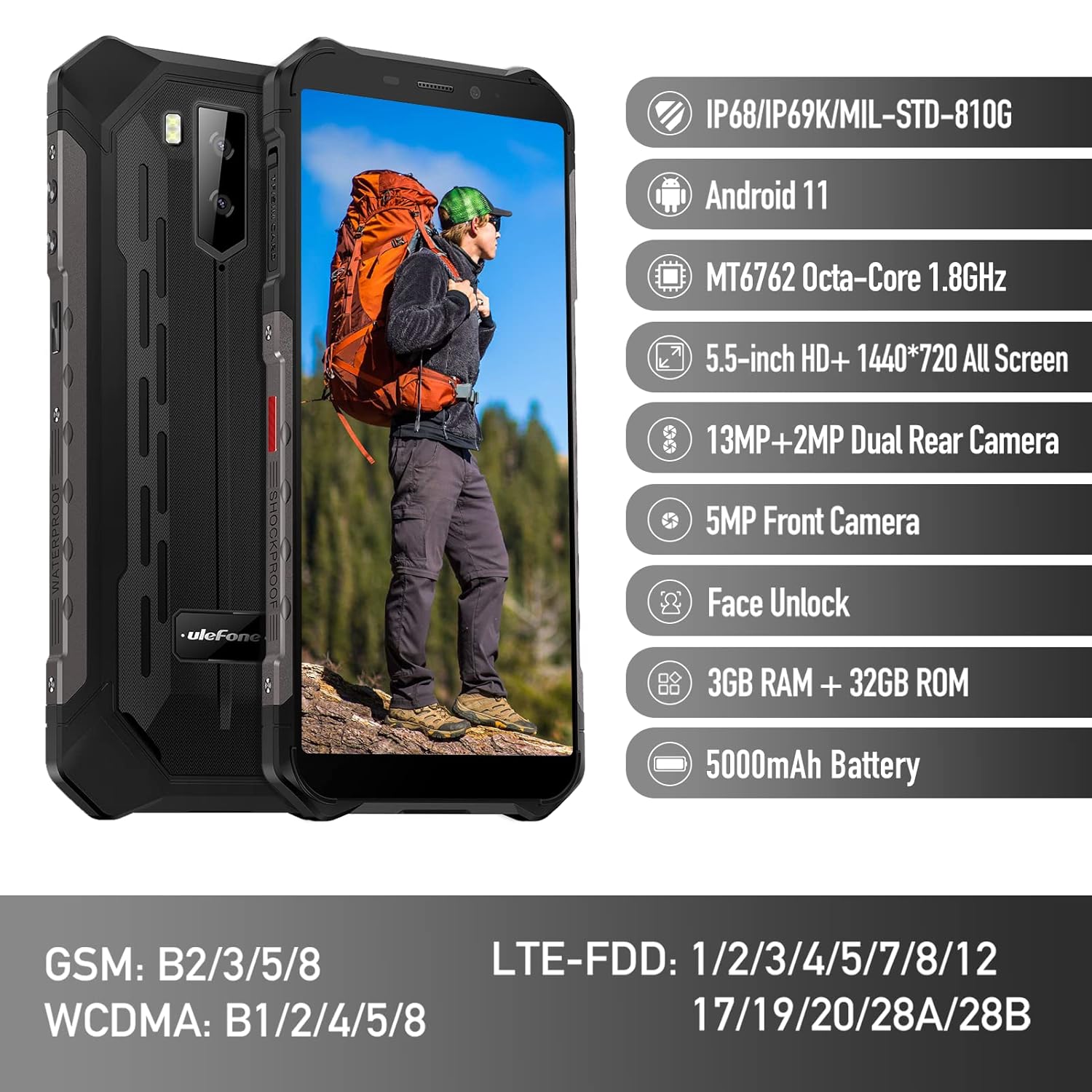
Figure 1: Ulefone Armor X9 Rugged Phone overview, highlighting its robust design and core specifications like IP68/IP69K rating, Android 11, Octa-Core processor, 5.5-inch HD+ screen, 13MP+2MP dual rear camera, 5MP front camera, Face Unlock, 3GB RAM + 32GB ROM, and 5000mAh battery.
2. Pengaturan
2.1. Pemasangan Kartu SIM dan Kartu TF
The Ulefone Armor X9 supports dual SIM cards and a TF (microSD) card for expandable storage. Follow these steps to install them:
- Temukan tempat kartu SIM di sisi telepon.
- Gunakan alat pelepas SIM yang disediakan untuk membuka baki.
- Carefully place your Nano-SIM cards into the designated slots (SIM1 and SIM2).
- If using a TF card, place it into the dedicated TF card slot. Note that some configurations may share a slot between SIM2 and the TF card.
- Gently push the tray back into the phone until it is flush with the device body. Ensure the tray is properly sealed to maintain water and dust resistance.

Figure 2: Illustration of the dual SIM and TF card tray, showing how to insert SIM1, SIM2, and a TF card into the Ulefone Armor X9.
2.2. Pengisian Awal
Before first use, it is recommended to fully charge your Ulefone Armor X9. Use the provided USB cable and power adapter.
- Hubungkan kabel USB ke port pengisian daya di ponsel Anda.
- Hubungkan ujung lain kabel USB ke adaptor daya.
- Hubungkan adaptor daya ke stopkontak di dinding.
- Indikator pengisian daya akan muncul di layar. Biarkan ponsel mengisi daya hingga ikon baterai menunjukkan penuh.
2.3. Menghidupkan/Mematikan
- Untuk menghidupkan: Press and hold the Power button (usually on the right side) until the Ulefone logo appears.
- Untuk mematikan: Press and hold the Power button until the power options menu appears on the screen. Select "Power off" and confirm.
- Untuk Memulai Ulang: Dari menu opsi daya, pilih "Mulai ulang" dan konfirmasi.
3. Petunjuk Pengoperasian
3.1. Navigasi Dasar (Android 11)
Your Ulefone Armor X9 runs on Android 11, offering an intuitive user interface. Common gestures and navigation include:
- Geser ke atas: Akses laci aplikasi.
- Geser ke bawah: Buka panel notifikasi dan pengaturan cepat.
- Mengetuk: Pilih item atau buka aplikasi.
- Tekan lama: Akses menu kontekstual atau pindahkan ikon.
- Cubit untuk Memperbesar: Memperbesar atau memperkecil gambar dan web halaman.

Figure 3: Screenshots of the Android 11 interface on the Ulefone Armor X9, showing settings menus, quick toggles, and the sound recorder application.

Figure 4: The 5.5-inch 18:9 All Screen display of the Ulefone Armor X9, showcasing its immersive viewing experience with an image of a skier.
3.2. Penggunaan Kamera
Your phone is equipped with a 16MP Triple Rear Camera and a Front Camera. To use the camera:
- Buka aplikasi "Kamera" dari layar beranda atau laci aplikasi Anda.
- Ketuk tombol rana untuk mengambil foto.
- Beralih antara mode foto dan video sesuai kebutuhan.
- Tap the icon to switch between the front and rear cameras.
- Explore various camera modes and settings for optimal results.
3.3. Konektivitas
The Ulefone Armor X9 supports various connectivity options:
- Wifinya: Buka Pengaturan > Jaringan & internet > Wi-Fi untuk terhubung ke jaringan yang tersedia.
- Bluetooth dapat digunakan untuk berbagai keperluan, seperti: Buka Pengaturan > Perangkat terhubung > Bluetooth untuk memasangkan dengan perangkat Bluetooth.
- Bahasa Indonesia: The phone features AGPS for accurate location services. Ensure location services are enabled in Settings > Location.
- Kabel USB: Connect your phone to a computer using a USB cable for data transfer or charging.
3.4. Buka Kunci Wajah
For convenient and secure unlocking, your Ulefone Armor X9 supports Face Unlock:
- Go to Settings > Security > Face Unlock.
- Ikuti petunjuk di layar untuk mendaftarkan wajah Anda.
- Ensure good lighting and hold the phone at eye level during registration.
- Once registered, you can unlock your phone by simply looking at the front camera.
4. Pemeliharaan
4.1. Pembersihan dan Perawatan
To maintain the performance and appearance of your rugged phone:
- Bersihkan layar dan badan dengan kain lembut dan tidak berbulu.
- Untuk kotoran yang membandel, gunakan sedikit damp kain. Hindari bahan kimia keras atau bahan abrasif.
- Ensure all port covers are securely closed to maintain water and dust resistance, especially after charging or using headphones.

Figure 5: The Ulefone Armor X9's 360° All Protection Design, showcasing its superior materials and superb durability against impacts and harsh conditions.
4.2. Ketahanan terhadap Air dan Debu (IP68/IP69K)
The Ulefone Armor X9 is rated IP68/IP69K, meaning it is resistant to dust and water immersion. However, this resistance is not permanent and may decrease over time with normal wear. To ensure optimal protection:
- Do not intentionally submerge the phone in water for extended periods or beyond specified depths.
- Avoid exposing the phone to high-pressure water or extreme temperatures.
- Ensure all port covers are tightly sealed before exposure to water or dust.
- If the phone gets wet, dry it thoroughly before charging or opening any ports.
4.3. Perawatan Baterai
Untuk memperpanjang masa pakai baterai Lithium Polymer 5580mAh Anda:
- Hindari suhu ekstrem (panas atau dingin) karena dapat menurunkan kinerja baterai.
- Gunakan hanya pengisi daya dan kabel asli atau aksesori yang kompatibel dan telah disertifikasi.
- Do not let the battery completely drain frequently. Charge it before it reaches very low levels.
5. Penyelesaian masalah
If you encounter issues with your Ulefone Armor X9, try the following troubleshooting steps:
5.1. Ponsel Tidak Menyala
- Pastikan baterai terisi penuh. Sambungkan ponsel ke pengisi daya setidaknya selama 30 menit.
- Tekan dan tahan tombol Daya selama 10-15 detik untuk memaksa memulai ulang.
5.2. Masalah Pengisian Daya
- Verify that the charging cable and adapter are working correctly. Try a different charger if available.
- Pastikan port pengisian daya bersih dan bebas dari kotoran.
- Make sure the charging cable is fully inserted into the port. Some rugged phone ports may require a firm connection due to protective covers.
5.3. SIM/TF Card Not Detected
- Ensure the SIM/TF card is correctly inserted into the tray and the tray is fully seated.
- Nyalakan ulang telepon.
- Check if the SIM card is active with your network provider.
5.4. App Crashes or Freezing
- Tutup dan buka kembali aplikasi yang bermasalah.
- Hapus cache dan data aplikasi (Pengaturan > Aplikasi > [Nama Aplikasi] > Penyimpanan & cache).
- Pastikan aplikasi diperbarui ke versi terbaru.
- Nyalakan ulang telepon.
5.5. Reset Pabrik
Jika masalah masih berlanjut, pengaturan ulang pabrik mungkin dapat menyelesaikannya. Peringatan: Ini akan menghapus semua data di ponsel Anda. Cadangkan data penting sebelum melanjutkan.
- Buka Pengaturan > Sistem > Opsi reset.
- Pilih "Hapus semua data (reset pabrik)".
- Konfirmasikan keputusan Anda dan masukkan PIN/kata sandi Anda jika diminta.
6. Spesifikasi
Below are the detailed specifications for the Ulefone Armor X9:

Figure 6: Details of the Ulefone Armor X9's Octa-Core Processor, highlighting its power-efficient yet powerful performance, along with 3GB RAM and 32GB ROM, and support for up to 256GB TF card extendable storage.
| Fitur | Spesifikasi |
|---|---|
| Sistem Operasi | Android 11.0 |
| RAM | 3 GB (Note: Feature bullets mention 4GB RAM, please verify actual model) |
| Kapasitas Penyimpanan Memori | 32 GB (Expandable with TF card up to 256GB. Feature bullets mention 128GB ROM, please verify actual model) |
| Model CPU | MT6762 Okta-Core 1.8GHz (Note: Specifications list 'Snapdragon', but image indicates MT6762. Please verify actual model) |
| Dimensi Produk | Ukuran 15.8x7.75x1.38 cm |
| Berat Barang | 472 gram |
| Baterai | 1 baterai Lithium Polymer (5580mAh, termasuk) |
| Komunikasi Nirkabel | Seluler, Bluetooth, USB, Wi-Fi |
| Bahasa Indonesia: GPS | Bahasa Indonesia: AGPS |
| Fitur Khusus | Rear Camera, Face Unlock, IP68/IP69K, MIL-STD-810G |
| Menampilkan | 5.5-inch HD+ 1440*720 All Screen |
| Kamera Belakang | 13MP+2MP Dual Rear Camera (Note: Feature bullets mention 16MP Triple Rear Camera, please verify actual model) |
| Kamera Depan | Kamera Depan 5MP |
| Warna | Hitam |
| Pabrikan | Ulefone |
Note: Specifications are based on available product data and may vary slightly. Please refer to your product packaging for the most accurate information. There are discrepancies between feature bullets, specifications, and image text regarding RAM, ROM, CPU, and camera megapixels. This manual uses the most frequently cited or detailed information, with notes for clarification.
7. Garansi dan Dukungan
7.1. Informasi Garansi
Your Ulefone Armor X9 is covered by a manufacturer's warranty. The specific terms and duration of the warranty may vary by region and retailer. Please refer to the warranty card included in your product packaging or contact your point of purchase for detailed information regarding warranty coverage and claims.
7.2. Dukungan Pelanggan
For technical assistance, troubleshooting beyond this manual, or warranty inquiries, please contact Ulefone customer support or your authorized dealer. You can typically find contact information on the official Ulefone websitus atau dalam dokumentasi produk Anda.
- Visit the official Ulefone website for FAQs, software updates, and support contact details.
- Siapkan bukti pembelian dan nomor seri produk Anda saat menghubungi layanan pelanggan.