1. Pendahuluan
Terima kasih sudah membeliasing the KEPLUG Sunrise Alarm Clock. This device is designed to enhance your waking and sleeping experience with its unique features, including sunrise and sunset simulations, dual alarms, FM radio, and various natural sounds. Please read this manual carefully to ensure proper use and optimal performance.
Isi Paket:
- 1 x KEPLUG Sunrise Alarm Clock
- 1 x Kabel Mikro USB
- 1 x Adaptor Dinding
- 1 x Panduan Pengguna
2. Produk Lebihview
Familiarize yourself with the main components and controls of your KEPLUG Sunrise Alarm Clock.

Gambar 2.1: Depan view of the KEPLUG Sunrise Alarm Clock, showing the digital time display and the illuminated light panel. The clock face is round with a white base.
Tombol Kontrol dan Port:
Refer to the diagram below for button identification (exact button layout may vary slightly by model, but functions are consistent).
- Tombol Pengaturan Waktu: Digunakan untuk memasuki mode pengaturan waktu.
- Tombol Alarm 1: Digunakan untuk mengatur dan mengaktifkan Alarm 1.
- Tombol Alarm 2: Digunakan untuk mengatur dan mengaktifkan Alarm 2.
- Tombol Radio FM: Activates and controls FM radio functions.
- Tombol Lampu: Controls the light brightness and color modes.
- Tombol Volume +/-: Menyesuaikan volume suara.
- Tombol Atas/Bawah: Menavigasi menu dan menyesuaikan nilai.
- Snooze/Sleep Aid Button: Activates snooze during an alarm or sleep aid function.
- Port Pengisian USB: Untuk mengisi daya perangkat eksternal.
- Input Daya Micro USB: Terhubung ke adaptor daya.
3. Pengaturan
3.1 Sambungan Daya
- Connect the micro USB cable to the power input port on the back of the alarm clock.
- Colokkan adaptor dinding ke stopkontak listrik standar.
- The display will light up, indicating the device is powered on.
The clock includes a built-in backup battery to retain settings during power outages or disconnections.
3.2 Mengatur Waktu
- Tekan tombol Tombol Pengaturan Waktu (often represented by a clock icon). The hour display will start flashing.
- Gunakan Tombol Atas/Bawah untuk menyesuaikan jam.
- Tekan tombol Tombol Pengaturan Waktu again to confirm the hour and move to minute setting. The minute display will flash.
- Gunakan Tombol Atas/Bawah untuk menyesuaikan menit.
- Tekan tombol Tombol Pengaturan Waktu a third time to confirm the minutes.
- Untuk beralih antara format 12 jam dan 24 jam, tekan tombol Tombol Atas/Bawah while the time is flashing during setup, or refer to the specific instructions in your manual for a dedicated time format button.
3.3 Time Display Brightness
The time display offers three brightness settings: High, Low, and Off. This can typically be adjusted by repeatedly pressing a dedicated display brightness button or by holding the Time Setting button. Refer to your specific model's instructions for exact control.
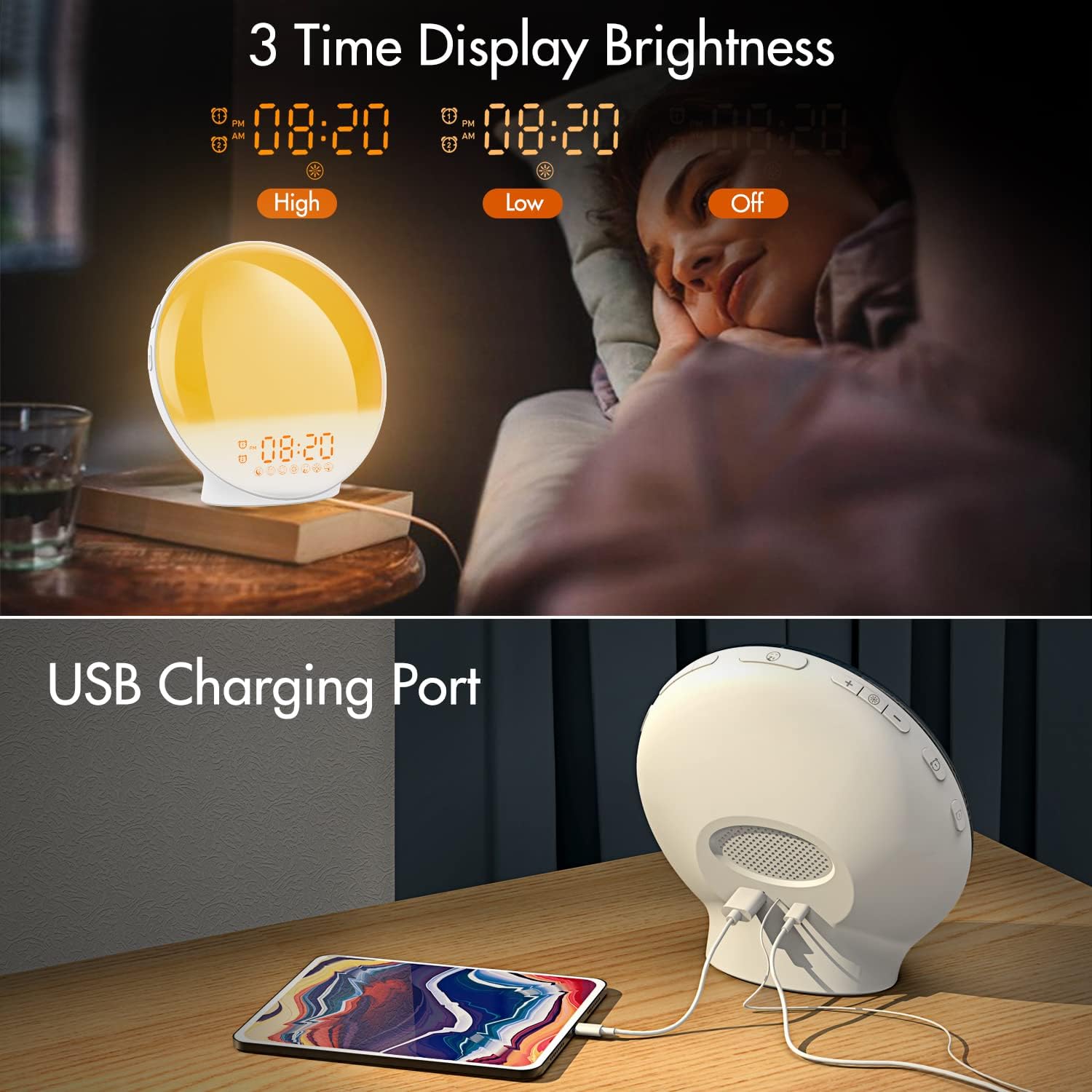
Gambar 3.1: Illustration of the three time display brightness options: High, Low, and Off, allowing users to customize visibility for different times of day or night.
4. Petunjuk Pengoperasian
4.1 Pengaturan Alarm (Alarm 1 & Alarm 2)
The clock features two independent alarms, allowing for separate wake-up times (e.g., weekday and weekend).

Gambar 4.1: Depiction of the dual alarm functionality, allowing users to set different alarms for weekdays and weekends, along with the snooze feature.
- Tekan tombol Alarm 1 Tombol (atau Alarm 2 Tombol) to activate and enter alarm setting mode. The alarm time will flash.
- Gunakan Tombol Atas/Bawah untuk mengatur jam alarm yang diinginkan.
- Tekan tombol Tombol Alarm again to confirm the hour and set the minutes.
- Gunakan Tombol Atas/Bawah untuk mengatur menit alarm yang diinginkan.
- Tekan tombol Tombol Alarm again to select the wake-up sound. Use Tombol Atas/Bawah to cycle through 7 nature sounds or FM radio.
- Tekan tombol Tombol Alarm again to set the volume level (1-16) for the alarm sound. Use Tombol Atas/Bawah untuk menyesuaikan.
- Tekan tombol Tombol Alarm one last time to confirm all settings and activate the alarm. An alarm icon will appear on the display.
4.2 Fungsi Tunda
When an alarm sounds, tap the Tombol Tunda (often the large button on top or front) to pause the alarm for 9 minutes. This can be repeated up to 5 times.
4.3 Simulasi Matahari Terbit
The sunrise simulation gradually brightens the light before your alarm time, mimicking a natural sunrise.

Gambar 4.2: Visual representation of the sunrise simulation feature, where the light intensifies gradually over a set period before the alarm, designed for a gentle wake-up.
- When setting an alarm, after selecting the sound and volume, you will typically be prompted to set the sunrise duration.
- Gunakan Tombol Atas/Bawah to choose a duration between 10 to 60 minutes. The light will gradually increase from 0% to the set brightness level (0-20) during this period.
- The light color will transition from deep red to bright yellow, simulating a natural sunrise.
4.4 Sunset Simulation / Sleep Aid
The sunset simulation gradually dims the light and can play soothing sounds to help you fall asleep.

Gambar 4.3: Illustration of the sunset simulation, where the light gradually dims over a period of 10 to 120 minutes, accompanied by optional sleep sounds like rain, forest, river, or FM radio.
- Tekan tombol Snooze/Sleep Aid Button (or a dedicated Sleep Aid button) to activate the sleep aid function.
- Gunakan Tombol Atas/Bawah to select a duration for the dimming process (10-120 minutes).
- You can also select a natural sound (Rain, Forest, River) or FM radio to play during this period.
- The light will gradually dim from 100% to 0% over the selected duration, and the sound will fade out.
4.5 Radio FM
The built-in FM radio allows you to listen to your favorite stations or use them as an alarm sound.

Gambar 4.4: Lebihview of the 7 available alarm sounds and the FM radio option, providing diverse choices for waking up.
- Tekan tombol Tombol Radio FM untuk menghidupkan/mematikan radio.
- Tahan Tombol Radio FM untuk memindai dan menyimpan stasiun yang tersedia secara otomatis.
- Gunakan Tombol Atas/Bawah to manually tune to a specific frequency or cycle through saved stations.
- Sesuaikan volume menggunakan Volume +/- Tombol.
4.6 Night Light / Color Light
The clock can function as a night light with various color options and adjustable brightness.

Gambar 4.5: Display of the 7 color atmosphere light options and 20 brightness levels, highlighting the clock's versatility as a mood light or reading lamp.
- Tekan tombol Tombol Lampu untuk menyalakan lampu.
- Tekan tombol Tombol Lampu repeatedly to cycle through 7 static colors (e.g., Red, Green, Blue, Yellow, Indigo, Purple, White) or an automatic color-changing mode.
- Gunakan Tombol Atas/Bawah to adjust the brightness level (0-20) of the selected color or white light.
- Tahan Tombol Lampu untuk mematikan lampu.
4.7 Port Pengisian USB
A 5V/2.4A USB port is located on the back of the device, allowing you to charge your smartphone or other small electronic devices.
Gambar 4.6: Belakang view of the alarm clock showing the USB charging port in use, connected to a tablet for charging.
5. Pemeliharaan
- Pembersihan: Lap perangkat dengan kain lembut dan kering. Jangan gunakan pembersih atau pelarut abrasif.
- Penyimpanan: Simpan perangkat di tempat yang sejuk dan kering saat tidak digunakan dalam jangka waktu lama.
- Kekuatan: Always use the provided power adapter to prevent damage.
6. Penyelesaian masalah
| Masalah | Kemungkinan Penyebab | Larutan |
|---|---|---|
| Jam tidak menyala. | Adaptor daya tidak tersambung atau rusak. | Ensure the power adapter is securely connected to both the clock and a working power outlet. Try a different outlet. |
| Alarm tidak berbunyi. | Alarm tidak aktif atau volume terlalu rendah. | Check if the alarm icon is displayed. Re-set the alarm and ensure the volume is set to an audible level. |
| Simulasi matahari terbit tidak berfungsi. | Sunrise duration not set during alarm setup. | Ensure you have set a sunrise duration (10-60 minutes) when configuring the alarm. |
| Radio FM mengalami gangguan statis atau penerimaan sinyal yang buruk. | Sinyal lemah atau posisi antena kurang baik. | Extend the antenna wire fully. Reposition the clock to improve reception. Perform an auto-scan for stations. |
| Pengisian daya USB tidak berfungsi. | Perangkat tidak kompatibel atau kabel rusak. | Ensure the device you are charging is compatible with 5V/2.4A USB charging. Try a different USB cable. |
7. Spesifikasi
- Merek: KEPLUG
- Model: B09FRY71NH
- Dimensi Produk: Ukuran 16x16x6.1 cm
- Berat Barang: 481 gram
- Jil.tage: 5 Volt
- Sumber Daya: Ditenagai baterai (dengan adaptor AC)
- Tipe Tampilan: Digital
- Fitur Khusus: Charging Port, Dimmable Light, Sunrise/Sunset Simulation, Dual Alarm, FM Radio, Nature Sounds
- Tanggal Pertama Tersedia: 12 Nopember 2021
8. Garansi dan Dukungan
For warranty information or technical support, please refer to the contact details provided with your purchase documentation or visit the official KEPLUG websitus. Simpan struk pembelian Anda sebagai bukti pembelian.