1. Informasi Keselamatan
Harap baca semua petunjuk dengan saksama sebelum menggunakan alat ini dan simpan untuk referensi di kemudian hari. Kegagalan mengikuti petunjuk ini dapat mengakibatkan sengatan listrik, kebakaran, atau cedera serius.
- Selalu cabut kipas dari stopkontak sebelum membersihkan, memperbaiki, atau memindahkannya.
- Do not operate the fan with a damaged cord or plug. If the cord or plug is damaged, contact customer service for repair or replacement.
- Kipas ini hanya предназначен untuk penggunaan di dalam ruangan. Jangan gunakan di luar ruangan atau di tempat yang basah.
- Keep the fan away from water and other liquids. Do not immerse the fan in water.
- Pastikan kipas diletakkan di permukaan yang stabil dan rata untuk mencegahnya terguling.
- Jauhkan anak-anak dan hewan peliharaan dari kipas angin selama pengoperasian.
- Jangan memasukkan jari atau benda apa pun ke dalam kisi-kisi saat kipas sedang beroperasi.
- Do not block air openings or operate near curtains, drapes, or other objects that could block airflow.
- Do not use the fan in areas where flammable liquids or gases are stored.
2. Produk Lebihview
The Amazon Basics 40" 70-Degree Oscillating Digital Tower Fan is designed to provide efficient and customizable cooling for various indoor spaces. It features a sleek, compact design and user-friendly controls.
Komponen
- Tower Fan Unit
- Alas (membutuhkan perakitan)
- Kontrol Jarak Jauh
Fitur Utama
- Pendinginan yang Efisien: Delivers powerful airflow for effective cooling in enclosed spaces.
- Kecepatan yang Dapat Disesuaikan: Four intuitive speed settings to adjust airflow.
- Beberapa Mode: Includes Standard, Breeze, and Nature modes for varied airflow patterns.
- Osilasi: 70-degree oscillation for wide-range air flow coverage.
- Fungsi Pengatur Waktu: Programmable timer up to 15 hours for energy saving and convenience.
- Kontrol Jarak Jauh: Convenient remote for adjusting settings from a distance.
- Kontrol Digital: Easy-to-use digital control panel located on the top of the fan.
- Desain Kompak: Slim tower design (11.4"D x 11.4"W x 39.3"H) fits easily into any room.

Gambar 2.1: The Amazon Basics 40-inch Digital Tower Fan shown with its remote control. The fan is black with a sleek, tall design, and the remote is compact with clearly labeled buttons for power, speed, mode, oscillation, and timer.

Gambar 2.2: A diagram illustrating the key features of the tower fan, including its 40-inch height, 4 customizable airflow speed settings, timer with auto shutoff (1h, 2h, 4h, 8h options), and convenient remote control for adjusting speed, oscillation, and timer. The diagram highlights the digital display and control panel on top of the fan.
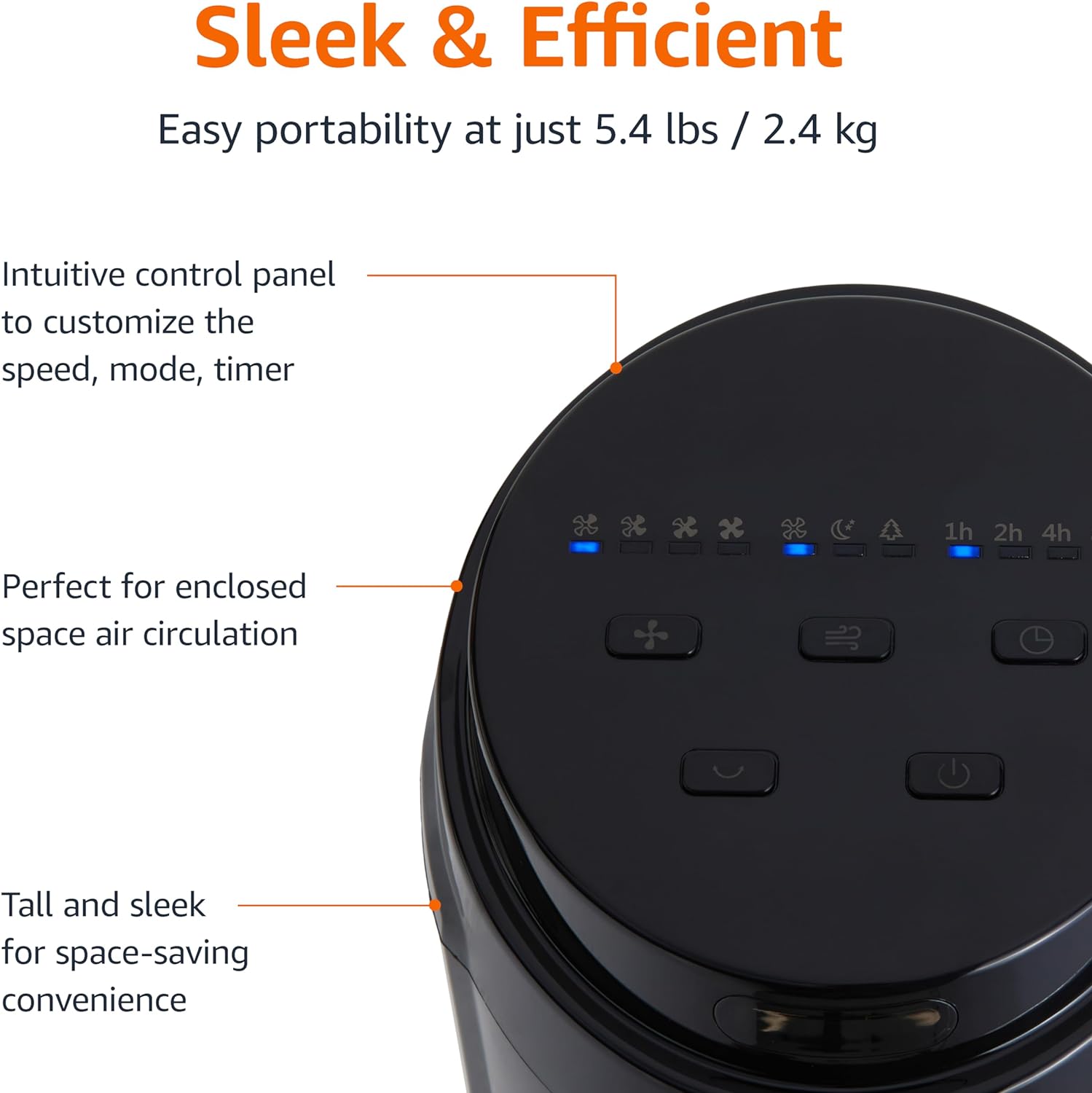
Gambar 2.3: Sebuah close-up view of the intuitive control panel located on the top of the Amazon Basics Tower Fan. The panel features buttons for speed, mode, power, oscillation, and timer, along with LED indicators for selected settings. This design allows for easy customization of fan operation.
3. Pengaturan
3.1 Perakitan
- Keluarkan semua komponen dari kemasannya dengan hati-hati.
- Attach the fan base to the main tower unit. Align the slots on the base with the corresponding tabs on the bottom of the fan.
- Secure the base using the provided screws, if any, ensuring it is firmly attached.
3.2 Penempatan
- Letakkan kipas angin di permukaan yang kokoh dan rata.
- Ensure there is adequate space around the fan for proper air circulation, especially for the oscillation feature.
- Keep the fan at least 1 foot (30 cm) away from walls, furniture, and other objects.
- Plug the power cord into a standard NEMA 5-15 (US Standard Wall Outlet) electrical outlet.
4. Petunjuk Pengoperasian
The fan can be operated using either the control panel on top of the unit or the included remote control.
4.1 Control Panel & Remote Control Functions
| Tombol/Fungsi | Keterangan |
|---|---|
| Daya (Hidup/Mati) | Menghidupkan atau mematikan kipas. |
| Kecepatan | Cycles through 4 fan speed settings (Low, Medium, High, Max). |
| Mode | Selects between 3 operating modes:
|
| Osilasi | Activates or deactivates the 70-degree oscillation feature, allowing the fan to sweep air across a wider area. |
| Pengatur waktu | Sets the fan to automatically turn off after a specified period (up to 15 hours in 1-hour increments). |
4.2 Penggunaan Kontrol Jarak Jauh
The remote control allows for convenient operation of all fan functions from a distance. Ensure the remote is pointed towards the fan's control panel for optimal response.
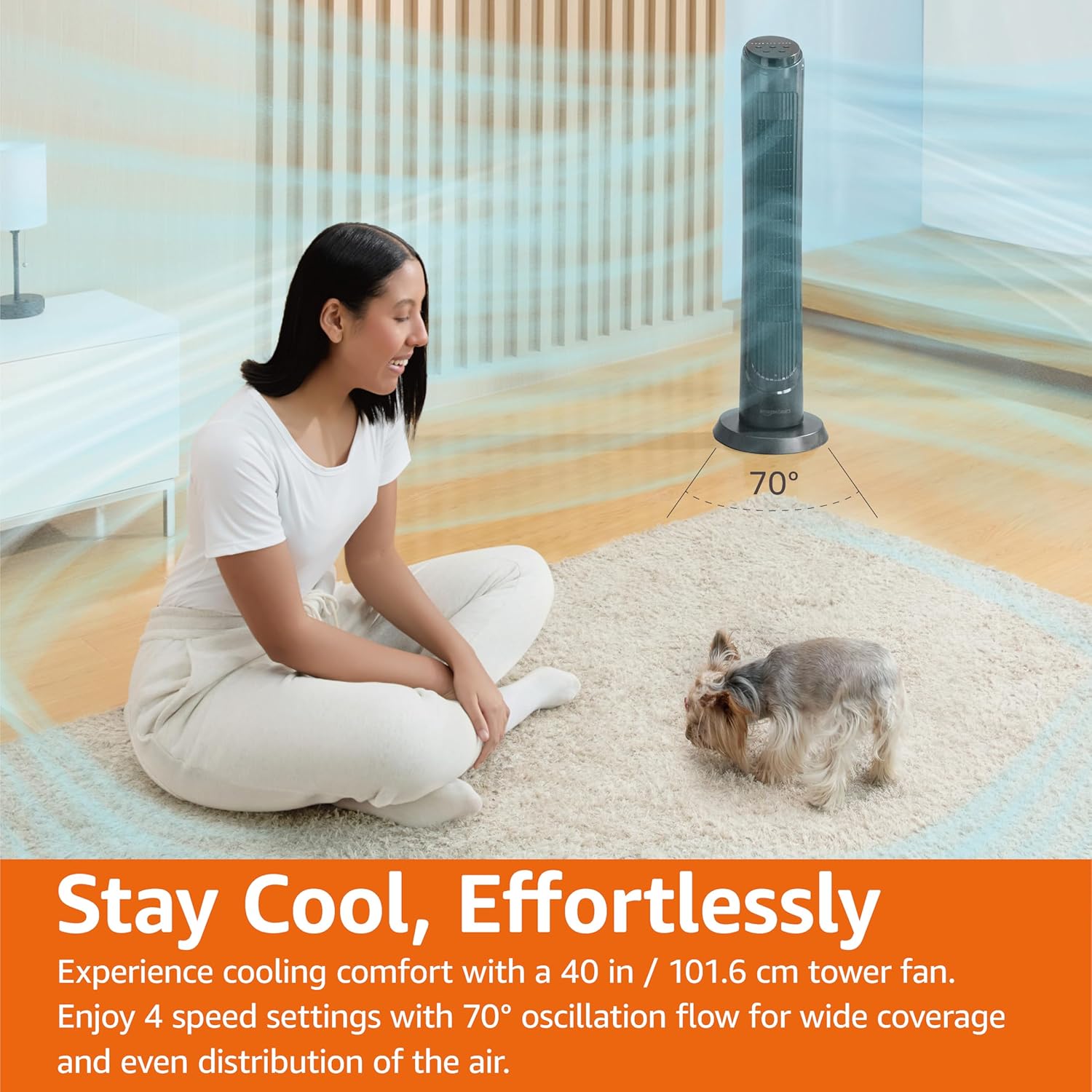
Gambar 4.1: The Amazon Basics Tower Fan oscillating 70 degrees, providing wide coverage and even air distribution in a room. A person and a small dog are comfortably seated on a rug, benefiting from the airflow.

Gambar 4.2: The Amazon Basics Tower Fan positioned in a modern living space, demonstrating its effective airflow. The image visually represents the air movement from the fan, highlighting its ability to circulate air throughout the room.
5. Pemeliharaan
5.1 Pembersihan
- Selalu cabut kipas angin sebelum membersihkan.
- Gunakan yang lembut, damp kain untuk menyeka permukaan luar kipas.
- Jangan gunakan pembersih abrasif atau bahan kimia keras, karena dapat merusak lapisan akhir kipas.
- For dust accumulation on the air intake or output grilles, use a vacuum cleaner with a brush attachment to gently remove dust.
- Pastikan kipas benar-benar kering sebelum mencolokkannya kembali.
5.2 Penyimpanan
- If storing the fan for an extended period, clean it thoroughly as described above.
- Simpan kipas angin di dalam kemasan aslinya atau kotak yang sesuai untuk melindunginya dari debu dan kerusakan.
- Simpan di tempat sejuk dan kering.
6. Penyelesaian masalah
Jika Anda mengalami masalah dengan kipas angin Anda, silakan lihat masalah umum dan solusi berikut:
| Masalah | Kemungkinan Penyebab | Larutan |
|---|---|---|
| Kipas tidak menyala. | Tidak ada catu daya; Tombol daya tidak ditekan. | Ensure the power cord is securely plugged into a working outlet. Press the Power button on the control panel or remote. |
| Aliran udara lemah atau tidak ada sama sekali. | Air intake/output blocked; Fan speed too low. | Check for any obstructions around the fan grilles. Increase the fan speed setting. |
| Osilasi tidak berfungsi. | Fitur osilasi tidak diaktifkan. | Press the Oscillation button on the control panel or remote. Ensure the fan is on a flat surface. |
| Kontrol jarak jauh tidak berfungsi. | Batteries are dead; Remote not pointed correctly. | Replace the remote control batteries. Ensure the remote is pointed directly at the fan's control panel. |
| Kebisingan yang tidak biasa. | Kipas tidak berada di permukaan yang rata; Terdapat penghalang internal. | Place the fan on a stable, level surface. Unplug the fan and check for any foreign objects inside the grilles (do not attempt to disassemble). |
Jika masalah berlanjut setelah mencoba solusi ini, hubungi dukungan pelanggan.
7. Spesifikasi
| Atribut | Detil |
|---|---|
| Merek | Dasar-Dasar Amazon |
| Nama Model | DC2021 |
| Warna | Hitam |
| Desain Kipas Listrik | Kipas Lantai |
| Sumber Daya | Daya AC |
| Gaya | 40" - Digital |
| Dimensi Produk | 11.4"Panjang x 11.4"Lebar x 39.3"T |
| Tipe Kamar | Kamar tidur, Ruang tamu, Kantor |
| Fitur Khusus | Oscillating, 4 Speeds, 3 Modes, Timer, Remote Control |
| Penggunaan yang Direkomendasikan | Cooling and Air Circulation for Indoor Spaces |
| Tingkat Kebisingan | 60dB |
| Apatage | 50 watt |
| Berat Barang | 7.5 pon (sekitar 3.4 kg) |
| Komponen yang Termasuk | Terpencil |
| Penggunaan Dalam/Luar Ruangan | Dalam |
| Metode Kontrol | Terpencil |
| Bahan Pisau | Plastik |
| Jumlah Tingkat Daya | 4 |
| Tipe Konektor Daya Utama | NEMA 5-15 (US Standard Wall Outlet) |
| Pabrikan | Bahasa Indonesia: Amazon.com |
| UPC | 840095880428 |
| Negara Asal | Cina |
8. Garansi dan Dukungan
For detailed warranty information, please refer to the official Warranty PDF document provided by Amazon Basics. This document outlines the terms and conditions of your product's warranty.
For further assistance, troubleshooting not covered in this manual, or to inquire about replacement parts, please contact Amazon Basics customer support.
- Panduan Pengguna Resmi (PDF): Unduh PDF
- Official Warranty (PDF): Unduh PDF
- Amazon Basics Store: Kunjungi Toko


