1. Pendahuluan
This manual provides detailed instructions for the installation, operation, and maintenance of your ESLYYDS Double Din Car Stereo. This advanced multimedia system offers a wide range of features including Apple CarPlay, Android Auto, Bluetooth connectivity, a high-definition touchscreen, and support for a backup camera, enhancing your in-car entertainment and navigation experience.

Figure 1.1: ESLYYDS Double Din Car Stereo Overview
2. Isi Paket
Harap verifikasi bahwa semua item yang tercantum di bawah ini disertakan dalam paket Anda:
- ESLYYDS Double Din Car Stereo Unit
- Set Braket Pemasangan
- Camera Wire A
- Camera Wire B
- Steering Wheel Control Unit
- Tali Kawat A
- Tali Kawat B
- Belakang-view Kamera
- Kontrol Jarak Jauh
- User Manual (dokumen ini)

Figure 2.1: Stereo Dimensions and Included Accessories
3. Fitur Produk
The ESLYYDS Double Din Car Stereo is equipped with a variety of features designed for convenience and enhanced driving experience:
- Apple CarPlay & Android Auto Compatibility: Seamlessly integrate your smartphone for navigation, music, calls, and messages using voice control.
- Layar Sentuh Kapasitif HD 7 inci: A responsive and accurate display supporting 1080P video playback.
- Bluetooth 5.2: For stable and clear hands-free calling and audio streaming.
- Tautan Mirror Ponsel: Display your smartphone's screen directly on the stereo.
- Antarmuka USB Ganda: One port for media playback and another with 2.1A fast charging capability.
- Belakang View Masukan Kamera: Supports the included 12 HD LED light, night vision, 170° viewing angle waterproof backup camera for safer reversing.
- Kontrol Roda Kemudi (SWC): Kompatibel dengan kontrol roda kemudi yang ada untuk pengoperasian yang nyaman.
- AM/FM Audio Receiver: Access to radio stations with user-friendly digital control.
- AUX IN Connectivity: Untuk perangkat audio eksternal.
- 7 Color LED Buttons: Pencahayaan tombol yang dapat disesuaikan.
3.1 Apple CarPlay dan Android Auto
Connect your smartphone via USB to access navigation, phone contacts, email, notifications, and music directly on the stereo display. This feature utilizes voice control technology for safe operation while driving.
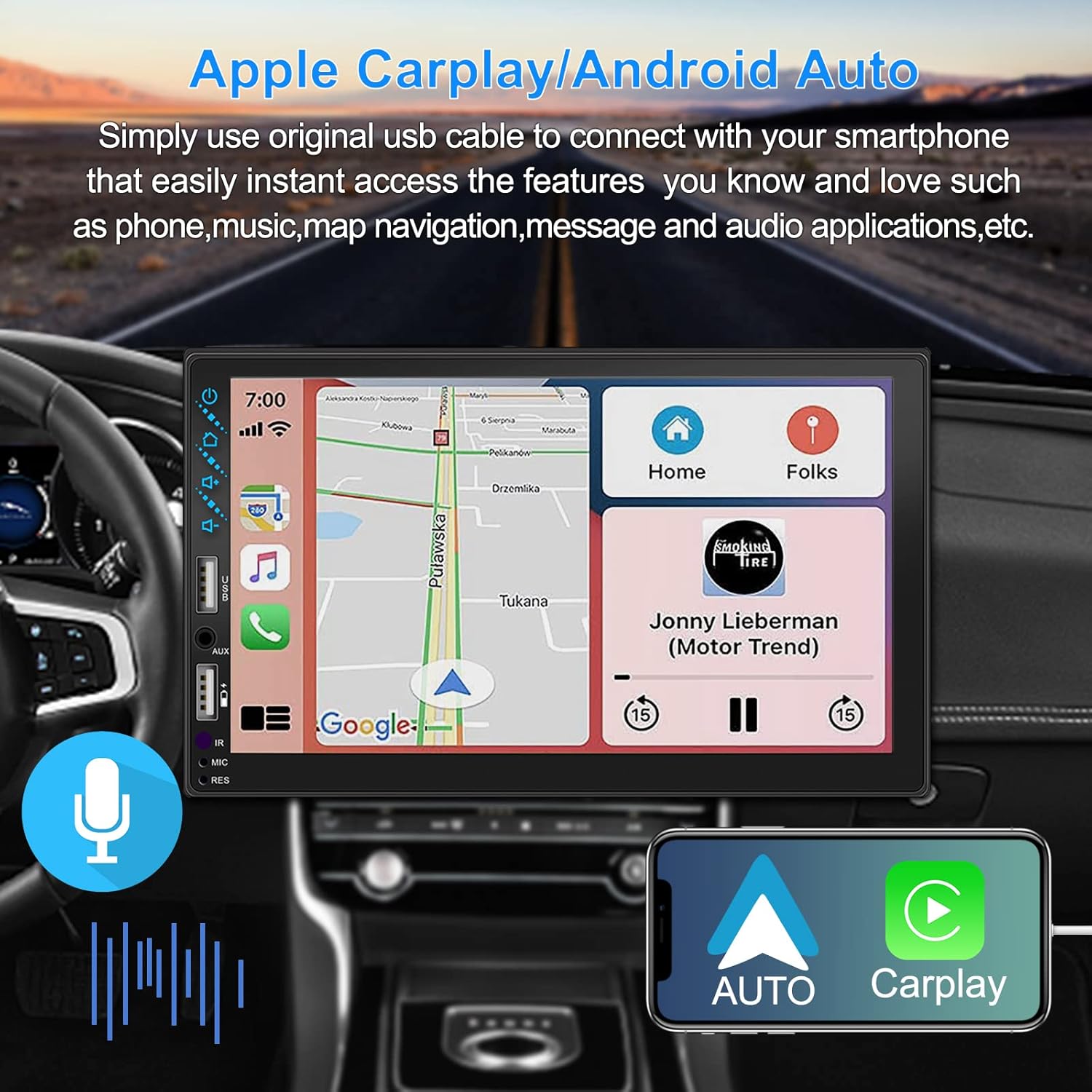
Gambar 3.1: Antarmuka Apple CarPlay dan Android Auto
3.2 Kontrol Suara
Utilize voice commands to control various functions such as making calls, playing music, and navigating, allowing you to keep your hands on the wheel and eyes on the road.

Gambar 3.2: Fungsionalitas Kontrol Suara
3.3 Tautan Cermin Ponsel
The Mirror Link function allows you to display your smartphone's screen directly onto the stereo's touchscreen. This supports Android devices (version 10.1 and below) and iPhone devices (version 14.5 and below, including iPhone 12, 11, XR, and 8 series and below) with resolutions up to 1920x1080 pixels.
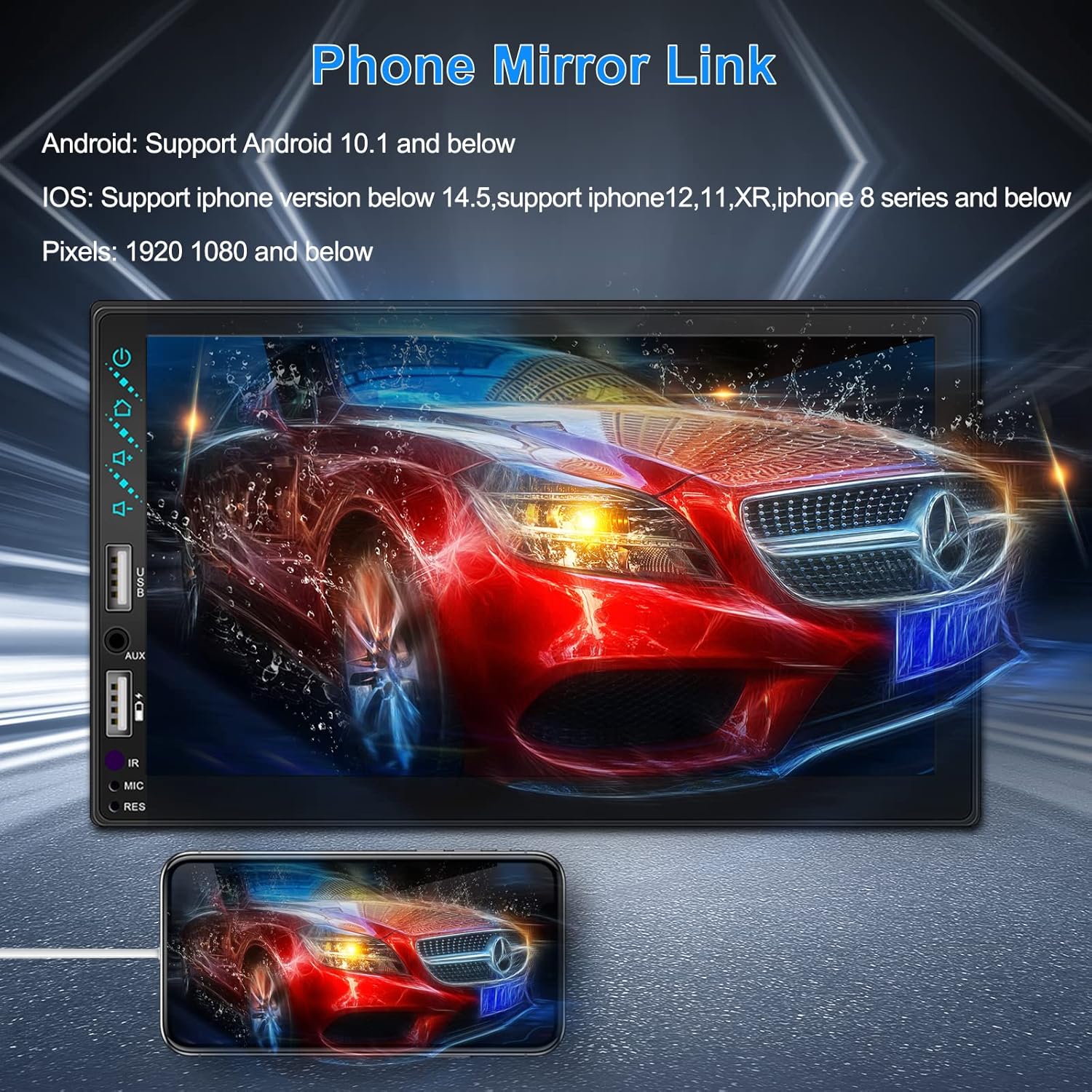
Figure 3.3: Phone Mirror Link
3.4 Belakang View Kamera
The included waterproof backup camera features 12 HD LED lights for night vision and a 170° viewing angle. When you shift into reverse, the system automatically displays the camera feed on the screen, providing optimal visibility in various weather conditions.
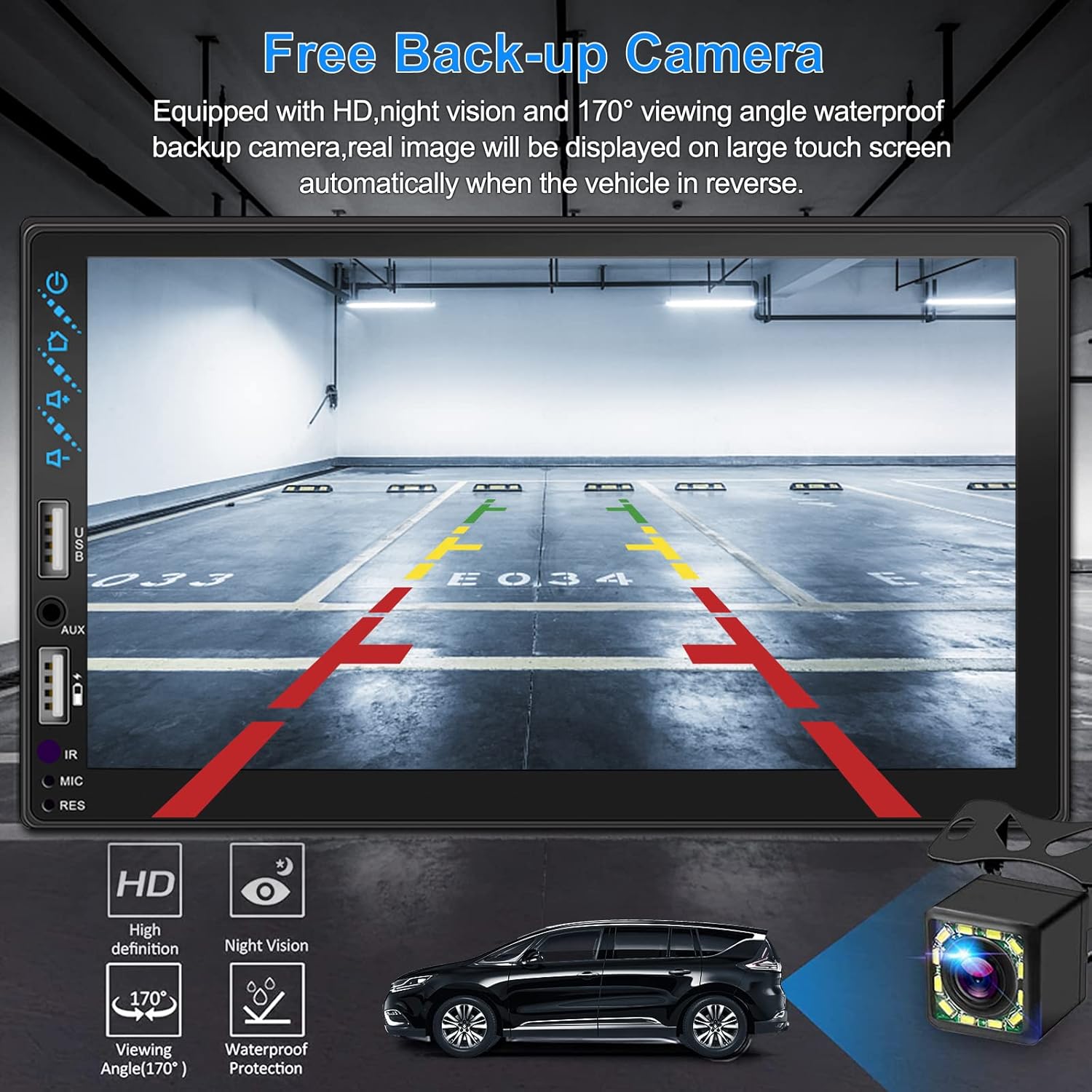
Gambar 3.4: Belakang View Tampilan Kamera
4. Panduan Instalasi
Pemasangan yang tepat sangat penting untuk kinerja optimal. Disarankan untuk meminta unit dipasang oleh profesional jika Anda tidak terbiasa dengan pemasangan kabel audio mobil.
4.1 Dimensi
The stereo unit has a standard double din size. Refer to Figure 2.1 for detailed dimensions.
- Lebar: 178mm (7 inci)
- Tinggi: 102mm (4 inci)
- Kedalaman: 60mm (2.6 inci)
4.2 Diagram Pengkabelan
Carefully follow the wiring diagram below to connect the stereo to your vehicle's electrical system. Ensure all connections are secure to prevent malfunctions.
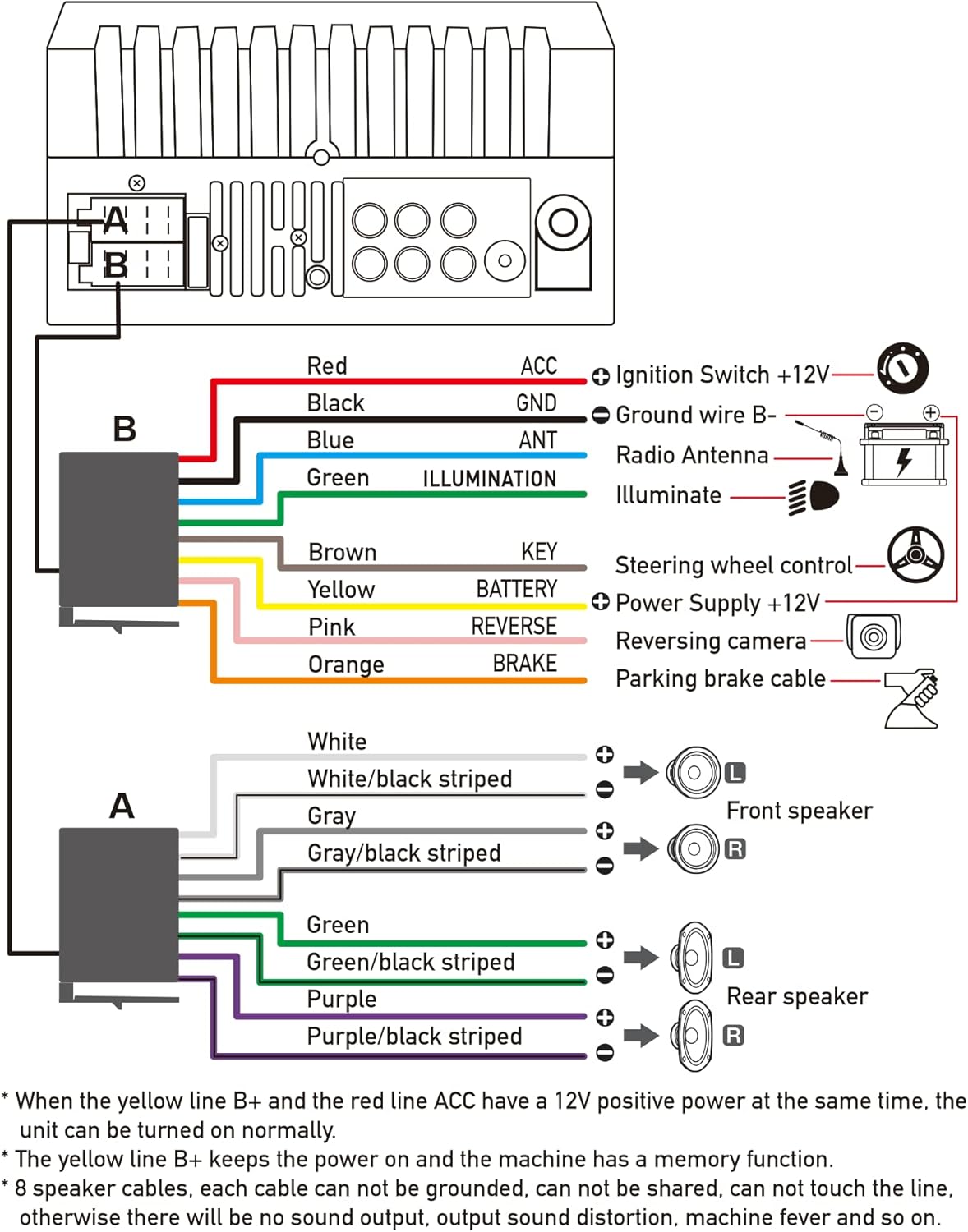
Gambar 4.1: Diagram Pengkabelan Utama
- Merah (ACC): Hubungkan ke sakelar pengapian +12V.
- Hitam (GND): Hubungkan ke kabel Ground B-.
- Biru (ANT): Hubungkan ke antena radio (jika ada).
- Hijau (PENERANGAN): Connect to Illuminate wire.
- Cokelat (KUNCI): Hubungkan ke kontrol roda kemudi.
- Kuning (BATERAI): Hubungkan ke catu daya +12V.
- Merah muda (BALIKNYA): Connect to Reversing camera input.
- Oranye (REM): Hubungkan ke kabel rem parkir.
Speaker Connections (8 speakers supported):
- White / White/black striped: Speaker Kiri Depan
- Gray / Gray/black striped: Speaker Kanan Depan
- Green / Green/black striped: Speaker Kiri Belakang
- Purple / Purple/black striped: Speaker Kanan Belakang
Catatan Penting:
- The unit requires both the Yellow (BATTERY) and Red (ACC) wires to have a 12V positive power supply simultaneously for normal operation.
- The Yellow (BATTERY) wire keeps the power on and maintains memory functions.
- For speaker connections, each cable must not be grounded or shared with other cables. Incorrect wiring can lead to no sound output, sound distortion, or damage to the machine.
5. Petunjuk Pengoperasian
5.1 Operasi Dasar
- Daya Hidup/Mati: Tekan tombol daya pada panel depan atau kendali jarak jauh.
- Kontrol Volume: Use the volume buttons on the front panel, steering wheel controls, or remote control.
- Pemilihan Sumber: Tap the 'Source' or 'Mode' icon on the touchscreen to switch between Radio, Bluetooth, USB, AUX, CarPlay, and Android Auto.
5.2 Apple CarPlay / Android Auto Usage
- Connect your compatible iPhone or Android smartphone to the stereo's USB port using a certified USB cable.
- The stereo will automatically detect the connection and prompt you to launch CarPlay or Android Auto.
- Ikuti petunjuk di layar untuk menyelesaikan pengaturan.
- Once connected, you can access supported apps like Maps, Phone, Messages, and Music directly from the stereo's touchscreen or via voice commands.
5.3 Pemasangan Bluetooth
- Nyalakan Bluetooth di telepon pintar Anda.
- Pada perangkat stereo, navigasikan ke menu Bluetooth.
- Pencarian untuk available devices on your smartphone. The stereo's Bluetooth name will typically be 'ESLYYDS' or similar.
- Select the stereo from your smartphone's list and confirm the pairing code if prompted.
- Setelah dipasangkan, Anda dapat membuat/menerima panggilan dan mengalirkan audio secara nirkabel.
5.4 Phone Mirror Link Usage
- Connect your smartphone to the stereo's USB port.
- Select the 'Mirror Link' option on the stereo's screen.
- Follow the specific instructions displayed on the stereo for your phone's operating system (Android or iOS) to enable screen mirroring. This may involve enabling USB debugging for Android or trusting the device for iOS.
5.5 Operasi Radio
- Select the 'Radio' source.
- Use the 'Scan' function to automatically search and save stations, or manually tune using the frequency controls.
- Simpan stasiun favorit Anda ke tombol yang telah ditetapkan untuk akses cepat.
5.6 Pemutaran USB
- Masukkan drive USB yang berisi audio atau video. files into the designated USB playback port.
- The stereo will automatically switch to USB mode or prompt you to select it.
- Browse and play your media files using the touchscreen controls.
6. Pemeliharaan
Untuk memastikan umur panjang dan kinerja optimal stereo mobil Anda, ikuti panduan perawatan berikut:
- Pembersihan: Use a soft, dry cloth to clean the screen and exterior. For stubborn smudges on the screen, use a screen cleaner specifically designed for electronic displays. Avoid abrasive cleaners or solvents.
- Suhu: Hindari memaparkan unit pada suhu ekstrem, baik panas maupun dingin, dalam jangka waktu lama.
- Kelembaban: Jaga agar unit tetap kering. Jangan sampai terkena air atau kelembapan yang berlebihan.
- Pembaruan Firmware: Periksa pabrikannya webKunjungi situs ini secara berkala untuk memeriksa pembaruan firmware yang tersedia guna meningkatkan kinerja dan menambahkan fitur baru.
7. Penyelesaian masalah
If you encounter issues with your ESLYYDS car stereo, please refer to the following common problems and solutions. If the problem persists, contact customer support.
| Masalah | Kemungkinan Penyebab | Larutan |
|---|---|---|
| Tidak ada daya | Kabel salah; Sekring putus; Masalah aki kendaraan. | Check power (Yellow and Red) and ground (Black) wire connections. Inspect vehicle fuses. Ensure vehicle battery is charged. |
| Tidak ada suara | Kabel speaker terhubung tidak benar; Volume terlalu rendah; Fungsi mute aktif. | Verify all speaker wire connections (ensure no shorts or grounds). Increase volume. Check if mute is enabled. |
| Bluetooth tidak terhubung | Bluetooth not enabled on phone/stereo; Incorrect pairing process. | Ensure Bluetooth is active on both devices. Delete previous pairings and re-attempt pairing process. |
| CarPlay/Android Auto tidak dapat diluncurkan. | Faulty USB cable; Phone not compatible; Software issue. | Use a high-quality, certified USB cable. Ensure your phone's OS version is compatible. Restart both phone and stereo. |
| Kamera belakang tidak menampilkan gambar. | Camera wire disconnected; Reverse trigger wire not connected. | Check the camera's video input and power connections. Ensure the Pink (REVERSE) wire is correctly connected to the vehicle's reverse light trigger. |
| USB not reading media | Tidak didukung file format; Corrupted USB drive; USB port issue. | Pastikan media files are in supported formats (e.g., MP3, MP4, MKV). Try a different USB drive. |
8. Spesifikasi
| Fitur | Spesifikasi |
|---|---|
| Dimensi Produk | 7x2.6x3.94 inci |
| Berat Barang | 2.33 pon |
| Nomor Model | L3 |
| Ukuran Layar | 7 inci (18 cm) |
| Jenis Tampilan | Layar Sentuh Kapasitif HD |
| Teknologi Konektivitas | Carplay, Android Auto, Mirror-Link, Bluetooth 5.2, USB, AUX |
| Tipe Pengendali | Google Assistant, iOS, Android |
| Fitur Khusus | Touchscreen, RDS, Steering Wheel Control (SWC), Fast Charging USB (2.1A) |
| Perangkat yang Kompatibel | Telepon pintar |
| Jenis Konektor | USB |
| Mode Keluaran Audio | Mengelilingi |
| Konfigurasi Saluran Suara Surround | 5.1 |
| Dukungan Pengkodean Video | MKV |
| Warna | Hitam |
| Tanggal Pertama Tersedia | 25 Sept 2021 |
9. Garansi dan Dukungan
ESLYYDS is committed to providing excellent customer service and technical support. For any inquiries or assistance, please contact our professional technical team.
- Jaminan Uang Kembali: 30-day period from purchase.
- Garansi Penggantian: 12-month period for product replacement.
- Dukungan Teknis: Life-time technical support is provided.
Please refer to your purchase documentation for specific contact details or visit the official ESLYYDS webSitus untuk informasi dukungan.


