Perkenalan
Thank you for choosing the TAOPON Smart Watch. This device is designed to enhance your daily life with its comprehensive features, including fitness tracking, health monitoring, and smart notifications. This manual provides detailed instructions to help you set up, operate, and maintain your smartwatch for optimal performance.

Figure 1: TAOPON Smart Watch Overview
Apa yang ada di dalam kotak
- TAOPON Smart Watch (with Watch Band)
- Kabel Pengisian Daya
- Panduan Pengguna
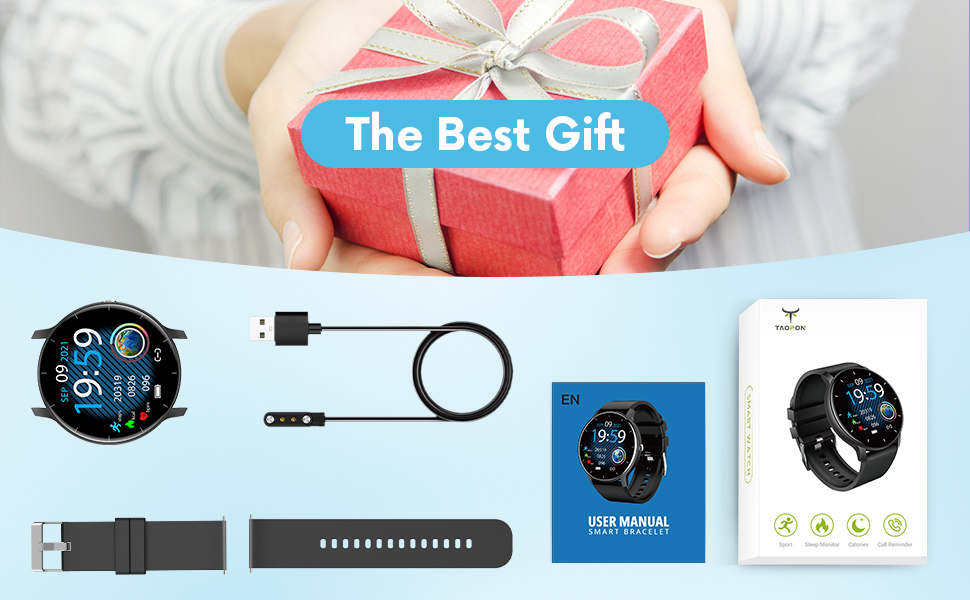
Gambar 2: Isi Paket
Panduan Pengaturan
1. Mengisi Daya Jam Tangan Pintar
Before first use, fully charge your smartwatch. Connect the magnetic charging cable to the charging points on the back of the watch and plug the USB end into a power adapter (not included) or a computer's USB port. A full charge typically takes about 2 hours and provides up to 7 days of typical use or 30 days of standby time.

Gambar 3: Mengisi daya Smart Watch
2. Instalasi dan Pemasangan Aplikasi
To unlock the full potential of your TAOPON Smart Watch, download and install the "Da Fit" app on your smartphone. The app is compatible with iOS 9.0 & Android 5.0 or higher.
- Scan the QR code in the manual or search for "Da Fit" in your phone's app store (App Store for iOS, Google Play Store for Android).
- Instal aplikasi "Da Fit".
- Buka aplikasi dan ikuti petunjuk di layar untuk membuat akun atau masuk.
- Aktifkan Bluetooth di telepon pintar Anda.
- In the "Da Fit" app, navigate to the device section and search for your smartwatch. Select "smartwatch zl02" to pair.
- Konfirmasikan permintaan pemasangan pada ponsel dan jam tangan pintar Anda.
Setelah dipasangkan, jam tangan akan menyinkronkan waktu dan data dengan ponsel Anda.
Petunjuk Pengoperasian
Navigasi Dasar
- Layar Sentuh: Swipe left/right or up/down to navigate through menus and features.
- Tombol Samping: Press to quickly return to the home screen or turn the screen on/off.
- Bangun untuk Bangun: The display will automatically light up when you raise your wrist.
Customizing Watch Dials
Your smartwatch offers a variety of pre-installed dials. You can also personalize your watch face by setting your favorite photo as the dial through the "Da Fit" app.

Figure 4: Watch Dial Customization
Pelacakan Kebugaran
The watch supports 8 sports modes to track your activities:
- Sedang berjalan
- Berlari
- Bersepeda
- Lompat Tali
- Bulutangkis
- Bola basket
- Sepak bola
- Swimming (IP67 waterproof, suitable for hand washing or rainy days, not for prolonged submersion or hot water)
During exercise, the watch tracks calorie consumption, steps, distance, minutes of activity, and heart rate. Connect to your mobile phone's GPS via the app to record your movement track.

Figure 5: Multiple Sports Modes Tracking
Pemantauan Kesehatan
The smartwatch accurately tracks real-time health data:
- Pemantauan Denyut Jantung: Records your heart rate throughout the day. You can also measure it in real-time by tapping the heart rate icon on the watch.
- Pemantauan Oksigen Darah: Provides SpO2 readings.
- Pemantauan Tekanan Darah: Mengukur tingkat tekanan darah.
- Pemantau Tidur: Tracks deep sleep, light sleep, and overall sleep duration, showing trends in sleep quality over a week.

Gambar 6: Pemantauan Kesehatan Komprehensif
Smart Features and Tools
The TAOPON Smart Watch offers various convenient tools:
- Pemberitahuan Pesan: Receive call reminders, SMS, Facebook, Twitter, LinkedIn, WhatsApp, Line, Instagram, etc., by connecting to the "Da Fit" APP. You can reject calls directly from the watch.
- Kamera jarak jauh: Kendalikan kamera ponsel Anda dari jarak jauh melalui jam tangan Anda.
- Kontrol Musik: Play, pause, skip tracks on your phone's music player.
- Prakiraan Cuaca: Dapatkan pembaruan cuaca secara langsung.
- Alat pengukur langkah: Menghitung langkah harian Anda.
- Pengingat Sedentary: Memberi Anda pengingat untuk bergerak setelah periode tidak aktif.
- Pengatur waktu: Built-in timer function.
- Deep Breathing Guide: Assists with guided breathing exercises.
- Alarm: Set up to 3 alarms directly on the watch.
- Kecerahan yang Dapat Disesuaikan: Sesuaikan kecerahan layar untuk hasil optimal. viewing.
- Mode Teater: Reduces screen brightness and disables vibrations for undisturbed viewing.

Figure 7: Remote Camera

Gambar 8: Kontrol Musik
Pemeliharaan
- Pembersihan: Regularly wipe your smartwatch and band with a soft, damp kain. Hindari bahan kimia keras atau bahan abrasif.
- Tahan Air: The watch is IP67 waterproof, meaning it is effective against splashes and can be worn during hand washing or rainy days. It is not recommended for showering with hot water, diving, or prolonged submersion.
- Perawatan Baterai: To prolong battery life, avoid extreme temperatures and do not allow the battery to fully drain frequently. Charge the watch regularly.
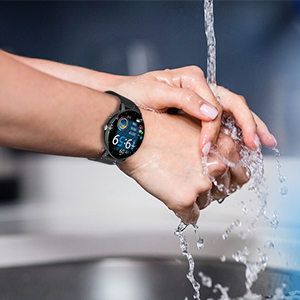
Gambar 9: Ketahanan Air IP67
Penyelesaian Masalah
- Jam tidak menyala: Pastikan jam tangan terisi penuh. Hubungkan ke kabel pengisi daya dan sumber daya minimal 30 menit.
- Tidak dapat dipasangkan dengan telepon:
- Pastikan Bluetooth diaktifkan pada ponsel Anda dan jam tangan berada dalam jangkauan.
- Mulai ulang ponsel dan jam tangan pintar Anda.
- Check if the "Da Fit" app is updated to the latest version.
- If previously paired, try unpairing the device from your phone's Bluetooth settings and re-pairing through the app.
- Data kesehatan yang tidak akurat:
- Pastikan jam tangan dikenakan dengan pas di pergelangan tangan Anda, kira-kira selebar satu jari dari tulang pergelangan tangan Anda.
- Jaga agar sensor tetap bersih dan bebas dari kotoran.
- Harap dicatat bahwa fitur pemantauan kesehatan hanya untuk referensi dan tidak boleh digunakan untuk diagnosis medis.
- Notifikasi tidak diterima:
- Check app permissions in your phone settings to ensure "Da Fit" has access to notifications.
- Verify that notification settings are enabled within the "Da Fit" app for specific applications.
- Pastikan jam tangan terhubung melalui Bluetooth ke ponsel Anda.
Spesifikasi
| Fitur | Detil |
|---|---|
| Nomor Model | smartwatch zl02 |
| Ukuran Layar | 1.28 inci (Diagonal layar terlihat: 2" / 4 cm) |
| Resolusi | 240*240 piksel |
| Kapasitas Baterai | Lithium Polymer 200mAh (termasuk) |
| Daya Tahan Baterai | 7 days (typical use), 30 days (standby) |
| Peringkat Tahan Air | Tingkat IP67 |
| Kesesuaian | iOS 9.0 & Android 5.0 or higher |
| Konektivitas | Bahasa Indonesia: Bluetooth |
| Berat Barang | 110 Gram (3.88 ons) |
| Dimensi Produk | 6.18x4.02x1.06 inci |
| Pabrikan | TAOPON |
Informasi Keselamatan Penting
- Jangan mencoba membongkar, memperbaiki, atau memodifikasi perangkat.
- Jauhkan perangkat dari suhu ekstrem, sinar matahari langsung, dan api terbuka.
- Hindari benturan keras atau menjatuhkan perangkat.
- Jauhkan dari jangkauan anak-anak.
- Dispose of the device and its battery according to local regulations. Do not dispose of with household waste.
- Consult a medical professional before starting any new exercise regimen or if you have any health concerns. The health monitoring data is for reference only.
Garansi dan Dukungan
For warranty information, technical support, or customer service inquiries, please refer to the contact details provided on the product packaging or the official TAOPON websitus. Harap simpan bukti pembelian Anda untuk klaim garansi.


