1. Pendahuluan
This manual provides comprehensive instructions for the setup, operation, maintenance, and troubleshooting of your BOMAKER Mini WiFi Projector 10''. Please read this manual thoroughly before using the projector to ensure proper operation and to maximize its lifespan. Keep this manual for future reference.
The BOMAKER Mini WiFi Projector 10'' is a portable 720P HD LCD projector designed for home cinema, gaming, and various multimedia applications. It features WiFi connectivity for smartphone mirroring, multiple input options including HDMI, USB, and AV, and supports projection sizes up to 300 inches.
2. Informasi Keselamatan Penting
To prevent fire, electric shock, or injury, always observe the following safety precautions:
- Jangan halangi lubang ventilasi. Pastikan aliran udara di sekitar proyektor memadai.
- Jangan melihat langsung ke lensa proyektor saat lampuamp menyala. Cahaya terang dapat menyebabkan kerusakan mata.
- Do not expose the projector to rain or moisture to avoid electric shock.
- Gunakan hanya adaptor daya yang disertakan dengan proyektor.
- Tempatkan proyektor pada permukaan yang stabil dan rata.
- Cabut proyektor dari stopkontak saat terjadi badai petir atau saat tidak digunakan dalam waktu lama.
- Jangan mencoba memperbaiki produk ini sendiri. Serahkan semua perbaikan kepada teknisi servis yang berkualifikasi.
3. Isi Paket
Verifikasi bahwa semua item yang tercantum di bawah ini disertakan dalam paket Anda:
- 1 x BOMAKER Mini WiFi Projector
- 1x Kontrol Jarak Jauh
- 1 x Adaptor Daya
- 1 x Kabel HDMI
- 1 x AV Cable
- 1 x Panduan Pengguna
4. Produk Lebihview
Pelajari berbagai bagian dan koneksi proyektor Anda.

Gambar 4.1: Depan view of the BOMAKER Mini WiFi Projector. This image shows the projector's lens, focus ring, and keystone correction dial, with a smartphone wirelessly connected and displaying content on its screen, illustrating the WiFi mirroring capability.
4.1. Port Input/Output
The projector features a variety of ports for connecting different devices.

Gambar 4.2: Belakang view of the projector displaying its connectivity options. From left to right, the ports include AV, USB, Audio Out, VGA, HDMI, and Micro SD card slot, allowing for versatile device connections.
- Port AV: Connect to older devices using the included AV cable.
- Port USB: Untuk menghubungkan drive USB untuk memutar media files.
- Suara keluar: Hubungkan speaker eksternal atau headphone.
- Port VGA: Connect to computers or laptops with a VGA output.
- Port HDMI: Connect to devices like laptops, gaming consoles (PS4), TV sticks, etc.
- Slot Kartu Micro SD: Masukkan kartu Micro SD untuk memutar media. files.
5. Pengaturan
5.1. Penempatan
Pilih lokasi yang sesuai untuk proyektor Anda. Untuk hasil optimal viewing, place the projector on a flat, stable surface or mount it. The optimal projection distance is between 8.2 and 11.2 feet (2.5 to 3.4 meters) for a screen size of 30 to 300 inches.
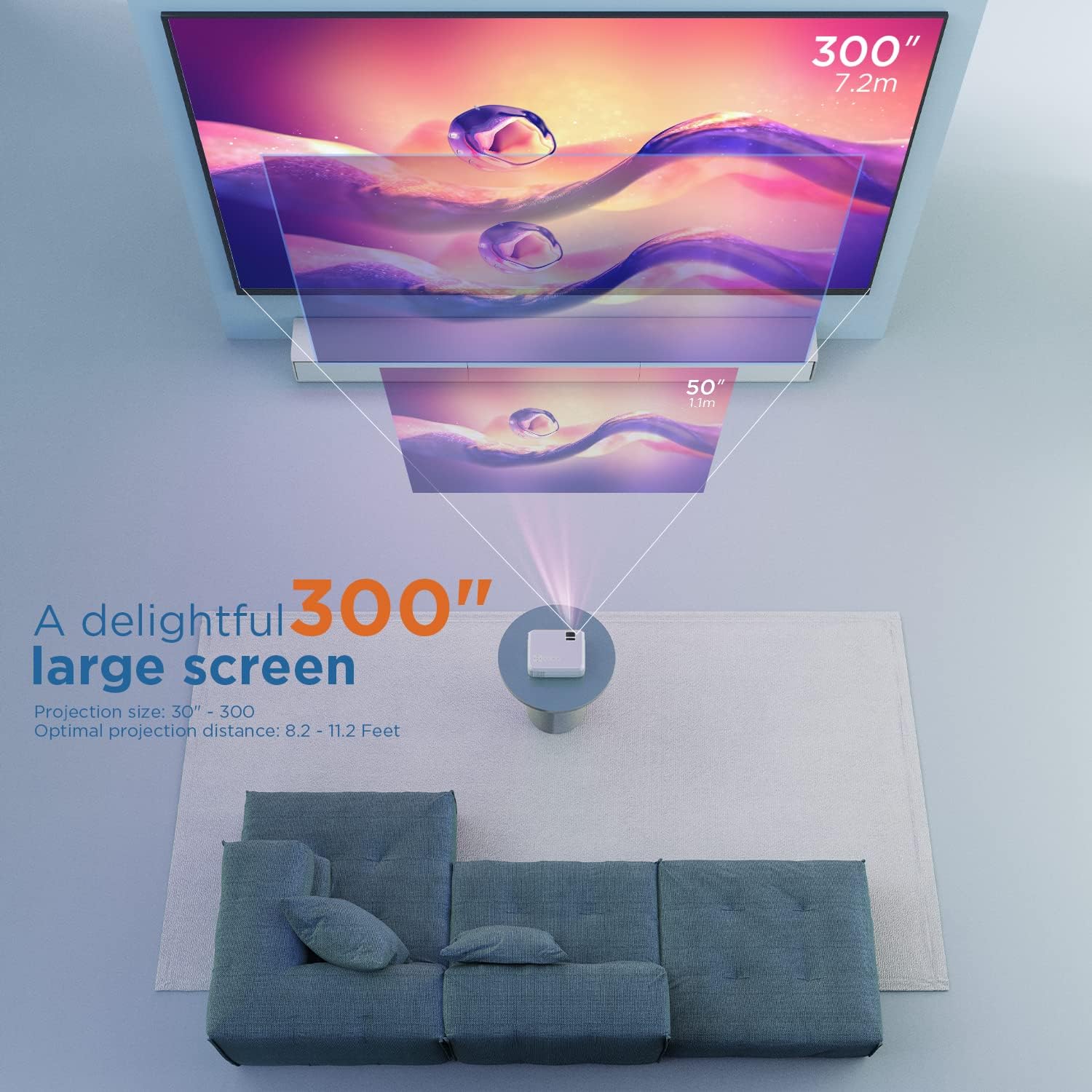
Gambar 5.1: Illustration of projection distances and corresponding screen sizes. The image demonstrates how varying the distance between the projector and the screen affects the projected image size, from 50 inches (1.1m) to 300 inches (7.2m).
5.2. Koneksi Daya
- Hubungkan adaptor daya ke port input daya proyektor.
- Hubungkan adaptor daya ke stopkontak di dinding.
- Tekan tombol daya pada proyektor atau remote control untuk menyalakannya.
5.3. Fokus dan Koreksi Keystone
- Fokus: Rotate the focus ring on the projector lens until the image is clear and sharp.
- Dasar: If the projected image appears trapezoidal, adjust the keystone correction dial (usually located near the lens) until the image is rectangular.
6. Petunjuk Pengoperasian
6.1. Operasi Dasar
- Daya Hidup/Mati: Tekan tombol daya pada proyektor atau remote control.
- Pemilihan Sumber Masukan: Use the "Source" button on the remote or projector to select the desired input (HDMI, AV, USB, Micro SD, WiFi).
- Penyesuaian Volume: Use the volume buttons on the remote control.
6.2. Menghubungkan Perangkat
Proyektor ini mendukung berbagai metode koneksi:
6.2.1. Koneksi HDMI
Connect your laptop, gaming console (PS4), TV stick (e.g., Roku, Fire TV), or other HDMI-enabled devices using an HDMI cable. Select "HDMI" as the input source.
6.2.2. USB/Micro SD Connection
Insert a USB drive or Micro SD card into the respective port. Select "USB" or "Micro SD" as the input source. The projector will display a menu to browse and play media file(foto, video, musik, teks).
6.2.3. AV Connection
Use the included AV cable to connect to devices with AV output. Select "AV" as the input source.
6.2.4. WiFi Mirroring (Smartphone Connection)
The projector supports wireless screen mirroring from smartphones (iOS and Android).
- Select "WiFi" as the input source on the projector.
- Follow the on-screen instructions to connect your smartphone to the projector's WiFi network.
- Once connected, enable screen mirroring/casting feature on your smartphone (e.g., "Screen Mirroring" for iOS, "Smart View" or "Cast" for Android).
- Pilih proyektor dari daftar perangkat yang tersedia.
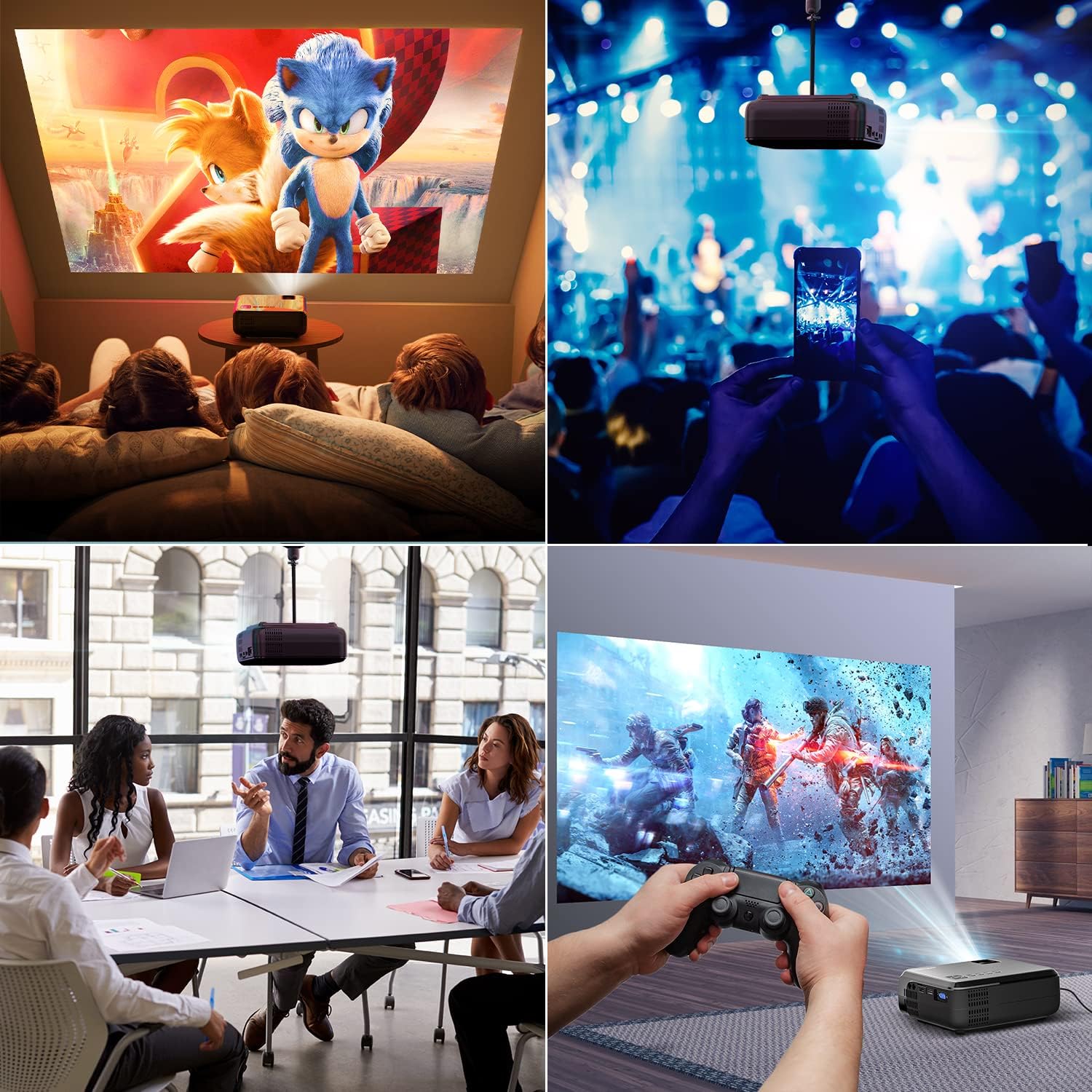
Gambar 6.1: This image displays a collage of the projector in different environments: a family watching a movie, a person using a smartphone to control the projector at a concert, a business meeting with a presentation, and a person playing video games. It highlights the versatility of the BOMAKER Mini WiFi Projector for entertainment and professional use.
6.3. Visual Experience
The projector delivers a native 720P HD resolution, ensuring clear and detailed images. It supports 1080P decoding and features a high brightness output for vibrant visuals.
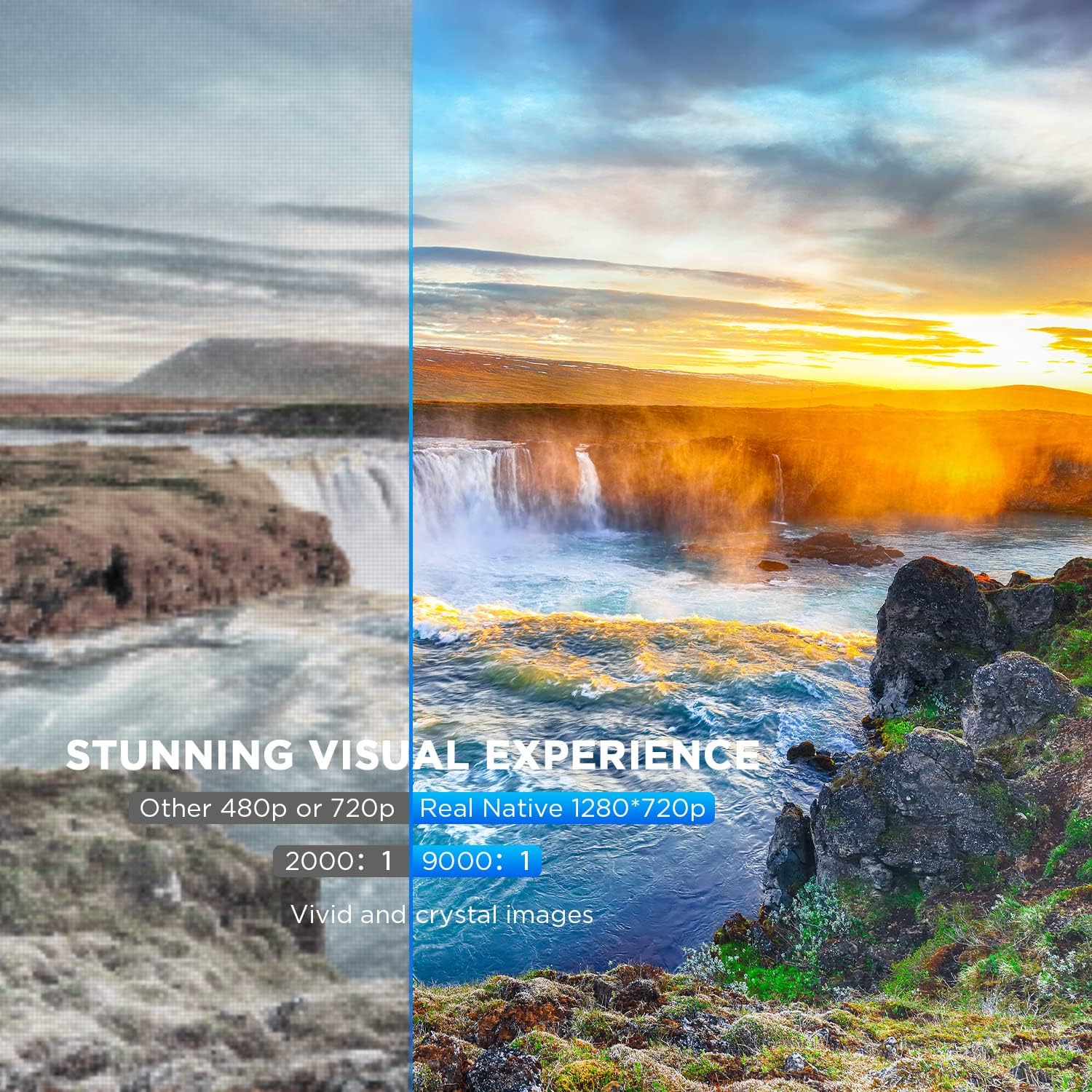
Gambar 6.2: A side-by-side comparison demonstrating the difference between standard 480p/720p projection and the projector's real native 1280x720p resolution. The native resolution side shows significantly sharper details and richer colors in a landscape image, emphasizing the "Stunning Visual Experience" and "Vivid and crystal images".

Gambar 6.3: This image illustrates the projector's "Crystal Clear Picture with Ultra-low Latency" feature, showing a vibrant, high-definition projection of a car racing scene on a large screen in a living room setting. The text highlights upgraded lens settings for a new visual experience with latency less than 30ms.
7. Pemeliharaan
7.1. Membersihkan Lensa
Use a soft, lint-free cloth specifically designed for cleaning optical lenses. Do not use abrasive cleaners or solvents. Gently wipe the lens to remove dust or smudges.
7.2. Membersihkan Bodi Proyektor
Bersihkan bagian luar proyektor dengan kain lembut dan kering. Untuk kotoran yang membandel, gunakan kain yang sedikit kering.amp Kain lap dapat digunakan, diikuti dengan kain kering. Pastikan tidak ada cairan yang masuk ke lubang ventilasi.
7.3. Penyimpanan
When not in use, store the projector in a cool, dry place, away from direct sunlight and extreme temperatures. Cover the lens with its cap to protect it from dust.
8. Penyelesaian masalah
Jika Anda mengalami masalah dengan proyektor Anda, lihat masalah umum dan solusi berikut:
| Masalah | Kemungkinan Penyebab | Larutan |
|---|---|---|
| Tidak ada gambar di layar | Power cable not connected; incorrect input source; device not powered on. | Periksa sambungan daya; pilih sumber input yang benar; pastikan perangkat yang terhubung dalam keadaan menyala. |
| Gambar buram | Fokus tidak disesuaikan; proyektor terlalu dekat/jauh dari layar. | Sesuaikan cincin fokus; posisikan ulang proyektor. |
| Gambarnya berbentuk trapesium | Keystone correction not adjusted. | Sesuaikan tombol koreksi keystone. |
| Tidak ada suara | Volume too low; external speakers not connected; audio settings on source device. | Increase volume; connect external speakers if needed; check audio output settings on source device. |
| WiFi mirroring issues | Incorrect WiFi connection; smartphone mirroring feature not activated. | Ensure correct WiFi network is selected; activate screen mirroring on your smartphone. |
9. Spesifikasi
| Fitur | Detil |
|---|---|
| Merek | PEMBUAT BOOM |
| Nomor Model | Mini WiFi Projector 10'' |
| Resolusi Tampilan | Native 1280 x 720 (Supports 1080P decoding) |
| Jenis Tampilan | Layar LCD |
| Teknologi Konektivitas | HDMI, Wi-Fi |
| Perangkat yang Kompatibel | Smartphone, TV Stick, PS4, Laptop, USB Drive, Micro SD Card |
| Dimensi Produk | 22L x 17L x 9H sentimeter |
| Faktor Bentuk | Portabel |
| Penggunaan yang Direkomendasikan | Bioskop Rumah, Game |
| Warna | Putih |
10. Garansi dan Dukungan
For warranty information or technical support, please refer to the documentation included with your purchase or contact BOMAKER customer service. Details regarding specific warranty periods and support channels are typically provided on the manufacturer's official weblokasi atau dalam kemasan produk.