Perkenalan
Thank you for choosing the Mistral MSF1650R 16-inch Stand Fan. This manual provides important information regarding the assembly, operation, maintenance, and troubleshooting of your new fan. Please read it thoroughly before use and retain it for future reference.
Petunjuk Keselamatan Penting
- Always ensure the fan is placed on a stable, level surface to prevent it from tipping over.
- Jangan mengoperasikan kipas angin dengan kabel atau steker yang rusak. Jika kabel rusak, kabel tersebut harus diganti oleh produsen, agen servisnya, atau orang yang memiliki kualifikasi serupa untuk menghindari bahaya.
- Unplug the fan from the power outlet before cleaning, assembling, or disassembling parts.
- Keep fingers, pencils, or any other objects out of the fan guard when it is operating.
- Jangan gunakan kipas angin di dekat air atau di lingkungan yang terlalu lembap.
- Peralatan ini tidak ditujukan untuk digunakan oleh orang (termasuk anak-anak) dengan keterbatasan fisik, sensorik, atau mental, atau kurang pengalaman dan pengetahuan, kecuali mereka telah diberi pengawasan atau petunjuk mengenai penggunaan peralatan oleh orang yang bertanggung jawab atas keselamatan mereka.
- Anak-anak harus diawasi untuk memastikan mereka tidak bermain-main dengan peralatan tersebut.
Komponen Produk
Familiarize yourself with the main parts of your Mistral MSF1650R stand fan.
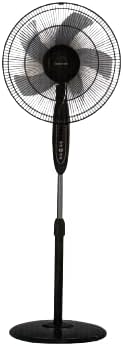
Gambar 1: Depan view of the Mistral MSF1650R 16-inch Stand Fan, showing the fan head, control panel, adjustable stand, and round base.

Figure 2: The Mistral MSF1650R stand fan accompanied by its remote control, illustrating the convenience of remote operation.
- Penjaga Depan
- Fan Blade (5 ABS blades)
- Pelindung Belakang
- Rumah Motor
- Panel Kontrol
- Tiang Penyangga yang Dapat Diatur
- Basis
- Kontrol Jarak Jauh
Petunjuk Perakitan
Follow these steps to assemble your stand fan:
- Pasangkan Basisnya: Place the stand pole onto the base and secure it using the provided screw and washer from underneath the base.
- Install the Rear Guard: Position the rear guard onto the motor housing, ensuring it aligns with the locating pins. Secure it with the guard nut.
- Mount the Fan Blade: Slide the fan blade onto the motor shaft, aligning the notch on the blade with the pin on the shaft. Secure it with the blade cap, turning it counter-clockwise.
- Attach the Front Guard: Place the front guard onto the rear guard, aligning the clips. Secure the guards together using the guard ring and clip, ensuring it is tightly fastened around the perimeter.
- Sesuaikan Tinggi: Loosen the height adjustment knob on the stand pole, extend or retract the pole to the desired height, and then tighten the knob securely.
Petunjuk Pengoperasian
Your Mistral MSF1650R fan can be operated via the control panel on the fan body or the remote control.
Fungsi Panel Kontrol:
- Tombol ON/OFF: Tekan untuk menghidupkan atau mematikan kipas.
- Tombol KECEPATAN: Press repeatedly to cycle through fan speeds: Low, Medium, High.
- Tombol MODE: Press to select between Normal, Natural, and Sleep modes.
- Tombol TIMER: Press to set the operating timer (up to 7.5 hours). Each press adds 0.5 hours.
- OSC (Oscillation) Button: Press to start or stop the fan head oscillating horizontally.
Fungsi Kontrol Jarak Jauh:
The remote control duplicates all functions available on the fan's control panel for convenient operation from a distance.
- Ensure batteries are correctly inserted into the remote control.
- Point the remote control towards the fan's receiver when operating.
- Buttons on the remote correspond to the functions described above (ON/OFF, SPEED, MODE, TIMER, OSC).
Perawatan dan Pembersihan
Pembersihan rutin akan membantu menjaga kinerja kipas dan memperpanjang masa pakainya.
- Cabut Sebelum Membersihkan: Always disconnect the fan from the power supply before attempting any cleaning or maintenance.
- Bersihkan Permukaan Eksterior: Usap permukaan luar kipas dengan kain lembut dan kering.amp kain. Jangan gunakan pembersih atau pelarut yang bersifat abrasif.
- Clean Fan Blades and Guards: To clean the fan blades and inside the guards, you may need to carefully remove the front guard. Use a soft cloth or a vacuum cleaner with a brush attachment to remove dust. Ensure all parts are dry before reassembling.
- Penyimpanan: Jika kipas angin disimpan untuk jangka waktu yang lama, tutuplah agar terlindungi dari debu dan simpan di tempat yang kering dan sejuk.
Penyelesaian Masalah
Lihat tabel di bawah untuk masalah umum dan solusinya.
| Masalah | Kemungkinan Penyebab | Larutan |
|---|---|---|
| Kipas tidak menyala. | Tidak ada catu daya. Fan not plugged in. Tombol daya tidak ditekan. | Periksa stopkontak. Pastikan steker terpasang sepenuhnya. Tekan tombol ON/OFF. |
| Aliran udara lemah. | Kecepatan kipas diatur terlalu rendah. Dust accumulation on blades/guards. | Tingkatkan kecepatan kipas. Clean fan blades and guards as per maintenance instructions. |
| Kipas mengeluarkan suara yang tidak biasa. | Bagian yang longgar. Penyumbatan pada bilah kipas. | Ensure all assembly screws and nuts are tight. Cabut steker dan periksa apakah ada benda asing. |
| Kontrol jarak jauh tidak berfungsi. | Baterai mati. Penghalang antara remote dan kipas. | Ganti baterai. Pastikan terdapat jalur pandang yang jelas ke penerima kipas. |
Spesifikasi
Technical details for the Mistral MSF1650R 16-inch Stand Fan.

Figure 3: Detailed specifications of the Mistral MSF1650R stand fan, including dimensions, power, and features.
| Model | MSF1650R |
| Bilah Kipas | 5 ABS Fan Blade |
| Jil.tage | 220-240V ~ 50Hz |
| Kekuatan | 55W |
| Volume Udara | 66.49 m³/menit |
| Aliran Udara Maksimal | 3.45 m/detik |
| Dimensi Produk | 45 x 15 x 57 cm (P x L x T) |
| Tinggi maksimal | 1.3m (Adjustable) |
| Berat Bersih | 5.85 kg |
| Fitur Khusus | Adjustable Height, Remote Controlled, 7.5 Hours Timer, 3 Speed Selection, Normal/Natural/Sleep Modes |
Garansi dan Dukungan
For warranty information or technical support, please refer to the warranty card included with your purchase or contact Mistral customer service. Keep your proof of purchase for warranty claims.
For further assistance, please visit the official Mistral websitus atau hubungi pusat layanan resmi mereka.


