1. Petunjuk Keselamatan Penting
Please read all instructions carefully before using this fan heater. Failure to follow these instructions may result in electric shock, fire, or serious injury.
- Always plug heaters directly into a wall outlet. Never use with an extension cord or relocatable power tap.
- Do not use this heater in bathrooms, laundry areas, or similar indoor locations where water is present.
- Do not cover the heater. Covering the heater can cause overheating and fire. Keep flammable materials at least 1 meter (3 feet) away from the heater.
- Cabut steker pemanas saat tidak digunakan.
- Jangan memasukkan atau membiarkan benda asing masuk ke dalam lubang ventilasi atau pembuangan karena dapat menimbulkan sengatan listrik atau kebakaran, atau merusak pemanas.
- Pemanas ini panas saat digunakan. Untuk menghindari luka bakar, jangan biarkan kulit telanjang menyentuh permukaan yang panas.
- Pastikan voltage yang tertera pada label rating sesuai dengan volume listriktage di rumah Anda.
- Peralatan ini tidak ditujukan untuk digunakan oleh orang (termasuk anak-anak) dengan keterbatasan fisik, sensorik, atau mental, atau kurang pengalaman dan pengetahuan, kecuali mereka telah diberi pengawasan atau petunjuk mengenai penggunaan peralatan oleh orang yang bertanggung jawab atas keselamatan mereka.
2. Produk Lebihview
The SATURN ST-HT7645K is a floor-standing fan heater designed for indoor use, providing efficient heating with a metal heating element and multiple power settings. It features a built-in thermostat and overheat protection for safety.
Komponen:
- Main Unit (Fan Heater)
- Kabel Listrik
- Control Knobs (Thermostat, Power/Mode Selector)
- Air Inlet/Outlet Grilles
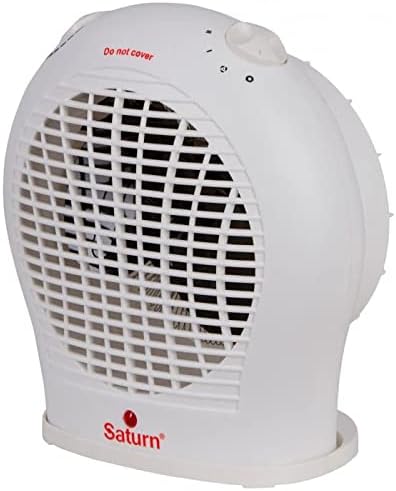
Gambar 2.1: Depan view of the SATURN ST-HT7645K fan heater, displaying the main body, front grille, and the 'Saturn' logo at the base.

Gambar 2.2: Atas view of the fan heater, highlighting the two rotary control knobs for temperature and power settings, along with a visible 'Do not cover' safety warning.

Gambar 2.3: Belakang view of the fan heater, illustrating the back air intake grille and the attached power cord extending from the lower right side.
3. Pengaturan
- Membongkar: Keluarkan pemanas dari kemasannya dengan hati-hati. Simpan kemasannya untuk penyimpanan atau pengangkutan di kemudian hari.
- Penempatan: Place the heater on a firm, level surface. Ensure there is at least 1 meter (3 feet) of clear space around the heater from walls, furniture, curtains, and other flammable materials. Do not place it directly under a power outlet.
- Sambungan Daya: Ensure the heater is switched off (mode selector set to '0'). Plug the power cord directly into a suitable 220-240V AC, 50Hz wall outlet. Do not use extension cords or multi-plugs.
4. Petunjuk Pengoperasian
The SATURN ST-HT7645K fan heater features two control knobs: one for the thermostat and one for power/mode selection.
Power/Mode Selector Knob:
- 0 (Mati): Mematikan pemanas.
- Hanya kipas: Activates the fan without heat, providing cool air circulation.
- I (Low Heat): Provides low heat output (e.g., 1000W).
- II (High Heat): Provides high heat output (e.g., 2000W).
Kenop Kontrol Termostat:
This knob allows you to set the desired room temperature. The heater will cycle on and off to maintain this temperature.
- Turn the thermostat knob to its maximum setting.
- Select the desired heat setting (I or II) using the power/mode selector knob.
- Once the room reaches your desired temperature, slowly turn the thermostat knob counter-clockwise until the heater switches off. The heater will now automatically maintain this temperature.
5. Pemeliharaan
Perawatan rutin memastikan kinerja optimal dan memperpanjang umur pemanas Anda.
Pembersihan:
- Selalu cabut steker pemanas dan biarkan dingin sepenuhnya sebelum dibersihkan.
- Lap permukaan luar dengan lembut, damp kain. Jangan gunakan pembersih atau pelarut yang bersifat abrasif.
- Gunakan penyedot debu dengan alat tambahan sikat untuk menghilangkan debu dari kisi-kisi saluran masuk dan keluar udara.
- Jangan pernah merendam pemanas dalam air atau cairan lainnya.
Penyimpanan:
- Jika menyimpan pemanas untuk jangka waktu yang lama, bersihkanlah secara menyeluruh.
- Simpan pemanas dalam kemasan aslinya di tempat yang sejuk dan kering.
6. Penyelesaian masalah
| Masalah | Kemungkinan Penyebab | Larutan |
|---|---|---|
| Pemanas tidak menyala. | Tidak ada catu daya. Termostat disetel terlalu rendah. Perlindungan panas berlebih diaktifkan. |
Check power outlet and plug. Turn thermostat knob to a higher setting. Unplug, let cool for 10-15 minutes, then plug back in. |
| Pemanas menghasilkan panas yang tidak mencukupi. | Pengaturan panas rendah dipilih. Ruangan terlalu besar untuk pemanas. Saluran masuk/keluar udara tersumbat. |
Select 'II' (High Heat) setting. Ensure heater is appropriate for room size (up to 20m²). Clean grilles and ensure no obstructions. |
| Pemanas sering menyala dan mati. | Pengaturan termostat terlalu dekat dengan suhu ruangan. Overheat protection activating. |
Adjust thermostat to a slightly higher or lower setting. Ensure proper ventilation and no obstructions. |
Jika masalah berlanjut setelah mencoba solusi ini, hubungi dukungan pelanggan.
7. Spesifikasi
- Model: ST-HT7645K
- Merek: SATURN (Generic)
- Jenis: Pemanas Kipas
- Tipe Lokasi: Lantai Mount
- Elemen Pemanas: Logam
- Kekuatan: 2000 Watts (Maks)
- Pengaturan Daya: 3 Modes (Fan Only, Low Heat, High Heat)
- Cakupan Pemanasan: Hingga 20m²
- Fitur Khusus: Thermostat, Overheat Protection
- Warna: Putih
- Faktor Bentuk: Alas
- Pemakaian Dalam/Luar Ruangan: Dalam
- Sumber Daya: Listrik Kabel
- Berat Barang: Sekitar 2 Kilogram
- Dimensi Paket: Sekitar 30x30x30 cm
8. Garansi dan Dukungan
This product is covered by a standard manufacturer's warranty against defects in materials and workmanship. Please refer to the warranty card included with your purchase for specific terms and conditions, including the warranty period and claim procedures.
For technical support, troubleshooting assistance, or warranty claims, please contact the retailer where the product was purchased or refer to the contact information provided in your product documentation.
Harap simpan bukti pembelian Anda untuk tujuan garansi.


