1. Pendahuluan
Welcome to the OKAI Neon Electric Scooter user manual. This guide provides essential information for the safe assembly, operation, maintenance, and troubleshooting of your new electric scooter. Please read this manual thoroughly before your first ride to ensure optimal performance and safety.
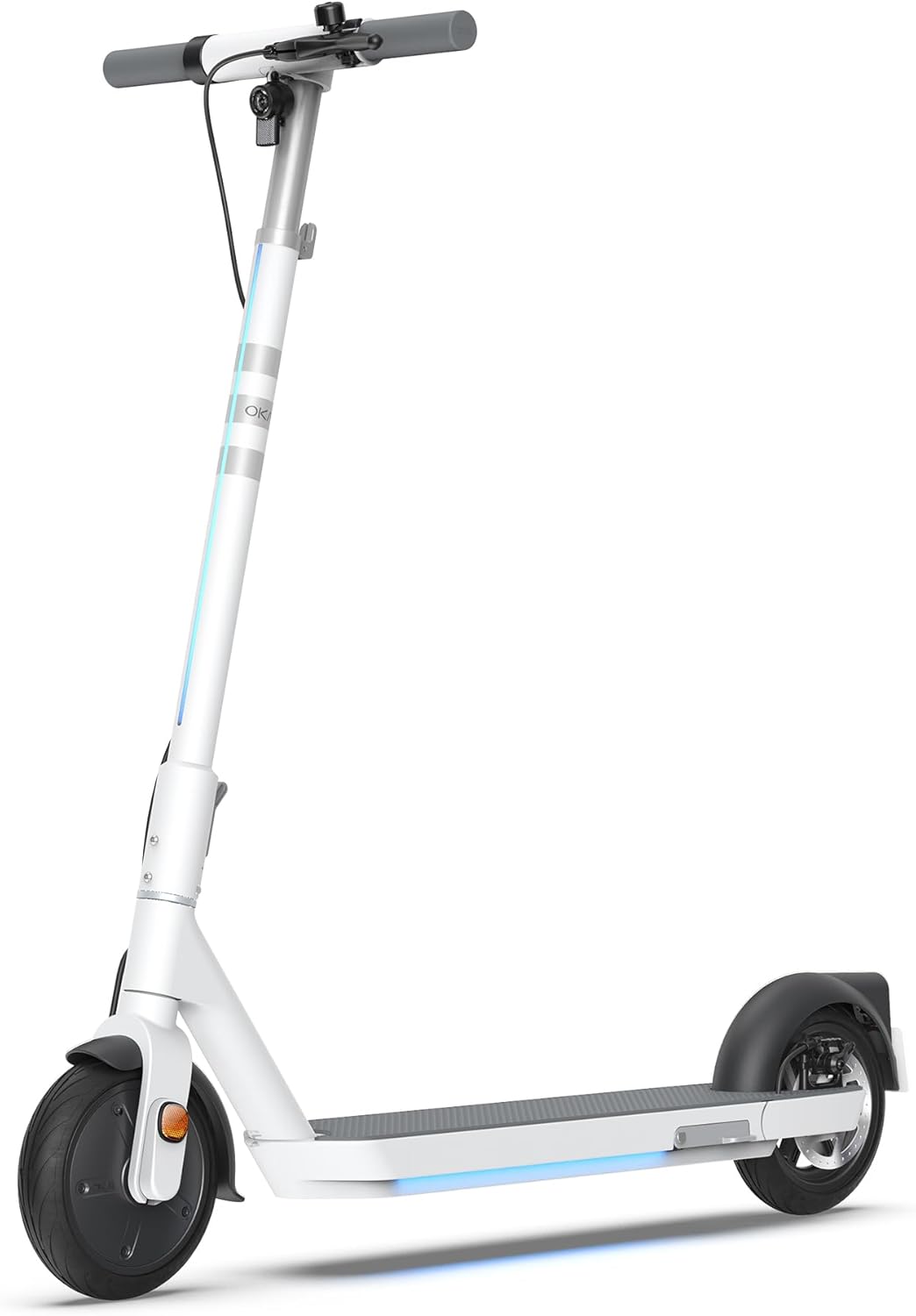
Figure 1: The OKAI Neon Electric Scooter, showcasing its sleek white design and integrated lighting.
2. Informasi Keselamatan
Mengendarai skuter listrik memiliki risiko tersendiri. Untuk meminimalkan risiko ini, selalu patuhi pedoman keselamatan berikut:
- Selalu kenakan helm dan perlengkapan keselamatan yang sesuai (pelindung lutut, pelindung siku) saat berkendara.
- Pastikan semua komponen telah terpasang dengan aman sebelum setiap perjalanan.
- Jangan berkendara dalam kondisi basah, hujan deras, atau melewati genangan air.
- Patuhilah peraturan dan hukum lalu lintas setempat.
- Jaga kecepatan dan jarak yang aman dari kendaraan lain dan pejalan kaki.
- Hindari berkendara di bawah pengaruh alkohol atau obat-obatan.
- Batas berat maksimum untuk skuter ini adalah 220 pon (100 kg). Jangan melebihi batas ini.
- This scooter is designed for adult use.
3. Isi Paket
Pastikan semua barang ada dan dalam kondisi baik saat membuka kemasan:
- OKAI Neon Electric Scooter
- Adaptor Pengisian Daya
- User Manual (dokumen ini)
- Alat Perakitan (jika diperlukan)
- Kartu Kunci NFC
4. Pengaturan dan Pengisian Awal
4.1 Unboxing dan Perakitan
Carefully remove the scooter and all accessories from the packaging. The OKAI Neon Electric Scooter typically comes pre-assembled with minimal setup required. Follow these steps:
- Lift the handlebar stem until it clicks into place. Ensure the folding mechanism is securely locked.
- Attach the handlebars to the stem, ensuring all cables are properly connected and not pinched. Tighten any screws as instructed in the quick start guide (if provided separately).
4.2 Pengisian Awal
Before your first ride, fully charge the scooter's battery. This helps prolong battery life.
- Temukan port pengisian daya pada skuter.
- Connect the charging adapter to the scooter's charging port, then plug the adapter into a standard wall outlet.
- The scooter's display will indicate charging status. A full charge typically takes approximately 5.5 hours.
- Setelah terisi penuh, lepaskan pengisi daya.
5. Petunjuk Pengoperasian
5.1 Menghidupkan/Mematikan
- To power on: Press and hold the power button on the handlebar until the display illuminates.
- Untuk mematikan: Tekan dan tahan tombol daya hingga layar mati.
5.2 Dasar-Dasar Berkuda
To begin riding, place one foot on the deck and push off with the other foot to gain some initial momentum. Once moving, gently press the accelerator lever to engage the motor. For braking, use the hand levers for the electric brake (front) and disc brake (rear).

Figure 2: Key features including the smart display, disc brake, 300W power motor, and hidden rear suspension.
5.3 Mode Kecepatan
The OKAI Neon Electric Scooter features multiple speed modes to suit different riding conditions and rider preferences. Refer to the scooter's display or the OKAI app to switch between modes. The maximum speed is approximately 15.5 MPH (25 km/h).
5.4 Mekanisme Pelipatan
The scooter features a one-click folding design for easy storage and transport. To fold, locate the folding latch near the base of the handlebar stem, release it, and carefully fold the stem down until it locks into place with the rear fender.
5.5 App Connectivity and Customization
Enhance your riding experience by connecting your OKAI Neon Electric Scooter to the OKAI app. The app allows for:
- Adjusting ambient light settings.
- Monitoring real-time ride updates and battery status.
- Customizing dashboard settings.
- Locking/unlocking the scooter (using the NFC key card or app).
Download the official OKAI app from your device's app store and follow the in-app instructions to pair your scooter.
6. Pemeliharaan
Regular maintenance ensures the longevity and safe operation of your OKAI Neon Electric Scooter.
6.1 Perawatan Baterai
- Isi baterai hingga penuh sebelum digunakan pertama kali.
- Avoid completely draining the battery. Recharge after each use, or at least once a month if not used regularly.
- Simpan skuter di tempat yang sejuk dan kering, jauh dari sinar matahari langsung dan suhu ekstrem.
- Use only the official OKAI charging adapter.
6.2 Tekanan Ban
The front tire is pneumatic, and maintaining correct tire pressure is crucial for ride comfort, range, and safety. Check tire pressure regularly. While specific recommended PSI is not provided in this manual, generally, electric scooters require tire pressure between 30-50 PSI. Consult a professional if unsure or if you experience frequent deflation.
6.3 Pembersihan dan Penyimpanan
- Bersihkan skuter dengan iklanamp Gunakan kain. Jangan gunakan semprotan air bertekanan tinggi atau pembersih korosif.
- Pastikan penutup port pengisian daya tertutup rapat sebelum dibersihkan.
- Store the scooter indoors in a dry environment when not in use.
6.4 Pemeriksaan Rem
Regularly inspect the front electric brake and rear disc brake for proper function. Ensure brake levers are responsive and brake pads are not excessively worn. Adjust or replace components as needed, or seek professional assistance.
7. Penyelesaian masalah
This section addresses common issues you might encounter with your OKAI Neon Electric Scooter.
| Masalah | Kemungkinan Penyebab | Larutan |
|---|---|---|
| Skuter tidak menyala. | Baterai lemah; koneksi longgar; masalah tombol daya. | Charge the battery fully. Check all visible cable connections. Ensure the power button is not stuck. |
| Motor tidak menyala. | Low battery; kick-start not performed; faulty accelerator. | Ensure battery is charged. Push off to gain initial speed before pressing accelerator. Contact support if issue persists. |
| Jangkauan atau kecepatan berkurang. | Tekanan ban rendah; beban berat; berkendara menanjak; cuaca dingin; penurunan kualitas baterai. | Check and inflate tires to recommended pressure. Reduce load. Battery performance can be affected by temperature. |
| Brakes feel weak or unresponsive. | Worn brake pads; loose brake cable; air in hydraulic system (disc brake). | Inspect brake pads for wear and replace if necessary. Adjust brake cable tension. For hydraulic issues, seek professional service. |
| Error codes on display (e.g., E3). | Sensor malfunction; motor issue; controller issue. | Refer to the OKAI app or contact customer support with the specific error code for diagnosis. |
If you encounter an issue not listed here or if the suggested solutions do not resolve the problem, please contact OKAI customer support.
8. Spesifikasi
| Fitur | Detil |
|---|---|
| Merek | Oke |
| Nama Model | Neon Series (ES20) |
| Warna | Putih |
| Kecepatan Maksimum | Hingga 15.5 MPH (25 km/jam) |
| Kisaran Maks | Hingga 25 Mil (40 km) |
| Batas berat | 220 pon (100 kg) |
| Waktu Pengisian Daya | Sekitar 5.5 Jam |
| Dimensi Produk (P x L x T) | 45" x 17.7" x 44.5" (114.3 cm x 44.9 cm x 113 cm) |
| Berat Barang | 35.2 pon (16 kg) |
| Bahan Bingkai | Aluminium |
| Ukuran Roda | 9 inci |
| Gaya Rem | Front: Electric Brake, Rear: Disc Brake |
| Jenis Suspensi | Suspensi Belakang |
| Fitur Khusus | Dual Braking System, Cruise Control, Wide Platform, Lockable, Foldable, Ambient Light |

Figure 3: Dimensions of the OKAI Neon Electric Scooter.
9. Garansi dan Dukungan Pelanggan
9.1 Informasi Garansi
The OKAI Neon Electric Scooter comes with a 1 Year Limited Warranty. This warranty covers manufacturing defects under normal use. Please retain your proof of purchase for warranty claims. For full warranty terms and conditions, refer to the official OKAI websitus atau hubungi dukungan pelanggan.
9.2 Dukungan Pelanggan
For technical assistance, warranty claims, or any other inquiries, please contact OKAI customer support. You can find contact information on the official OKAI website or through the OKAI app. OKAI offers 100% local customer support.
Visit the official OKAI Store on Amazon: OKAI Store


