Perkenalan
Thank you for choosing the BUFFBEE Alarm Clock with Wireless Charging Station. This device combines a digital alarm clock with a versatile wireless charging stand, designed to charge your iPhone, Apple Watch, and AirPods simultaneously. It features a dimmable LED display, adjustable volume, and multiple safety protections to ensure efficient and secure charging. Please read this manual carefully before use to ensure proper operation and to maximize the lifespan of your product.
Apa yang ada di dalam kotak
Saat membuka paket Anda, harap verifikasi bahwa semua item berikut telah disertakan:
- BUFFBEE Alarm Clock with Wireless Charging Station
- Kabel Pengisian Daya USB-C
- Adaptor Daya
- User Manual (dokumen ini)
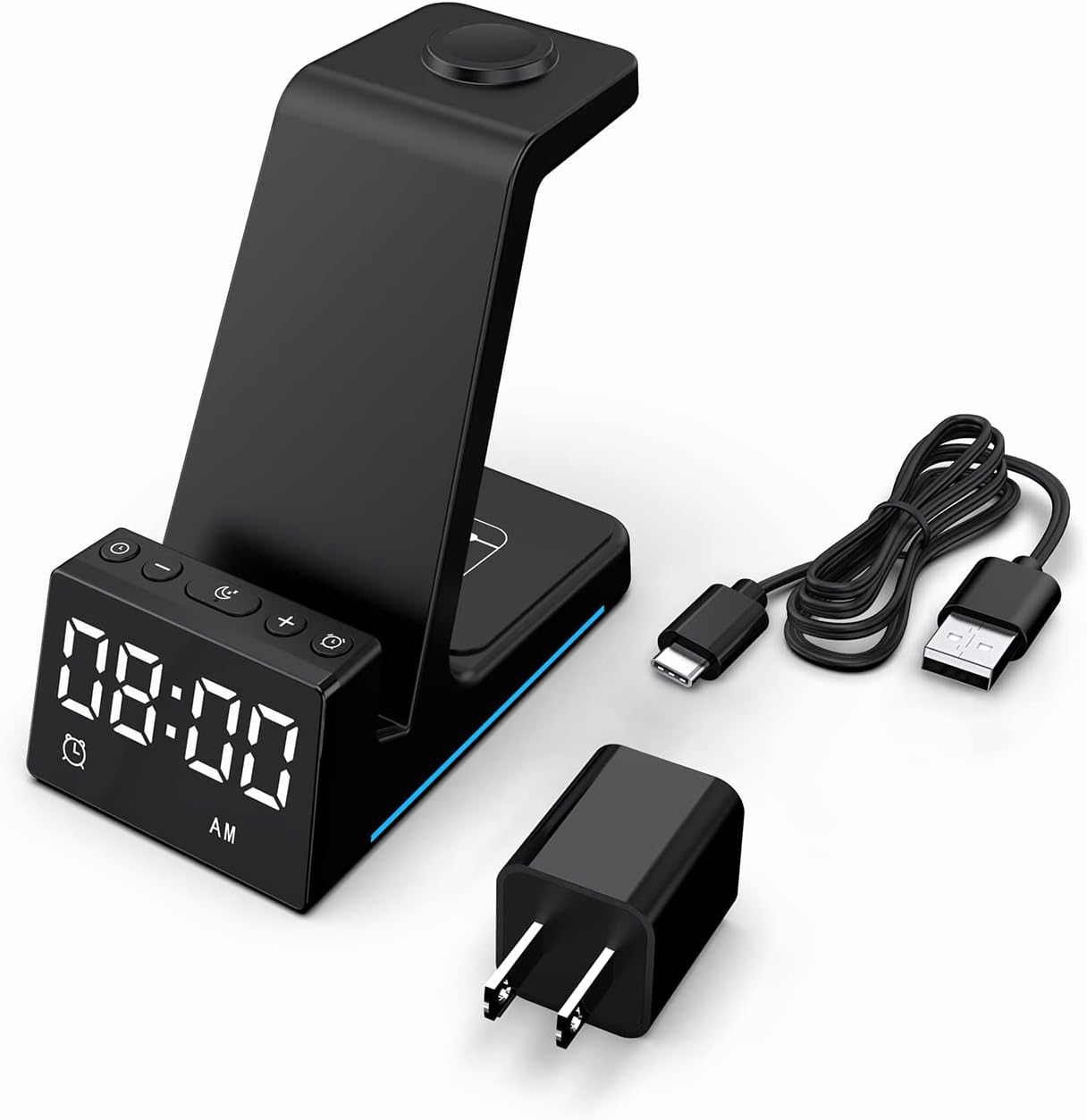
Gambar: Semua komponen yang termasuk dalam kemasan produk.
Produk Selesaiview
The BUFFBEE Alarm Clock with Wireless Charging Station is designed for convenience and efficiency. It features dedicated charging areas for your smartphone, Apple Watch, and AirPods, alongside a clear digital clock display.
Fitur Utama:
- Jam Alarm Digital: Features adjustable brightness and volume, with 12/24 hour format options.
- Wireless Phone Charging: Supports 15W, 10W, 7.5W, and 5W output for various wireless charging enabled smartphones.
- Pengisian Daya Apple Watch: Dedicated magnetic charging spot for Apple Watch Series 2-7, SE.
- Pengisian AirPod: Wireless charging pad for AirPods 2 (with wireless charging case), AirPods 3, and AirPods Pro.
- Perlindungan Keamanan: Built-in overcharge, overvoltage, overheat, and overcurrent protection.

Image: The charging station with devices in place, highlighting its multi-device capability.

Image: Diagram illustrating the internal safety features and charging coils.
Pengaturan
Follow these steps to set up your BUFFBEE Alarm Clock with Wireless Charging Station:
- Hubungkan Daya: Insert the USB-C end of the charging cable into the port on the back of the charging station. Plug the other end of the cable into the provided power adapter, then plug the adapter into a wall outlet. The digital display will light up, indicating power is connected.
- Tempatkan Perangkat:
- Telepon pintar: Place your wireless charging enabled smartphone vertically or horizontally on the main charging stand. Ensure it is centered for optimal charging.
- Jam Tangan Apple: Place your Apple Watch on the magnetic charging disc at the top of the stand.
- AirPods: Place your AirPods (with wireless charging case) on the flat charging pad at the base of the unit.
- Verifikasi Pengisian Daya: A blue indicator light will briefly illuminate when a device is correctly placed and charging. Your device's screen will also show a charging icon.
Video: Official product video demonstrating the setup and charging capabilities of the BUFFBEE Alarm Clock with Wireless Charging Station for iPhone, Apple Watch, and AirPods.

Image: Universal compatibility chart for different devices and charging wattagyaitu.
Petunjuk Pengoperasian
Mengatur Waktu
- Tekan dan tahan tombol Waktu yang ditetapkan button (usually marked with a clock icon) for 3 seconds. The hour digits will begin to flash.
- Gunakan + Dan - tombol untuk mengatur jam.
- Tekan tombol Waktu yang ditetapkan Tekan tombol lagi untuk beralih ke pengaturan menit. Angka menit akan berkedip.
- Gunakan + Dan - tombol untuk menyesuaikan menit.
- Tekan tombol Waktu yang ditetapkan Tekan tombol sekali lagi untuk mengkonfirmasi dan keluar dari mode pengaturan waktu.
- Untuk beralih antara format 12 jam dan 24 jam, tekan sebentar tombol tersebut. Waktu yang ditetapkan tombol saat tidak dalam mode pengaturan.
Mengatur Alarm
- Tekan dan tahan tombol Set Alarm button (usually marked with an alarm clock icon) for 3 seconds. The alarm hour digits will flash.
- Gunakan + Dan - tombol untuk mengatur jam alarm.
- Tekan tombol Set Alarm button again to switch to alarm minute adjustment. The alarm minute digits will flash.
- Gunakan + Dan - tombol untuk mengatur menit alarm.
- Tekan tombol Set Alarm tombol sekali lagi untuk mengonfirmasi dan keluar dari mode pengaturan alarm.
- Untuk mengaktifkan atau menonaktifkan alarm, tekan sebentar tombol tersebut. Set Alarm tombol. Ikon alarm akan muncul/menghilang di layar.
- When the alarm sounds, press any button to activate the snooze function (typically 9 minutes). To turn off the alarm completely, press and hold the Set Alarm tombol.

Gambar: Lebih dariview of the digital alarm clock features.
Menyesuaikan Kecerahan Tampilan
The LED display has multiple brightness levels to suit your preference, especially for nighttime use.
- Tekan tombol Kecerahan button (usually marked with a sun icon) repeatedly to cycle through the available brightness levels (e.g., 100%, 40%, 3%, 1%, 0% off).
- Select the desired brightness level. The '0% off' setting turns the display completely off for undisturbed sleep.

Image: Visual representation of the 5-level adjustable brightness settings.
Menyesuaikan Volume Alarm
The alarm volume can be adjusted to your preferred level.
- While the alarm is sounding, or during alarm setting mode, press the Volume button (usually marked with a speaker icon) to cycle through the available volume levels.
- Select the desired volume.

Image: Illustration of the 3-level adjustable volume feature.
Pemeliharaan
To ensure the longevity and optimal performance of your charging station, follow these maintenance guidelines:
- Pembersihan: Disconnect the power before cleaning. Use a soft, dry cloth to wipe the surface. Do not use abrasive cleaners, solvents, or chemical sprays.
- Hindari Cairan: Jauhkan perangkat dari air dan cairan lainnya. Jangan mengoperasikan perangkat dengan tangan basah.
- Suhu: Store and operate the device in a dry environment at room temperature. Avoid extreme heat or cold.
- Penanganan: Tangani perangkat dengan hati-hati. Hindari menjatuhkannya atau membuatnya terkena benturan keras.
- Catu Daya: Only use the provided power adapter and cable. Using unauthorized power sources may damage the device and void the warranty.
Penyelesaian Masalah
If you encounter any issues with your BUFFBEE Alarm Clock with Wireless Charging Station, please refer to the following troubleshooting guide:
| Masalah | Kemungkinan Penyebab | Larutan |
|---|---|---|
| Device is not powering on. | Power cable not connected properly; Power adapter faulty; Wall outlet not working. | Ensure the USB-C cable is securely connected to both the station and the power adapter. Try a different wall outlet. Verify the power adapter is functioning. |
| Smartphone/AirPods not charging wirelessly. | Device not placed correctly; Device not wireless charging compatible; Phone case too thick; Foreign objects on charging pad. | Reposition the device to ensure it is centered on the charging pad. Remove any thick phone cases or metallic objects. Confirm your device supports Qi wireless charging. |
| Apple Watch tidak mengisi daya. | Watch not placed correctly; Watch charger not making contact; Watch model not supported. | Ensure the Apple Watch is securely placed on the magnetic charging disc. Remove any watch cases that might obstruct contact. This charger supports Apple Watch Series 2-7, SE. |
| Pengisian daya lambat atau terputus-putus. | Using a non-original power adapter/cable; Device overheating; Multiple devices charging simultaneously. | Use the provided power adapter and cable. Ensure the device is in a well-ventilated area. Charging multiple devices may slightly reduce individual charging speeds. |
| Alarm clock display is too bright/dim. | Pengaturan kecerahan perlu disesuaikan. | Tekan tombol Kecerahan button to cycle through the 5 brightness levels, including 'off'. |
| Alarm is not sounding or is too quiet/loud. | Alarm not set or deactivated; Volume level too low/high. | Verify the alarm is activated (alarm icon visible). Adjust the alarm volume using the Volume tombol. |
Spesifikasi
| Fitur | Detil |
|---|---|
| Dimensi Produk | 6.3x1.5x3.5 inci |
| Berat Barang | 15.8 ons |
| Merek | BUFFBEE |
| Jenis Konektor | Nirkabel |
| Perangkat yang Kompatibel | Cellular Phones, Apple Watch, AirPods (with wireless charging case) |
| Model Telepon yang Kompatibel | Samsung Galaxy S10 series, iPhone 8 and newer, other Qi-enabled phones |
| Fitur Khusus | Adjustable, Fast Charging, Wireless Charger, Wireless Charging |
| Masukan Voltage | 9 Volt |
| Jumlah Port USB | 1 (for power input) |
| Apatage | 15 watts (max output) |
| Spesifikasi Met | Qi |
| Sumber Daya | AC Adapter (Battery Powered refers to internal clock battery backup, not main power) |
Garansi dan Dukungan
Your BUFFBEE Alarm Clock with Wireless Charging Station comes with a standard manufacturer's warranty. For specific warranty details, including duration and coverage, please refer to the warranty card included in your product packaging or contact BUFFBEE customer support directly.
If you require technical assistance, have questions about product operation, or need to report a defect, please reach out to BUFFBEE customer service through the contact information provided on the product packaging or the official BUFFBEE websitus. Harap siapkan model produk dan tanggal pembelian Anda saat menghubungi dukungan.


