1. Pendahuluan
Thank you for choosing the Edifier W280NB Bluetooth Wireless Neckband Earbuds. These earbuds are designed to provide a high-quality audio experience with features like Active Noise Cancellation (ANC), Ambient Sound Monitoring, and AI call noise reduction. Their lightweight, comfortable design and IP55 water resistance make them ideal for various activities, including gym workouts and running.
2. Apa yang ada di dalam kotak
- Edifier W280NB Earbuds
- Kabel Pengisian Daya
- Multiple Sizes of Eartips and Ear Wings
3. Produk Lebihview
Familiarize yourself with the components of your Edifier W280NB earbuds:

Gambar 3.1: Edifier W280NB Neckband Earbuds. The image shows the black neckband-style earbuds with the control module visible on the right side of the neckband.
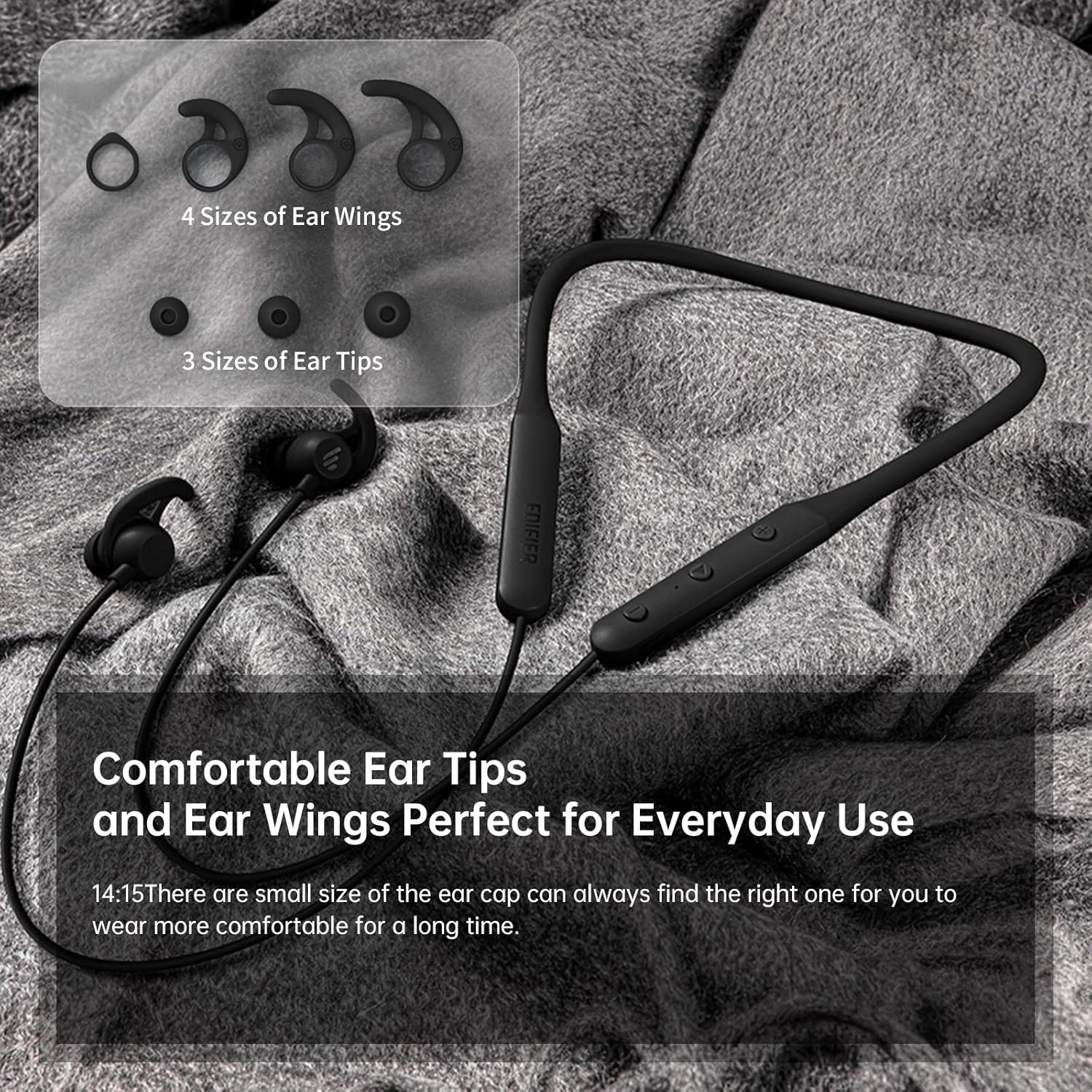
Gambar 3.2: Comfortable Ear Tips and Ear Wings. This image displays different sizes of silicone ear tips and ear wings, highlighting the customizable fit for user comfort.
The earbuds feature a flexible neckband for secure wear, with integrated controls for easy access to functions like volume, playback, and call management. The ear tips and ear wings are designed for a comfortable and stable fit during various activities.
4. Pengaturan
4.1 Mengisi Daya Earbud
Before first use, fully charge the earbuds. Connect the provided charging cable to the charging port on the neckband and to a USB power source. The indicator light will show charging status. A full charge provides up to 13 hours of playtime (ANC off). For quick use, a 2-minute charge can provide approximately 2 hours of playtime.

Gambar 4.1: Fast Charge and Long Playback Time. This image illustrates the battery life with ANC on (11 hours) and ANC off (13 hours), and the quick charge capability (10 minutes charge for 2.5 hours use).
4.2 Pemasangan Bluetooth
- Pastikan earbud terisi daya dan dimatikan.
- Press and hold the power button until the indicator light flashes blue and red, indicating pairing mode.
- Pada perangkat Anda (ponsel pintar, tablet, laptop), aktifkan Bluetooth dan cari perangkat yang tersedia.
- Select "Edifier W280NB" from the list of found devices.
- Setelah terhubung, lampu indikator akan menyala biru terang.
5. Petunjuk Pengoperasian
5.1 Kontrol
The control module on the neckband allows you to manage various functions:
- Tombol Daya: Tekan dan tahan untuk menghidupkan/mematikan. Tekan sebentar untuk memutar/menjeda musik atau menjawab/mengakhiri panggilan.
- Volume Naik (+): Tekan sebentar untuk menaikkan volume. Tekan lama untuk lagu berikutnya.
- Volume Turun (-): Tekan sebentar untuk mengecilkan volume. Tekan lama untuk memutar lagu sebelumnya.
- Tombol Fungsi: (Specific button for ANC/Ambient mode, refer to product diagram if available, otherwise assume integrated with power/volume)
5.2 Peredam Kebisingan Aktif (ANC)
The ANC feature reduces ambient noise, providing a more immersive listening experience. Activate or deactivate ANC using the designated control button (often a long press on the power button or a dedicated button).

Gambar 5.1: Active Noise Cancellation. A man is shown wearing the earbuds, with text indicating the ANC technology for a quieter experience.
5.3 Ambient Sound Monitoring
This mode allows you to hear your surroundings without removing the earbuds, enhancing safety and awareness. Toggle this mode on/off via the control module.

Gambar 5.2: Ambient Sound Mode. A woman is shown wearing the earbuds, with text explaining the real-time sensation of ambient sound monitoring.
5.4 Fungsi Panggilan
The earbuds support hands-free calling with AI call noise reduction technology, ensuring clear conversations by filtering out ambient noise.
- Menjawab/Mengakhiri Panggilan: Tekan sebentar tombol daya.
- Tolak Panggilan: Tekan lama tombol daya.

Gambar 5.3: Call Noise Cancellation. A woman is shown wearing the earbuds, with text describing the AI call noise-cancelling technology for clear calls.
6. Pemeliharaan
6.1 Pembersihan
- Bersihkan ujung earphone secara teratur dengan kain lembut dan kering.
- If necessary, remove the ear tips and wash them with mild soap and water, ensuring they are completely dry before reattaching.
- Wipe the neckband and earbud surfaces with a slightly damp kain. Hindari menggunakan bahan kimia keras atau bahan abrasif.
6.2 Tahan Air dan Debu (IP55)
The Edifier W280NB earbuds are IP55 rated, meaning they are protected against dust ingress and low-pressure water jets from any direction. This makes them suitable for use during workouts and in light rain. However, they are not designed for submersion in water.

Gambar 6.1: IP55 Dust and Water Resistance. A man is shown wearing the earbuds, with text highlighting their IP55 protection against dust and water.
6.3 Penyimpanan
Store the earbuds in a cool, dry place away from direct sunlight and extreme temperatures. Avoid tangling the neckband to prevent damage.
7. Penyelesaian masalah
| Masalah | Kemungkinan Penyebab | Larutan |
|---|---|---|
| Earbud tidak menyala | Baterai lemah | Isi daya earbud hingga penuh. |
| Tidak dapat dipasangkan dengan perangkat | Earbuds not in pairing mode; Bluetooth off on device; too far from device | Pastikan earbud dalam mode pemasangan (lampu biru/merah berkedip). Aktifkan Bluetooth di perangkat Anda. Dekatkan earbud ke perangkat Anda (dalam jarak 10 meter). |
| Tidak ada suara atau volume rendah | Volume too low; earbuds not connected; incorrect audio output selected | Increase volume on earbuds and device. Reconnect earbuds. Check your device's audio output settings. |
| Kualitas suaranya buruk | Interference; ear tips not sealed properly; dirty earbuds | Move away from sources of interference. Adjust ear tips for a secure fit. Clean ear tips and earbud nozzles. |
8. Spesifikasi
| Fitur | Detil |
|---|---|
| Nomor Model | W280NB |
| Teknologi Konektivitas | Nirkabel |
| Teknologi Komunikasi Nirkabel | Bluetooth 5.0 |
| Komponen yang Termasuk | Cable, Eartip |
| Bahan | Silikon |
| Penggunaan Khusus Untuk Produk | Olahraga dan Latihan |
| Penggunaan yang Direkomendasikan untuk Produk | Calling, Running |
| Perangkat yang Kompatibel | Ponsel pintar, Tablet, Laptop, Komputer desktop |
| Jenis Kontrol | Kontrol Media |
| Fitur Kabel | Tanpa Kabel |
| Tingkat Tahan Air | Tahan air (IP55) |
| Rentang Frekuensi | 20Hz - 20KHz |
| Metode Kontrol | Menyentuh |
| Jumlah Barang | 1 |
| Daya Tahan Baterai | 13 Jam (ANC dimatikan) |
| Jenis Penggerak Audio | Driver Dinamis |
| Jangkauan Bluetooth | 10 Meter |
| Bentuk Lubang Suara | Di telinga |
| Jumlah Port USB 2 | 1 |
| UPC | 875674006623 |
9. Garansi dan Dukungan
Edifier products typically come with a limited warranty. Please refer to the warranty card included with your product or visit the official Edifier website for detailed warranty terms and conditions. For technical support, product inquiries, or service requests, please contact Edifier customer service through their official channels.


