1. Pendahuluan
The iOptron CEM26 is a portable, high-performance telescope mount designed for both observational astronomy and astrophotography. Its unique center-balanced 'Z' design enhances stability and portability. This manual provides essential information for the setup, operation, and maintenance of your CEM26 mount, including the AccuAlign optical polar scope and 1.5-inch stainless steel tripod.
2. Fitur Utama
- Effortless Portability: Designed for easy transport, allowing the mount to be carried conveniently.
- Dukungan yang Kuat: Provides stable and secure support for various telescope configurations.
- Center-Balanced 'Z' Design: Optimizes stability and reduces the need for heavy counterweights.
- Intuitive GoTo Functionality: Enables precise automatic pointing to celestial objects.
- Smooth Stepper Motor Drive System: Ensures accurate and quiet tracking of astronomical targets.
- Sturdy 1.5-inch Stainless Steel Tripod: Provides a stable foundation for the mount.
- Integrated AccuAlign Optical Polar Scope: Facilitates quick and accurate polar alignment.
- Aplikasi serbaguna: Suitable for both visual observing and light astrophotography.
3. Isi Paket
Upon unpacking, verify that all components are present. The standard package for the iOptron CEM26 mount includes:
- iOptron CEM26 Go-To German Equatorial Mount Head
- 1.5-inch Stainless Steel Tripod
- AccuAlign Optical Polar Scope (integrated)
- Poros Penyeimbang
- Hand Controller (Go2Nova® 8407+)
- Adaptor Daya
- Kabel USB
- Hard Carrying Case (as shown in image)

Figure 3.1: The iOptron CEM26 mount and its primary accessories are securely stored within a durable hard carrying case, designed for protection and portability.
4. Pengaturan
Proper setup is crucial for the performance of your CEM26 mount. Follow these steps carefully:
- Perakitan Tripod: Extend the legs of the 1.5-inch stainless steel tripod to a stable height. Ensure the tripod is level using a bubble level.
- Mount Head Attachment: Securely attach the CEM26 mount head to the tripod. Ensure all locking knobs are tightened.
- Counterweight Shaft Installation: Thread the counterweight shaft into the mount head. Attach appropriate counterweights to balance your telescope setup.
- Telescope Mounting: Attach your telescope to the mount's dovetail saddle. Ensure it is securely fastened and balanced in both Right Ascension (RA) and Declination (DEC) axes.
- Koneksi Kabel: Connect the hand controller to the mount. Connect the power adapter to the mount and then to a suitable power source.
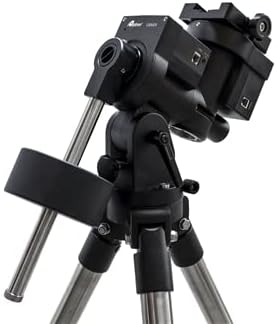
Figure 4.1: The iOptron CEM26 mount fully assembled on its 1.5-inch stainless steel tripod, ready for telescope attachment and operation.
5. Petunjuk Pengoperasian
This section outlines the basic steps for operating your iOptron CEM26 mount.
- Nyalakan: Turn on the mount using the power switch. The hand controller will illuminate and display the initial boot screen.
- Informasi Situs: Enter your current location (latitude, longitude) and time zone into the hand controller. This is crucial for accurate GoTo functionality.
- Polar Alignment (AccuAlign): Use the integrated AccuAlign optical polar scope to precisely align the mount's polar axis with the celestial pole. Follow the instructions displayed on the hand controller or refer to the detailed polar alignment guide in the full manual (available on the iOptron websitus).
- Star Alignment: Perform a 1-star, 2-star, or 3-star alignment using bright stars. This calibrates the mount's internal model for accurate pointing.
- Fungsi GoTo: Select a celestial object from the hand controller's database (e.g., planets, stars, deep-sky objects). Press "GoTo" and the mount will automatically slew to the target.
- Pelacakan: Once an object is targeted, the mount will automatically begin tracking it across the sky, compensating for Earth's rotation.
- Slewing Speeds: Adjust the slewing speed using the hand controller's arrow keys for fine adjustments or rapid movement.
6. Pemeliharaan
Regular maintenance ensures the longevity and optimal performance of your iOptron CEM26 mount.
- Pembersihan: Keep the mount free from dust and debris. Use a soft, dry cloth for cleaning the exterior. Avoid abrasive cleaners or solvents.
- Pelumasan: The mount's internal gears are factory-lubricated. Do not attempt to lubricate internal components unless specifically instructed by iOptron support.
- Penyimpanan: When not in use, store the mount in its original carrying case in a dry, temperature-controlled environment to prevent moisture damage.
- Pemeriksaan Kabel: Periodically inspect all cables for signs of wear or damage. Replace damaged cables immediately.
- Pembaruan Firmware: Check the iOptron website periodically for firmware updates for the mount and hand controller. Keeping the firmware updated can improve performance and add new features.
7. Penyelesaian masalah
This section addresses common issues you might encounter with your CEM26 mount.
- Mount Not Powering On:
- Ensure the power adapter is securely connected to both the mount and a working power outlet.
- Verify the power source is providing the correct voltage (12VDC).
- Periksa kabel daya apakah ada kerusakan.
- GoTo Ketidakakuratan:
- Re-check your site location (latitude, longitude) and time settings in the hand controller.
- Perform a precise polar alignment using the AccuAlign scope.
- Ensure your star alignment procedure was accurate and used bright, well-separated stars.
- Verify the mount is properly balanced with your telescope.
- Masalah Pelacakan:
- Confirm accurate polar alignment.
- Check for any obstructions or cable snags that might impede smooth movement.
- Ensure the mount is not overloaded beyond its weight capacity.
- Hand Controller Not Responding:
- Disconnect and reconnect the hand controller cable.
- Restart the mount.
- Check for any bent pins in the hand controller port or cable.
For more detailed troubleshooting or issues not listed here, please refer to the comprehensive user manual on the iOptron support website or contact iOptron customer service.
8. Spesifikasi
Technical specifications for the iOptron CEM26 Go-To German Equatorial Mount:
| Fitur | Detil |
|---|---|
| Nama Model | CEM26 |
| Nomor Model Barang | C262A1 |
| Jenis Gunung | Center Balanced German Equatorial Mount (CEM) |
| Batas berat | 26 pon (sekitar 11.8 kg) |
| Mount Head Weight | 10 pon (sekitar 4.5 kg) |
| Tipe Tripod | 1.5-inch Stainless Steel Tripod |
| Tinggi Maksimum | 66.93 inci (sekitar 170 cm) |
| Tipe Kepala Tripod | iPolar TM electronic polar scope (integrated) |
| Bahan | All metal, Casting + CNC machined |
| Warna | Hitam |
| Perangkat yang Kompatibel | Camera, Laptop, Tablet, Smartphone (for control/imaging) |
| Fitur Khusus | Dapat disesuaikan |
| Tanggal Pertama Tersedia | 11 Desember 2021 |
9. Garansi dan Dukungan
iOptron products are designed for durability and performance. For specific warranty terms and conditions, please refer to the official iOptron website or the warranty card included with your product. Typically, iOptron offers a limited warranty covering manufacturing defects.
For technical support, product registration, or to download the latest firmware and comprehensive user manuals, please visit the official iOptron support portal:
iOptron Official Weblokasi: www.ioptron.com
When contacting support, please have your product model number (C262A1) and serial number ready.


