1. Pendahuluan
The Renogy RMS-DCDC-JP is a high-precision monitor specifically designed for Renogy MPPT charge controllers. It provides a clean and professional interface for monitoring your charging system. This monitor can be flush-mounted and features a backlit LCD display. With its four intuitive buttons, users can easily view critical system information, including charging parameters and error codes. It offers real-time feedback for two battery systems, ensuring you have the most current status of your power setup.
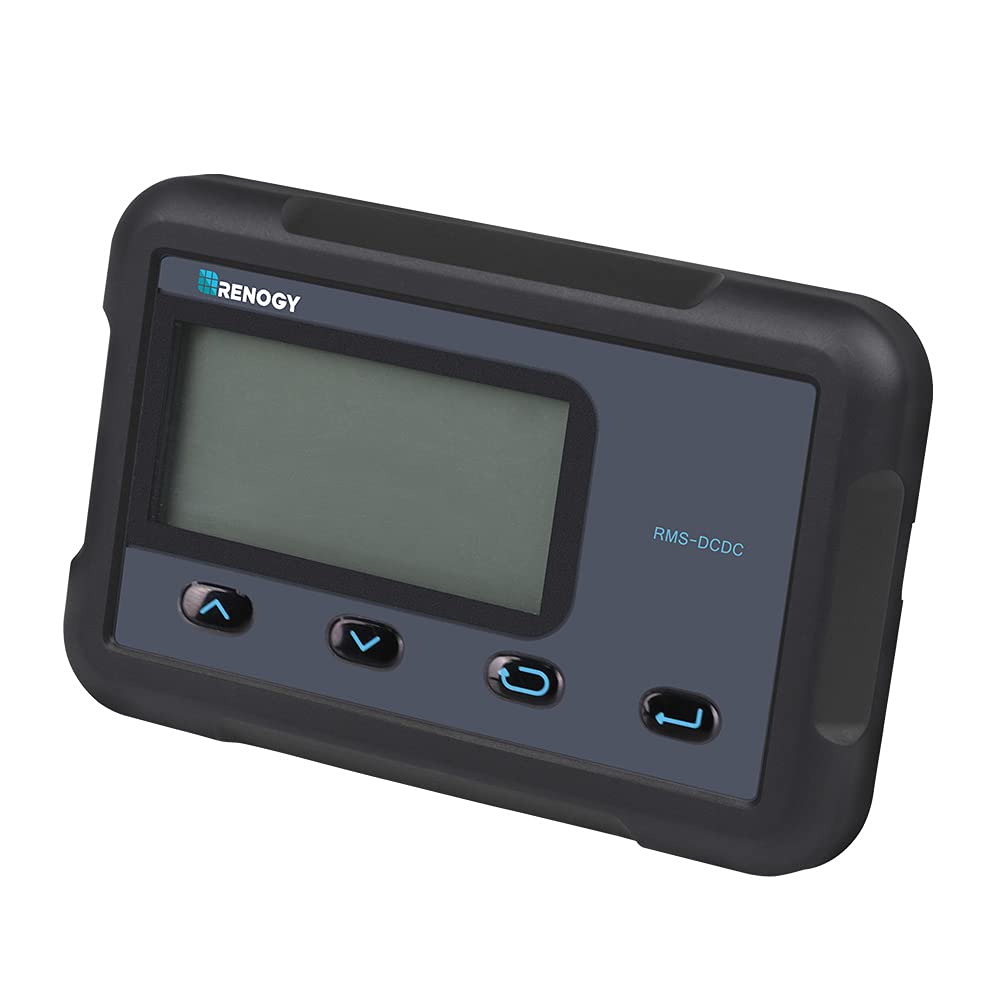
Image: The Renogy RMS-DCDC-JP monitor displaying system information, shown with and without its backlight activated.
2. Fitur Utama
- Two Battery System Monitoring: Continuously track the charging status of both main and sub-batteries, providing a comprehensive overview of your solar system's health.
- Parameter yang Dapat Disesuaikan: Modify charging voltage, charging current, and other settings directly through the monitor interface.
- Koneksi Sederhana: Connects directly to the DCC charge controller via an RJ45 cable for immediate use.
- Pengukuran Akurat: Provides real-time charging information from both solar panels and the alternator with high accuracy.
- Kesesuaian: Designed for use with DCC Charge Controllers 12V 30A MPPT (RBC30D1S-JP) and DCC Charge Controllers 12V 50A MPPT (RBC50D1S-JP).
3. Isi Paket
Verify that all items listed below are included in your package. If any items are missing or damaged, please contact Renogy customer support.
- LCD Monitor (x1)
- English Instruction Manual (x1)
- Communication Cable (CAT5, 5m) (x1)
- Mounting Screws (M2.9x13) (x4)
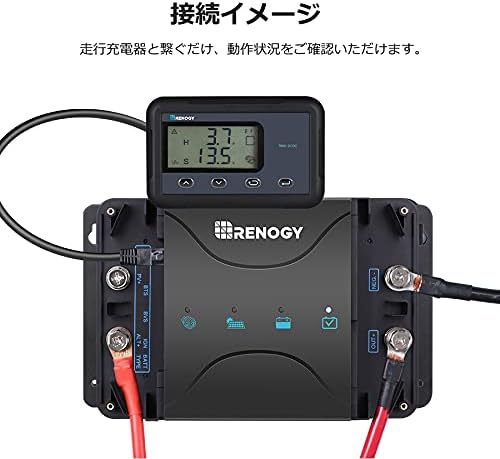
Image: All components included in the RMS-DCDC-JP product package.
4. Pengaturan dan Instalasi
4.1 Instalasi Fisik
The RMS-DCDC-JP monitor is designed for flush mounting. Ensure you have adequate space behind the mounting surface for the monitor's body and cable connections. Use the provided mounting screws to secure the monitor in place.

Image: Exploded diagram illustrating the monitor's components, including the PVC board, ABS resin covers, and high-resolution display.
4.2 Koneksi Listrik
Connect the monitor to your Renogy DCC charge controller using the supplied RJ45 communication cable. Simply plug one end of the RJ45 cable into the monitor's port and the other end into the corresponding port on the DCC charge controller. The monitor will power on automatically once connected.
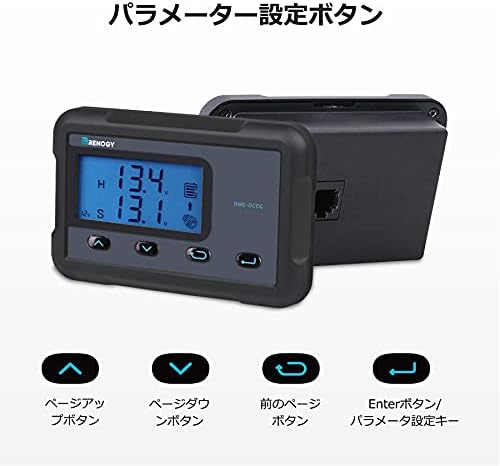
Image: The RMS-DCDC-JP monitor connected to a Renogy DCC charge controller, showing the RJ45 cable connection.
4.3 Panduan Video Instalasi
Video: A detailed guide on how to install and connect the Renogy RMS-DCDC-JP monitor to your charge controller.
5. Petunjuk Pengoperasian
5.1 Tampilan Lebihview
The LCD display provides real-time information about your battery and charging system. The displayed items may vary based on your system's configuration.

Image: Detailed breakdown of the monitor's display, indicating icons for solar charging, sub-battery, system error, parameter units, alternator, main battery, and charging status.
- Solar Charge Icon: Indicates active solar charging.
- Sub-Battery Icon: Represents the secondary battery's status.
- Kesalahan Sistem: Displays error codes if a fault is detected.
- Parameter Unit: Shows units for displayed values (e.g., V, A, W, kWh).
- Alternator Icon: Indicates charging from the alternator.
- Main Battery Icon: Represents the primary battery's status.
- Status Pengisian: Shows the current charging phase (MPPT, Boost, Float, Equalization).
- Volume Sistemtage: Menampilkan volume sistem saat initage.
- Parameter Baterai: Shows various battery-related data.
- Sub-Battery State of Charge (SOC): Indicates the charge level of the sub-battery.
5.2 Fungsi Tombol
The monitor features four buttons for navigation and parameter adjustment.

Image: The four control buttons on the monitor: Page Up, Page Down, Previous Page, and Enter/Parameter Setting Key.
- Up Arrow (Page Up) Button: Navigates up through menu options or increases a value.
- Down Arrow (Page Down) Button: Navigates down through menu options or decreases a value.
- Left Arrow (Previous Page) Button: Kembali ke layar atau menu sebelumnya.
- Right Arrow (Enter/Parameter Setting Key) Button: Confirms selections or enters parameter adjustment mode.
5.3 Penyesuaian Parameter
You can adjust charging current limits for the sub-battery directly from the monitor. This feature allows you to optimize charging based on your battery's specifications and system requirements.

Image: Current limit settings for DCC30S and DCC50S models, adjustable via the monitor.
Untuk menyesuaikan parameter:
- Tekan tombol Memasuki button to access the parameter setting menu.
- Gunakan Up Dan Turun arrow buttons to navigate through the available parameters (e.g., charging voltage, charging current limit).
- Tekan Memasuki again to select a parameter for adjustment.
- Gunakan Up Dan Turun Tombol panah untuk mengubah nilai.
- Tekan Memasuki untuk mengkonfirmasi nilai baru.
- Tekan tombol Halaman Sebelumnya button to exit the setting menu.
5.4 Operasi Selesaiview Video
Video: Sebuah overview of the monitor's display and basic operation, including how to navigate through information screens.
6. Spesifikasi
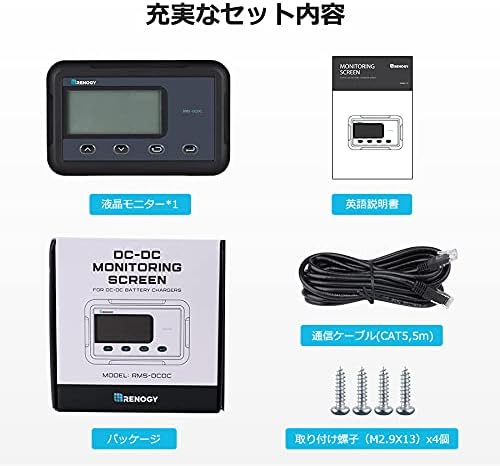
Image: Technical specifications and dimensions of the RMS-DCDC-JP monitor.
| Parameter | Nilai |
|---|---|
| Spesifikasi Listrik | Tegangan 5VDC |
| Pasokan Saat Ini | 30mA |
| Konsumsi Sendiri | <1W |
| Kisaran Suhu Operasional | -20°C hingga 45°C |
| Jil.tage Akurasi | ±0.1V |
| Akurasi Saat Ini | ± 0.1A |
| Dimensi (P x L x T) | 70 x 110 x 31.5 mm (2.76 x 4.33 x 1.24 inci) |
| Berat | 62g (0.14 pon) |
| Volume Keluarantage | 12 Volt |
7. Kompatibilitas
The Renogy RMS-DCDC-JP monitor is compatible with the following Renogy DCC Charge Controllers:
- DCC Charge Controller 12V 30A MPPT (Model: RBC30D1S-JP)
- DCC Charge Controller 12V 50A MPPT (Model: RBC50D1S-JP)
8. Penyelesaian masalah
If you encounter issues with your Renogy RMS-DCDC-JP monitor, please refer to the following common troubleshooting steps:
- Monitor Tidak Menyala:
- Ensure the RJ45 communication cable is securely connected to both the monitor and the DCC charge controller.
- Verify that the DCC charge controller is powered on and functioning correctly.
- Bacaan yang Salah:
- Periksa semua sambungan kabel untuk melihat apakah ada yang longgar atau rusak.
- Confirm that the monitor is compatible with your specific DCC charge controller model.
- Refer to the main DCC charge controller manual for calibration procedures if available.
- Menampilkan Kode Kesalahan:
- Note the specific error code displayed on the monitor.
- Consult the DCC charge controller's instruction manual for a detailed explanation of error codes and their corresponding troubleshooting steps.
- Tombol Tidak Responsif:
- Ensure the monitor is not in a locked mode (if applicable, refer to the main manual).
- Gently press the buttons to ensure proper contact.
For persistent issues or advanced troubleshooting, please contact Renogy customer support.
9. Pemeliharaan
The Renogy RMS-DCDC-JP monitor requires minimal maintenance to ensure optimal performance and longevity.
- Pembersihan: Regularly wipe the display screen and casing with a soft, dry cloth. Avoid using abrasive cleaners, solvents, or harsh chemicals, as these can damage the surface.
- Koneksi: Periksa secara berkala semua sambungan kabel untuk memastikan semuanya aman dan bebas dari korosi.
- Lingkungan: Ensure the monitor is installed in a location that adheres to the specified operating temperature range and is protected from direct moisture and extreme environmental conditions.
10. Garansi dan Dukungan
The Renogy RMS-DCDC-JP monitor comes with a Garansi pabrik 1 tahunGaransi ini mencakup cacat bahan dan pengerjaan dalam penggunaan normal.
For warranty claims, technical assistance, or any product-related inquiries, please contact Renogy customer support through their official website or the retailer where the product was purchased. Please have your product model number (RMS-DCDC-JP) and proof of purchase ready when contacting support.
10.1 Additional Support Videos
Video: Seorang jenderal di atasview of Renogy products and their features, which may provide additional context for your system.
Video: Another informational video from Renogy, potentially covering system integration or advanced tips.


