Perkenalan
This manual provides detailed instructions for the installation, operation, and maintenance of your WGP Teleheer T6 Plus Motorcycle Bluetooth Headset. Please read this manual thoroughly before using the device to ensure proper function and safety. The T6 Plus is designed for motorcycle riders, offering full-duplex Bluetooth real-time intercom communication, hands-free calling, music playback, and voice assistant integration.
Fitur Utama
- Full Duplex Bluetooth Real-time Intercom: Stable signal transmission up to 1500 meters (93 MPH) with ceramic antenna.
- Hands-free & Multi-function Keys: Bluetooth 5.1 connectivity, supports call handling (answer/refuse/redial), music playback. Automatic switch to phone mode for incoming calls. Large button design for easy operation with gloves.
- IP65 Waterproof & Dustproof Design: Withstands various weather conditions, operational down to -15°F.
- HD Speakers & Ultra High Quality Sound: High-definition sound quality, especially for bass, with effective wind noise reduction.
- All-in-One Type-C Port: Integrated audio, data transfer, and charging.
- Daya Tahan Baterai yang Lama: 850 mAh battery providing 30 hours of continuous use and 500 hours standby.
Isi Paket
Harap verifikasi bahwa semua item ada dalam paket Anda:
- WGP Teleheer T6 Plus Bluetooth Headset Unit (2 units for 2-pack)
- Speaker Helm
- Microphone (boom mic for open-face helmets, soft mic for full-face helmets)
- Mounting Clip (clamp and adhesive options)
- Kabel Pengisi Daya USB Type-C
- Panduan Pengguna

Image: A detailed diagram illustrating the components of the WGP Teleheer T6 Plus headset, including the main unit with its Type-C port, indicator light, and control buttons (OFF/ON, Volume+, Volume-, Telephone, Connect). It also shows the securing clip, microphone, and trumpet (speakers), providing a clear visual guide to the parts included and their connections.
Pengaturan dan Instalasi
1. Mengisi Daya Perangkat
Before first use, fully charge the T6 Plus headset. Connect the provided USB Type-C cable to the headset's Type-C port and the other end to a USB power adapter (not included). The indicator light will show charging status and turn off when fully charged.
- Waktu pengisian daya: Sekitar 2-3 jam.
- Indicator light: Red during charging, off when fully charged.
2. Installing the Headset in Your Helmet
The T6 Plus can be installed using either the clamp mount or the adhesive mount.
- Pilih Lokasi Pemasangan: Select a flat area on the left side of your helmet where the headset unit can be easily accessed.
- Pasang Speaker: Attach the speakers inside the helmet's ear pockets using the adhesive pads. Ensure they are positioned directly over your ears for optimal sound quality.
- Pasang Mikrofon:
- For full-face helmets: Use the soft wire microphone and position it inside the chin bar, close to your mouth.
- For open-face or modular helmets: Use the boom microphone and position it in front of your mouth.
- Pasang Unit Utama:
- Clamp Gunung: Geser clamp between the helmet shell and the inner padding. Secure it tightly.
- Pemasangan perekat: Clean the chosen surface on the helmet. Peel off the protective film from the adhesive mount and firmly press it onto the helmet for at least 30 seconds. Allow 24 hours for the adhesive to cure before use.
- Hubungkan Kabel: Plug the speaker/microphone cable into the Type-C port on the main headset unit.

Image: A WGP Teleheer T6 Plus headset unit mounted on the side of a motorcycle helmet. This image demonstrates the typical installation position of the headset on a helmet, showing its compact design and how it integrates with the helmet's exterior. The control buttons are visible, indicating ease of access for the rider.
Petunjuk Pengoperasian
1. Daya Hidup/Mati
- Nyalakan: Tekan dan tahan tombol Tombol Daya selama 3 detik hingga lampu indikator berkedip.
- Matikan: Tekan dan tahan tombol Tombol Daya for 3 seconds until the indicator light turns off.
2. Memasangkan Bluetooth dengan Ponsel
- Ensure the T6 Plus is powered off.
- Tekan dan tahan tombol Tombol Daya tunggu sekitar 5-7 detik hingga lampu indikator berkedip merah dan biru bergantian, menandakan mode pemasangan.
- On your mobile phone, enable Bluetooth and search for "Teleheer T6 Plus".
- Select "Teleheer T6 Plus" from the list of available devices to connect. Once connected, the indicator light will flash blue slowly.
3. Intercom Pairing (Two Units)
To establish intercom communication between two T6 Plus units:
- Ensure both T6 Plus units are powered off.
- Pada Unit 1, tekan dan tahan Tombol Daya for 5-7 seconds until the indicator light flashes red and blue alternately.
- Pada Unit 2, tekan dan tahan Tombol Daya for 5-7 seconds until the indicator light flashes red and blue alternately.
- Tekan sebentar tombol Tombol Daya on either Unit 1 or Unit 2 (one short press). The units will search for each other.
- Setelah terhubung, lampu indikator pada kedua unit akan berkedip biru perlahan, dan Anda akan mendengar nada konfirmasi.
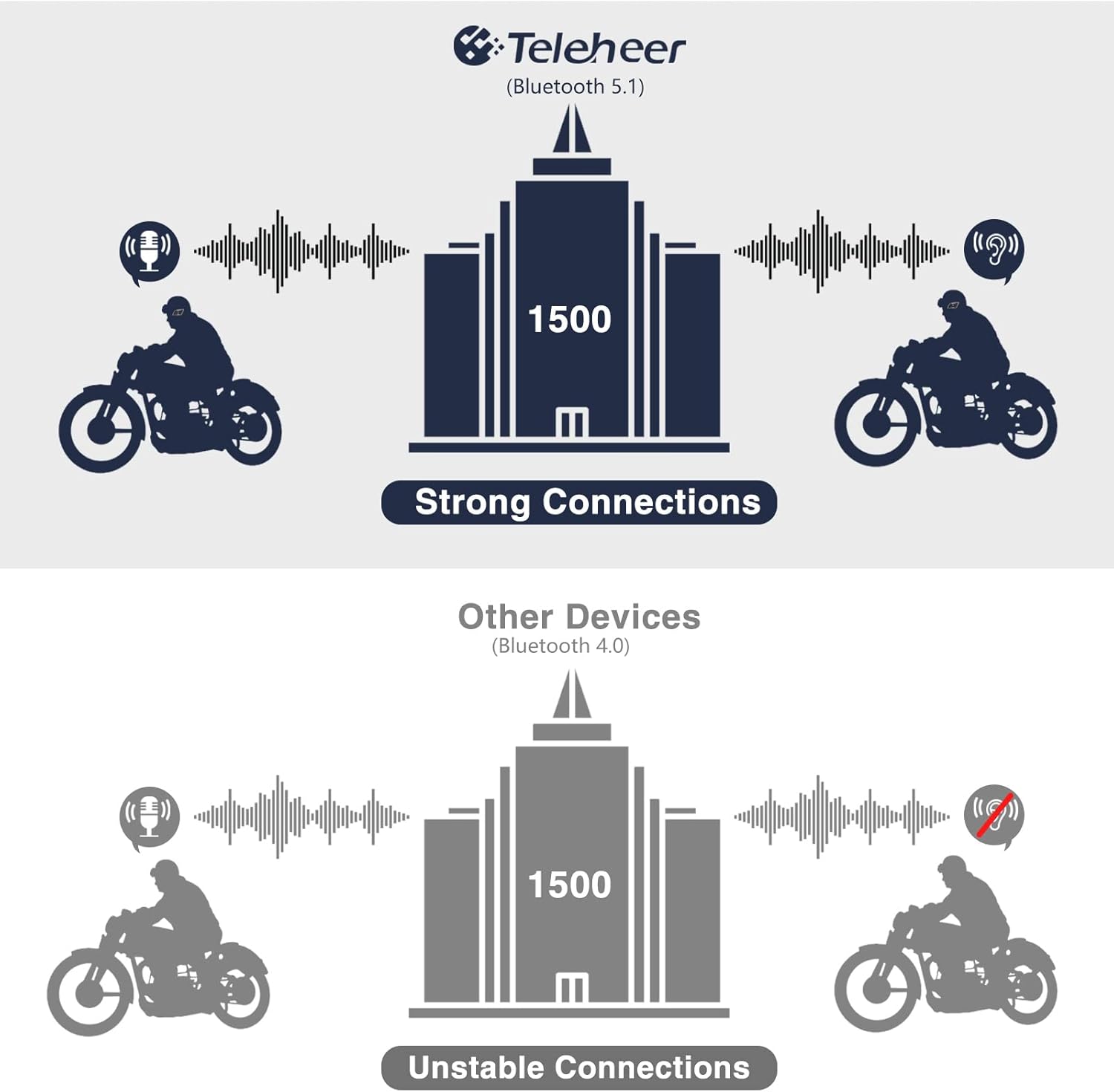
Image: A graphic illustrating the effective intercom range of the Teleheer T6 Plus (Bluetooth 5.1) compared to older Bluetooth 4.0 devices. The T6 Plus shows stable connections over 1500m, while older devices show unstable connections over shorter distances. This highlights the improved signal stability and range due to Bluetooth 5.1 and the ceramic antenna.
4. Fungsi Panggilan Telepon
- Menjawab Panggilan: Tekan sebentar Tombol Telepon.
- Akhiri Panggilan: Tekan sebentar Tombol Telepon.
- Menolak Panggilan: Tekan dan tahan tombol Tombol Telepon selama 2 detik.
- Panggil Ulang Nomor Terakhir: Tekan dua kali Tombol Telepon.
5. Pemutaran Musik
- Putar/Jeda: Tekan sebentar Tombol Telepon.
- Lagu Berikutnya: Tekan sebentar Tombol Volume Naik.
- Lagu Sebelumnya: Tekan sebentar Tombol Volume Turun.
- Penyesuaian Volume: Tekan dan tahan tombol Tombol Volume Naik/Turun untuk menambah atau mengurangi volume.
6. Asisten Suara (Siri/Google Assistant)
- Aktifkan Voice Assistant: Tekan dua kali Tombol Daya.

Image: A graphic depicting the voice assistant feature of the Teleheer T6 Plus, showing a helmeted rider interacting with their phone via voice commands like "Hey Siri" or "Ok Google". This illustrates the hands-free convenience for navigation, calls, and other smartphone functions while riding.
Pemeliharaan dan Perawatan
- Pembersihan: Bersihkan unit headset dengan kain lembut dan kering.amp kain. Jangan gunakan bahan kimia keras atau pembersih abrasif.
- Tahan Air: The device is IP65 waterproof. While it can withstand water jets, avoid submerging it in water for extended periods. Ensure the Type-C port cover is securely closed when not charging.
- Penyimpanan: Simpan perangkat di tempat yang sejuk dan kering saat tidak digunakan. Hindari suhu ekstrem.
- Perawatan Baterai: To prolong battery life, avoid fully discharging the battery frequently. Charge the device regularly, even if not in use for long periods.

Image: A WGP Teleheer T6 Plus headset unit partially submerged in water with splashes, demonstrating its IP65 waterproof rating. The image emphasizes the device's ability to withstand water exposure, making it suitable for various weather conditions during riding.
Penyelesaian Masalah
| Masalah | Kemungkinan Penyebab | Larutan |
|---|---|---|
| Perangkat tidak menyala. | Baterai lemah. | Isi daya perangkat hingga penuh. |
| Tidak dapat dipasangkan dengan telepon. | Perangkat tidak dalam mode berpasangan; Bluetooth mati di telepon; terlalu banyak perangkat yang dipasangkan. | Ensure device is in pairing mode (red/blue flashing). Turn on phone's Bluetooth. Delete old Bluetooth connections on phone. |
| Intercom connection unstable or short range. | Obstructions; out of range; interference. | Ensure clear line of sight. Stay within 1500m range. Avoid strong electromagnetic interference. |
| Tidak ada suara dari speaker. | Speaker tidak terhubung dengan benar; volume terlalu rendah. | Check speaker connection to Type-C port. Increase volume. |
| Microphone not picking up voice. | Microphone not connected properly; microphone position. | Check microphone connection. Ensure microphone is close to your mouth. |
| Wind noise during calls/intercom. | High speed; improper microphone placement. | Ensure microphone is positioned correctly to minimize wind exposure. The device has DSP noise suppression, but extreme conditions may affect performance. |
Spesifikasi
| Fitur | Detil |
|---|---|
| Nama Model | Teleheer T6 Plus |
| Versi Bluetooth | Bluetooth 5.1 |
| Jangkauan Interkom | Up to 1500 meters (93 MPH) |
| Kapasitas Baterai | 850 mAh |
| Waktu Penggunaan Terus Menerus | 30 jam |
| Waktu Siaga | 500 jam |
| Port Pengisian Daya | Tipe-C |
| Tahan Air | IP65 (Jet-proof) |
| Suhu Operasional | Turun hingga -15°F |
| Bahan Antena | Keramik |
| Metode Kontrol | Touch / Physical Buttons |
| Berat Barang | 14.4 ons (sekitar 408 gram) |
| Dimensi (Paket) | 8.54x3.9x2.95 inci |
Garansi dan Dukungan
For warranty information and technical support, please refer to the official WGP websitus atau hubungi layanan pelanggan mereka secara langsung. Simpan tanda terima pembelian Anda sebagai bukti pembelian untuk klaim garansi.
Untuk bantuan lebih lanjut, Anda dapat mengunjungi halaman produk di Amazon atau hubungi penjual langsung melalui platform Amazon.