1. Pendahuluan
The My Arcade Gamer V Classic is a portable gaming system designed for on-the-go entertainment. This device comes preloaded with 220 classic video games, offering a wide variety of genres including entertainment, sports, and adventure. Its compact size and 2.5-inch color display make it suitable for use at home, during travel, or at social gatherings. This manual provides essential information for setting up, operating, maintaining, and troubleshooting your Gamer V Classic.
2. Apa yang ada di dalam kotak
- Gamer V Classic Portable Gaming System
- Panduan Pengguna (dokumen ini)
3. Fitur Produk
- Desain Ramah Anak: No console or controllers required.
- Excellent Gaming Experience: Perfect for travel, birthday parties, gifts, and more.
- Rich Collection of Classic Games: Includes 220 preloaded video games including various types such as entertainment, sports, and adventure.
- Nyaman: 2.5" color display, suitable for playing portable games outdoors.
- Kontrol Volume: Integrated volume control for adjustable audio.
- Kecil dan Ringan: Dirancang agar mudah dibawa.
- Sumber Daya: Powered by 3 AAA batteries (not included).
4. Pengaturan
4.1 Pemasangan Baterai
- Locate the battery compartment on the back of the Gamer V Classic unit.
- Buka penutup ruang baterai.
- Masukkan 3 baterai AAA baru, pastikan polaritasnya benar (+/-) seperti yang tertera di dalam kompartemen.
- Tutup penutup ruang baterai dengan rapat.
Catatan: Batteries are not included. Alternatively, the unit can be powered via a USB-C cable (not included) connected to a 5V power source.
4.2 Menghidupkan
Press and hold the power button (usually located on the top left of the device) for a few seconds until the screen illuminates and the My Arcade logo appears.

Image: The Gamer V Classic in use, showing its compact design and screen.
5. Petunjuk Pengoperasian
5.1 Kontrol Berakhirview
- D-Pad (Papan Arah): Located on the left, used for movement and menu navigation.
- Tombol A/B: Action buttons located on the right, used for jumping, firing, selecting, etc.
- Tombol Mulai: Initiates games and pauses gameplay.
- Tombol Reset: Returns to the main menu or restarts the current game.
- Tombol Home: Returns to the game selection screen.
- Kontrol Volume: Adjusts the audio level of the device.
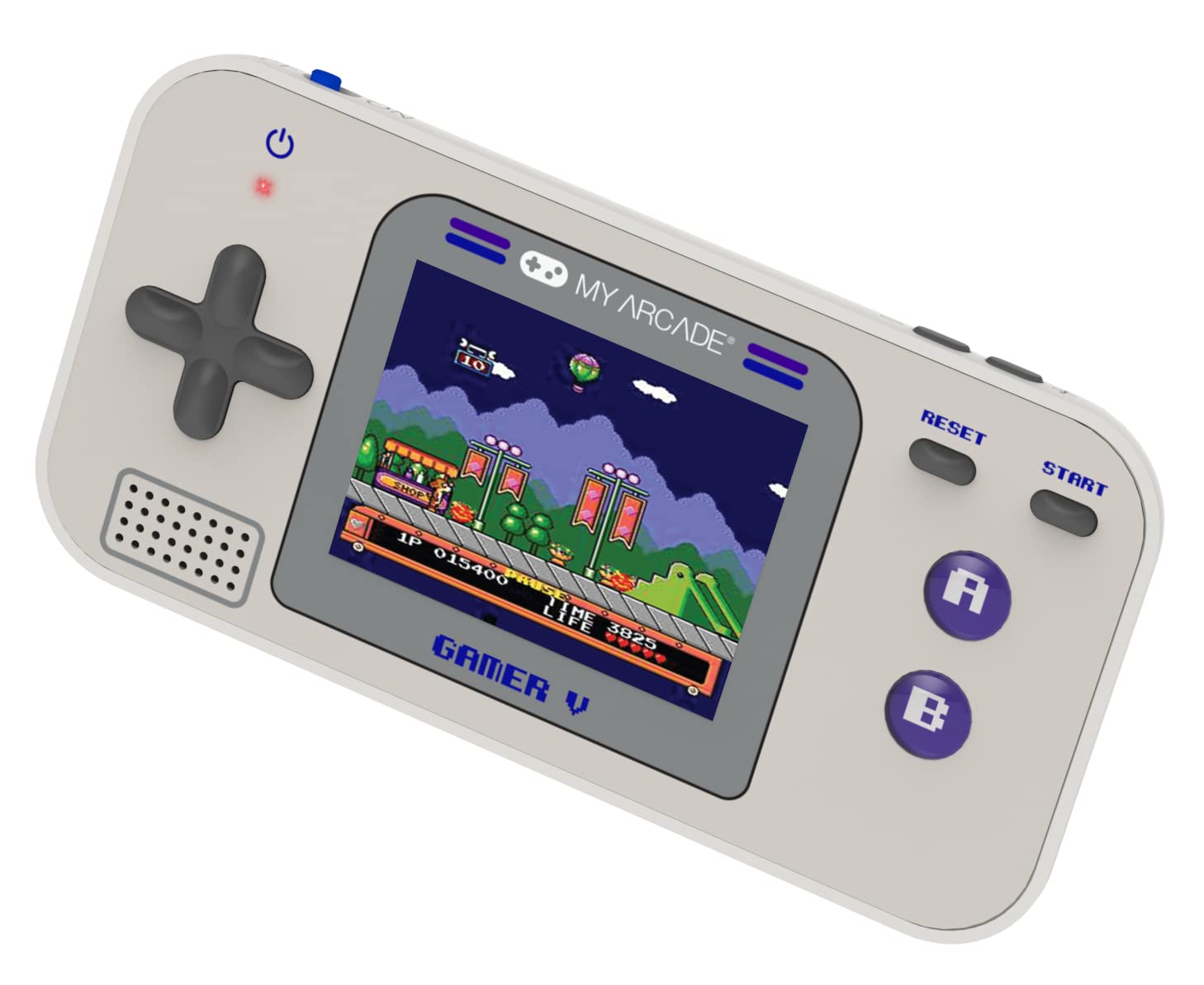
Gambar: Detail view of the Gamer V Classic controls.
5.2 Game Selection and Play
- After powering on, the device will display the main game selection menu.
- Use the D-Pad to scroll through the list of available games.
- Press the 'A' button or 'Start' button to select and launch a game.
- Follow on-screen instructions for specific game controls.
- To return to the game selection menu, press the 'Home' button.
5.3 Menyesuaikan Volume
Use the dedicated volume control buttons or switch (location may vary slightly by unit) to increase or decrease the sound output.
6. Pemeliharaan
- Pembersihan: Gunakan kain lembut dan kering untuk membersihkan perangkat. Jangan gunakan pembersih cair atau aerosol.
- Penyimpanan: Store the device in a cool, dry place away from direct sunlight and extreme temperatures. If storing for an extended period, remove the batteries.
- Perawatan Baterai: Replace all batteries at the same time. Do not mix old and new batteries or different types of batteries. Dispose of used batteries responsibly.
- Hindari Dampak: Jangan menjatuhkan atau membenturkan perangkat ke benda keras, karena hal ini dapat merusak komponen internal atau layar.
7. Penyelesaian masalah
| Masalah | Kemungkinan Penyebab | Larutan |
|---|---|---|
| Perangkat tidak menyala. | Baterai lemah atau mati. Pemasangan baterai salah. | Replace batteries with new ones, ensuring correct polarity. Try powering via USB-C cable. |
| Screen is blank or distorted. | Low battery power. Device malfunction. | Replace batteries or connect to USB-C power. If problem persists, contact customer support. |
| Tidak ada suara atau volume rendah. | Volume set too low. Mute function activated. | Adjust volume using the volume controls. Ensure no external headphones are connected if not intended. |
| Tombol tidak responsif. | Device frozen. Low battery power. | Try pressing the 'Reset' button. Replace batteries. Power cycle the device (turn off and on). |
8. Spesifikasi
- Dimensi Produk: 5"P x 2.5"L x 0.75"T
- Tipe Pengontrol: Kontrol Tombol
- Berat Barang: 0.15 Kilogram (5.3 ons)
- Ukuran Layar: 2.5 inci
- Sumber Daya: Bertenaga Baterai (diperlukan 3 baterai AAA, tidak termasuk)
- Antarmuka Perangkat Keras: Internal with removable media
- Rentang Usia (Deskripsi): Kid, Teen
- Tipe Tampilan: LCD atau LED
- Bahan: Plastik
- Faktor Bentuk: Genggam
- Nomor Model Barang: DJUN-3920
- Pabrikan: Arkade Saya
9. Garansi dan Dukungan
For warranty information and customer support, please refer to the official My Arcade websitus web atau hubungi layanan pelanggan mereka. Simpan struk pembelian Anda sebagai bukti pembelian.


