1. Pendahuluan
Thank you for choosing the Karaca BakeXL Bread Maker. This versatile appliance is designed to simplify your baking experience, allowing you to prepare fresh bread, knead dough, make jam, and even yogurt with ease. Your bread maker also comes with a booklet containing 45 different recipes to get you started. Please read this manual thoroughly before first use to ensure safe operation and optimal performance. Keep this manual for future reference.
2. Petunjuk Keselamatan Penting
- Selalu pastikan alat tersebut dicabut dari stopkontak sebelum membersihkan atau saat tidak digunakan.
- Jangan merendam alat, kabel, atau steker dalam air atau cairan lainnya.
- Jauhkan tangan dan peralatan dari bagian yang bergerak selama pengoperasian untuk mencegah cedera.
- Do not touch hot surfaces. Use oven mitts when removing the bread pan or handling hot bread.
- Peralatan ini hanya untuk penggunaan di rumah. Jangan gunakan di luar ruangan.
- Ensure the appliance is placed on a stable, heat-resistant surface, away from flammable materials.
- Pengawasan ketat diperlukan saat peralatan apa pun digunakan oleh atau di dekat anak-anak.
- Jangan mengoperasikan peralatan apa pun dengan kabel atau steker yang rusak, atau setelah peralatan tersebut mengalami kegagalan fungsi atau telah rusak dengan cara apa pun.
- Jangan menggunakan aksesori yang tidak direkomendasikan oleh produsen, karena hal ini dapat menyebabkan cedera.
3. Produk Lebihview
Familiarize yourself with the components of your Karaca BakeXL Bread Maker:

Gambar 3.1: Luar view of the Karaca BakeXL Bread Maker. This image shows the sleek black and silver design of the appliance from an angled perspective, highlighting its compact form.

Gambar 3.2: Bread Maker with lid open. This view reveals the interior cavity where the bread pan is placed, along with the heating element and the mechanism for the kneading paddles.

Gambar 3.3: Bread Maker with the bread pan removed. This image displays the main unit alongside the removable bread pan, illustrating how it detaches for easy cleaning and ingredient loading.
Fungsi Panel Kontrol:

Gambar 3.4: Close-up of the control panel. This image provides a clear view of the digital display and various buttons for program selection, loaf size, crust color, and start/stop functions.
- TIDAK BISA: Selects the desired program (e.g., Basic Bread, Whole Wheat, Jam, Yogurt).
- UKURAN LOAF: Adjusts the loaf weight (e.g., 1000g, 1250g, 1500g).
- WARNA: Sets the crust darkness (Light, Medium, Dark).
- DELAY TIMER (+/-): Sets a delayed start time for baking.
- MULAI BERHENTI: Memulai atau membatalkan program yang dipilih.
4. Pengaturan dan Penggunaan Pertama
- Unpack the bread maker and all accessories. Remove any packaging materials.
- Bersihkan bagian luar alat dengan adamp kain.
- Cuci loyang roti dan pengaduk adonan dengan air hangat dan sabun. Bilas hingga bersih dan keringkan sepenuhnya.
- Insert the kneading paddles onto the shafts at the bottom of the bread pan.
- Place the bread pan into the baking chamber, ensuring it clicks securely into place.
- Position the bread maker on a stable, flat, and heat-resistant surface, ensuring adequate ventilation around the unit.
- For the first use, it is recommended to run the "Bake" program (usually program 12 or similar) for 10 minutes without ingredients to burn off any manufacturing residues. Allow the unit to cool completely afterward.
5. Petunjuk Pengoperasian
General Baking Steps:
- Ensure the kneading paddles are correctly installed in the bread pan.
- Add liquid ingredients first, followed by dry ingredients. Make sure yeast is added last and does not come into direct contact with liquid or salt. Refer to your recipe booklet for precise ingredient order.
- Place the bread pan into the bread maker and close the lid.
- Plug in the appliance. The default program will display.
- Tekan tombol MENU button to select your desired program.
- Tekan tombol UKURAN LOAF button to select the desired loaf weight (e.g., 1000g, 1250g, 1500g).
- Tekan tombol WARNA button to select your preferred crust darkness (Light, Medium, Dark).
- Jika diinginkan, gunakan PENGATUR WAKTU TUNDA buttons to set a delayed start.
- Tekan tombol MULAI/BERHENTI button to begin the program. The machine will beep, and the timer will start counting down.
- Once the program is complete, the machine will beep multiple times. Unplug the appliance.
- Using oven mitts, carefully remove the bread pan by twisting and lifting it out.
- Invert the pan onto a wire rack to release the bread. If the kneading paddles remain in the bread, remove them carefully with a non-metallic utensil.
- Allow the bread to cool on a wire rack for at least 20-30 minutes before slicing.

Gambar 5.1: A user selecting settings on the control panel. This image shows a hand pressing one of the control buttons, demonstrating the interactive nature of the bread maker's interface.
Catatan Program Khusus:
- Bread Programs (Basic, French, Whole Wheat, Sweet, Rapid): These programs handle the entire process from kneading to baking. Follow the recipe booklet for specific ingredient ratios.
- Program Adonan: This program kneads and allows the dough to rise, but does not bake it. Ideal for pizza dough, rolls, or pastries that will be baked in a conventional oven.
- Jam Program: Use this program for making homemade jams. Ensure fruits are chopped and sugar is added according to a suitable recipe.
- Yogurt Program: This program maintains a consistent temperature for fermenting yogurt. Follow specific yogurt recipes for best results.
6. Perawatan dan Pembersihan
Regular cleaning ensures the longevity and hygiene of your bread maker.
- Selalu cabut steker alat dan biarkan dingin sepenuhnya sebelum dibersihkan.
- Bread Pan and Kneading Paddles: Remove the bread pan and paddles. Wash them with warm, soapy water using a soft sponge. Do not use abrasive cleaners or metal scouring pads, as this can damage the non-stick coating. Rinse and dry thoroughly.
- Luar: Bersihkan bagian luar pembuat roti dengan kain lembut dan kering.amp kain. Jangan gunakan bahan kimia keras atau pembersih abrasif.
- Tutup: Tutupnya bisa dibersihkan dengan lap.amp cloth. Ensure no water enters the ventilation slots.
- Ruang memanggang: Gunakan yang lembut, damp cloth to wipe the inside of the baking chamber. Remove any crumbs or residue.
- Jangan pernah merendam unit utama dalam air atau cairan lainnya.
7. Penyelesaian masalah
| Masalah | Kemungkinan Penyebab | Larutan |
|---|---|---|
| Roti tidak mengembang. | Expired yeast, incorrect water temperature, too much salt/sugar, yeast in direct contact with liquid/salt. | Check yeast expiry. Use lukewarm water (38-43°C). Ensure ingredients are added in the correct order as per recipe. |
| Roti ini terlalu padat. | Terlalu banyak tepung, terlalu sedikit cairan, dan kurang mengaduk. | Measure ingredients precisely. Ensure correct program is selected. |
| Bread collapses in the middle. | Terlalu banyak cairan, terlalu banyak ragi, kelembaban tinggi. | Reduce liquid slightly. Ensure correct yeast amount. |
| Kneading paddles stuck in bread. | Kejadian umum. | Remove carefully with a non-metallic utensil after bread has cooled. |
| Mesin tidak mau menyala. | Not plugged in, lid not closed properly, program not selected. | Check power connection. Ensure lid is fully closed. Select a program and press START/STOP. |
8. Spesifikasi
- Merek: KIJANG
- Nomor Model: 000001000018219001
- Warna: Hitam
- Dimensi Produk: 30 cm (Kedalaman) x 36 cm (Lebar) x 46 cm (Tinggi)
- Berat: 7.22 Kilogram
- Kapasitas: 1500 gram
- Daya/Wattage: 850 watt
- Bahan: Plastik
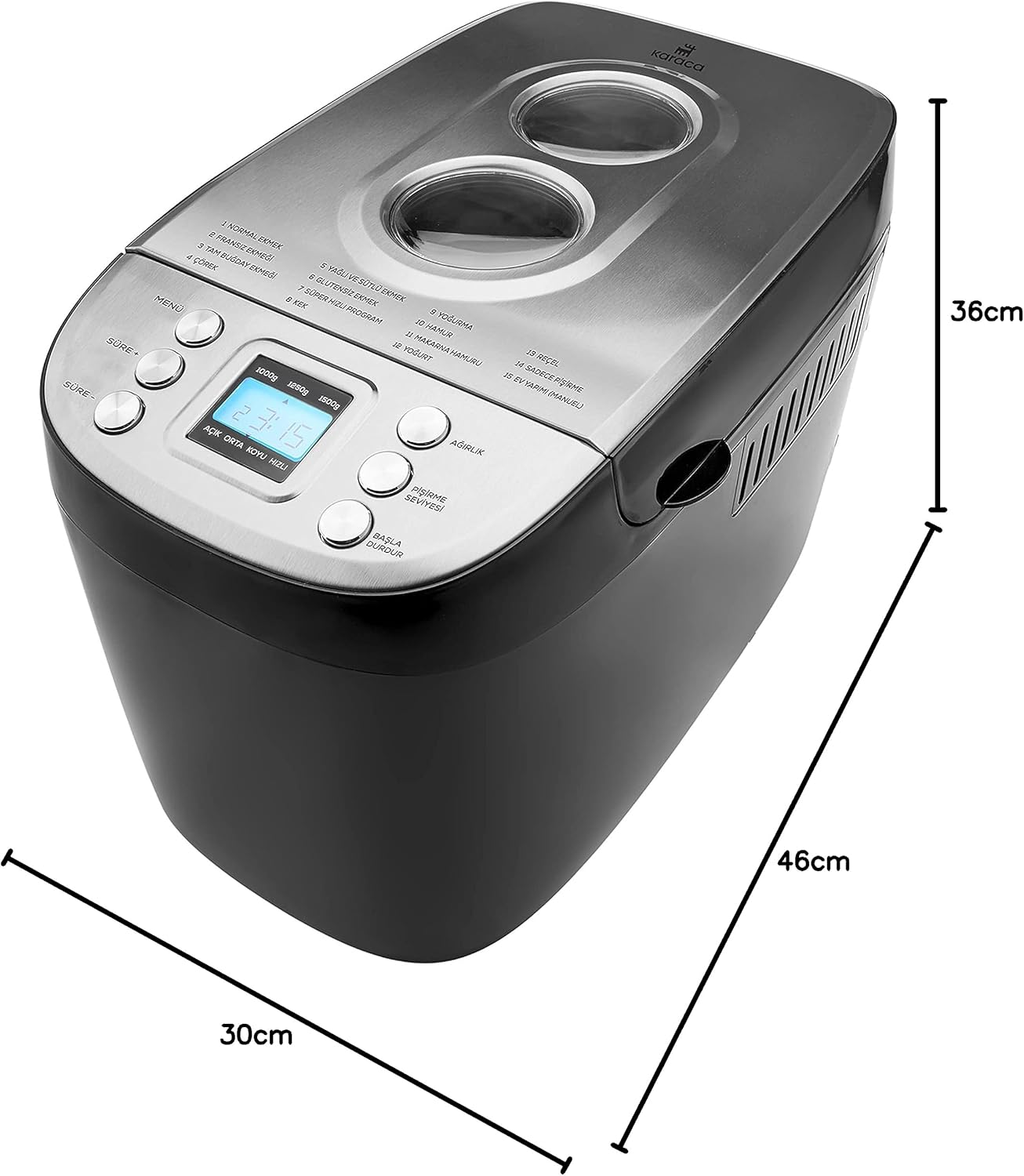
Gambar 8.1: Dimensions of the Karaca BakeXL Bread Maker. This image visually represents the depth (30cm), width (36cm), and height (46cm) of the appliance.
9. Garansi dan Dukungan
For warranty information, technical support, or service inquiries, please refer to the warranty card included with your product or visit the official KARACA website. Do not attempt to repair the appliance yourself, as this will void the warranty and may pose safety risks.
Anda dapat menemukan informasi lebih lanjut dan detail kontak di KARACA Store on Amazon.


