Perkenalan
This manual provides detailed instructions for the installation, operation, and maintenance of your YUNTX Android 10 Car Radio with Navigation, designed specifically for the Nissan Qashqai J10 models from 2008 to 2014. Please read this manual thoroughly before using the product to ensure proper functionality and safety.
Isi Paket
Verifikasi bahwa semua item yang tercantum di bawah ini disertakan dalam paket Anda:
- 1 x YUNTX Android Car Radio Unit
- 1 x Kabel Daya
- 1 x RCA Output Cable A
- 1 x RCA Output Cable B
- 1 x Antena GPS
- 1 x Kabel USB
- 1 x Antena Nirkabel
- 1 x Kamera Belakang
- 1 x Panduan Pengguna (dokumen ini)
Spesifikasi
| Sistem Operasi | Android 10 |
| Prosesor | Quad-Core, Cortex 1.1 GHz |
| RAM | 2 GB |
| Bahasa Indonesia: ROM | 32 GB |
| Ukuran Layar | 9 inci |
| Resolusi Layar | Ukuran 1024x600 |
| Keluaran Audio | 4 x 50 W, Stereo |
| Versi Bluetooth | 5.0 |
| Konektivitas | Bluetooth, USB, Wi-Fi |
| Dukungan USB/Kartu SD | Hingga 500 GB |
| Dimensi (P x L x T) | Ukuran 1x1x1 cm |
| Berat | 2.25 kg |
Pengaturan dan Instalasi
Bagian ini menyediakan informasi lebih lanjutview of the installation process. Professional installation is recommended.
1. Pemeriksaan Kompatibilitas
Ensure your vehicle is a Nissan Qashqai J10 manufactured between 2008 and 2014. The unit is designed for a direct fit in this model range.
2. Panduan Instalasi Visual

This image illustrates the seamless integration of the YUNTX Android 10 car radio into the dashboard of a Nissan Qashqai J10 (2008-2014). It displays the original car radio setup and the new 9-inch touchscreen unit after installation, highlighting the improved aesthetic and functionality.
The image above demonstrates the appearance of the dashboard before and after the installation of the YUNTX car radio. The unit is designed to replace the factory radio, providing a modern 9-inch touchscreen interface.
3. Koneksi Kabel

This image displays the customizable RGB button illumination feature, supporting up to 196 languages. It also provides a comprehensive wiring diagram with labeled connectors and a visual guide to included accessories like power sockets, RCA outputs, GPS antenna, USB cables, and the rear camera.
Refer to the detailed wiring diagram provided in the image above for connecting the power harness, RCA cables, GPS antenna, USB cables, and other accessories. Ensure all connections are secure and correctly matched to prevent damage to the unit or vehicle.
- Soket listrik: Connect the main power harness to the vehicle's wiring.
- Antena GPS: Hubungkan antena GPS dan letakkan di lokasi dengan pandangan yang jelas. view langit untuk penerimaan sinyal yang optimal.
- Kabel USB: Hubungkan kabel USB yang disediakan untuk penyimpanan eksternal atau konektivitas ponsel cerdas.
- RCA Output Sockets: Use RCA cables for connecting external amplifiers, subwoofers, or additional displays.
- Kamera Belakang: Connect the included rear camera for parking assistance.
- Antena Nirkabel: Connect for improved Wi-Fi and Bluetooth signal.
Petunjuk Pengoperasian
1. Menghidupkan/Mematikan dan Navigasi Dasar
Press the power button to turn the unit on or off. Navigate the interface using the 9-inch touchscreen. The main menu provides access to all primary functions.
2. CarPlay dan Android Auto

This image showcases the integrated Apple CarPlay and Android Auto features, allowing users to connect their smartphones for navigation, music, calls, and messages. The screen displays a typical CarPlay interface with app icons and a voice command prompt.
Connect your smartphone via USB to activate CarPlay (for Apple devices) or Android Auto (for Android devices). This allows you to access navigation, make calls, send messages, and play music directly from your phone's interface on the car radio screen. Use voice commands for hands-free operation.
3. Bluetooth 5.0

This image demonstrates several advanced features: Mirrorlink for mirroring smartphone content, Split Screen mode for running two apps simultaneously, Bluetooth 5.0 for hands-free calling and audio streaming, and the Headrest Function for connecting external displays for rear-seat entertainment.
Pair your phone via Bluetooth for hands-free calling and audio streaming. Access your phonebook, call history, and music library directly from the car radio. Bluetooth 5.0 ensures a stable and high-quality connection.
4. Wi-Fi dan Konektivitas Internet
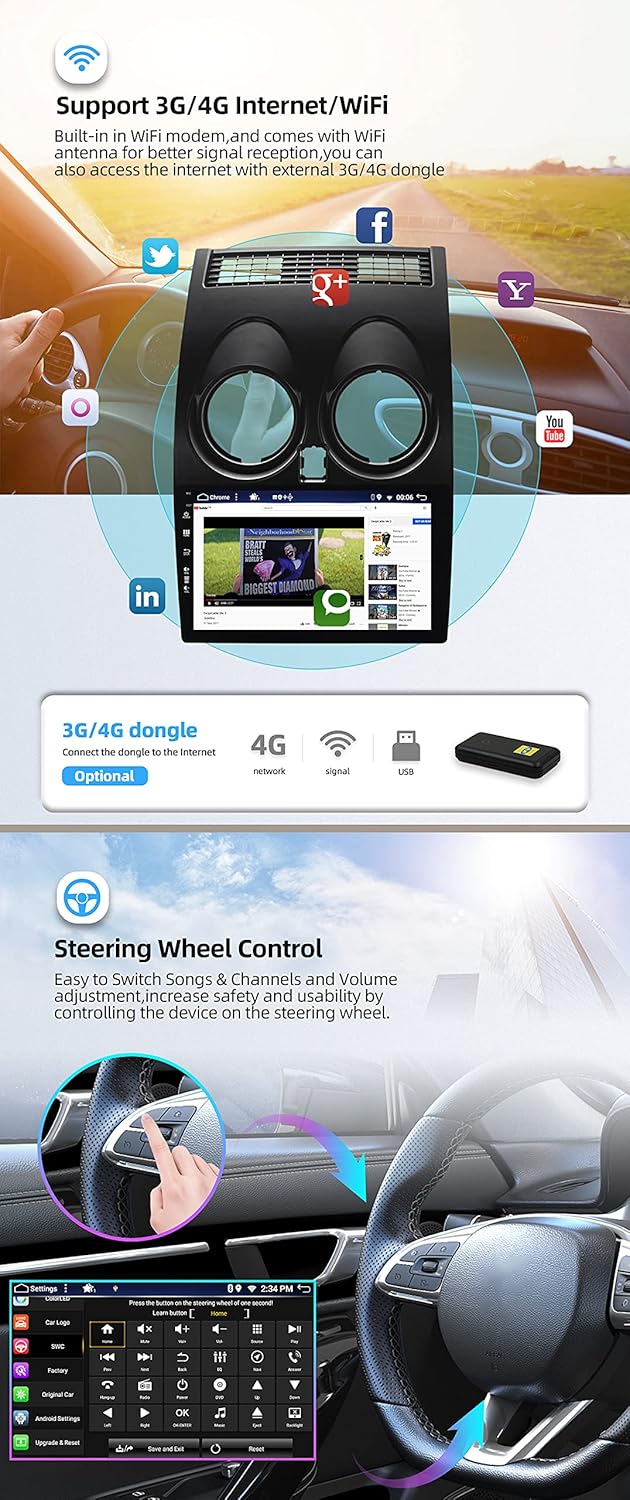
This image highlights the car radio's internet capabilities, including built-in WiFi and support for external 3G/4G dongles. It also illustrates the steering wheel control function, enabling safe and convenient operation of media and volume without taking hands off the wheel.
The unit features built-in Wi-Fi. Connect to a mobile hotspot or home Wi-Fi network to access online features, download apps, and browse the internet. External 3G/4G dongles (sold separately, e.g., B089KGJT61) are supported for mobile data access.
5. Kontrol Roda Kemudi
The unit supports your vehicle's original steering wheel controls. After installation, you may need to configure the buttons in the system settings to match your preferences for volume, track skipping, and other functions.
6. MirrorLink
MirrorLink allows you to mirror your smartphone's screen onto the car radio display via USB or Wi-Fi. This feature supports both Android and iOS devices, enabling you to view and control your phone's content directly from the unit.
7. Mode Layar Terpisah
Utilize the split-screen function to run two applications simultaneously. For example, you can have navigation open on one side and music playback on the other, enhancing multitasking capabilities.
8. Headrest Function
The unit supports video output to external headrest monitors. Connect compatible displays to the RCA video output to provide entertainment for rear-seat passengers.
9. Navigasi GPS
The integrated GPS supports both online and offline navigation applications. Install your preferred navigation app and download offline maps for use without an internet connection. The system supports 3D maps and voice guidance.
10. Radio (AM/FM/DAB)
The unit includes an integrated AM/FM tuner with RDS (Radio Data System) for enhanced radio information. For digital radio (DAB+), an optional DAB box (e.g., B07NRD4T9D) is required, offering CD-like sound quality.
11. Multicolor Button Illumination
Customize the color of the physical buttons on the unit to match your vehicle's interior lighting or personal preference. The system supports a wide range of RGB colors and up to 196 languages for the interface.
Pemeliharaan
1. Membersihkan Layar
Gunakan kain lembut bebas serat untuk menyeka layar sentuh dengan lembut. Untuk noda membandel, usap sedikitampBasahi kain dengan air atau larutan pembersih layar yang dirancang untuk elektronik. Hindari bahan kimia keras atau bahan abrasif.
2. Pembaruan Perangkat Lunak
Periodically check for software updates to ensure optimal performance and access to new features. Updates can typically be performed via Wi-Fi or USB. Refer to the system settings for update options.
3. Perawatan Umum
Avoid exposing the unit to extreme temperatures, direct sunlight for prolonged periods, or excessive moisture. Ensure proper ventilation around the unit to prevent overheating.
Penyelesaian Masalah
- Tidak Ada Daya: Periksa semua sambungan listrik dan sekring. Pastikan kunci kontak kendaraan menyala.
- Tidak ada suara: Periksa sambungan speaker, level volume, dan pemilihan sumber audio. Periksa amplifier connections if applicable.
- Kehilangan Sinyal GPS: Ensure the GPS antenna is properly connected and has an unobstructed view dari langit. Coba mulai ulang unitnya.
- Masalah Koneksi Bluetooth: Pastikan Bluetooth diaktifkan baik di radio mobil maupun di ponsel cerdas Anda. Hapus pemasangan sebelumnya dan coba sambungkan kembali.
- Layar Sentuh Tidak Responsif: Coba restart perangkat. Jika masalah berlanjut, pengaturan ulang pabrik mungkin diperlukan (catatan: ini akan menghapus semua data pengguna).
- CarPlay/Android Auto Tidak Terhubung: Ensure your phone's operating system is up to date. Try a different USB cable. Check the settings on both the car radio and your phone for CarPlay/Android Auto permissions.
For issues not covered here, please refer to the support section or contact customer service.
Dukungan dan Garansi
For technical assistance, troubleshooting, or to request a PDF version of this manual in German, Italian, French, Spanish, or English, please contact YUNTX technical support:
E-mail: yuntx_techsupport@163.com
Information regarding specific warranty terms and conditions is available upon request from YUNTX customer service.


